
Consulting businesses live and die by clean billing, clear cash flow, and knowing which clients are actually profitable. The best accounting tools for consultants make invoicing fast, keep expenses organized, and give you reports you can trust without turning bookkeeping into a second job.
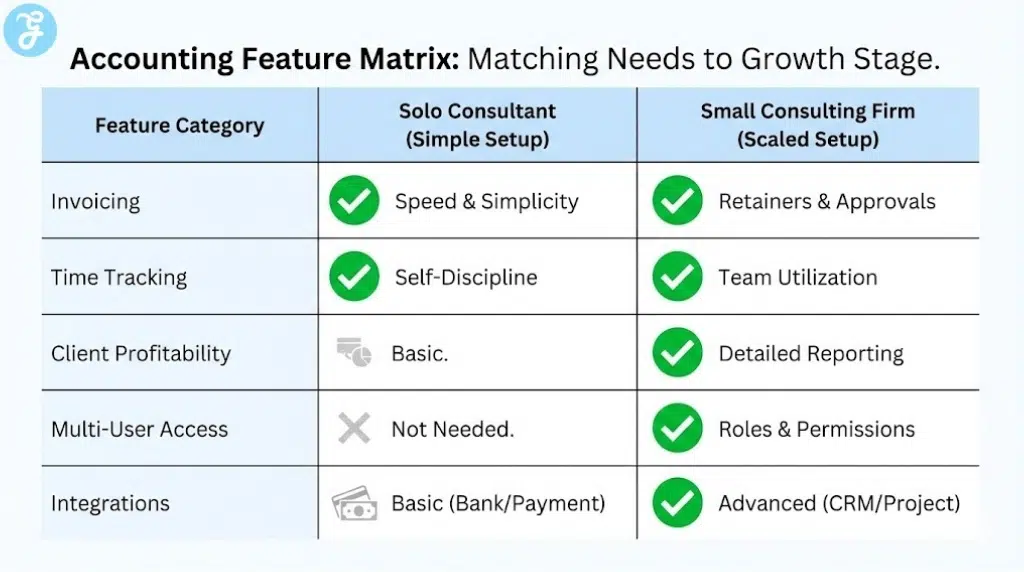
If you are solo, you want something simple that gets you paid faster. If you run a small firm, you want approvals, multi-user access, and client-level visibility so you can scale without financial blind spots.
How We Picked Our 12 Best Accounting Software for Consultants
Here are the criteria we followed:
-
Billing flexibility: Estimates, invoices, retainers, and recurring billing
-
Time and expense tracking: Built-in tools or strong integrations for billable work
-
Client visibility: Reporting for profitability, receivables, and cash flow
-
Payments: Easy ways for clients to pay with clean reconciliation
-
Integrations: Bank feeds, payment processors, CRM, and project tools
-
Growth fit: Works for solo consultants and small consultancies
Comparison Table
| Software | Best For | Invoicing | Time Tracking | Client Profitability | Reporting Depth | Ease of Use |
|---|---|---|---|---|---|---|
| QuickBooks Online | Most consultants | Strong | Add-on/integrations | Good | Strong | Medium |
| Xero | Reporting + integrations | Strong | Integrations | Good | Strong | Medium |
| FreshBooks | Service invoicing simplicity | Excellent | Built-in | Basic | Medium | Easy |
| Zoho Books | Value + automation | Strong | Integrations | Medium | Strong | Medium |
| Wave | Budget-focused solo | Good | No | Basic | Basic | Easy |
| Sage Accounting | Straightforward accounting | Good | Limited | Basic | Medium | Medium |
| NetSuite | ERP-level control | Strong | Integrations | Strong | Very strong | Advanced |
| Odoo Accounting | Custom workflows | Strong | Module-based | Strong | Strong | Advanced |
| Bonsai | Freelance consulting workflow | Strong | Built-in | Basic | Medium | Easy |
| Harvest + accounting | Time-first consultants | Medium | Excellent | Medium | Medium | Easy |
| ZarMoney | Feature-rich SMB | Strong | Limited | Medium | Strong | Medium |
| Akaunting | Open-source basics | Good | No | Basic | Basic | Medium |
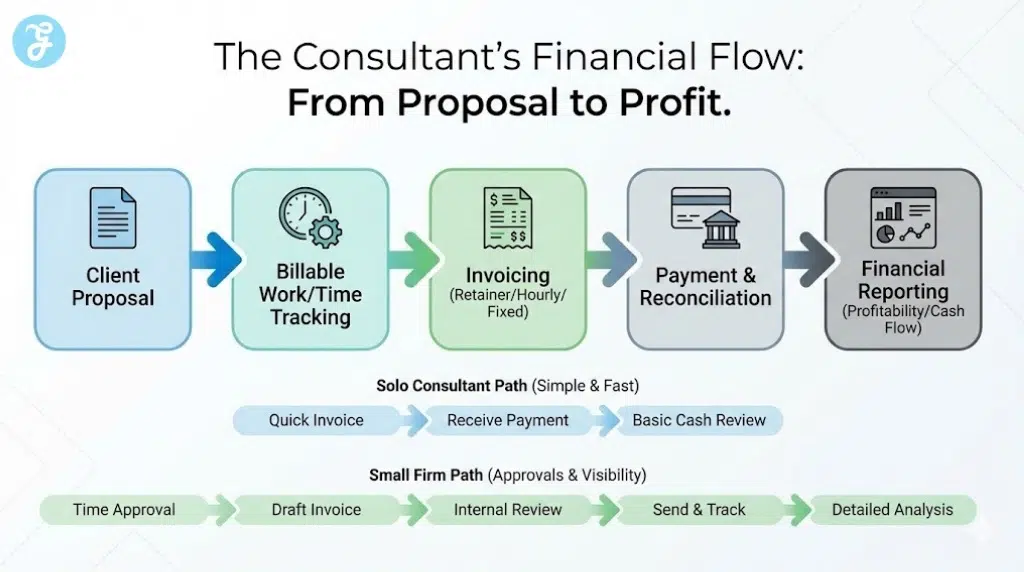
Set up Paths for Consultants
Here are two paths consultants can take:
Simple Setup for Solo Consultants
-
Bank sync: One business bank account and one business card
-
Categories: Keep categories minimal so you do not waste time deciding
-
Monthly routine: Reconcile weekly, invoice weekly, review cash monthly
Scaled Setup for Small Teams
-
Roles: Separate owner, ops, and bookkeeper permissions
-
Approvals: Build a simple policy for expenses, reimbursements, and vendor bills
-
Dashboards: Track receivables, runway, and utilization trends in one place
12 Best Accounting Software for Consultants
Here are 12 Best Accounting Software for Consultants options to manage invoicing, expenses, and cash flow without losing billable time.
1) QuickBooks Online
QuickBooks Online is a strong all-around choice for consultants who want dependable invoicing, bank syncing, and CPA-friendly reporting in one place. It works well for hourly billing, fixed-fee projects, and retainers once you set up clean products and categories.
-
Best For: Consultants who want a mainstream, accountant-friendly system
-
Pros: Strong reporting; wide integrations; scalable for small teams
-
Cons: Pricing can rise as you add users, payroll, or advanced features
2) Xero
Xero is a great fit for consultants who care about clean financial reporting and a strong integration ecosystem. It is especially useful when you want flexible workflows for invoices, bills, and bank reconciliation without a cluttered interface.
-
Best For: Consultants who want strong reporting and integrations
-
Pros: Excellent bank reconciliation; strong add-on ecosystem
-
Cons: Some features depend on integrations rather than being fully built in
3) FreshBooks
FreshBooks is built for service businesses that want fast, client-friendly invoicing and simple expense tracking. It is ideal when your main priority is billing clarity and getting paid quickly, not complex accounting workflows.
-
Best For: Solo consultants who want simple invoicing and payments
-
Pros: Very easy invoicing; strong client-facing experience
-
Cons: Less depth for advanced reporting and multi-entity complexity
4) Zoho Books
Zoho Books is a strong value option with automation features that help consultants streamline recurring invoices, reminders, and workflows. It fits well if you already use Zoho apps or want a connected system for finance and operations.
-
Best For: Consultants who want value plus workflow automation
-
Pros: Strong automation; good reporting for the price
-
Cons: Works best if you are comfortable inside the Zoho ecosystem
5) Wave
Wave is a popular choice for budget-focused consultants who need basic invoicing, income and expense tracking, and simple financial reports. It is best when your needs are straightforward and you want to keep overhead low.
-
Best For: New consultants and side hustlers on a tight budget
-
Pros: Low cost; simple setup
-
Cons: Not ideal for growing teams or advanced reporting needs
6) Sage Accounting
Sage Accounting works well for consultants who want a more traditional accounting experience with solid fundamentals. It is a stable option for basic invoicing, bank syncing, and bookkeeping routines.
-
Best For: Consultants who want a straightforward accounting tool
-
Pros: Solid core accounting features; familiar structure
-
Cons: Not as modern or flexible as some newer platforms
7) NetSuite
NetSuite is built for consulting firms that have outgrown small-business tools and need deeper control across finance and operations. It makes sense when you want stronger approvals, complex reporting, and scalable processes across teams.
-
Best For: Growing consulting firms needing ERP-level control
-
Pros: Very strong reporting and controls; supports complex business structures
-
Cons: Higher cost and implementation effort than SMB tools
8) Odoo Accounting
Odoo is a good fit for consultants who want a modular system that can expand into CRM, projects, invoicing, and operations as they scale. It is powerful if you want flexibility and do not mind a more hands-on setup.
-
Best For: Consultants who want a customizable, modular business system
-
Pros: Highly flexible; grows with your workflow
-
Cons: Setup and optimization can take time without technical support
9) Bonsai
Bonsai is designed for freelancers and consultants who want proposals, contracts, invoicing, and basic financial tracking in one workflow. It is a strong choice when your biggest pain is admin overhead across client work.
-
Best For: Independent consultants who want an all-in-one client workflow
-
Pros: Great proposal-to-invoice flow; reduces admin time
-
Cons: Not a full replacement for deeper accounting in more complex firms
10) Harvest (Time Tracking) + Accounting Software
Harvest is excellent for consultants who bill by time and want clean tracking by client, project, and team member. It pairs well with accounting platforms when you want time data to drive invoices and profitability tracking.
-
Best For: Time-based consultants focused on utilization and billing accuracy
-
Pros: Best-in-class time tracking; strong client/project breakdowns
-
Cons: You may still need a separate accounting system for full book
11) ZarMoney
ZarMoney can be a strong option for consultants who want deeper features than basic invoicing, including workflows for payments, vendor bills, and detailed reporting. It is useful when you want more control without jumping all the way to ERP.
-
Best For: Small consultancies that want robust features and reporting
-
Pros: Feature-rich; strong reporting options
-
Cons: Interface and setup can feel heavier than simpler tools
12) Akaunting
Akaunting is a lightweight, open-source accounting option that can work for consultants who want a basic system they can control and customize. It is best when your accounting needs are simple and you prefer a DIY-friendly setup.
-
Best For: Consultants who want a simple, controllable open-source option
-
Pros: Flexible and customizable; good for basic workflows
-
Cons: Not ideal if you need advanced automation, support, or complex reporting
How to Choose the Right Accounting Software as a Consultant
Quick Checklist
-
Billing model: Hourly, fixed-fee, retainer, or mixed
-
Getting paid: Card payments, ACH, or international invoices
-
Time tracking: Built-in, integrated, or not needed
-
Client profitability: Per-client reporting or overall profit and loss
-
Collaboration: Multi-user access, approvals, or a bookkeeper login
-
Tax readiness: Easy exports and clean reports for your CPA
| If you need… | Choose… |
|---|---|
| Fast invoicing and simple bookkeeping | FreshBooks or Wave |
| CPA-ready books with strong reporting | QuickBooks Online or Xero |
| Automation and value | Zoho Books |
| ERP-level control for a consulting firm | NetSuite |
| Time-first billing discipline | Harvest paired with accounting |
Common Mistakes to Avoid
-
Overbuying: Paying for advanced features you will not use
-
Under-tracking: Mixing personal and business spending, then fixing it later
-
Messy categories: Too many expense categories that slow your monthly close
-
No receivables routine: Not following up on invoices until cash gets tight
Consultant Accounting Best Practices
Here are two best practices you can follow:
A Simple Monthly Workflow
-
Week 1: Reconcile accounts and categorize transactions
-
Week 2: Invoice, follow up on overdue, review receivables
-
Week 3: Review profitability by client and adjust pricing if needed
-
Week 4: Set aside taxes and plan next month’s cash
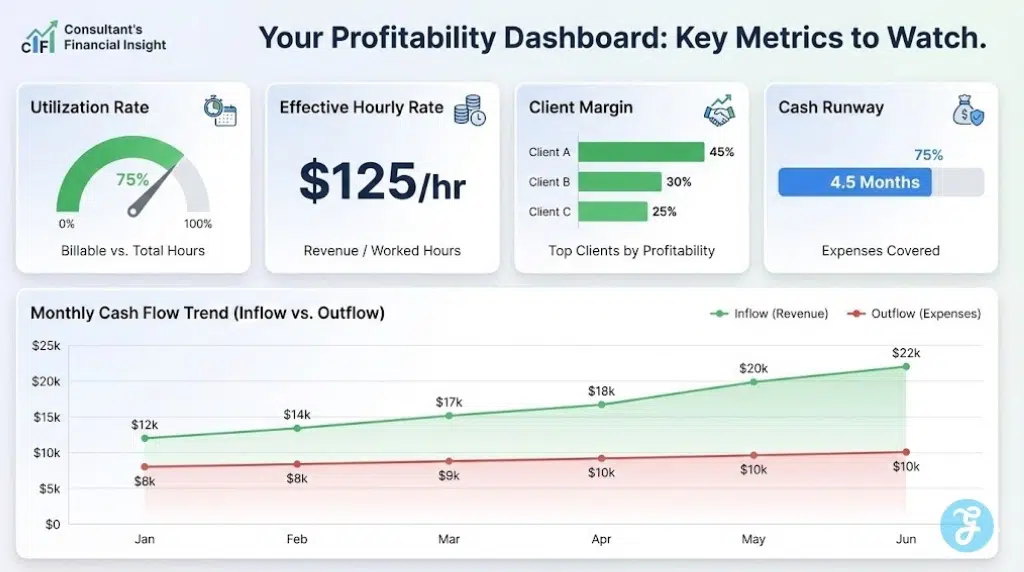
What to Track to Improve Profit
-
Utilization: Billable hours vs total hours
-
Effective rate: Revenue divided by hours worked
-
Client margin: Revenue minus direct costs like contractors and tools
-
Cash runway: Months of expenses covered by cash on hand
In The End
The best accounting software for consultants is the one that protects your billable time while keeping your financial picture sharp. Start with a tool that makes invoicing effortless, reconciliation routine, and reporting clear enough that you actually look at it monthly.
If you are solo, optimize for speed and simplicity so you stay focused on clients. If you are growing, choose a platform that supports roles, approvals, and client-level visibility so your business scales with control instead of chaos.