

SaaS, or Software as a Service, means using software over the internet instead of installing it on your computer. In crowded SaaS markets today, companies often offer similar features that are easy for rivals to copy. This is why many see SaaS UX Differentiation as the only way to stand out. Good user experience, also called UX design, helps keep customers happy and loyal.
It makes people enjoy using a product and want to return. Easy-to-use designs save money by lowering support calls and training needs for staff. A strong focus on UI/UX now acts as part of each brand’s identity in these busy markets. Many successful companies hire skilled designers just for this reason—they help make products special when others look almost the same.
Trends show that more buyers choose SaaS tools not because they have extra features but because they feel smooth and simple to use. Best practices around research and testing shape how teams create standout platforms every day. Many experts now say great UX isn’t just helpful; it is what keeps users from leaving at all. Each section ahead unpacks why smart design in software matters more than ever before… so keep reading!
The Importance of UX in SaaS
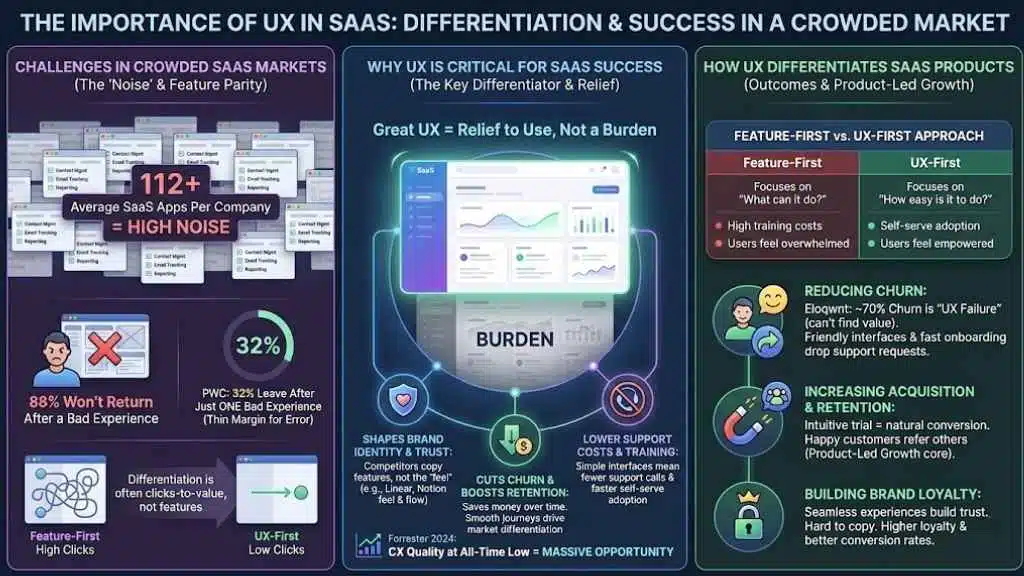
User experience shapes how people feel about software, and it decides if they stay or leave. As SaaS options grow, great UX often becomes the main reason users choose one product over another. In fact, a 2024 report from Forrester found that customer experience quality in the US has hit an all-time low. This drop creates a massive opportunity for companies willing to invest in better design.
Why UX is critical for SaaS success
Great UX design is now the main way for SaaS products to win in crowded markets. Simple, clear interfaces help people use software with less training and fewer support calls. In 2026, companies cannot stand out just by adding more features. If you look at the data, the average company now uses about 112 different SaaS applications. That is a lot of noise. Your product needs to be the one that feels like a relief to use, not a burden.
Good user experience shapes brand identity and builds customer trust. Competitors can copy features fast, but they cannot copy how users feel about a product. Think about linear or Notion. Their features are not unique, but their specific feel and flow are their biggest competitive moats.
Strong UX design cuts churn rates and boosts retention, which saves money over time. Data shows that brands with easy digital experiences see higher customer loyalty and better conversion rates. UI/UX designers play a big role in setting SaaS companies apart from others offering similar tools. A smooth user journey often becomes the reason customers choose one platform over another, driving real market differentiation today.
Challenges in crowded SaaS markets
Feature lists in many SaaS products now look almost the same. Competing platforms can copy new tools fast, shrinking any technical advantage. This makes it tough to stand out just by adding extra options or checkboxes. For example, in the CRM space, nearly every tool offers contact management and email tracking. The difference between a market leader and a struggling startup often comes down to how many clicks it takes to log a call.
Even pricing wars rarely work for long because lower costs often bring lower profit and service quality. Companies turn to better design strategies instead, using intuitive user interfaces and smart digital experiences as their edge.
“According to PWC, 32% of customers will leave a brand they love after just one bad experience. The margin for error is thinner than ever.”
The crowded SaaS market means users have endless choices; if an app feels slow or confusing, people switch fast without a second thought. Reports show that 88% of online users will not return after a bad experience with a product interface. The cost of offering more training and support grows as products become complex from feature creep alone. Clear user experience (UX) design lowers those costs while helping brands build customer loyalty that features alone cannot match.
How UX Differentiates SaaS Products
A standout User Experience UX grabs attention fast in crowded SaaS markets. People choose software that feels easy and enjoyable every single time they log in. It really is that simple.
Reducing churn rates
Clear and simple user experience keeps customers coming back. In crowded SaaS markets, users leave quickly if they feel confused or frustrated. Data from Eloqwnt suggests that up to 70% of customer churn is not due to product failure, but “UX failure”—meaning the user just couldn’t figure out how to get value from the tool.
Friendly interfaces, fast onboarding, and helpful features drop support requests, so people are less likely to give up. When a user hits a wall, they don’t call support anymore; they just cancel. Easy navigation builds confidence and trust with each visit. Brands like Slack stand out because people find what they need without digging through menus or waiting on help desks. Good UX lowers training needs too. Teams use software right away instead of wasting hours figuring things out. Strong digital experiences make switching to another service seem like hard work.
Increasing customer acquisition and retention
User Experience UX shapes how new users feel about a SaaS product from day one. Simple onboarding and clear navigation help people get started quickly. SaaS companies with strong UX design see fewer users leave, which means lower churn rates.
Studies show that good digital experience can boost conversion rates because happy customers often refer others. This is the core of Product-Led Growth (PLG). Your product is your best salesperson. If the trial experience is intuitive, the conversion happens naturally.
| Feature-First Approach | UX-First Approach |
|---|---|
| Focuses on “What can it do?” | Focuses on “How easy is it to do?” |
| High training costs | Self-serve adoption |
| Users feel overwhelmed | Users feel empowered |
In crowded SaaS markets, features can be copied fast; experiences cannot. A well-designed user interface UI sets a brand apart and builds trust. Brand perception matters more now than ever, as it guides customer choices in busy markets. Hiring skilled UI/UX designers helps create platforms that people want to use again and again, building customer loyalty and increasing retention over time.
Building brand loyalty through seamless experiences
Great UX design builds trust and keeps people coming back. In crowded SaaS markets, good features alone do not set a company apart. Experiences are hard to copy, while features can get copied fast. Research shows companies with simple, easy-to-use platforms see higher customer loyalty rates and better conversion rates. Making signup smooth helps new users feel welcome right away. Clear layouts and helpful prompts lower support costs for SaaS brands. People who find tasks easy on a platform are less likely to leave for another service.
Key UX Strategies for SaaS Differentiation
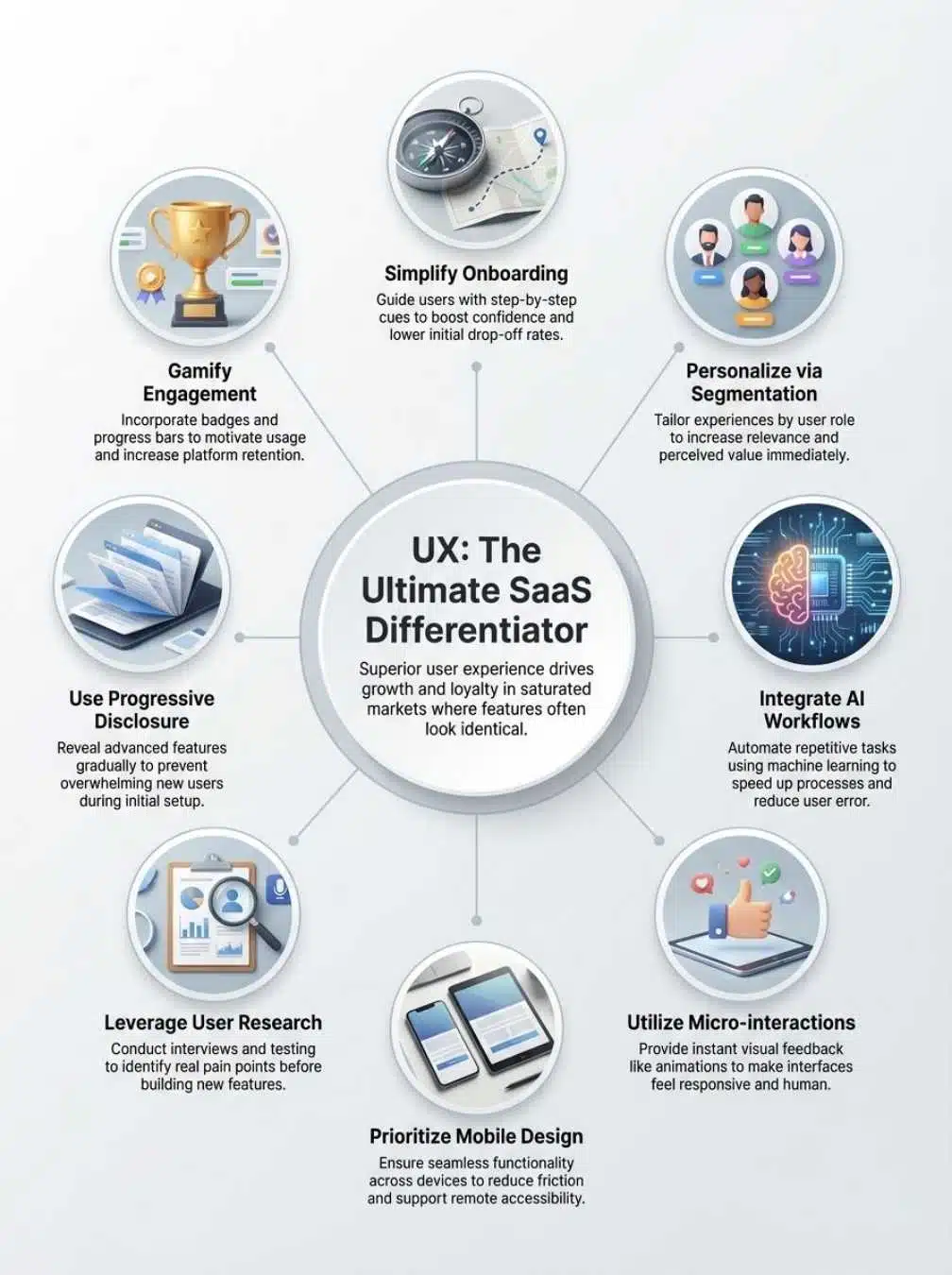
Strong UX strategies can set your SaaS product apart. Small changes in design and flow can leave a big mark on user satisfaction.
Simplify onboarding processes
A fast and easy onboarding process is key for SaaS companies. Clear steps help new users feel confident, lower support costs, and boost conversion rates. You want to aim for the “Aha! Moment” as quickly as possible.
- Use “Empty States” effectively: Don’t show a blank screen. Show a sample project or a “Create your first item” button to drive action immediately.
- Limit initial choices: Use progressive profiling. Don’t ask for a phone number, company size, and job title all at once. Ask for just an email first.
- Offer role-based paths: Ask “Are you a Marketer or a Developer?” and change the interface to match their language.
- Show progress bars: Users need to know how close they are to finishing. A simple “3 steps left” indicator increases completion rates significantly.
- Let users skip: Some people learn by doing. Always include a “Skip Tour” button for the power users who want to explore on their own.
Clear onboarding becomes a competitive edge in crowded SaaS markets. Brands like Calendly demonstrate this perfectly. They don’t just dump you in a dashboard; they force you to set up your first meeting type immediately, ensuring you get value in the first 5 minutes.
Personalization through user segmentation
User segmentation lets SaaS companies group users by roles, industry, skill level, or behavior. This way, the product experience changes for each user type. For example, new users may get helpful tooltips and guides while experienced ones see advanced shortcuts right away. Segmenting also helps reduce support costs because users find what they need faster.
Personalized UX boosts customer satisfaction and brand loyalty in crowded SaaS markets. Data shows that people are more likely to stay with a service if it feels like a good fit for them. Personalization sets products apart where features alone can be copied easily but unique digital experiences cannot be matched by competitors. The result is higher conversion rates and lower churn since every user feels valued from their first login onward.
AI-powered workflows for efficiency
AI-powered workflows make SaaS products smarter and faster. Companies use machine learning to handle simple, repetitive tasks for users. For example, Notion AI can rewrite text or summarize notes, saving the user hours of manual work. This speeds things up and lowers the chance of mistakes.
In crowded SaaS markets, time matters. Faster task completion means happier customers and fewer support requests. Exceptional user experience (UX) stands out here because it makes digital experiences smooth and stress-free. Adding AI-driven workflows also cuts costs by reducing training needs and support tickets, helping brands keep their edge against competitors with similar features.
Micro-interactions for enhanced engagement
Tiny actions like clicks, taps, or swipes help users feel in control. Micro-interactions provide instant feedback. A simple “Saved!” message or a shake animation for errors makes the software more human and less confusing. These details can lower support costs for SaaS companies since users get clear signals without needing extra help.
Strong user experience often depends on these small touches. In crowded SaaS markets where features are easy to copy, micro-interactions set products apart by improving digital experiences and brand perception. They build trust with intuitive interfaces that boost satisfaction and reduce churn rates. SaaS tools with polished micro-interactions keep customers coming back. For instance, Asana uses a “celebration creature” (like a unicorn) that flies across the screen when you complete a task. It sounds silly, but it triggers a small dopamine hit that makes work feel rewarding.
Mobile-first and responsive design
Most users now access SaaS products from their phones. A mobile-first design helps them work faster and with fewer errors on smaller screens. This approach leads to better customer satisfaction, which is key for standing out in crowded SaaS markets. Responsive design means the product looks good and works well on any device or screen size. Companies that invest in strong mobile UX see lower support costs, greater user retention, and higher conversion rates. Good mobile experiences shape brand perception and boost customer loyalty while driving a clear competitive advantage in the digital experience space.
Best Practices for UX in SaaS
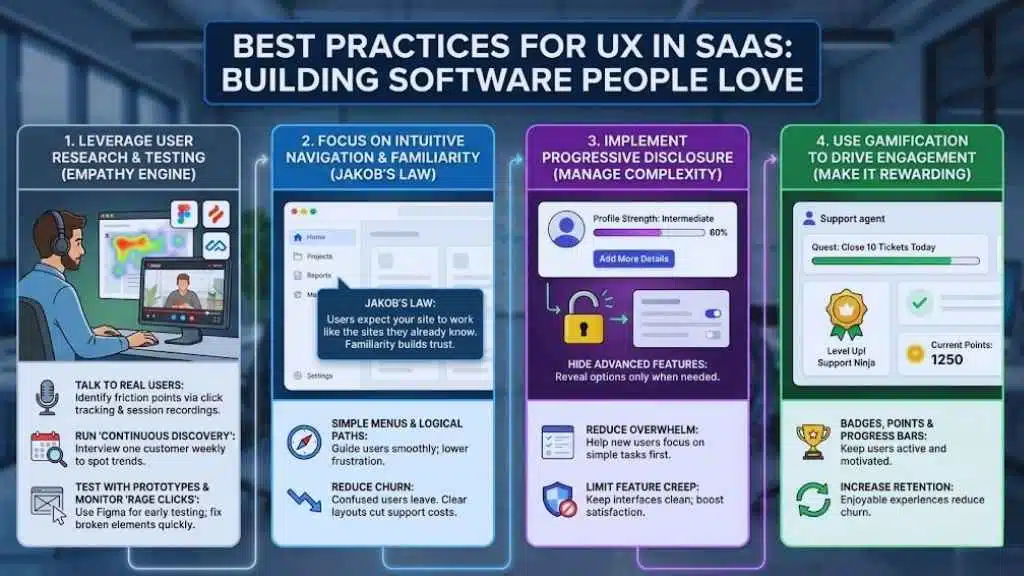
Great UX starts with empathy and clear intentions. Explore proven methods that help teams build software people love to use—every single day.
Leverage user research and testing
SaaS companies face tough competition in crowded markets. User research and testing help teams build better products that customers love. You cannot guess what users want; you have to ask them.
- Talk to real users: Tools like Hotjar or Maze allow you to see exactly where users are clicking and where they are getting stuck.
- Run “Continuous Discovery”: Don’t just research once a year. Make it a habit to interview one customer every week to spot shifting trends.
- Test with prototypes: Before writing a single line of code, use Figma prototypes to test if your design makes sense to a stranger.
- Monitor the “Rage Clicks”: If analytics show users clicking the same button five times in a row, you have a broken design element that needs fixing immediately.
People expect to move through software with ease. An intuitive interface guides users smoothly from one task to the next. Simple menus, clear buttons, and logical paths help users find what they need faster. Most customers are used to familiar layouts in top SaaS products like Dropbox. Sticking close to common patterns can lower frustration and build trust.
This concept is known as “Jakob’s Law.” It states that users spend most of their time on other sites. This means they expect your site to work the same way as all the other sites they already know. Research shows that confused users will leave quickly; low usability increases churn rates by up to 40 percent in crowded markets. Clear navigation cuts support costs because people do not get lost or stuck as often.
Implement progressive disclosure for complex features
Showing too much information at once can confuse users. Progressive disclosure solves this problem in SaaS products. It hides advanced features until the user needs them. This design strategy helps new users focus on simple tasks first, then unlock more complex options as their skills grow.
For example, LinkedIn uses a “Profile Strength” bar to encourage users to add more details over time, rather than demanding a full resume on day one. This reduces support costs and limits feature creep that often overwhelms customers in crowded markets. Progressive disclosure also keeps interfaces clean, which boosts customer satisfaction and brand perception according to recent UX research. Using this method gives your product a strong competitive advantage where experience matters more than raw features.
Use gamification to drive user engagement
Gamification can make SaaS products more fun and engaging. Simple features like badges, points, or progress bars keep users active. A well-known example is Freshdesk, which uses a “Quest” system for support agents. It turns closing tickets into a game with rewards, which keeps morale high in a tough job.
Users often return more frequently, trying to reach new goals or unlock rewards. UX design uses gamification as a key strategy in crowded markets. It helps reduce churn rates since people enjoy using software that feels rewarding and easy to use, not just functional. These small touches set apart memorable digital experiences from the basic ones competitors offer. Smart companies use this approach to build loyalty and increase customer satisfaction without adding extra support costs.
The Future of SaaS UX Design
Smart teams now use new tools and ideas to shape digital experiences. Keep an eye on emerging shifts—they will soon change how users interact with SaaS products.
Trends shaping UX in SaaS
AI-powered design tools now help create faster and more efficient SaaS experiences. Companies use machine learning to offer smart suggestions, automate tasks, and predict what users need next. This is leading to “Generative UI,” where the interface itself might adapt and change based on what the user is trying to do at that moment.
Personalized workflows have become the norm since customers want products that feel made just for them. Mobile-first layouts are also standard since most people use phones over desktops in 2026. Micro-interactions like simple button animations or instant feedback hold attention longer. Companies focus more on user research than ever before, because brands can no longer win with features alone—great UX sets leaders apart in crowded markets where every extra second counts for customer retention and loyalty.
The role of empathy in designing for users
Empathy means understanding what users feel, need, and expect. SaaS companies with high empathy create interfaces that solve real problems fast. For example, clear onboarding steps help new customers start using a product in minutes, not hours. Focusing on user pain points also reduces the cost of support and training for these products. Companies can use empathy to design features that match how people already work. This way, users spend less time searching for answers or feeling frustrated.
Final thoughts
Great UX shapes how users feel and act in crowded SaaS markets. From what we have seen, the companies that win are the ones that treat design as a business strategy, not just a visual layer. Clear onboarding, smart personalization, and smooth workflows make software easy to use and hard to leave. These simple steps do not need big budgets or long timelines but bring higher conversion rates and strong customer loyalty. A well-designed user interface can set a SaaS brand apart while improving trust with every click. Take what you have learned here, try it out for your next project, and watch even small changes spark big results that customers love.






















