Home security has graduated from simple, ear-piercing alarms to sophisticated “home operating systems” that manage everything from safety to energy efficiency. If you are in the market for a system today, you aren’t just looking for a burglar alarm; you are looking for intelligence, automation, and peace of mind. To help you navigate this crowded market, we have identified the Must-Have Smart Home Security Features that distinguish a truly protective system from a basic noisemaker.
The shift from reactive security (an alarm sounding after a window breaks) to proactive security (stopping the intruder before they get close) is the defining trend of the industry. Whether you are a tech-savvy homeowner or just want to keep your family safe, understanding these Must-Have Smart Home Security Features is critical to making an informed investment that won’t require an upgrade in six months.
Key Takeaways
-
Integration is King: The best systems act as a hub for your entire smart home, not just security.
-
AI Reduces Noise: Look for “Person” and “Package” detection to eliminate 90% of false alarms.
-
Privacy Matters: Physical shutters and local storage options are essential for privacy-conscious homeowners.
-
Redundancy Saves Lives: Always ensure your system has cellular and battery backup.
The Evolution: From Passive Alarms to Active Guardians
To understand why specific features are now non-negotiable, we have to look at how the threat landscape—and technology—has changed. Historically, a home security system was a passive collection of sensors that waited for a door to be kicked in before reacting. It was a “grudge purchase” that sat silently on the wall until something went wrong.
Today, the best home security system features focus on prevention rather than just reaction. We have moved into the era of the smart home ecosystem, where your security devices don’t just signal for help; they actively work to deter crime. Modern systems use data and connectivity to create a presence in your home, simulating occupancy with smart lights or warning loiterers with automated voice messages. This shift from “passive noise-maker” to “active guardian” is what separates legacy alarm systems from modern protection.
Balancing High-Tech Security with Daily Convenience
As you review the list below, you will notice a recurring theme: the convergence of safety and convenience. In the past, high security meant complicated keypads and rigid protocols. Now, the most effective systems are the ones that blend seamlessly into your life.
Americans are increasingly prioritizing home automation integration because it ensures the system is actually used. If a system is too difficult to arm or generates too many false alarms, homeowners stop using it. Therefore, a “must-have” feature isn’t just defined by its ability to catch a burglar; it is defined by how well it simplifies your daily routine—whether that’s unlocking the door for a pet sitter remotely or checking on the kids via a live video feed. The features listed below represent this perfect balance of rigorous defense and effortless usability.
The Command Center: Control & Integration
The heart of any modern system is how you control it. The days of rushing to a keypad before the countdown ends are largely over.
1. Unified Mobile App Control
The absolute baseline for any system is a single, intuitive mobile app. Users now demand a “single pane of glass” experience. You shouldn’t need one app for your cameras, another for your smart locks, and a third for your alarm panel. The best systems integrate all these feeds into one dashboard, allowing you to arm your system, check video feeds, and lock doors from a beach halfway across the world.
2. Matter Protocol Support (Interoperability)
One of the most significant advancements in smart home tech is the “Matter” protocol. In simple terms, this is a universal language that allows devices from Google, Apple, Amazon, and Samsung to talk to each other.
-
Why it’s a must-have: It ensures your security sensors can trigger your smart lights (even if they are different brands) to flash red when an alarm trips. It future-proofs your home, ensuring you aren’t locked into a single “walled garden” ecosystem.
3. Voice Control Integration
Hands-free control is no longer a gimmick; it’s a safety feature. Integrating with Amazon Alexa, Google Assistant, or Siri allows you to execute commands like “Show me the front door camera” on a smart display or “Arm the system in Away mode” as you walk out the door with your hands full of groceries.
| Feature | Basic System | Advanced System |
| App Control | Arm/Disarm only | Full automation, video, & lock control |
| Compatibility | Proprietary devices only | Matter, Z-Wave, Zigbee support |
| Voice Command | None or limited | Full two-way voice integration |
Visual Intelligence: The Eyes of the System
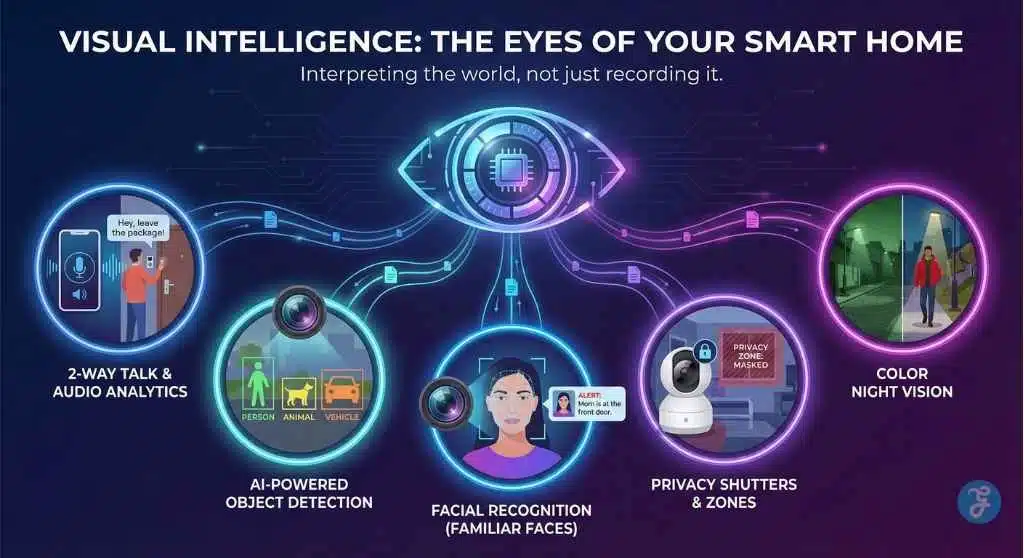
Cameras have evolved from grainy, black-and-white recorders to intelligent guards that can interpret what they see.
4. Video Doorbells with 2-Way Talk
Often, the first device a homeowner purchases, the video doorbell, is their front-line defense against “porch pirates.” The essential requirement here is crisp, low-latency 2-way audio that allows you to have a real-time conversation with a delivery driver—or warn off a suspicious stranger—without opening your door.
5. AI-Powered Object Detection
Old motion sensors were “dumb”—a swaying tree branch or a wandering cat would trigger the same alarm as a person. Modern Must-Have Smart Home Security Features include AI that distinguishes between:
-
People: To alert you of potential intruders.
-
Animals: To filter out false alarms from pets.
-
Vehicles: To let you know when someone pulls into the driveway.
-
Packages: To alert you specifically when a delivery is dropped off.
6. Facial Recognition (Familiar Faces)
Taking AI a step further, top-tier systems now offer facial recognition. Instead of a generic “Person detected” alert, your phone notifies you that “Mom is at the front door.” This dramatically reduces anxiety, as you instantly know if the motion is a threat or just a family member coming home.
7. Privacy Shutters and Digital Zones
With cameras coming inside the home, privacy is a massive concern. Mechanical privacy shutters (which physically cover the lens) are becoming a standard requirement for indoor cameras. Additionally, “digital privacy zones” allow you to black out specific areas of a camera’s field of view—like a neighbor’s window—to ensure you are only recording your own property.
8. Color Night Vision
Grainy, ghostly green night vision provides little detail to police. Modern cameras use starlight sensors or integrated spotlights to record in full color even in pitch darkness. This captures critical details like the color of an intruder’s car or the clothes they are wearing.
Perimeter & Entry Defense
Stopping a break-in before it happens is the gold standard.
9. Smart Locks & Keyless Entry
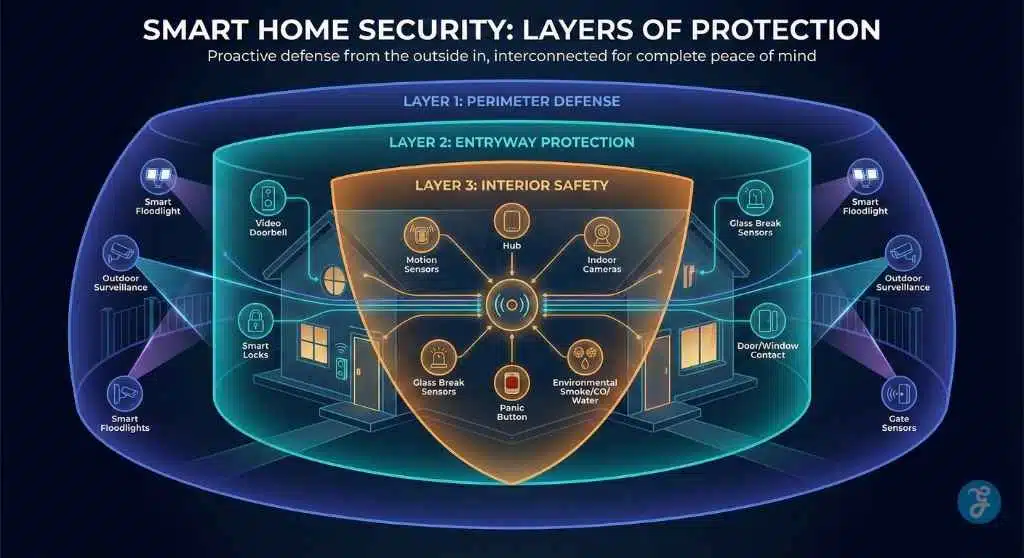
Smart locks eliminate the “under the doormat” key risk. They allow you to issue temporary, unique access codes to dog walkers or contractors that only work during specific hours. You also get a log of exactly who entered and when.
10. Motion-Activated Floodlights
Light is one of the best deterrents. Integrating high-intensity floodlights with your security cameras ensures that the moment motion is detected, the area is bathed in light. This often startles intruders enough to send them running before they even attempt to touch a window.
11. Glass Break Sensors
Intruders know that opening a window might trip a sensor, so they often break the glass instead. Acoustic glass break sensors are tuned to the specific frequency of shattering glass, adding a critical layer of defense that standard entry sensors miss.
12. Geo-Fencing Capabilities
This feature uses your phone’s location services to automate your security.
-
Leaving: The system reminds you (or automatically arms itself) when everyone has left a 1-mile radius of the home.
-
Arriving: The system disarms and turns on the porch lights as you pull into the driveway.
Safety, Redundancy & “Peace of Mind”
A security system must remain operational when the power acts up or the internet fails.
13. 24/7 Professional Monitoring
While DIY self-monitoring is popular, the option for professional monitoring remains a critical safety net. In the event of a fire or a break-in while you are on a flight and can’t check your phone, a professional monitoring center can dispatch police or fire services on your behalf.
14. Cellular & Battery Backup
Smart burglars may cut power or cable lines. A system with a built-in battery and a cellular chip (LTE/5G) ensures your alarm can still signal for help even if the Wi-Fi is down and the house is dark.
15. Environmental Sensors (Fire, CO, Water)
Burglars aren’t the only threat to your home. Comprehensive systems integrate:
-
Smoke/CO Detectors: These automatically unlock smart locks to help you escape during a fire.
-
Water Leak Sensors: Placed near washing machines or water heaters to detect leaks early, potentially saving you thousands in water damage.
16. Panic Buttons / Duress Codes
A physical panic button near the bedside or a “duress code” (a fake PIN that disarms the system but silently summons the police) provides an essential layer of personal safety during a home invasion scenario.
Ownership & Flexibility
Finally, how you own and store your data matters more than ever.
17. Local Video Storage Options
Consumers are increasingly wary of monthly cloud subscription fees and data privacy. A major “must-have” is the ability to record video locally to a microSD card or a local hub. This keeps your footage in your possession and eliminates monthly costs for video history.
The Real Cost of “Smart”: Subscriptions vs. Upfront Equipment
One of the most common shocks for new buyers is the “hidden” cost of ongoing service. You can buy a camera for $50, but it might cost you $100 a year just to watch the footage it records. Understanding the pricing models is just as important as the hardware itself.
-
The Subscription Trap: Many “affordable” cameras require a monthly fee (typically $3–$10 per camera) to unlock essential features like person detection or cloud recording history. Without the sub, they are just live-stream monitors.
-
The Professional Premium: Systems with 24/7 professional monitoring (AD, Vivint, SimpliSafe) generally charge between $20 and $60 per month. While expensive, this fee often covers cellular backup and equipment warranties.
-
The Local Storage Saver: If you want to avoid monthly fees entirely, prioritize systems with “Local Storage” (SD card slots or a local HomeBase). You pay more for the hardware upfront, but your monthly bill is $0.
Estimated Cost Breakdown (First Year)
| System Type | Upfront Hardware Cost | Monthly Fee | 1st Year Total Cost | Best For… |
| Budget DIY (Cloud) | $200 – $350 | $3 – $10 | ~$300 | Renters, single-camera users |
| Pro Monitored | $100 – $500 (Subsidized) | $40 – $60 | ~$800+ | Homeowners wanting “hands-off” safety |
| Local Storage (No Fee) | $400 – $700 | $0 | ~$550 | Privacy advocates & long-term savers |
Cybersecurity: Protecting Your Virtual Front Door
A smart home security system is technically an “Internet of Things” (IoT) device, which means it can be vulnerable to hacking if not secured. A camera inside your home is a major liability if the wrong person accesses it. To ensure your physical security doesn’t compromise your digital privacy, look for these specific cybersecurity features:
-
Two-Factor Authentication (2FA/MFA): This is non-negotiable. It requires a text message code or authenticator app approval to log in, meaning a hacker can’t access your cameras even if they steal your password.
-
End-to-End Encryption: Ensure your video footage is encrypted before it leaves the camera. This prevents bad actors (or even employees of the security company) from viewing your private feeds.
-
Anti-Jamming Technology: Sophisticated burglars use “Wi-Fi jammers” to disconnect wireless cameras. Premium systems now include algorithms to detect jamming interference and sound the alarm locally, even if the internet is cut.
Wired vs. Wireless: Which Setup is Right for You?
The debate between “hardwired” (Power over Ethernet/PoE) and “wireless” (Battery/Wi-Fi) is the first technical decision you need to make.
Choose Wireless IF:
-
You are a Renter: You cannot drill holes in walls. Wireless sensors use peel-and-stick adhesive.
-
You want Easy Install: You want to be up and running in 30 minutes without hiring an electrician.
-
Flexibility: You plan to move in the next 1-3 years and want to take the system with you.
Choose Wired (PoE) IF:
-
You own a Large Home: Wi-Fi signals struggle to reach through brick walls or to the end of a long driveway. Wired connections are flawless.
-
You want 24/7 Recording: Battery cameras only record when motion is triggered (to save power). Wired cameras can record 24/7 without ever needing a recharge.
-
You hate Maintenance: You never want to climb a ladder to change a battery in the middle of winter.
Frequently Asked Questions
1. What is the single most important feature in a home security system?
While opinions vary, professional monitoring is often cited as the most critical. No amount of smart technology matters if you miss the alert because you are sleeping or in a meeting. A monitoring team guarantees a response 24/7.
2. Can I mix and match devices from different brands?
Yes, but you need to check for Matter or Z-Wave compatibility. These protocols allow a smart lock from one brand to talk to a security hub from another. Without these standards, you might end up with five different apps to control your home.
3. Is local storage better than cloud storage for cameras?
Local storage (SD cards) is better for privacy and avoiding monthly fees. However, if a burglar steals the camera or the hub, the footage is gone. Cloud storage offers an off-site backup that preserves evidence even if the hardware is destroyed. A hybrid approach is often best.
4. Do smart security systems require a hardwired landline?
No. Modern systems rely on Wi-Fi and Cellular connections. Landlines are considered outdated for security because they can be easily cut from the outside of the house.
5. How does “Geo-fencing” actually help with security?
It removes human error. The most common security failure is simply forgetting to arm the system. Geo-fencing acts as a fail-safe, ensuring your home automatically secures itself when it detects that no authorized users are home.
Final Thoughts: Security Meets Lifestyle
Investing in a smart home security system today is no longer just about installing alarms; it’s about choosing a proactive partner for your daily life. The features listed here—from AI-driven detection to seamless home automation- represent a fundamental shift towards systems that don’t just react to danger, but actively prevent it.
When choosing your setup, prioritize the technology that solves your specific friction points, whether that is preventing package theft or simply checking on pets while you are away. Ultimately, the best security system is one that offers robust protection without demanding your constant attention. Secure your home, simplify your life, and choose a system that is smart enough to grow with you.