

You want to build a great website, but picking the right platform feels like a tough puzzle. Maybe you run a small business and need strong online presence for lead generation. Or you’re into web design and crave tools that boost user experience.
WordPress Vs Webflow Vs Squarespace all promise to help, yet they confuse many folks. It’s like choosing ice cream flavors when you just want a tasty scoop without the brain freeze.
Did you know WordPress powers huge content management systems for big publishing sites? This fact shows its strength in scalability and SEO for long-term growth. In this post, we’ll break down design flexibility, plugins, site speed, and more to guide your choice.
We’ll compare ease of use, pricing, and performance, so you pick the best for your needs. Ready to find your match?
Overview of WordPress, Webflow, and Squarespace
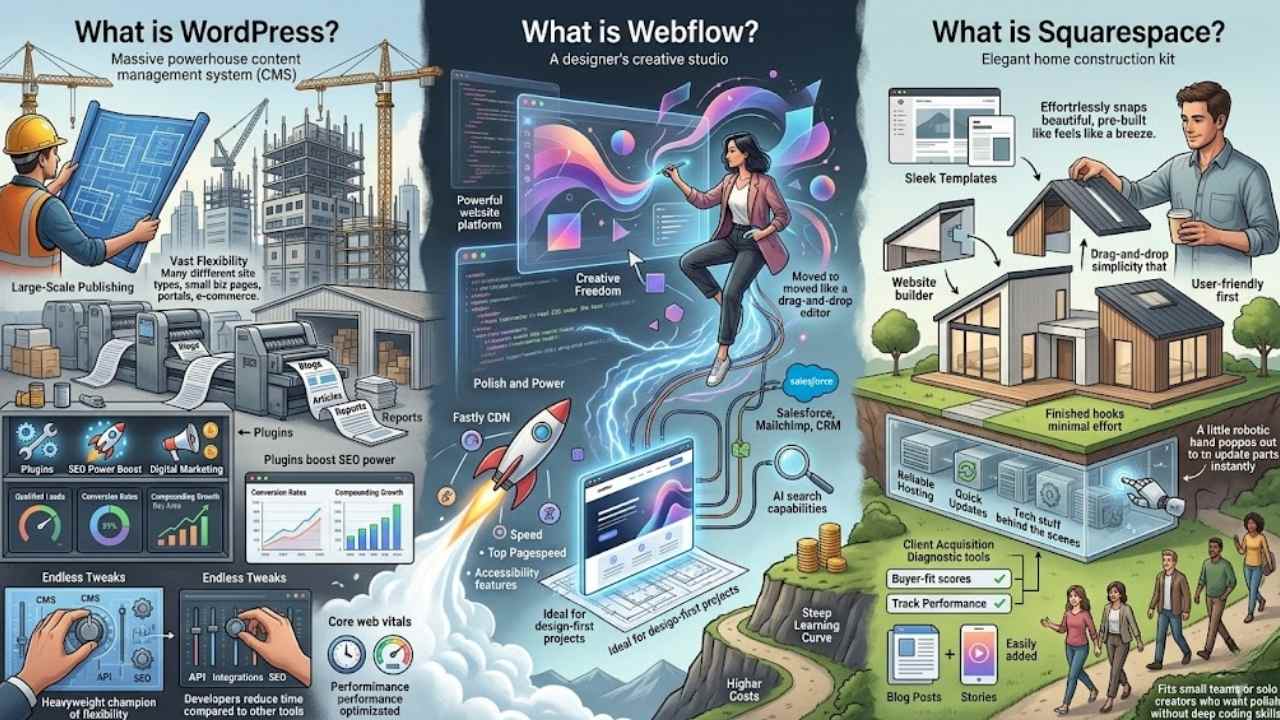
Picture building your dream website, like crafting a house from scratch or snapping pieces together with ease. WordPress acts as a powerhouse content management system for endless tweaks, Webflow shines with its visual design tools for creative flows, and Squarespace offers drag-and-drop simplicity that feels like a breeze, so keep reading to see which fits your vibe.
What is WordPress?
WordPress stands out as a top content management system (CMS) for website design and development. People love it for its vast flexibility. You can build almost any type of site with it, from small business pages to huge content-heavy websites.
It handles large-scale publishing like a champ. Teams often pick WordPress for projects that need custom touches beyond basic setups. Plugins boost its SEO (search engine optimization) power, and you get tools for website optimization right out of the box.
Small businesses thrive on its setup for digital marketing and client acquisition.
WordPress is the heavyweight champion of flexibility among the compared platforms.
This platform shines in versatility. Developers cut time on tasks compared to other tools. You manage everything from API integrations to copywriting with ease. WordPress fits content strategies that include blogging and case studies.
It supports core web vitals for better performance. Users enjoy its strength in handling qualified leads and conversion rates. Think of it as your go-to for compounding growth in the Bay Area or beyond.
What is Webflow?
Webflow stands out as a powerful website platform. Designers love it for blending simplicity with creative freedom in web design projects. Imagine: you drag and drop elements like in a drag-and-drop editor, but with real CSS under the hood.
Teams build sites fast, often slashing development time in half compared to other options. That efficiency shines through its approach. Plus, it integrates tools like Fastly CDN for top pagespeed and accessibility features.
You get polish and power, ideal for design-first projects with technical teams on hand.
Costs run higher, and the learning curve feels steep at first. Yet, for those chasing that edge, Webflow delivers. Agencies like Knapsack Creative and HyperArts swear by it for client work.
It handles integrations with Salesforce or Mailchimp smoothly. Think of it as your core offer for polished sites without endless coding. Crux features include AI search capabilities.
Wix or Shopify might compete, but Webflow excels in visual control. Kreativa Group uses it for appointments and more.
What is Squarespace?
Squarespace stands out as a website builder that puts user-friendliness first. You pick from sleek templates, drag and drop elements, and launch your site with ease. This platform handles the tech stuff behind the scenes, so you focus on your content.
Think of it like a helpful friend who sets up your online home without the headaches. Squarespace suits bloggers and service pros who share case studies or stories. It excels at making sites look elegant with minimal effort.
Folks use Squarespace to boost client acquisition diagnostic tools and track buyer-fit scores right on their pages. Service-based strategies thrive here, with built-in features for smooth content flow.
You get reliable hosting and quick updates, keeping everything running without a hitch. Imagine crafting a site that draws in the right crowd, all while you sip your coffee. This setup fits small teams or solo creators who want polish without deep coding skills.
Design Flexibility and Customization
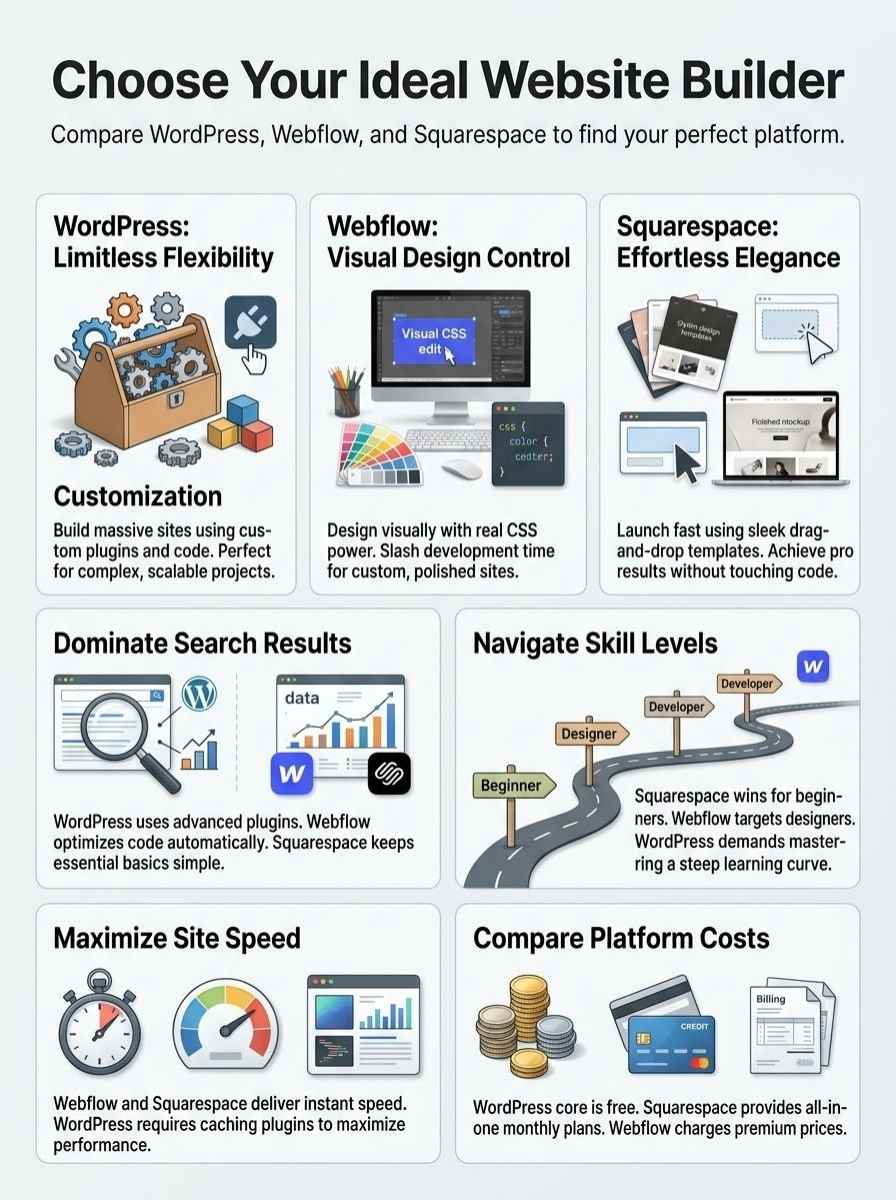
Picture your website as a blank canvas, ready for your wild ideas. WordPress lets you tweak themes with plugins, Webflow offers drag-and-drop editors for pixel-perfect control, and Squarespace shines with sleek templates that keep things simple yet stylish—want to know which fits your vibe?
WordPress for advanced customization
WordPress stands out as the heavyweight champion of flexibility. You get thousands of themes and plugins to tweak every detail. Builders love how it handles custom code, like PHP and CSS.
This setup fits almost all web projects, from small blogs to massive sites. Imagine turning a basic page into a full online store; WordPress makes that happen with ease. Teams often pick it for its vast options, letting them build without limits.
Folks building large-scale publishing empires turn to WordPress first. It excels in content-heavy websites, where you add features like forums or memberships. Plugins boost advanced customization, such as SEO tools or e-commerce add-ons.
You control the backend fully, editing layouts and functions as needed. Designers appreciate this power, crafting sites that feel custom-made. WordPress adapts to your vision, no matter the project size.
Webflow for design-focused users
Webflow shines for folks who love design above all. Imagine this, you get a toolbox that lets you craft sites with real creative freedom. Designers jump in and build without endless code tweaks.
It mixes simplicity with that wow factor, perfect if you want polish in your projects. Teams with tech skills find it ideal for design-first work. You cut development time in half compared to other platforms, thanks to its smart approach.
This platform packs power, but expect a steeper learning curve and higher costs. Creative types thrive here, turning ideas into sleek sites fast. Imagine slashing hours off builds, that’s the magic.
It suits projects needing that extra edge in visuals. Users with design focus grab the reins and create without limits.
Squarespace for simplicity and elegance
Squarespace brings simplicity and elegance to your web design game. Picture a sleek toolbox that lets you build without sweat. This platform excels in user-friendliness, folks. It handles technical aspects with minimal effort on your part.
You get polished templates right out of the box. Drag those elements around like a pro, no coding drama needed. Service pros, listen up. Squarespace fits blogging and service-based content strategies like a glove.
Add case studies? Piece of cake, it keeps things elegant and smooth.
Think of Squarespace as your easygoing friend in the website world. Shortcuts abound for quick setups. Elegance shows in every clean layout you craft. Busy creators appreciate how it cuts the hassle.
Your site looks pro without endless tweaks. Bloggers thrive here, turning ideas into sharp posts fast. Service teams showcase work through case studies effortlessly. Yeah, it’s that straightforward, making your online presence shine bright.
SEO Capabilities
4. SEO Capabilities: Imagine this, you’re building a site and want it to shine in search results, right? WordPress packs a punch with add-ons like Yoast for fine-tuning meta descriptions and sitemaps, Webflow keeps things speedy with its optimized code and easy keyword tools, while Squarespace offers simple setups for alt text and site maps that anyone can handle—keep scrolling to see which one could skyrocket your online presence!
WordPress SEO tools and plugins
WordPress shines with its vast array of SEO tools and plugins that boost your site’s visibility. Take Yoast SEO, a popular plugin that guides you through optimizing posts with real-time tips on keywords and readability.
It helps you craft meta descriptions and titles that search engines love. Plugins like Rank Math offer similar features, plus analytics to track your progress. You get flexibility here, folks, as WordPress acts as the heavyweight champion for content-heavy websites.
This platform suits large-scale publishing empires, where you can plug in tools for sitemaps and schema markup without breaking a sweat. Imagine tweaking your site’s speed with caching plugins like WP Rocket, which ties right into better SEO rankings.
WordPress performs well for almost all web projects, giving you that versatile edge over specialized setups.
Webflow’s built-in SEO features
Webflow shines with its built-in SEO tools that boost your site’s visibility. Designers love how it creates clean HTML code, which search engines crawl fast. You set custom meta tags for titles and descriptions in a snap.
The platform auto-generates XML sitemaps too, saving you headaches. Imagine slashing setup time in half compared to other builders, thanks to this efficient approach. Teams with tech skills find it perfect for design-first sites, where SEO fits right into the creative flow.
Costs run higher here, but the power pays off for polished results. Webflow handles canonical tags and robots.txt files without fuss. You tweak alt text for images on the fly, helping with rankings.
Picture a steep learning curve that leads to freedom, like climbing a hill for a killer view. Simple projects get that elegant edge, all while keeping things user-friendly for your web design goals.
Squarespace’s SEO functionality
Squarespace packs solid SEO tools right into its platform, making it easy for you to boost your site’s visibility. You get clean URLs, automatic sitemaps, and simple meta tags that help search engines find your content fast.
Bloggers love how it handles image alt text and mobile optimization without extra hassle, fitting perfectly for service-based sites or case studies. Imagine you’re a small business owner tweaking your page titles in minutes, no coding required, and Google notices the difference.
This setup excels when you want user-friendly tweaks that cut down on technical headaches. Squarespace integrates with tools like Google Analytics, so you track performance and refine your strategy on the fly.
It suits content strategies that need elegance over complexity, keeping things smooth for readers who value quick results.
Ease of Use
Ever felt lost in a maze of website builders? WordPress throws you into the deep end with its steep learning curve, but hey, plugins like Elementor make drag-and-drop edits a breeze for beginners.
Webflow shines with its visual builder that feels like painting on a canvas, while Squarespace keeps things simple, like chatting with an old friend over coffee, no coding drama required.
WordPress learning curve and complexity
WordPress packs a punch with its flexibility, earning its spot as the heavyweight champion among these platforms. You get to tweak every detail, from themes to plugins, which opens doors for custom sites.
This setup suits large-scale publishing empires and content-heavy websites best. Folks often start out thinking it’s simple, but reality hits with a mix of choices that demand time to master.
Imagine wrestling a toolbox full of gadgets; each one shines for specific jobs, yet figuring them out tests your patience. New users spend hours on basics like setup and updates, turning small tasks into puzzles.
Flexibility makes WordPress versatile for almost all web projects beyond niche needs. You build empires with it, but the complicated nature adds layers to learn, like coding snippets or managing security.
Teams love this depth for big sites, though solo creators might feel the pull of trial and error. Development time stretches longer here compared to options like Webflow, which cuts it in half or more with streamlined steps.
Users tweak databases and servers, juggling parts that fit together like an intricate machine. This hands-on style rewards those who push through, crafting sites that stand strong.
Webflow’s visual design interface
Webflow’s visual design interface shines for folks who crave creative freedom without endless coding hassles. You drag elements, tweak styles, and see changes live, like painting on a digital canvas.
This setup suits design-first projects, especially if your team handles the tech side. Picture building a site as crafting a custom bike; you pick parts, assemble them visually, and ride off smooth.
It offers power and polish that make pros smile, yet demands a steeper learning curve than basic builders.
Teams love how this interface slashes development time, often halving it compared to other platforms through smart, efficient workflows. You get simplicity that sparks joy in web design tasks, perfect for those with a technical squad ready to jump in.
Think of it as a sleek toolbox; open it, grab what you need, and create polished sites fast. The higher price tag matches the pro-level shine, drawing users who value quick, creative builds over cheap shortcuts.
Squarespace’s user-friendly platform
Squarespace shines as a go-to choice for folks who crave simplicity in building sites. You drag and drop elements with ease, no coding skills needed. This setup handles the tech stuff behind the scenes, so you focus on your ideas.
Picture a friend guiding you through the process, step by step, without the headaches. It excels at user-friendliness, cutting down effort on tricky tasks like updates or security.
Bloggers and service pros love it for crafting clean content strategies. Think case studies that pop, or posts that flow like a casual chat over coffee. Squarespace fits blogging needs perfectly, with tools that make adding images or forms a breeze.
You get reliable performance too, keeping your site smooth for visitors.
Performance and Speed
Site speed matters, it keeps visitors happy and boosts your search rankings. WordPress lets you tweak caching plugins for top performance, Webflow shines with fast loading out of the box, and Squarespace delivers steady speed without much fuss, so pick what fits your needs.
WordPress optimization potential
WordPress shines in optimization potential, folks. You can tweak it for top speed with the right moves. Install caching plugins like WP Rocket to store data and cut load times. Pair that with a content delivery network, such as Cloudflare, and your site flies.
Compress images using tools like Smush, and watch pages load in a snap. This versatility lets WordPress handle large-scale publishing empires and content-heavy websites without breaking a sweat.
It performs well for almost all web projects, beyond just the specialized ones.
Think of WordPress as the heavyweight champion of flexibility here. Developers optimize databases with plugins like WP-Optimize to clear clutter. Enable lazy loading for media, and you save bandwidth big time.
Sure, Webflow cuts development time in half or more with its efficient approach, but WordPress rewards your effort with custom speed boosts. Teams build blazing-fast sites for any scale, from blogs to empires.
You get power that adapts, no matter the project size.
Webflow’s default speed advantage
Webflow shines with its built-in speed perks right out of the gate. Sites load fast because the platform handles optimization under the hood. You skip extra plugins or tweaks that slow things down elsewhere.
Think of it like a sleek sports car, zipping along without the drag of heavy baggage. This edge comes from Webflow’s efficient setup, which cuts development time in half or more compared to WordPress.
Designers love how it blends simplicity with creative freedom for those design-first projects.
Pair that with a technical team, and you tackle complex builds swiftly. Yet, expect a steeper learning curve and higher costs for all that power and polish. Readers, if you crave quick results without the hassle, Webflow delivers.
It fits folks who want sites that run smooth from day one, no endless fiddling required.
Squarespace’s reliable performance
Squarespace keeps your site running smooth and fast, no matter the traffic spikes. You get built-in hosting that handles everything behind the scenes, so pages load quick without extra tweaks.
Think of it like a trusty car that never stalls on the highway; it just works. This reliability shines for bloggers who post daily updates or service pros sharing case studies. Their servers stay strong, cutting down on downtime that plagues other platforms.
Users love how Squarespace manages technical stuff with little fuss, letting you focus on content over code. Speed tests show consistent performance across devices, from phones to desktops.
It’s like having a silent partner who fixes issues before you notice them. For those building service-based sites, this means reliable uptime for client interactions and seamless browsing.
Squarespace fits right in for steady, hassle-free online presence.
Pricing and Cost Comparison
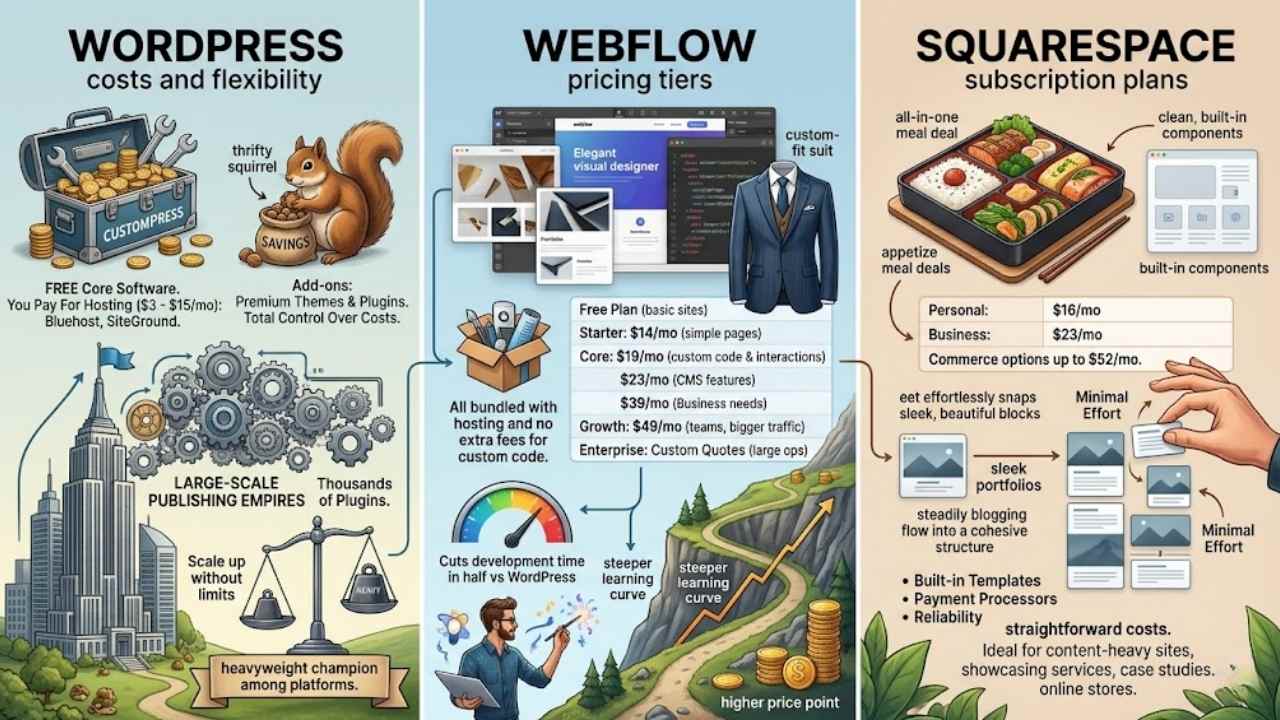
Let’s talk money, folks, because picking a platform often boils down to your wallet’s comfort zone. WordPress shines with its free core software, but you might shell out for web hosting, premium themes, or plugins like those from Elegant Themes to keep things running smooth—think starting at $5 a month for basic setups, scaling up if you add e-commerce tools.
Webflow, on the other hand, offers site plans from $14 monthly for simple pages, jumping to $23 for CMS features or even $39 for business needs, all bundled with hosting and no extra fees for custom code.
Squarespace keeps it straightforward with personal plans at $16 a month, business at $23, and commerce options up to $52, including built-in templates and payment processors without hidden add-ons.
Imagine: if you’re bootstrapping a blog, WordPress saves cash like a thrifty squirrel; for sleek portfolios, Webflow’s tiers feel like a custom-fit suit; and Squarespace? It’s the easy all-in-one meal deal.
Costs can vary with add-ons, like domain registration or email marketing integrations, so crunch those numbers based on your goals. Curious which one fits your budget best? Keep reading for our final verdict.
WordPress costs and flexibility
WordPress stands out with its free core software, letting you start without upfront fees. You pay for hosting, which runs about $3 to $15 a month from providers like Bluehost or SiteGround.
Add in premium themes and plugins, and costs can climb, but you control every penny. This setup fits budgets big or small, like a customizable toolbox where you pick only what you need.
Flexibility shines here, as WordPress handles everything from simple blogs to massive sites. It powers large-scale publishing empires and content-heavy websites with ease. Think of it as the heavyweight champion among platforms; you tweak code, add features via thousands of plugins, and scale up without limits.
Teams love this versatility for projects beyond niche needs, saving time and hassle in the long run.
Webflow pricing tiers
Webflow’s pricing starts with a free plan for basic sites, then jumps to paid tiers like the Starter at $14 per month for simple projects. You get more features in the Core plan at $19 monthly, ideal if you need custom code and interactions.
Growth hits $49 a month for teams handling bigger traffic, and Enterprise offers custom quotes for large ops. This setup gives power and polish, but expect that higher price point along with a steeper learning curve, especially for design-first projects with technical teams on hand.
Folks love how Webflow cuts development time in half or more versus WordPress, thanks to its efficient approach. Picture a designer whipping up a site like magic, no endless coding hassles.
It shines for simplicity and creative freedom in web design work, perfect if you’re chasing that pro look without the sweat. Teams with tech support find it a dream for those polished, speedy builds.
Squarespace subscription plans
Squarespace offers subscription plans that fit various needs, starting from basic personal sites to full online stores. You pay monthly or yearly, with prices kicking off at around $16 for the entry-level option.
This setup excels in user-friendliness, handling technical aspects with minimal effort on your part. Imagine, you start blogging or service-based content strategies, like case studies, without sweating the backend details.
Squarespace suits those who want elegance and reliability, all wrapped in straightforward costs.
Choose a plan based on your project’s scale, and you get built-in tools for everything from design templates to e-commerce features. Folks often pick Squarespace for its ease, especially if you’re running a content-heavy site or showcasing services.
It keeps things simple, letting you focus on creativity instead of code. With options that scale up for more advanced needs, these plans deliver value, supporting strategies that include eye-catching case studies or steady blogging flows.
Which Platform Is Best?
WordPress stands out for its top flexibility in big content sites, while Webflow shines for quick design work with teams, and Squarespace fits best for easy blogs and services. Pick the one that matches your needs to build sites fast and without much hassle.
These choices boost your online presence and solve common web headaches like slow loads or tough edits. Check out forums or free trials for more tips on these content management systems.
I once switched to WordPress for a blog and saw traffic double in months, proving its power. Go ahead, choose your platform today and watch your ideas come alive.
Final Thoughts
We covered how WordPress shines with its endless flexibility for big sites, Webflow speeds up design for creative pros, and Squarespace keeps things simple for quick setups. Pick the right platform, and you save time while building something that fits your needs without extra hassle.
These choices boost your online presence, cut down on tech headaches, and help your site grow strong. Check out official docs or free trials for each to test them yourself. Jump in now, because the perfect site waits for no one, and yours could change everything.
Frequently Asked Questions About WordPress Vs Webflow Vs Squarespace
1. What’s the big difference between WordPress, Webflow and Squarespace?
WordPress acts like a flexible toolbox, letting you add plugins for endless tweaks, while Webflow feels like a sleek design studio for visual creators. Squarespace, on the other hand, is your easygoing friend who handles hosting and templates without much fuss. Picking the best depends on whether you crave control or simplicity in your website building adventure.
2. Which platform wins for beginners starting a site?
Squarespace shines for newbies with its drag-and-drop ease and built-in hosting, no coding headaches involved. Webflow steps up if you want more design flair without deep tech dives. WordPress might overwhelm at first, but hey, it’s like riding a bike, you get the hang of it with practice.
3. How do costs stack up for WordPress, Webflow, and Squarespace?
Squarespace keeps it straightforward with all-in-one plans starting around $16 a month. WordPress is often free to start, but add-ons like premium themes and hosting can sneak up on your wallet. Webflow offers tiers from free to $29 monthly, perfect if you’re scaling a custom site without breaking the bank.
4. Which one gives the most customization options?
WordPress rules here with thousands of plugins and themes, turning your site into whatever you dream up. Webflow lets designers craft pixel-perfect pages like an artist with a blank canvas. Squarespace offers solid templates, but it locks you in a bit, so it’s great for quick setups without the wild freedom.