
It’s easy to take full access to the web for granted. Smooth navigation, vibrant visuals, and interactive elements often define a great digital experience, until you realize these aspects may be hiding obstacles for countless users. As a leader in technology with a decade of experience, I’ve watched impressive digital projects fall short by unintentionally excluding people. The harsh reality? A visually stunning website or a flawless user interface might still leave some of your visitors behind, if you’re not prioritizing accessibility.
Website accessibility is more than a compliance checkbox; it’s a fundamental pillar for building trust, expanding your reach, and protecting your brand’s reputation. Many organizations only realize they have a problem when a costly lawsuit looms or a frustrated user speaks up publicly. But you don’t have to wait for that wake-up call. There are clear signs that indicate your website likely needs a professional accessibility audit right now.
Let’s look at the unmistakable red flags that signal it’s time for a comprehensive review, before your site’s unseen barriers become a very visible problem.
1. Complaints, Negative Reviews, or Public Feedback Around Usability
The digital world is interconnected and very vocal. If you have received direct emails or public feedback pointing to difficulties experienced by people with disabilities, consider yourself lucky. You’re being offered valuable insight into the lived experiences of real users. Many organizations don’t get such warnings.
Ignoring feedback, whether it’s a user unable to fill out an online form with their screen reader or a reviewer calling out lack of sufficient contrast, can harm your reputation and loyalty, while silently excluding potential clients. Sometimes, even common things, such as text size or font, can become a real obstacle for a cluster of your target audience. Things you never thought about can be communicated to your team through special channels.
Some typical forms these signals take:
- User emails reporting frustration using your website with assistive technology
- Social media complaints about navigation, colors, or missing captions in videos
- Negative reviews referencing accessibility somewhere online
- Customer service tickets about content being “hard to find” or “unusable” for certain users
The accessibility conversation has gone mainstream. Many people who encounter barriers won’t stay silent. They’ll share their experiences, driving others away. Take this feedback as your first cue to seek accessibility audit services, the sooner, the better. In some areas, numerous violations in this matter can even cause legal penalties aside from user dissatisfaction.
Quick Self-Evaluation Question
Can every piece of feedback from users with visual, hearing, or mobility impairments be confidently addressed with concrete improvements? If not, an audit is overdue.
2. No Documentation, Policy, or Internal Awareness Around Accessibility
Does your organization have a clearly defined accessibility policy? Can team members confidently state how your site complies with standards such as the Web Content Accessibility Guidelines (WCAG)? Are there onboarding materials or training sessions focused on accessibility?
If the answer to any of these questions is “no” or “I’m not sure,” you have a glaring indicator that accessibility is an afterthought. Even in case you theoretically have all of that, but nobody in your team uses it, that is just a wasted resource giving you nothing practical.
Lack of policy or proactive awareness means:
- Accessibility is not embedded in your design, development, and QA processes
- New features or content may self-sabotage any prior fixes
- You are dangerously exposed to regulatory, legal, or brand risks
Let’s put it plainly: in my experience, the most common cause of accessibility failures is not actively ignoring the issue, but failing to manage it systematically. Without structure, issues slip by, no matter your intentions.
What a Mature Accessibility Approach Looks Like
| Level | Typical Practices | Outcome |
| No Policy | Ad hoc fixes, unclear ownership | Unpredictable user experiences, high risk |
| Informal Awareness | Awareness but no documentation or process | Patchy compliance, inconsistent outcomes |
| Policy & Training | Written policies, employee training, defined roles | Consistent improvements, lower legal risk |
Are you at the first or second level? Then it’s time to call in professionals to assess, document, and guide improvements company-wide. In case you have implemented all three levels, there is always an option to compare your processes to best-known practices and check for any omissions.
3. Your Site Has Gone Through a Major Redesign or Feature Release
Digital innovation fuels the growth of businesses and product all along. But each round of new features, branding updates, or third-party integrations piles on more complexity. Each tweak can unintentionally undermine accessibility, even if it was introduced in the core of the system.
I’ve led teams through website relaunches, and even with the best developers and designers, something always breaks. Changing a button style, adding a pop-up, or even swapping out a font can introduce barriers.
Common risks after updates:
- New plugins or widgets lack keyboard navigation
- Custom-styled forms are missing descriptive labels for screen readers
- DIY color schemes lower contrast ratios below acceptable levels
- Responsive design breakpoints hide vital navigation elements or cause overlapping interface elements
A major update sweeps away old structures, sometimes including hard-fought accessibility wins from earlier iterations. It’s vital to perform an accessibility audit whenever significant changes are made, even for “minor” upgrades.
Post-Launch Checklist
- Have real users with disabilities tested the new site or features?
- Has every template and new content type been checked for WCAG compliance?
- Has a regression audit been performed to ensure fixes haven’t been overwritten?
If you can’t answer “yes” to all, the risks multiply with every update.
4. Legal Requirements or Market Forces Are Growing Around You
Regulations and lawsuits tied to digital accessibility aren’t speculative, they are becoming standard practice. Countries and regions continue tightening laws, and organizations face increasing scrutiny.
Here are a few examples of evolving legal frameworks:
- USA: The Americans with Disabilities Act (ADA) has been interpreted to require web accessibility. Lawsuits have surged, with thousands filed annually.
- European Union: The European Accessibility Act takes effect soon, expanding obligations for digital services.
- Canada: The Accessible Canada Act mandates digital compliance for private and public sector sites.
- UK & Australia: Both have strong legal standards mirroring WCAG guidelines.
It isn’t just about the legal minimums, either. Procurement standards increasingly demand vendors prove accessibility. Major institutional clients won’t work with partners whose digital products exclude users or could lead to compliance headaches.
Typical Scenarios Where Requirements Intensify
- Your customer base includes students, federal employees, or the aging population.
- You’re moving into new international markets with stronger regulations.
- You hope to land contracts with governments, universities, or Fortune 500 firms.
Legal action rarely gives warning. “We had no idea” is not a valid legal defense, and it’s avoidable with proactive checks.
5. Analytics Reveal Unexplained Drop-Offs or Unusual User Behavior
Data is the digital world’s loudest whisper. Advanced analytics are more than just traffic counters; they tell you where users get lost or discouraged.
If you’re noticing:
- High bounce rates only on new customer sign-up pages
- Forms with abnormally low completion rates
- Critical features (e.g., “Add to Cart”) rarely used on specific devices or browsers
- Unusual session durations, rage clicks, or navigation loops
these could be symptoms of unintentional accessibility barriers.
Sometimes only certain users are affected, a keyboard-only user who can’t tab to the “Submit” button, or a user with vision loss unable to discern form errors. Your analytics might look average in aggregate but mask significant “invisible” segments. Segmenting by device, browser, or entry point often reveals trouble spots.
Data-Driven Troubleshooting
Consider a simple table reflecting common behaviors and potential accessibility roots:
| Behavior Observed | Potential Accessibility Issue |
| High bounce rate on product details | Images lack alternative text |
| Low form submissions on mobile | Form fields not labeled/properly grouped |
| Sudden drop in conversion rates | New modal dialog not keyboard accessible |
| Peak abandonment in checkout flow | Color contrast issues on vital buttons |
While analytics can’t uncover every cause, unexplained negative trends are too expensive to ignore. An accessibility audit digs where numbers alone can’t reach.
Missed Market Opportunities and Damaged Brand Loyalty
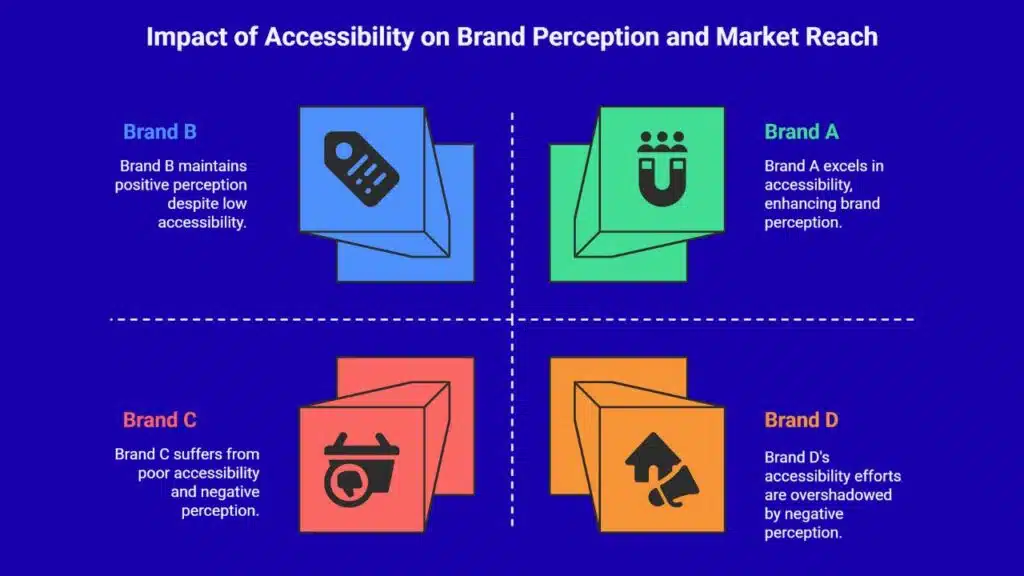
A well-designed audit is fundamentally about people, not just compliance checklists.
When websites ignore accessibility, organizations unintentionally close the door on millions of potential customers, collaborators, and advocates. People living with vision, hearing, motor, or cognitive disabilities aren’t a small niche; they comprise up to one in four American adults. This number only grows when considering aging populations or people dealing with situational disabilities (like a broken arm or temporary vision impairment).
Exclusion produces more than technical problems:
- User frustration that turns into scathing public feedback.
- Missed sales from shoppers who can’t complete purchases.
- Negative word-of-mouth among professional, advocacy, and family networks.
- Lower search engine rankings, since modern web standards increasingly align with accessibility guidelines.
Accessibility is now synonymous with quality, innovation, and empathy. Brands defining their commitment take control of this narrative; those who ignore it, lose it.
How an Accessibility Audit Works: The Process Behind the Scenes
Wondering what happens during an accessibility audit? It’s more sophisticated than running automated tests or checklists, although those are part of the arsenal.
A successful audit layers expert review, authentic user testing, and deep technical analysis:
- Discovery and Scope Setting
- Define all user flows: sign-up, search, checkout, customer support, and more.
- Map out every interaction point and technology stack (web, mobile, PDFs, etc.).
- Automated and Manual Testing
- Deploy WCAG-conformant tools to identify obvious violations.
- Apply manual checks for keyboard navigation, screen reader compatibility, and dynamic content.
- User Experience Testing
- Bring in real users with disabilities to provide nuanced, lived-experience feedback.
- Document hard-to-spot issues, such as misleading links or timed out pop-ups.
- Prioritization & Roadmap
- Assign severity levels: blockers, moderate issues, minor enhancements.
- Build a practical improvement roadmap aligned with business goals.
- Knowledge Transfer
- Train internal teams on root causes, fixes, and sustainable development practices.
- Deliver accessible design guidelines embedded into the workflow.
Here’s a snapshot table comparing basic vs. advanced audit outcomes:
| Type of Audit | Focus Areas | Impact |
| Automated Only | Code errors, color contrast | Catches 30-40% of violations, leaves gaps |
| Manual/Expert-Led | Full user flow, ARIA, forms | Uncovers 90%+ of issues, direct recommendations |
| User-Involved | Real experience, satisfaction | Drives empathy, informs practical solutions |
For organizations craving a future-proof digital strategy, only the latter approach suffices.
Moving Accessibility Up the Priority List
One of the biggest myths about accessibility audits is that they’re only for public-sector behemoths or enterprises with deep pockets. This couldn’t be further from reality.
Startups, mid-sized firms, SaaS providers, all benefit from making accessibility proactive, not reactive. Modern frameworks and tooling make improvements more efficient and integrated than ever. Even a “first pass” audit can often net quick wins in days, not months.
Think of it as investing in insurance, risk management, and customer success all in one move. More importantly, you’re defining a culture where empathy, innovation, and user-centric excellence drive every release and every conversation.
Get Personal: Why My Perspective Matters
A decade at the intersection of software development and business strategy has taught me that digital transformation means nothing without people at the center. The greatest technical teams I’ve led have always valued not just what works, but who it works for. Accessibility is not only a regulatory demand, it’s a moral and commercial imperative to suit the rising need in the market.
Companies succeed when they take bold steps to include, not exclude. What sets the world-class apart is their refusal to settle for “good enough.”
If these signs feel familiar, the time for waiting is past. Now is the moment to assess, address, and build better, before the next barrier causes someone to give up, walk away, or speak out. If you want your digital presence to maximize opportunity, protect your reputation, and grow your audience, I can help facilitate exactly that shift.
Don’t let unseen obstacles hold your business back. Connect directly for a professional consultation, tailored audit, or simply to discuss the best way forward. True inclusion starts with a single, informed move, and I’m ready to help you make it count.