Moving your business operations to the cloud makes sense for growth, but it opens up massive holes in your defenses if you ignore vendor risk. Your employees likely sign up for new software applications every week to make their jobs easier. The problem happens when they hand over your customer records, financial data, or proprietary code to a third-party company that does not prioritize protection. You have to treat every new software vendor as a potential weak link in your company network.
Building a reliable evaluation process stops bad actors from using a vendor system as a backdoor into your business. Following a structured SaaS security checklist helps your team ask the right questions, demand the right evidence, and block unsafe applications before a contract ever gets signed.
Review Identity and Access Management Controls
Securing who gets into your system is the absolute first thing you must check when looking at a new software vendor. If a platform has weak login rules, hackers will walk right through the front door using stolen passwords. You need a setup that actively questions every login attempt and limits what people can see once they get inside. Reviewing these access controls gives you a clear picture of how seriously the vendor takes baseline security.
| Security Feature | Purpose | Risk if Missing |
| Single Sign-On | Centralizes login through corporate credentials. | Employees use weak, easily guessed passwords. |
| Multi-Factor Authentication | Requires a phone prompt or token to log in. | Stolen passwords lead directly to account takeovers. |
| Granular Permissions | Restricts access based on specific job duties. | Junior staff can view or delete sensitive files. |
| Session Timeouts | Logs idle users out automatically. | Unattended laptops become security liabilities. |
Multi-Factor Authentication and Single Sign-On
You cannot rely on just a username and password anymore. Attackers buy lists of compromised credentials on the dark web and test them across thousands of cloud platforms. If your new software vendor does not support multi-factor authentication, you should immediately walk away from the deal. Multi-factor authentication stops automated attacks cold because the hacker needs physical access to an employee phone or hardware token to complete the login. You should check if the platform forces this requirement across the entire account or if it leaves the choice up to individual users.
Single sign-on takes this protection a step further by connecting the new software directly to your central identity provider, like Okta, Microsoft Entra, or Google Workspace. This setup means your employees only have to remember one strong password to access everything. When an employee quits or gets fired, your IT team can instantly revoke their access to every connected cloud application with one click. If the vendor charges an extra fee to unlock single sign-on, you need to factor that into the true cost of the software.
Role-Based Access Permissions
Once an employee logs in, they should only see the exact information they need to do their specific job. Giving everyone administrative rights is a disaster waiting to happen. The software must allow you to create custom roles with very strict boundaries. For example, your marketing team might need access to a reporting dashboard, but they absolutely do not need the ability to export the entire customer database or change billing settings.
You want to look for vendors that offer granular permission settings rather than basic admin or user toggles. The platform should log every action taken by every user, creating a clear audit trail. If someone accidentally deletes a massive project file or intentionally downloads a client list before resigning, you need to know exactly who did it and when. Good access management limits the damage that a single compromised account or a malicious insider can cause to your broader organization.
Examine Data Encryption Standards
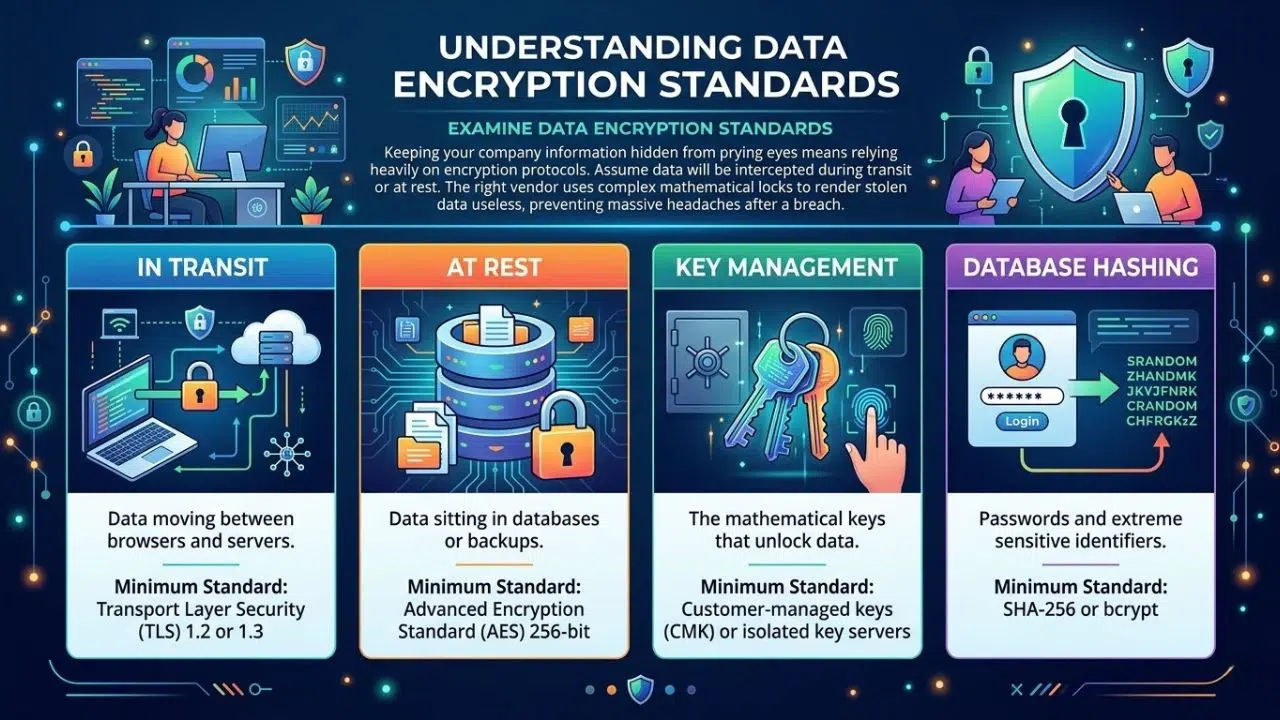
Keeping your company information hidden from prying eyes means relying heavily on encryption protocols. You have to assume that someone will eventually try to intercept your data while it travels across the internet or while it sits on a remote server. The right vendor wraps your data in complex mathematical locks that render it useless to anyone who steals it. Checking their encryption setup prevents massive headaches if a breach actually happens.
| Encryption Type | What It Protects | Minimum Standard to Accept |
| In Transit | Data moving between browsers and servers. | Transport Layer Security 1.2 or 1.3 |
| At Rest | Data sitting in databases or backups. | Advanced Encryption Standard 256-bit |
| Key Management | The mathematical keys that unlock data. | Customer-managed keys or isolated key servers |
| Database Hashing | Passwords and extreme sensitive identifiers. | SHA-256 or bcrypt |
Encryption in Transit and at Rest
Data lives in two states, and you need to protect both. When an employee types customer details into a web browser and hits save, that information travels across the public internet to the vendor servers. This is data in transit. The vendor must use Transport Layer Security, specifically version 1.2 or 1.3, to scramble this information during the journey. This stops attackers from sitting on a public Wi-Fi network and capturing your plain text data as it flies by.
When that data finally lands on the vendor servers, it becomes data at rest. If a hacker breaks into the vendor data center or steals a hard drive, the files should be completely unreadable. The current gold standard for protecting stored files is Advanced Encryption Standard 256-bit encryption. The math behind this standard is so complex that the world fastest computers would take millions of years to crack it by brute force. If the vendor uses outdated standards or admits they only encrypt passwords, your data is not safe.
Cryptographic Key Management
Encryption is only as good as the keys used to lock and unlock the files. If a vendor leaves the master key sitting on the same server as your encrypted data, the protection is completely useless. A smart hacker will just steal both. You need to ask the vendor exactly how they manage, rotate, and store their cryptographic keys. They should use dedicated hardware security modules that separate the keys from the application servers entirely.
Some highly secure platforms offer a feature called bring your own key. This gives your IT team total control over the encryption process. You hold the master key on your own internal servers, and the vendor cannot read your data even if they want to. If the vendor suffers a massive breach or receives a government subpoena for your records, you simply revoke their access to your key, instantly turning all your hosted data into unreadable garbage.
Verify Compliance and Industry Certifications
You should never take a software provider at their word when they say their systems are completely secure. You want to see proof from independent auditors who have actively tested and verified their internal controls. Certifications show that the vendor cares enough to spend time and money meeting strict global standards. This step helps you avoid regulatory fines and ensures your own company stays compliant with privacy laws.
| Compliance Standard | Focus Area | Why You Need It |
| SOC 2 Type II | Security, availability, and processing integrity. | Proves the vendor follows security rules consistently. |
| ISO 27001 | Information security management systems. | Shows a globally recognized commitment to security. |
| GDPR | European consumer privacy rights. | Prevents massive fines if you handle EU data. |
| HIPAA | Healthcare data protection in the US. | Legally required if you touch medical records. |
SOC 2 Type II and ISO 27001 Audits
Marketing brochures lie, but independent audit reports do not. When you evaluate a vendor, you must ask for their latest SOC 2 Type II report. A Type I report only proves the vendor had security rules in place on one specific day. A Type II report proves that an outside auditor watched the vendor for six to twelve months and verified that the employees actually followed those security rules every single day. It covers how they handle access, respond to alerts, and manage changes to their software.
ISO 27001 is another major certification you want to see. It means the vendor has built an entire framework for managing information security, rather than just buying a few firewalls. Achieving this certification takes years of effort and requires constant internal reviews. When a vendor hands you these documents, you should actually read them. The auditor will list exceptions if the vendor failed certain tests, and you need to know what those failures mean for your specific data.
Data Privacy and Residency Regulations
Governments care deeply about where data lives and how it gets processed. Depending on your industry and location, you might face severe legal penalties if you store customer data on the wrong servers. For instance, if you collect information from European citizens, your vendor must fully comply with the General Data Protection Regulation. This law dictates how long you can keep data, how you must track consent, and how you handle requests from users who want their information deleted.
You must also check data residency options. If you are a Canadian company, your laws might require certain government or financial records to stay physically inside Canadian borders. You need to ask the cloud provider where exactly their data centers sit. If they only have servers in the United States, you might break your local compliance laws just by signing the contract. The best vendors let you choose the geographic region where your data gets hosted to avoid these legal traps.
Assess Incident Response and Disaster Recovery
Even the best technology companies suffer from unexpected outages or targeted cyberattacks at some point. The real test of a reliable vendor is how fast they react when things go completely wrong and their servers crash. You need to know exactly how long it takes them to notify you about a problem and how quickly they can restore your lost data. Asking these hard questions upfront saves your business from extended downtime later.
| Recovery Metric | Definition | Ideal Standard |
| Notification Time | How fast they tell you about a data breach. | Under 24 hours of discovery. |
| Recovery Time Objective | How long the system stays offline after a crash. | Less than 4 hours for critical apps. |
| Recovery Point Objective | How much recent data you lose if servers die. | Less than 1 hour of data loss. |
| Backup Location | Where the secondary copies live. | Geographically separate from the main server. |
Breach Notification Policies
When a hacker breaches a vendor system, the clock starts ticking immediately. You have legal obligations to report data losses to your customers and government regulators within strict timeframes. You cannot meet those deadlines if your vendor tries to cover up the hack or takes three weeks to figure out what happened. Your contract with the provider must contain a hard timeline for breach notification, ideally demanding an alert within twenty-four hours of a confirmed security incident.
You also need to know what that communication looks like. A vague email saying they experienced a security event is useless. The vendor must commit to sharing technical details, including exactly what data the hackers accessed, how the attackers got in, and what steps they took to lock the system back down. You have to run this scenario past your own legal team to make sure the vendor response plan aligns with your corporate risk tolerance.
Data Backup and Continuity Plans
A ransomware attack on your vendor can freeze your entire operation if they do not have a solid backup strategy. You need to verify their Recovery Time Objective, which tells you how many hours the application will stay offline while they fix the problem. You also need to check their Recovery Point Objective, which defines how much data you lose during the restore process. If their objective is twenty-four hours, you lose an entire day of work.
Ask the vendor about their physical infrastructure. If their primary data center sits in Florida and gets wiped out by a hurricane, they need a secondary data center in a completely different geographic region, like Ohio or Oregon, ready to take over immediately. Their backups must run automatically, and they must store those backup files offline or on immutable storage drives where ransomware cannot reach them.
Analyze Application Security and Vulnerability Testing
Software code always has hidden bugs, and some of those bugs create open windows for hackers to climb through. A secure provider constantly attacks their own systems to find and fix these vulnerabilities before criminals exploit them. They should bake security into their daily development habits rather than treating it as an afterthought. Looking at their testing routines tells you if their engineering team cuts corners.
| Testing Method | Purpose | Frequency |
| Penetration Testing | Human hackers try to break into the live app. | At least annually. |
| Bug Bounty Program | Paying external researchers to find flaws. | Continuous. |
| Automated Scanning | Software checking code for known weak spots. | Daily or with every code update. |
| Open Source Audits | Checking third-party code libraries for risks. | Continuous. |
Routine Penetration Testing
You cannot trust a vendor to grade their own homework. They must hire independent security firms to conduct regular penetration tests. These ethical hackers use the same tools and tactics as real criminals to try and breach the application, steal data, and bypass access controls. A mature SaaS company will run these tests at least once a year and immediately after any major redesign of their platform.
When you ask for proof of security, request the executive summary of their latest penetration test. They will not show you the full report because it acts as a roadmap for hackers, but the summary will tell you if the testers found critical flaws and how fast the engineering team fixed them. If a vendor claims they do not do penetration testing because their system is already secure, that is a massive red flag.
Secure Software Development Life Cycle
Fixing security bugs after the software goes live is expensive and dangerous. The best vendors build security into their software development life cycle from day one. This means their developers receive training on how to write safe code that blocks common attacks like SQL injection or cross-site scripting. Before they push any new features to the live environment, the code must pass through automated security scanners.
You should ask the vendor how they handle open-source components. Almost all modern software uses free, open-source code libraries to speed up development. If one of those libraries contains a zero-day vulnerability, the vendor application instantly becomes vulnerable too. They need automated tools that constantly monitor their code base and flag outdated libraries so developers can patch them before hackers exploit the weakness.
Review Data Ownership and Offboarding Processes
Your relationship with a software vendor will eventually end, and breaking up can be incredibly messy if you skip this step. You need a clear path to pack up your information and leave without the vendor holding your data hostage. They must also guarantee that they will permanently delete your files from their servers once you close your account. Setting these exit terms right from the start protects your proprietary secrets long term.
| Offboarding Step | What to Demand | Why It Matters |
| Data Export | Ability to download files in standard formats. | Prevents vendor lock-in. |
| Format Choice | Exporting to CSV, JSON, or SQL formats. | Makes importing to a new tool easier. |
| Data Deletion | A firm timeline for wiping your data. | Stops data leaks after you leave. |
| Certificate of Destruction | Proof the wipe actually happened. | Satisfies compliance auditors. |
Data Portability and Export Features
Never load your customer lists into a platform without verifying exactly how you will get them back out. Shady vendors trap customers by making it impossible to export data in a usable format. If you decide to move to a competing platform because of bad service or high prices, you need to pull your records out easily. The software must offer bulk export tools that let you download your information into common, readable formats like CSV, JSON, or XML.
Check if there are any artificial limits on data exports. Some vendors quietly cap how much data you can download at one time or charge massive hidden fees for a complete database dump when you cancel your contract. A solid SaaS security checklist ensures you test the export function during your free trial. If the exported file looks like disorganized garbage that no other system can read, you need to find a different vendor.
Secure Data Destruction Protocols
When you finally cancel your subscription, the vendor has no business keeping your files. Your contract must define exactly what happens to your data after you leave. They should provide a clear retention policy stating that they will completely wipe your information from their active servers within thirty days, and scrub it from their backup tapes within ninety days.
You do not want your proprietary code or financial records sitting forgotten on a vendor server for five years, waiting for a hacker to find it. Ask the vendor if they provide a certificate of destruction after you close your account. This document acts as a legal guarantee that they destroyed your data according to industry standards. If regulators ever ask what happened to the customer data you gave to that vendor, you have the paperwork to prove you handled it responsibly.
Using Your SaaS Security Checklist Effectively
Having a list of requirements means nothing if your internal teams do not actually enforce the rules during the buying process. You must build a mandatory review step into your procurement cycle so employees cannot sign up for random apps with corporate credit cards. Sticking to your evaluation criteria stops shadow IT from ruining your network defenses. A consistent approach turns security from a roadblock into a standard business practice.
| Implementation Step | Action Required | Result |
| Block Shadow IT | Restrict corporate card purchases for software. | Forces employees through IT review. |
| Score Vendors | Create a pass/fail grading system. | Removes emotion from buying decisions. |
| Annual Reviews | Re-check vendors every year. | Catches slipping security standards. |
| Update Contracts | Tie payments to security metrics. | Gives you leverage if they fail. |
Vendor Risk Assessment
You need to formalize the evaluation process by turning your checklist into a standard vendor risk assessment questionnaire. Whenever a department head wants to buy a new tool, they must send this document to the vendor sales team. The questionnaire forces the vendor to answer specific questions about their encryption methods, their access controls, and their compliance audits. You evaluate their answers and give the software a risk score before negotiations even begin.
This process removes the emotion from software buying. It does not matter how sleek the interface looks or how cheap the monthly fee is; if the vendor fails the baseline security score, you kill the deal. Sticking to your guns forces software providers to take security seriously if they want to win enterprise business.
Continuous Monitoring
A vendor passing your check today does not mean they will stay secure forever. Technology changes fast, and companies get bought out, change leadership, or lay off their security teams. You have to treat vendor security as an ongoing monitoring project, not a one-time task. You should require your most critical vendors to submit an updated SOC 2 report and their latest penetration test summary every single year.
If a vendor suffers a data breach or falls out of compliance, you need a backup plan ready to go. You have to evaluate the market constantly so you know exactly which competitor you will switch to if your current provider becomes too risky. Maintaining this leverage ensures that your digital infrastructure stays resilient and protected against external threats.
Frequently Asked Questions (FAQs)
What is the most important item on a SaaS security checklist?
While every business has different operational needs, verifying identity and access management controls is almost always the most critical step. If a vendor does not support multi-factor authentication or single sign-on, malicious actors can easily bypass other complex backend defenses simply by stealing a single employee password.
How often should I review my cloud software providers?
You should run your existing software providers through a full risk assessment at least once a year. The cybersecurity landscape moves incredibly fast, and a vendor that looked completely safe twelve months ago might have fallen behind on critical software patches or failed their most recent compliance audits.
Can I actually negotiate security terms in a standard vendor contract?
Yes, you can and absolutely should negotiate these terms before you sign anything. Enterprise agreements routinely include specific clauses regarding mandatory data breach notification timelines, guaranteed server uptime, and strict financial penalties if the provider fails to maintain their promised security standards.
What happens to my company data if a cloud provider goes out of business?
This scenario highlights exactly why your initial evaluation must include a thorough review of their data export capabilities. If the vendor suddenly shuts down their servers, you need a proven way to quickly download your entire database in a readable format so you can migrate to a competitor without losing your operational history.
Does a SOC 2 Type II report guarantee a vendor is completely hack-proof?
No compliance report can guarantee a system is entirely immune to cyberattacks. However, a SOC 2 Type II report proves that an independent auditor watched the company for several months and verified that their engineering team actually follows strict security protocols every single day, which massively reduces your overall risk.
Final Thoughts
Putting your company data on someone else’s server requires absolute trust, and trust has to be verified. Relying on blind faith or flashy marketing materials will eventually lead to a devastating data breach. You have to treat software procurement as a critical defense strategy rather than just an administrative task.
By forcing every provider through a rigorous SaaS security checklist, you strip away the sales pitch and expose the actual engineering reality of the platform. When you understand exactly how a vendor handles access controls, encryption, and disaster recovery, you can build a cloud environment that drives your business forward without sacrificing your safety.