
Starting a new business is tough. Most people do not know how to code, but everyone wants their mobile app or online store to stand out. You may want a website that looks good on smartphones and tablets or an app builder you can use without learning JavaScript or HTML.
The trouble? Web development often feels like piecing together a 1,000-piece puzzle with two pieces missing.
Here’s some hope: More founders are turning to no-code tools for launching web apps and minimum viable products (MVPs). In fact, new no-code platforms like Softr and Bubble let small businesses build great websites or web applications using drag-and-drop interfaces tied to spreadsheets or Google Sheets—with zero coding experience needed! This guide shows the top five no-code app builders for startups in 2025.
Find your best fit below. Keep reading if you want real answers fast!
Key Takeaways
- No-code platforms like Softr, Bubble, Glide, Backendless, and FlutterFlow let anyone build apps or websites in 2025 without coding skills.
- Many tools offer free plans or start as low as $15 a month (Backendless), making them budget-friendly for startups.
- Softr turns Airtable sheets into fast MVPs; Bubble is great for flexible app design with deep integration options; Glide uses Google Sheets to build mobile apps simply.
- Backendless gives strong backend control and learning guides but takes more time to learn than Softr or Glide.
- FlutterFlow lets you export code and build cross-platform apps for iOS and Android from one place—good if you need basic no-code now but want custom features later.
Key Features to Look for in a No-Code Platform
Choosing the right no-code app builder can save you time, money, and headaches. Look for tools that play well with Google Workspace or Facebook, and let your website shine on search engines.
Ease of use
No-code platforms should feel like riding a bike with training wheels, not reading quantum physics. You click, drag-and-drop and get results without typing HTML or CSS. Softr and Glide use clean layouts, big buttons and simple menus.
Even folks who tinker with spreadsheets can build web pages in minutes. Bubble skips hard coding too, letting people make apps with colorful blocks instead of long scripts.
Mobile app builders now offer helpful hints right inside the app builder itself — no thick manuals needed. Clear icons and step-by-step guides help you follow along at your pace, sort of like building LEGO sets but for mobile apps or landing pages.
Thanks to intuitive interfaces, users spend less time scratching their heads over website design stuff and more hours making real-time collaboration tools work for small businesses, stores or project-management teams.
Scalability and flexibility
Scalable app builders let you start small and grow fast, just like planting a seed and watching it bloom. Some no-code development platforms use modular designs, making it easy to upgrade from a basic personal project to a full enterprise web design with more users or features—think WeWeb for frontend power or Xano if you need backend muscle.
Want your online stores ready for thousands of customers? A good platform adapts as numbers rise.
Changing needs do not scare flexible no-code tools either. Tweak user experiences on the fly, add new checkout options in your e-commerce platform, connect CRM systems, or set up push notifications—all without calling mobile app developers every time.
You can build an MVP first and then scale as feedback pours in. Cloud-based solutions like content delivery network (CDN) help keep things speedy whether one person clicks around or 10,000 shop at once.
Integration capabilities
No-code platforms stand out by letting you link with tools such as Xano, monday.com, and SQL databases. Softr makes adding your app to these systems simple. You can pull data or push updates in real time, like magic but for business folks.
FlutterFlow gives startups power to build cross-platform apps that talk easily with Firebase. Set up chatbots or connect serverless architectures without breaking a sweat. Many no-code app builders now support Google Play uploads and even work with Unity for game features.
These connections help small businesses grow faster and manage dynamic content across the web, using fewer clicks than ever before.
Cost-effectiveness
Costs can make or break a new business. Many no-code platforms help by offering free plans, so you get to try before you buy. Some paid options start as low as $15 a month, like Backendless, while others sit between $20 and $100 a month.
These prices look friendly next to the steep bills for hiring developers or buying expensive software.
Startups find real value in these choices. A good app builder lets you launch an MVP or build websites without draining your pocketbook. Small businesses enjoy clear price tiers and only pay for what they need—no more, no less.
Drag-and-drop interfaces cut down time spent learning tough coding skills, which means your team gets more done with less money spent.
Customization options
Personalize apps fast using drag-and-drop interfaces or tweak visual tools for design, data, and logic. With FlutterFlow, export customizable Flutter code to fine-tune how your app looks and works—no need to settle for cookie-cutter results.
No-code platforms like Bubble and Glide give you free rein over layouts, colors, user-friendly URLs, and even database management features.
Add ai-powered features or real-time collaboration tools as your project grows. Adjust search engine rankings with seo tools or manage redirects in a few clicks. Small businesses can make MVPs that stand out without hiring big tech teams.
If you want responsive design or alt text help for better accessibility and value propositions that matter to users, these no-code app builders cover it all with plenty of wiggle room built right in.
Softr: Simplifying Web Development for Startups

Softr turns Airtable sheets into websites with just a few clicks, almost like magic. Even your grandma could use its drag-and-drop builder and launch an MVP before her morning coffee gets cold.
Key Features of Softr
Getting started with Softr feels like stacking Lego blocks to build your dream product. This no-code app builder stands out for creating websites and apps using drag-and-drop interfaces.
- Perfect for beginners, this no-code tool offers a free plan that helps small businesses start without stress.
- No need to know how to code, as every step uses visual building blocks—click, drag, drop, done.
- Connects with Xano, monday.com, and SQL databases for smooth data flow across different internal tools.
- Includes AI app builder features to speed up app development and automate complex tasks—think smarter apps in less time.
- Paid plans begin at $59 a month, making it more affordable than traditional app builders or website development services.
- Real-time collaboration features let teams work together just like they are scribbling ideas on the same sticky note wall.
- Works well for MVP (minimum viable product) launches because you can test ideas fast without large budgets or tons of meetings.
- Built-in templates give startups a head start so users aren’t forced to stare at a blank screen while waiting for inspiration.
- Mobile-responsive layouts mean your apps look sharp whether viewed on desktop or phone—no extra fuss needed.
- Offers integration options that help link apps with other popular no-code platforms and low-code tools, saving both time and headaches during the process.
Softr opens the door for anyone who wants to turn an idea into reality without getting tangled up in code or long technical guides. Apps built here shine whether meant for personal use or real business needs in 2025.
Pros & Cons of Using Softr
Softr makes web development feel like snap-together toys, not rocket science. Before you jump in, see how it shakes out for new founders, right here in this comparison table:
| Pros of Softr | Cons of Softr |
|---|---|
|
|
Bubble: The Go-To No-Code Platform for Startups
Bubble gives you a blank canvas and lets you use drag-and-drop features to build apps your way, fast. It connects well with tools like Stripe for payments or Zapier for automating tasks—no need to touch any code.
Key Features of Bubble
Bubble stands out in the no-code development space. Many small businesses use it to build fast and launch MVPs.
- Bubble uses a simple drag-and-drop interface, so you can shape your app without writing code.
- It offers real-time collaboration tools, letting teams work together from anywhere, at any time.
- You get powerful integration abilities with APIs, Zapier, and other low-code tools.
- The platform supports AI-powered features that automate tasks or add smart functions to your app.
- You can scale projects easily; Bubble grows with your startup as user numbers climb.
- Customization options run deep. Tweak layouts, colors, logic—your way.
- Paid plans start at $32/month, making it cost-effective for new ventures trying to save cash.
- Bubble has a strong user community with lots of guides and resources for support day or night.
- There is a free plan available, so you can test ideas before spending money on upgrades.
Pros & Cons of Using Bubble
Launching your next big idea? Here’s a quick look at the perks and downsides of using Bubble for your startup, all served up in a clear table.
| Pros | Cons |
|---|---|
|
|
Glide: Transforming Data into Functional Apps
Glide takes spreadsheets and snaps them into slick, working apps in minutes. Even folks who usually get lost with code can whip up quick tools or mobile solutions right from Google Sheets.
Key Features of Glide
Turning data into apps can feel like magic with Glide. Users get fast, drag-and-drop tools that almost anyone can use.
- Drag-and-drop interfaces shape the app-building process, making tasks simple and quick for non-developers.
- Turn Google Sheets or Excel files into working mobile apps; just upload your data and watch it change form.
- Real-time collaboration lets small businesses work together on their apps, even if they are far apart.
- AI-powered features help with smarter suggestions and faster builds, so users skip lots of guesswork.
- Installation happens as web apps, which means you do not need to worry about device type updates.
- Free plan works for individuals seeking a no-cost way to build an MVP (minimum viable product).
- Paid plans start at $60/month for those wanting more power or pro features in their app builders.
- Supports clean layouts that look good on both phones and computers without extra coding knowledge.
- Many startups choose Glide as their first step into no-code development because it is cost-effective and scales well.
Pros & Cons of Using Glide
Glide can turn spreadsheet data into mobile apps fast. Here’s what works and what might trip you up.
| Pros | Cons |
|---|---|
|
|
Backendless: Full Control with a No-Code Backend
Backendless gives you power over your backend without needing to write a single line of code. Think of it as the engine room for building real-time collaboration, internal tools, and apps faster than you can say “drag-and-drop.”.
Key Features of Backendless
Backendless gives startups power with easy tools and strong control. It makes no-code app builders more flexible for small businesses.
- Drag-and-drop interfaces help you build apps without writing code. Move blocks, connect actions, and see changes fast.
- Free plan lets anyone try key functions before spending money. Start working on your MVP at no upfront cost.
- Paid plans start at $15 per month, making it a budget pick for new companies.
- Backendless Missions offer structured lessons. These step-by-step guides teach the whole platform through real tasks.
- Real-time collaboration keeps teams in sync. Multiple users can work together on the same app, at the same time.
- Complete data management puts you in charge of how your business handles information. Store, search, and filter data with simple screens.
- Integration capabilities let you connect with other top no-code tools like Zapier or Airtable for extra power.
- Full API access brings advanced controls when needed. Developers can jump in if deeper features are required later.
- AI-powered features speed up smart actions and automate repeating jobs within your platform.
- React Native support helps you launch mobile apps that look sharp on both Android and iOS devices.
Backendless stands out as an all-in-one choice for growing startups needing more than just basic no-code development.
Pros & Cons of Using Backendless
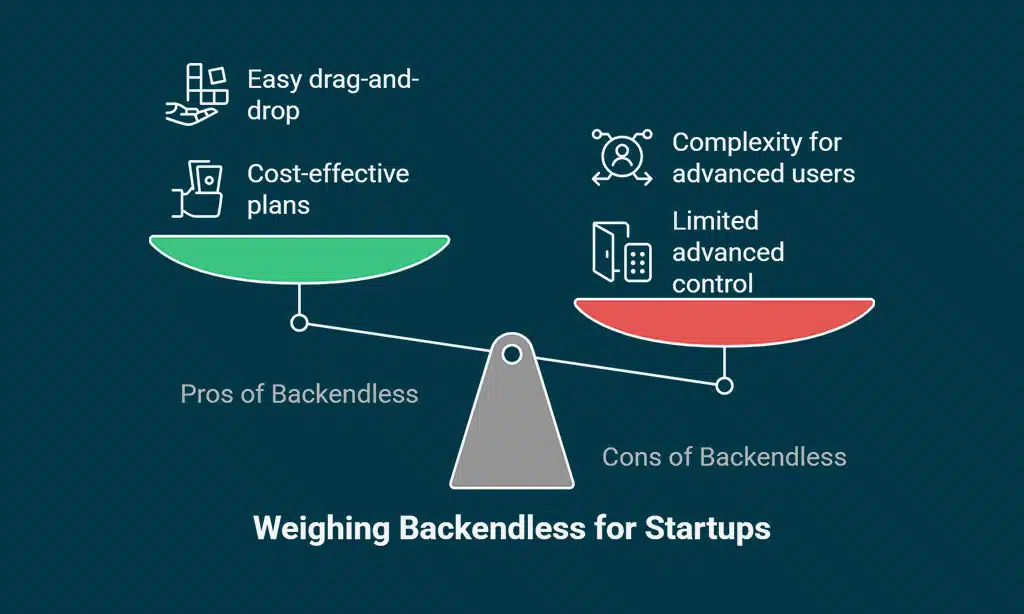
You get strong backend control, which helps you shape your no-code app builders just how you want. Backendless offers structured learning paths, so you can pick up new skills as you build. This is good for small businesses that need flexibility and room to grow. Real-time collaboration tools support team efforts, like building MVPs fast or scaling internal tools.
The main catch lies in the steep learning curve. If you’re used to drag-and-drop interfaces like Glide or Softr, Backendless may feel complex at first. You might spend more time figuring things out compared to other no-code platforms such as Bubble or FlutterFlow. Still, if advanced features and deeper controls matter most for your project, this option packs a heavy punch even with its trickier start.
FlutterFlow: Bridging No-Code and Coding Flexibility
FlutterFlow brings drag-and-drop interfaces together with the option to add handy scripts, so you aren’t boxed in. Picture making apps for Android and Apple gadgets, all while sipping your coffee—no sweat.
Key Features of FlutterFlow
FlutterFlow is a game-changer for small businesses and startups. It brings no-code app builders right to your fingertips, delivering fast results without headaches.
- Cross-platform apps roll out easy, working on iOS and Android with the same build.
- Drag-and-drop interfaces keep building simple, letting anyone create MVPs and internal tools in hours.
- Integration with Firebase adds real-time collaboration features, perfect for live data needs or syncing across devices.
- AI-powered features help you design smarter layouts and speed up no-code development.
- Free plan gives you a solid start; paid plans begin at just $30 per month for more growth power.
- Customizable Flutter code lets you export or edit as needed, making it handy for teams that move from low-code tools to custom coding later.
- Templates and widgets save time, so you don’t have to reinvent the wheel every project.
- App builders love the simple setup — launch your idea without IT staff or deep tech skills.
- Collaboration tools within FlutterFlow support teams everywhere, working together from any corner of the world.
- Real projects built in 2024 prove startups use this tool to go live faster than ever before, no joke!
Pros & Cons of Using FlutterFlow
FlutterFlow helps you build cross-platform apps fast. You can use drag-and-drop tools, which makes starting projects easy for small businesses and startups. It offers lots of design choices and lets you add your own custom code for more power. Real-time collaboration tools help teams work together well.
Some parts have a steep learning curve, so new users may feel lost at first. Advanced app builders might need some coding skills to unlock all features. For those just using no-code platforms, this can slow things down a bit when building an mvp or internal tools with complex needs. Still, it works well if you need something that grows with your business and supports both simple sites and big app ideas.
Takeaways
Choosing the best no-code app builder is like picking out shoes for a long walk. Some fit right, some pinch your toes. Tools like Softr, Bubble, Glide, Backendless, and FlutterFlow help startups skip coding headaches and get running fast.
With so many choices now, even newcomers can build real businesses without knowing much tech stuff. Try one or two—your next big idea could be only a few clicks away!
FAQs on No-Code Platforms to Launch Your Startup in 2025
1. What are no-code platforms, and how do they help small businesses launch startups in 2025?
No-code platforms let you build apps or websites without writing code. Drag-and-drop interfaces make it easy for anyone to create MVPs fast. Small businesses can skip hiring big tech teams.
2. Can I use no-code app builders for real-time collaboration with my team?
Yes, many no-code tools now offer real-time collaboration features. Your whole team can work on projects together at the same time, which helps speed up development.
3. How do low-code tools differ from pure no-code development options?
Low-code tools give a bit more control if you know some coding basics, but still keep things simple. No-code app builders target those who want zero programming involved.
4. Are there AI-powered features in these top five no-code app builders for 2025?
Absolutely! Some leading platforms add AI-powered features to automate tasks and check duplicate content, making your startup smarter from day one.
5. Will these drag-and-drop internal tools support building an MVP quickly?
Yes, drag-and-drop interfaces mean less setup time and faster results when creating an MVP or other internal tools—so you can test ideas before going all-in on your business plan.