
Meta has officially launched a powerful new AI-powered video editing feature that brings advanced generative technology directly into the hands of everyday users. Available through the Meta AI app, the Meta.AI website, and a new standalone Edits app, the feature allows users to creatively transform short-form videos without any professional editing experience.
This rollout marks a significant step in Meta’s strategy to incorporate generative AI into everyday digital content creation. The feature, which builds on Meta’s MovieGen AI model, is designed to help users easily reimagine their video clips using AI-generated effects, styles, and themes.
What Is the New AI Video Editing Tool?
At its core, this new feature enables users to apply pre-set AI prompts to short video clips (up to 10 seconds long). Using just a few taps, users can turn an ordinary video into something visually unique and creatively enhanced—without using complicated software like Adobe Premiere Pro or Final Cut.
Meta’s aim is to make AI video editing intuitive and accessible, whether you’re a casual user looking to enhance personal clips or a content creator trying to speed up your production process.
How Does It Work?
1. Upload Your Video
Users begin by uploading a video directly to the Meta AI app, Meta.AI website, or the Edits app. The maximum length for AI transformation is currently 10 seconds per clip.
2. Choose from 50+ AI Prompts
Once the video is uploaded, users are presented with over 50 preset AI prompts. These prompts are designed to apply stylized changes to the video, such as:
- Turning an ordinary scene into a comic book or graphic novel style
- Transforming a rainy outdoor moment into a sun-kissed, dreamy day with bright colors and sparkles
- Altering clothing to look like gaming armor or futuristic suits
- Changing the environment, like placing the subject in a snowy mountain, tropical beach, or urban neon-lit cityscape
3. AI Processes the Video
After selecting a prompt, Meta’s AI engine processes the clip, generating a fully rendered edited version of the original content based on the chosen theme. These results are generated in just a few seconds using generative AI technology based on the MovieGen framework.
4. Download or Share Your Video
The edited video can be downloaded or shared directly to platforms like Facebook, Instagram, and Meta’s Discover feed, ensuring seamless content publishing within the Meta ecosystem.
Built on Meta’s Research: MovieGen and Generative Video
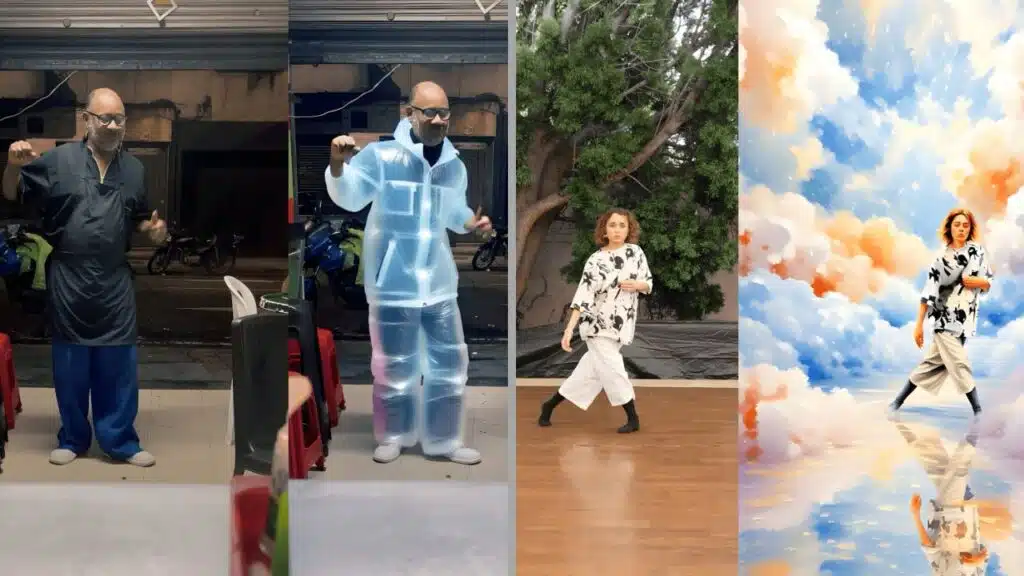
This new tool isn’t just a gimmick—it’s based on some of Meta’s most recent AI research. The MovieGen model, which powers the editing process, was first teased in late 2023 as Meta’s answer to OpenAI’s Sora and Google’s Lumiere. It is capable of generating high-quality video scenes from text descriptions and can now be used to transform existing video footage with creative and contextual flair.
In the past, Meta has released Make-A-Scene and Emu Video, AI models designed to generate or edit visual content. The current video editing tool uses advancements from those technologies to offer style transfer, scene reimagining, and character alteration, while maintaining motion fluidity and realism.
Who Can Use It—and Where?
As of now, the AI video editing feature is available in the United States and in more than a dozen other countries. Meta has not provided the full list of supported regions, but users across North America, Europe, and parts of Asia have reported access.
The company has stated that this tool is being offered for free for a limited time during its initial rollout phase. However, there are limitations:
- Each user can only edit up to 10 seconds per video
- The service may introduce a paid tier or usage caps once broader adoption is achieved
Meta confirmed that the tool is intended for personal and creative use, although its functionality may expand based on user demand and content trends.
Key Features
| Feature | Description |
| Free AI video editing | Available for a limited time on all platforms |
| Up to 10 seconds | Clip length restriction ensures fast AI processing |
| 50+ creative prompts | Choose from various themes like comics, fantasy, gaming |
| Cross-platform | Works on mobile apps and browsers |
| Integrated sharing | Direct export to Facebook, Instagram, or Meta Discover |
Collaboration with Creators
Meta says the editing prompts were co-developed with content creators and influencers to ensure the styles resonate with today’s digital audiences. The goal is to streamline video production while offering artistic control.
This collaboration reflects a growing trend of tech companies working directly with creators to fine-tune AI tools. By making the tool useful to both casual users and professionals, Meta is trying to bridge the gap between creativity and technology.
What’s Coming Next?
According to Meta, this is just the beginning. The company has promised more advanced capabilities later this year, including:
- Free-form text-to-edit commands: Instead of selecting a preset prompt, users will be able to describe what they want in their own words (e.g., “Make this look like a 1950s film noir”)
- Multi-scene editing: Future updates may allow longer videos and even multi-part story generation
- Voice and sound transformation: Meta may soon apply similar AI tools to audio editing, as part of its broader AI suite
These features would position Meta as a serious player in the AI content creation space, alongside startups like RunwayML, Captions, and Pika, and tech giants like Google and OpenAI.
How to Access the Tool
You can try Meta’s AI video editor today through any of the following:
- Meta AI App (available for iOS and Android)
- Meta.AI website: https://meta.ai
- Edits App: Meta’s dedicated app for AI-powered visual transformations
No payment is required during the limited trial period. Users only need a Meta account (such as Facebook or Instagram login) to get started.
Meta’s new AI video editing tool brings professional-grade creativity to the masses in a way that’s never been easier or more intuitive. Whether you’re crafting social media content, editing a travel vlog, or just experimenting for fun, the tool offers a fast, simple, and free way to make your videos stand out.
With future updates set to offer text-based customization and possibly longer video editing support, Meta is setting the stage for a powerful suite of AI content tools—making it easier for anyone to tell visual stories in a matter of seconds.
The Information is Collected from Live Mint and The Verge.