
Learn How to Share YouTube Video on Facebook in 2 Simple Methods

How to Share Youtube Video on Facebook

Listen to the Podcast:

YouTube is gaining more followers every day. And it is that the videos, in addition to being much more attractive content, are very useful in improving the SEO positioning of a website and capturing users’ attention. The advantage is that we can use dissemination channels as influential as Facebook.

Videos are the most viewed posts on social media and are likely to be shared by users. Therefore, if you are thinking of creating a corporate video for your brand and want to know how to promote it, you need to know how to share YouTube video on Facebook. Today we present two different methods to share YouTube videos on Facebook.

Benefits of sharing YouTube videos on Facebook

Youtubers can put their social networks on the YouTube channel and enjoy a large number of benefits; it is even the main thing to grow a channel since it will have:

Better reach and interaction with the audience

In addition to your followers on the YouTube channel, you will also use those on Facebook by directly sharing your videos. The recommended method is to create a Fanpage from 0 and increase your followers since a profile has a limit of 5,000 thousand friends.

sharing-youtube-videos
YouTube Video Sharing

On the other hand, the Fanpage has no limits; on Facebook, you will get followers different from those subscribed to on YouTube; for this reason, the interaction with what your audience likes will reach more people.

Promotion of your work

Promoting this work on social networks like Facebook is easier for YouTube channels that offer “Howto” type videos or tutorials since it has groups related to the same topic. You can show your work or content in groups or pages already established.

Gain popularity

One of the benefits that YouTube creator obtains when their videos are shared on Facebook is to gain popularity since if one of the Facebook followers likes the content, they visit your YouTube account. They will likely subscribe to the channel.

In addition, this option will also help many people to recognize your work and thus be able to reach a more significant number of followers.

How to share YouTube video on Facebook?

There are two ways to post a YouTube video on Facebook from your cell phone or PC; one is from the bottom of the video, click on “Share” and select the “Facebook” application; it can be the normal or the Lite version.

The other is to copy the URL or link of the YouTube video and paste it where you will create the Post. Facebook will recognize it and show a preview of it, you can add a comment if you want or click on publish, and that’s it.

Of course, the operating system does not matter for Android or iPhone cell phones. To do so, you must follow the following procedure :

Posting the URL

Go to a YouTube channel and locate a video; you can also use the search engine; the important thing is to open the video; when doing so, you can copy its URL and then paste it on Facebook or a social network.
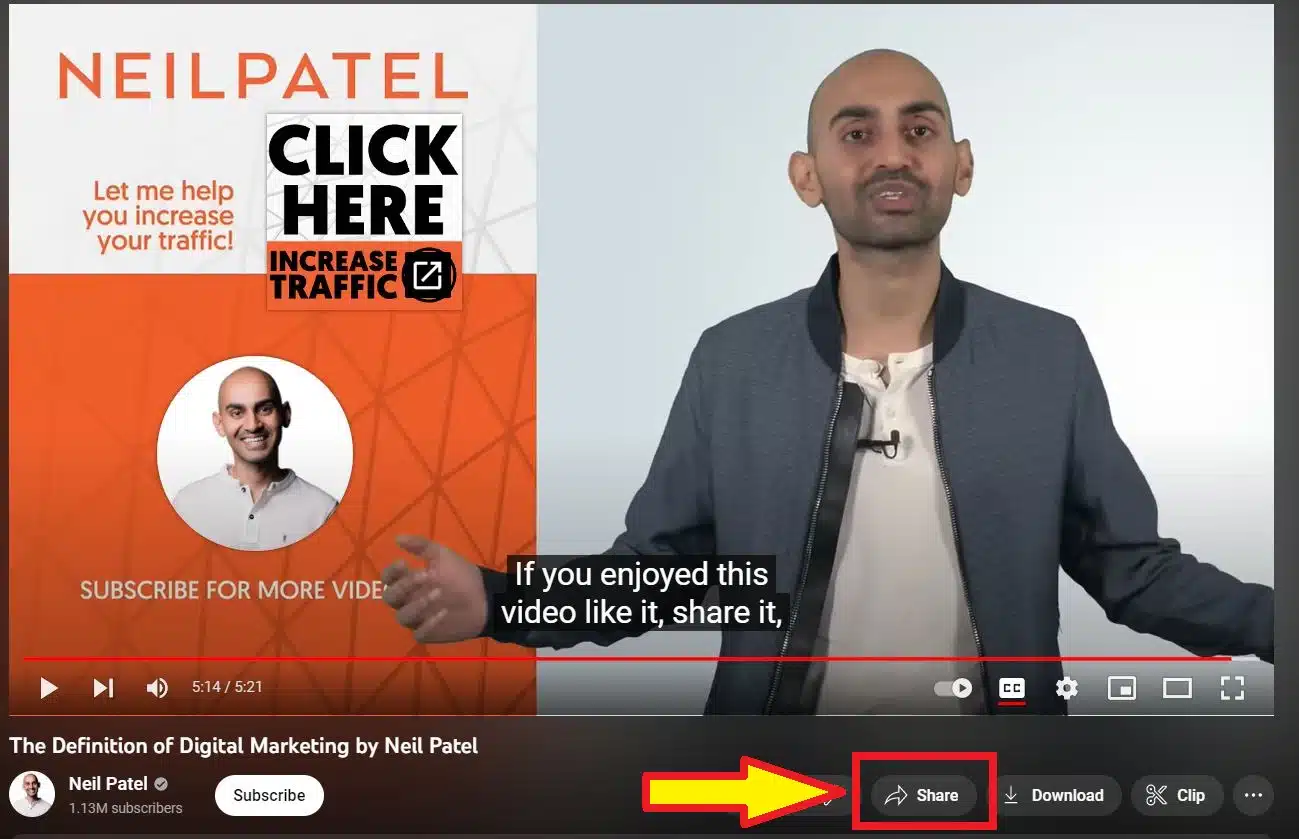
Press the share button
Press the share button.

To copy the URL, press the share button and then where it says “copy,” this method is valid for any device. 
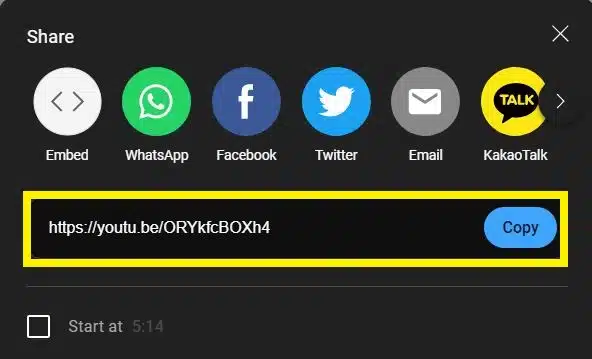
Copy the URL
Copy the URL

You can also take the link at the video’s top, right in the navigation bar.
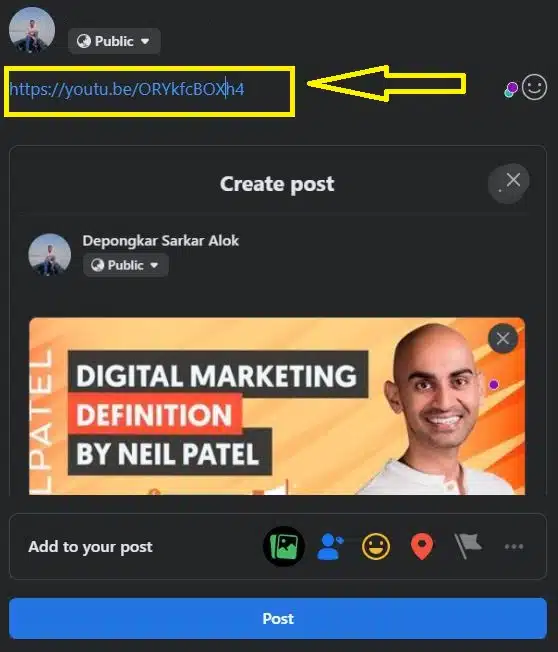
Paste the link on Facebook

Using the YouTube share button

At the bottom of each video, we have several options, including “Share” when you press, you will notice many social networking applications and related platforms; you can choose the one you prefer; in this case, we are using Facebook.
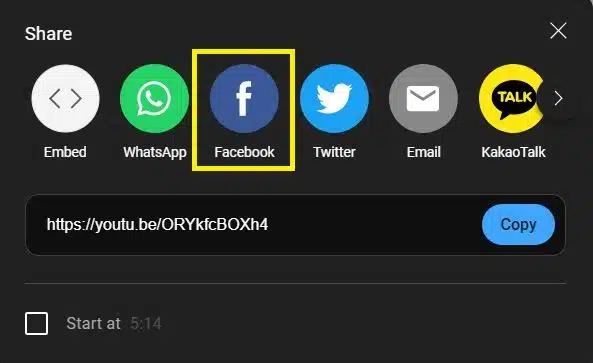
Using the YouTube share button

Remember that Facebook is one of the largest social networks in the world, which is why sharing our content through this platform will go much further, and thus, our work will be recognized.

Also, among these options, you can select the copy tool to use the link of a program outside of those recommended by Facebook, be it a blog or a mobile application.


Subscribe to Our Newsletter

Related Articles

Top Trending

Best 4K TVs for Console
12 Best 4K TVs For Console Gaming (PS5 & Xbox Series X)
AI And DEI
Diversity, Equity, and Inclusion (DEI) in an AI-Driven World: Transforming Tomorrow's Workforce Today!
Best Portable Bluetooth Speakers for Outdoor
10 Best Portable Bluetooth Speakers for Outdoor Parties
Best Personal Loan Lenders for Debt Consolidation
10 Best Personal Loan Lenders for Debt Consolidation
Best Mobile Games With Controller Support
15 Best Mobile Games With Controller Support (iOS & Android)

Fintech & Finance

Digital Wallet vs Bank Account
Digital Wallet Vs Bank Account: Which Fits Your Financial Lifestyle? [Part 2]
Neobank Trust Deficit: How Digital Banks Rebuild Reputation
The Trust Deficit: How Neobanks are Rebuilding Reputation
AI Agents In DeFi
Unlocking Potential: The Role of AI agents in Decentralized Finance [DeFi]
strategies for debt consolidation
Balance Transfers In 2026: Simplify Your Life with Debt Consolidation Strategies
Understanding Account Abstraction Making Crypto User-Friendly
Smart Wallet "Account Abstraction": Making Crypto User-Friendly

Sustainability & Living

What is Eco-Gentrification
Unmasking What is Eco-Gentrification: The Social Cost of Green Building
Eco-Conscious Valentine Day Budget Breakdown
The Eco-Conscious Valentine's Day Budget Breakdown: $25, $50, $100, $250 and More
Carbon Footprint Tracking App
Tech for Good: Apps That Track Your Personal Carbon Footprint [Go Green Effortlessly]
effects of climate change in daily life
What is the Impact of Climate Change in Daily Life? Take Action Today!
Professional Eco-Friendly Valentines Gift For Colleagues
The Office Valentine: Professional Eco-Friendly Gifts for Colleagues [That Won't Get HR Called]

GAMING

Best Mobile Games With Controller Support
15 Best Mobile Games With Controller Support (iOS & Android)
The Ethics of Dynamic Difficulty Adjustment Are Games Manipulating Us
The Ethics of Dynamic Difficulty Adjustment: Are Games Manipulating Us?
Complete League Of Legends Guide
Complete League of Legends Guide: Champions, Strategies and How to Climb Ranks in 2026
League of Legends for Beginners
League of Legends for Beginners: Complete Starter Guide (2026 Updated)
Mobile Graphics vs. PC The Gap is Closing Faster Than You Think
Mobile Graphics vs PC: The Gap is Closing Faster Than You Think

Business & Marketing

AI And DEI
Diversity, Equity, and Inclusion (DEI) in an AI-Driven World: Transforming Tomorrow's Workforce Today!
Neobank Trust Deficit: How Digital Banks Rebuild Reputation
The Trust Deficit: How Neobanks are Rebuilding Reputation
The Shadow IT Problem in the Age of AI Employees
The "Shadow IT" Problem in the Age of AI Employees
strategies for debt consolidation
Balance Transfers In 2026: Simplify Your Life with Debt Consolidation Strategies
Psychological Safety in Hybrid Teams The 2026 Playbook
Psychological Safety in Hybrid Teams: The 2026 Playbook

Technology & AI

Best Android Smartwatches
10 Best Smartwatches For Android Users (Samsung & Alternatives)
Uptime Guarantees reading the fine print
Navigate Uptime Guarantees: Reading The Fine Print In 2026 Contracts
The Ethics of Dynamic Difficulty Adjustment Are Games Manipulating Us
The Ethics of Dynamic Difficulty Adjustment: Are Games Manipulating Us?
The Shadow IT Problem in the Age of AI Employees
The "Shadow IT" Problem in the Age of AI Employees
How to Calculate SaaS LTV
How to Calculate SaaS LTV: Interpret and Improve SaaS LTV [Complete Guide]

Fitness & Wellness

how to stay fit at home
How to Stay Fit at Home: Why Your Living Room Matters More Than the Gym
meditation apps for anxiety
10 Top-Rated Meditation Apps for Anxiety and Stress Relief
fitness for busy professionals
The Executive ROI: Why Fitness for Busy Professionals is the New Corporate Currency
wellness apps for remote workers
Top 20 Wellness Apps That Actually Keep You Healthy [Tested & Reviewed]
science-backed sleep tracking apps
Free vs. Paid Sleep Tracking Apps: Top 10 Science-Backed Options Ranked by Accuracy