Work is changing fast. Many teams now rely on AI agents that can research, write, analyze, triage tickets, route requests, run checks, and coordinate tools. These agents behave less like simple automation and more like goal-driven workers.
That shift creates a new leadership job. You no longer manage only people and processes. You also manage systems that act, decide, and escalate. If you want reliable outcomes, you need role clarity, guardrails, measurement, and a clean operating model.
This guide shows you how to manage digital employees in a practical, evergreen way. You will learn how to define agent roles, set boundaries, measure performance, reduce risk, and scale adoption without chaos.
What Are Digital Employees

Digital employees are AI agents that perform work with some level of autonomy. They can complete multi-step tasks, use tools, and produce outputs that people or systems act on. They may run inside a chat interface, an internal platform, or a workflow tool.
A digital employee does not mean full autonomy in every situation. Most organizations start with semi-autonomous agents that operate with approval steps, structured inputs, and clear stop conditions.
Definition And Core Capabilities
A true agent usually has these capabilities:
- Goal-driven execution: It works toward an outcome, not just a single prompt.
- Multi-step planning: It breaks work into steps and checks progress.
- Tool use: It can call approved tools like search, ticketing, CRM, spreadsheets, or internal APIs.
- Context handling: It uses provided context and approved knowledge sources.
- Self-checking: It validates outputs against rules, templates, or tests.
- Escalation: It hands off to humans when it hits risk, uncertainty, or exceptions.
If your system can only follow a fixed flow, you have automation. If it can reason across steps and decide when to escalate, you have something closer to a digital employee.
Digital Employees Vs Automation Vs Assistants
Here is a simple comparison you can use in leadership discussions:
| Type | What It Is | Best For | Main Risk |
| Automation | Fixed steps with predictable inputs | Repetitive processes | Breaks on edge cases |
| Assistant | Human-led help for single tasks | Drafting, brainstorming, quick help | Inconsistent outputs if unmanaged |
| Digital Employee | Goal-led execution with guardrails | End-to-end workflows and ops support | Overreach if permissions are loose |
The key difference is decision scope. Digital employees need boundaries, not just instructions.
Common Digital Employee Roles In Organizations
Most teams succeed when they start with clear roles. Examples include:
- Support Triage Agent: classifies tickets, drafts first replies, routes to the right queue
- Research Agent: summarizes internal docs, competitor info, or market trends from approved sources
- Quality Agent: checks outputs for policy, formatting, completeness, and risk flags
- Finance Ops Agent: matches invoices, flags anomalies, prepares exception lists
- Content Ops Agent: prepares briefs, outlines, SEO checks, and publishing readiness steps
- IT Helpdesk Agent: handles basic issues, collects diagnostics, escalates complex cases
Pick roles where the work is high-volume and rules-based, but still benefits from reasoning. Avoid roles that require uncontrolled judgment or sensitive decisions without strong oversight.
Why Traditional Management Breaks In Agentic Work
Many leaders try to manage agents like people or like software. Both approaches fail in different ways. Agents do not have human intuition, and they also do not behave like deterministic code.
You need a third approach that combines management discipline with engineering discipline.
The New Bottlenecks
When agents enter workflows, bottlenecks often move to:
- approvals and reviews
- tool access and security controls
- data quality and knowledge consistency
- unclear ownership when the agent fails
- missing standards for prompts, templates, and tests
If you ignore these bottlenecks, you will see fast early wins and slow long-term pain.
New Failure Modes Leaders Must Expect
Agent failures look different from human failures. Common patterns include:
- confident but incorrect outputs
- missed edge cases and silent omissions
- tool misuse due to ambiguous instructions
- policy drift as teams copy and tweak prompts
- compounding errors across multi-step workflows
Good management reduces these risks by design. It does not rely on hope or repeated reminders.
The Leadership Shift
In agent-first work, leadership shifts from assigning tasks to designing systems. You must define outcomes, constraints, and quality gates. You also need an escalation model that keeps humans accountable for decisions that matter.
That is the core of how to manage digital employees successfully.
How To Manage Digital Employees With A Digital Workforce Operating Model
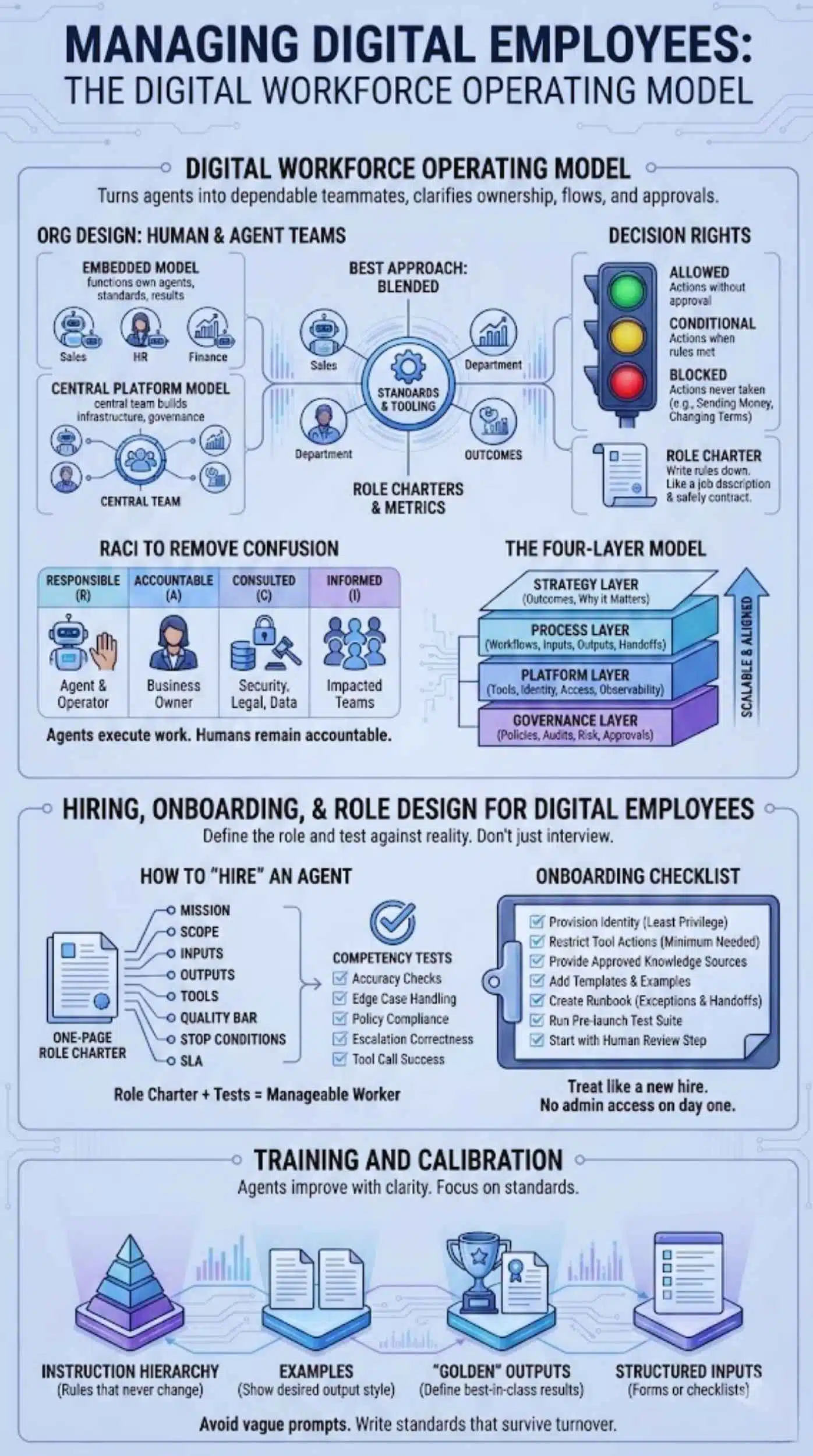
A strong operating model turns agents into dependable teammates. It clarifies who owns what, how work flows, and where approvals happen. It also prevents the “everyone built their own agent” problem.
Org Design For Human And Agent Teams
Most organizations choose one of two models:
- Embedded model: each function owns its agents, standards, and results
- Central platform model: a central team builds agent infrastructure and governance, while functions own outcomes
In practice, the best approach blends both. A central team defines standards and tooling. Functional teams define role charters and success metrics.
Use a simple RACI to remove confusion:
- Responsible: the agent and its human operator
- Accountable: the business owner of the workflow
- Consulted: security, legal, compliance, data owners
- Informed: impacted teams and stakeholders
Agents execute work. Humans remain accountable for outcomes.
The Four-Layer Model
You can manage complexity by organizing decisions into four layers:
- Strategy layer: what outcomes agents own and why it matters
- Process layer: workflows, inputs, outputs, handoffs, and exceptions
- Platform layer: tools, identity, access, observability, environments
- Governance layer: policies, audits, risk controls, and approvals
This structure keeps your program scalable. It also makes cross-team alignment easier.
Decision Rights
Decision rights prevent agent overreach. Define three categories:
- Allowed: actions the agent can take without approval
- Conditional: actions allowed only when rules are met
- Blocked: actions the agent must never take
Examples of blocked actions often include sending money, changing legal terms, granting access, or contacting customers without a review step.
Write these rules down in a role charter. Treat the charter like a job description and a safety contract.
Hiring, Onboarding, And Role Design For Digital Employees
You do not hire a digital employee with interviews. You “hire” it by defining the role and testing it against reality. If you skip this step, you will get fragile agents that look impressive in demos and fail in production.
How To “Hire” An Agent
Start with a one-page role charter. Include:
- Mission: the outcome the agent owns
- Scope: what is included and excluded
- Inputs: what data it can use and from where
- Outputs: required formats, tone, and structure
- Tools: allowed tools and tool boundaries
- Quality bar: what “good” means, with examples
- Stop conditions: when it must escalate
- SLA: expected speed and service level
Then define competency tests. For example:
- accuracy checks on known cases
- edge case handling
- policy compliance checks
- escalation correctness
- tool call success rate
A role charter plus tests turns a vague agent into a manageable worker.
Onboarding Checklist
Onboarding matters because most agent failures come from unclear constraints. Use this checklist:
- Provision identity with least privilege
- Restrict tool actions to the minimum needed
- Provide approved knowledge sources and ban everything else
- Add templates and examples of great outputs
- Create a runbook for exceptions and handoffs
- Run a pre-launch test suite on real cases
- Start with a human review step before autonomy
Treat this like onboarding a new hire. You would not give a new employee admin access on day one. Do not do it for agents either.
Training And Calibration
Agents improve when you give them clarity. Focus on:
- instruction hierarchy, with rules that never change
- examples that show the desired output style
- “golden” outputs that define best-in-class results
- structured inputs, such as forms or checklists
Avoid training that relies on vague prompts. Write standards that survive turnover and scaling.
Managing Performance And Productivity
You cannot scale what you cannot measure. Performance management for agents should feel like operations management, not opinion. Build a scorecard that balances quality, speed, reliability, and cost.
What To Measure
Use metrics that reflect business impact:
- Quality: accuracy rate, defect rate, rework rate, compliance pass rate
- Speed: cycle time, time to first useful output, time to resolution
- Reliability: tool success rate, fallback frequency, outage impact
- Cost: cost per task, cost per resolution, cost per approved outcome
Tie these metrics to the workflow, not to vanity measures like “messages sent.”
Agent KPIs By Function
Different roles need different KPIs:
- Customer support: correct routing, resolution quality, escalation accuracy, reduced handle time
- Finance ops: match accuracy, exception rate, audit readiness, time saved per batch
- Content ops: structure compliance, edit distance, publishing readiness rate
- IT helpdesk: diagnostic completeness, correct categorization, escalation quality
Set targets that are realistic for your maturity stage. Early on, prioritize quality and safe escalation over speed.
Performance Reviews For Agents
Run a monthly review like you would for an operational process:
- Review scorecard trends
- Sample outputs and compare to the quality bar
- Investigate the biggest defects and their root causes
- Track changes by version with a clear change log
- Decide whether to expand scope or tighten guardrails
Around this point in scale, many leaders realize that the hard part is not building agents. The hard part is running them. That is why disciplined teams learn to manage digital employees like a living system.
Building Trust With Guardrails
Trust does not come from impressive demos. Trust comes from predictable performance under constraints. Guardrails let agents move fast without creating unacceptable risk.
The Guardrails Stack
Build guardrails in layers:
- Policy rules: what is allowed, conditional, and blocked
- Tool constraints: allowed actions, rate limits, and sandboxing
- Data constraints: data classification rules and retention limits
- Output constraints: format requirements, required fields, and checks
Do not rely only on “be careful” instructions. Put guardrails into the system.
Human-In-The-Loop Done Right
Human review can be heavy or light. Choose based on risk:
- Full review: for customer-facing, legal, financial, or security-impacting outputs
- Sampling: for medium-risk workflows with stable performance
- Exception-only: for low-risk workflows with strong tests and monitoring
Make review efficient. Use structured review checklists. Track what reviewers change, and feed that into improvements.
Escalation Paths
Escalation should be a feature, not a failure. Define:
- stop conditions, such as low confidence, missing data, policy flags, or high impact
- who receives the escalation
- what context the agent must include in the handoff
A good escalation packet includes the goal, inputs used, steps taken, tool outputs, and the specific question for the human.
Security, Compliance, And Risk Management
Agents often touch sensitive systems. If you treat them like generic software users, you create risk. If you treat them like untrusted outsiders, you block value. The right approach is controlled access with auditability.
Identity And Access Management
Give each agent a distinct identity. Do not share credentials across agents. Then apply least privilege:
- limit tools and actions to role needs
- separate read and write permissions
- use just-in-time access for high-risk actions where possible
This approach protects you from both mistakes and misuse.
Data Governance For Agent Work
Define what data agents can access and where outputs can live:
- approved knowledge sources and data stores
- prohibited data types, such as certain PII or confidential contracts, based on your policies
- retention rules for prompts, logs, and outputs
- encryption and access controls for stored artifacts
Keep governance practical. People ignore policies that slow work with no clear value.
Incident Response For Agent Failures
Failures will happen. Prepare like an ops team:
- define severity levels
- create a containment plan, such as disabling tools or restricting scope
- capture logs and context for analysis
- run post-incident reviews focused on system fixes, not blame
This turns agent mistakes into organizational learning.
Agent Ops: The Missing Function Most Companies Need

As usage grows, ad hoc ownership breaks down. Teams need a function that treats agents as production systems. Many organizations call this Agent Ops, AI Ops, or Agent Enablement.
What Agent Ops Owns
Agent Ops typically owns:
- standards for role charters, prompts, and templates
- evaluation tests and pre-deploy checks
- monitoring and performance dashboards
- lifecycle management for versions and changes
- incident playbooks and escalation design
- training for teams that build and use agents
This function reduces duplicated effort and prevents policy drift.
Observability And Monitoring
If you cannot see agent behavior, you cannot manage it. Monitoring should include:
- tool call logs and outcomes
- error rates and fallback behavior
- quality sampling results
- escalation frequency and causes
- drift indicators, such as rising defect rates
Keep monitoring tied to decisions. Dashboards should trigger action, not just reporting.
Testing And Release Management
Agents change over time. Treat changes like releases:
- run a pre-deploy evaluation suite
- test on a staging set of real cases
- roll out with a canary approach on a small percentage
- maintain rollback capability
This discipline prevents small changes from causing large operational failures.
Change Management And Culture
Agents change how people work. If you ignore the human side, you will face resistance, confusion, and inconsistent adoption.
How To Communicate Digital Employees Without Fear
Use clear language:
- agents augment teams and reduce low-value work
- humans keep accountability for outcomes
- adoption focuses on quality, safety, and measurable impact
Avoid hype and avoid threats. People support change when they see stability and fairness.
Redesigning Human Jobs Around Agents
Jobs shift toward higher leverage tasks:
- defining workflows and standards
- reviewing and improving outputs
- handling exceptions and complex cases
- owning customer outcomes and decisions
Build training around these skills. Teach teams how to write role charters, evaluate outputs, and diagnose failures.
Incentives And Accountability
Make accountability explicit. When an agent produces an output, the workflow owner remains accountable. That clarity prevents a “blame the system” culture and keeps incentives aligned with quality.
Implementation Playbook
A good rollout plan reduces risk and increases adoption. Move in stages. Earn trust with stable wins, then expand scope.
Step-By-Step Rollout Plan
Use this seven-step plan:
- Pick a high-volume workflow with low to medium risk
- Define success metrics and a clear quality bar
- Write a role charter with boundaries and stop conditions
- Build the first version with structured inputs and templates
- Run a pilot with human review and tight tool access
- Add tests, monitoring, and a versioned release process
- Expand scope and autonomy only when metrics justify it
This approach keeps your program grounded in outcomes. It also helps you manage digital employees without creating hidden risk.
30-60-90 Day Roadmap
First 30 days:
Run one pilot. Establish baseline metrics. Define governance rules. Create a repeatable role charter template.
Days 31 to 60:
Add monitoring, sampling, and evaluation tests. Improve instructions and templates. Expand to more cases in the same workflow.
Days 61 to 90:
Standardize an agent catalog. Train additional teams. Launch Agent Ops practices for releases, incident response, and consistent governance.
You can move faster, but only if you protect quality and security.
Common Pitfalls And How To Avoid Them
These mistakes appear across industries:
- Over-automation too early: start with review, then earn autonomy
- Vague role definitions: write a tight charter with stop conditions
- No measurement baseline: track quality, speed, reliability, and cost
- Too much tool access: enforce least privilege and staged permissions
- No owner for incidents: assign accountability and build a playbook
Avoiding these pitfalls matters more than picking the perfect model.
The Future Of Leadership In Agent-First Organizations
Agent-first organizations reward leaders who think in systems. They design constraints, define metrics, and build governance that scales. They also treat change management as a core competency, not an afterthought.
Expect growth in multi-agent workflows where specialized agents collaborate. Expect more internal marketplaces where teams share proven agent roles. This will make standardization, evaluation, and governance even more important.
Takeaways
Leading in the age of agents means building a reliable digital workforce. You do that by defining roles, setting decision rights, measuring performance, and enforcing guardrails through policy, tools, and tests.
Start small, prove value, and scale with discipline. When you treat agents as production systems with clear accountability, you can confidently manage digital employees while improving speed, quality, and resilience.