Working from home can make you feel tired and distracted. Maybe your back hurts, or your desk always seems messy. You might wonder why it is so hard to focus in your own space.
Good news. Studies show that the right office upgrades do boost work speed and focus. A better chair or an extra monitor can really help you get more done.
This post will share which changes work best for a home office setup. You’ll see easy tips to save time, cut stress, and feel good while working at home. Ready to make your workspace work smarter? Keep reading!
Ergonomic Essentials for Comfort
Ergonomic essentials are key for comfort at your desk. A good chair and keyboard can make a big difference in how you feel during long hours of work.
An ergonomic office chair to reduce back strain
Sitting for long hours can hurt your back. A good office chair with lumbar support helps keep your spine straight, which prevents slouching and reduces pain. People who switch to ergonomic chairs often report less discomfort in their lower backs after just a week or two.
“Your back will thank you if you invest in the right seat,” says physical therapist Amanda Lee.
Movable armrests and easy height adjustments allow better blood flow too. Soft padding gives extra comfort during remote work marathons. To protect your wrists and hands next, look at ergonomic keyboards as part of simple workspace enhancements.
An ergonomic keyboard to protect your wrists
After your back gets support from a good chair, your wrists ask for help next. An ergonomic keyboard gives that support. It shapes to fit the curve of your hands and wrists. This means less twisting and stretching, which lowers the chance of wrist pain or carpal tunnel syndrome.
Doctors see more wrist injuries since remote work took off in 2020. People who type all day need protection from these hidden strains. Studies show an ergonomic design can cut muscle strain by up to 25%.
Try one with soft keys and a gentle slope—your fingers will thank you every hour on the job. Even small changes like padded wrist rests or split keyboards help keep you working strong and sharp.
A slim laptop stand for better screen positioning
Sliding from wrist comfort to better screen height, a slim laptop stand makes a noticeable difference. Place your computer on the stand, and your neck will thank you. No more hunching over like a folded-up lawn chair! Raising your laptop helps keep your eyes level with the screen.
This simple shift can lower back pain, improve posture, and give those slouchy shoulders a break.
A good stand is lightweight, so you can move it around with ease; some even fold flat for travel or storage. Many remote workers use stands daily to boost productivity and focus at home.
Studies in office ergonomics say that proper monitor height reduces neck strain for up to 70% of people who adjust their setup. Pair this upgrade with an external keyboard for even better workspace organization and workflow efficiency.
Enhancing Visual and Mental Focus
Good lighting can change your work vibe. A soft light desk lamp helps reduce eye strain and keeps you alert while working. A big external monitor lets you see more at once, making multitasking a breeze.
Plus, a sleek monitor riser with USB ports adds extra convenience for all your devices.
A soft light desk lamp to reduce eye strain
A soft light desk lamp can help reduce eye strain while you work. Bright lights can make your eyes tired fast. Soft lighting creates a calm environment. It also makes it easier to focus on tasks without discomfort.
Many people find that warm, gentle light is best for long hours of work. This helps keep you alert and focused throughout the day. A good lamp improves your workspace, making it more inviting and productive.
Next up, we will explore how a big external monitor can enhance multitasking efficiency in your home office.
A big external monitor for improved multitasking
A big external monitor helps you see more. It gives you extra screen space. You can open two or three programs at once. This makes it easier to work on projects without switching screens all the time.
With a larger view, your focus improves. You can compare documents side by side, which saves time and boosts productivity. This upgrade is especially helpful for remote work. It keeps everything organized right in front of you.
Enjoy multitasking like never before!
A sleek monitor riser with additional USB ports
A big external monitor helps with multitasking. To make this setup even better, a sleek monitor riser is a must-have. It raises your screen to eye level. This position can help reduce neck strain during long hours of work.
The riser also has extra USB ports. These ports let you charge devices easily without taking up desk space. You can keep essential gadgets close at hand. With this simple upgrade, boosting your productivity becomes much easier in your home office setup.
Tools for Organization and Creativity
Tools for organization and creativity can spark new ideas. A desktop whiteboard helps catch thoughts fast. You can jot down quick notes too! Plus, a wall-mounted whiteboard works great for big brainstorming sessions.
Want to keep your space tidy? Charging accessories help keep devices powered up! Explore more ways to boost your workspace vibes.
A desktop whiteboard for quick notes and ideas
A desktop whiteboard is great for quick notes and ideas. It fits right on your desk, giving you a space to jot down thoughts fast. You can use it for lists, reminders, or sketches.
This helps keep your mind clear and organized.
Having a place to write things down makes work smoother. You won’t lose track of ideas or tasks because they are all in one spot. Plus, it’s easy to erase and change items as needed.
A whiteboard boosts productivity by making information visible and handy at all times.
A larger wall-mounted whiteboard for brainstorming sessions
A larger wall-mounted whiteboard can change your workspace. It gives you space to write down big ideas and important notes. You can easily see everything at once. This helps keep thoughts organized during meetings or brainstorming sessions.
You don’t have to worry about running out of space with a large board. Use it for lists, sketches, or mind maps. This tool encourages creativity and makes group work easier too. Team members can add their input directly on the board.
Collaboration becomes smoother, boosting productivity in remote work settings.
Charging accessories to keep devices powered
Charging accessories are key for keeping your devices ready to go. A good power strip can help you plug in multiple gadgets at once, saving time and space. Look for one with USB ports, too; that way, you can charge your phone and tablet easily.
Wireless chargers are another great option. They make it quick to power up without messing with cords. Keep a portable charger handy as well; it’s perfect for when you’re on the move or need extra juice during long work hours.
These tools will boost your productivity by making sure all your devices stay charged and ready!
Technology for Seamless Productivity
Technology can boost your work speed. A good wireless router keeps you connected and helps avoid annoying hiccups while working. A quick computer saves time, letting you get back to what matters most.
And a Bluetooth speakerphone brings clarity to video calls, making meetings feel more personal and less robotic.
A reliable wireless router for consistent connectivity
A reliable wireless router boosts your work. It keeps you connected to the internet without breaks. This means no sudden pauses during video calls or important tasks. A good router offers strong signals throughout your space.
You can work from anywhere in your home office.
Choose a router with speed and range for best results. Look for one that supports multiple devices at once, too. This way, all your gadgets can connect smoothly at the same time. Investing in a quality wireless router improves productivity and helps keep everything running seamlessly.
A super-fast computer to minimize downtime
A super-fast computer keeps you working smoothly. It quickly loads programs and opens files. This saves time and cuts down on waiting. Less downtime means more productivity.
Fast computers also help during video calls or online meetings. They reduce lag, making communication clear and easy. With a reliable setup, your work feels less stressful. Upgrading to a speedy machine greatly boosts efficiency in your home office.
A Bluetooth speakerphone for clearer video calls
A Bluetooth speakerphone makes video calls easier. It allows everyone to hear and be heard clearly. No more confusion or straining to listen. Good sound quality helps you focus on the conversation.
Using a speakerphone also frees up your hands. You can type or take notes while talking. This multitasking boosts productivity during meetings. A smooth call keeps collaboration flowing nicely.
Up next, let’s explore furniture upgrades for better health in your home office.
Furniture Upgrades for Better Health
A great desk can change everything. Choose one that feels good for long hours. An adjustable standing desk converter gets you off the chair and moving around. Dual monitors can make your work feel lighter and faster, giving you more space to think!
A desk you love for long hours of work
A desk you love makes work easier. Choose one that suits your style and needs. It should have enough space for your computer, papers, and supplies. A clear surface helps keep things organized.
Look for a desk with adjustable height options. This way, you can sit or stand as needed during those long hours. Comfort plays a big role in staying productive. Invest in a design that feels good to use every day; it will help you enjoy working more!
An adjustable standing desk converter to reduce sitting time
An adjustable standing desk converter helps you change your position while working. It allows you to stand or sit easily. This can cut down on hours spent sitting each day. Less sitting means a lower risk of health issues, like back pain and poor circulation.
Being on your feet boosts energy and focus during the workday. You might feel less tired and more alert after switching positions often. This simple upgrade can help keep your mind fresh as you tackle tasks all day long.
Next up, let’s talk about a dual-monitor riser for an efficient multi-screen setup.
A dual-monitor riser for an efficient multi-screen setup
A dual-monitor riser boosts your workspace. It raises your screens to eye level. This helps reduce neck strain, making long hours more comfortable.
With a dual-monitor setup, multitasking becomes easier. You can see multiple apps side by side without squinting or straining your eyes. Adding extra USB ports means you can connect devices easily too.
This simple upgrade makes working smoother and more productive from the comfort of home.
Atmosphere Boosters for Mood and Efficiency
Plants can bring life to your workspace and make it more calming. Good speakers fill the room with energizing music that keeps you moving. A yoga mat lets you stretch during breaks, keeping your body happy.
Want to know how these little tweaks can take your home office up a notch? Keep reading!
Plants to create a calming workspace
Adding plants to your workspace brings many benefits. They improve air quality and reduce stress. Some good options are snake plants, peace lilies, or pothos. These are easy to care for and thrive indoors.
Having a few green friends around can boost your mood too. Their colors create a fresh look that helps you focus better on tasks. Placing them near windows lets in sunlight, which keeps them happy and brightens up your space as well!
Quality speakers for energizing background music
Quality speakers can really lift your mood. Good sound helps create an upbeat atmosphere. You can enjoy your favorite songs while working. This background music makes tasks feel less boring.
It encourages creativity and keeps you focused. Choose speakers that fit well in your space and produce clear sounds. Listening to energizing tunes can keep you motivated and productive in your home office.
Next, let’s explore yoga mats that encourage movement during breaks.
A yoga/stretching mat to encourage movement during breaks
Take a moment to stretch and breathe. A yoga mat can help you move during your break. It’s soft and comfortable, making it easy to sit or lie down. Stretching keeps your body loose and relaxed.
Movement helps fight fatigue from sitting at a desk all day. A few simple stretches can boost energy levels. Use that mat! You’ll feel better and more focused when you get back to work.
Plus, it adds a little fun to those breaks!
Smart Gadgets for Time and Energy Savings
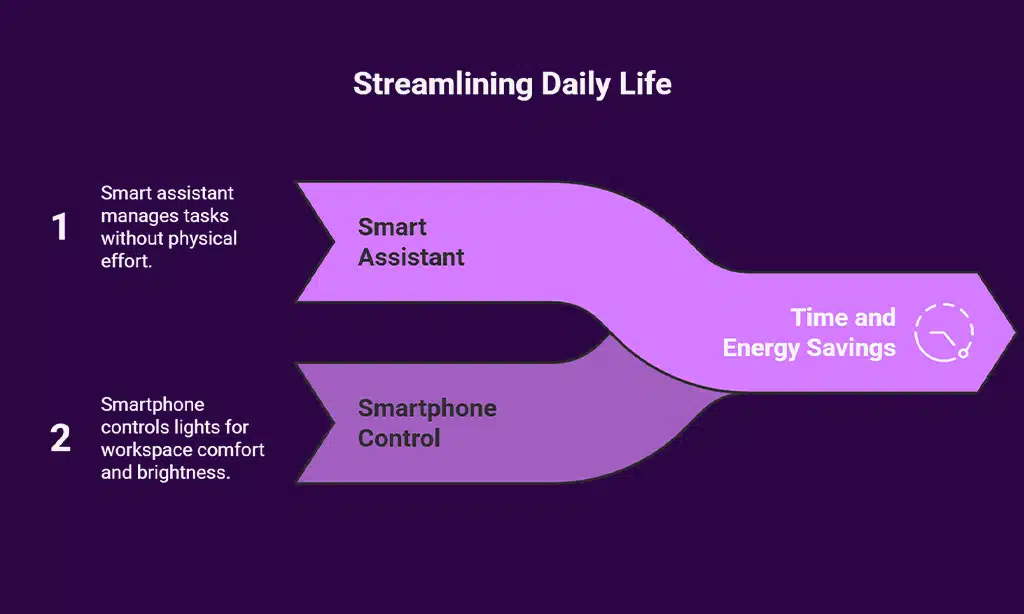
Smart gadgets can save you time and energy. A smart assistant helps manage tasks without lifting a finger. You can control your lights with just your smartphone, making your workspace cozy and bright!
A smart assistant for hands-free task management
A smart assistant can really help with task management. You can use voice commands to set reminders and schedules. This makes it easy to stay organized without typing all the time.
It also helps you focus on your work, rather than getting lost in apps or notes.
This device works well with other tools, like your calendar and email. You can ask it for updates while you keep working at your desk. A smart assistant saves time and cuts down distractions.
This way, you boost your productivity even more!
Smartphone-controlled lighting for customized ambiance
Smartphone-controlled lighting helps set the mood in your home office. You can change colors or brightness with just a tap on your phone. Soft light can make you feel relaxed, while bright light can keep you focused.
This kind of lighting is perfect for remote work. It allows you to adapt your space based on tasks. Create a warm atmosphere for video calls or bright settings for intense work sessions.
With smart lights, you control the vibe, making it easy to boost productivity and comfort at the same time.
Budget-Friendly Must-Haves
When you want to boost your home office, you don’t have to spend a ton of money. A good monitor can change how you work, making tasks easier and faster without breaking the bank.
A budget-friendly 24-inch monitor for improved workflow
A 24-inch monitor can boost your workflow without breaking the bank. The larger screen makes it easier to see documents and tabs side by side. You won’t have to squint or switch back and forth as much.
This upgrade helps with multitasking. You can work on one project while keeping another open nearby. A budget-friendly monitor keeps you organized and productive, making remote work smoother than ever.
A compact desk organizer to declutter your space
A compact desk organizer helps keep your workspace neat. It keeps pens, papers, and small tools in one place. This makes it easy to find what you need quickly. When your space is tidy, you can focus better on your work.
Look for organizers with sections for different items. Some even have spots for charging devices. With a clean area, you will feel more relaxed and ready to tackle tasks efficiently.
An organized space boosts productivity and makes remote work much easier!
Tips for Personalizing Your Home Office
Adding personal touches makes a big difference. Hang up photos or artwork that inspire you. A walnut wood desk accessory can also add style and keep things organized. Your space should feel like yours, not just an office!
Add personal touches like photos or artwork
Photos and artwork can make your office feel more like home. Hang a few pictures of friends or family on the wall. It brings joy and warmth to your space.
Artwork adds color and personality too. Choose pieces that inspire you or spark creativity. Personal touches help create a happier workspace, making it easier to focus on work tasks.
Use a walnut wood desk accessory for style and functionality
A walnut wood desk accessory adds flair to your workspace. Its rich color and texture make your office look stylish. This simple addition can also help you stay organized. You can use it to hold pens, paperclips, or notes.
Having everything in one place cuts down on clutter. Less mess boosts focus and productivity. A walnut piece blends beauty with usefulness, making work feel more enjoyable.
Takeaways
Home office upgrades can truly enhance your workday. Ergonomic chairs, better lighting, and smart tech help you feel good and stay focused. Simple tools like whiteboards keep your ideas flowing.
A nice desk makes long hours easier too. These changes improve comfort and also help you work faster. Embrace these tips; small steps can lead to big wins!