
In 2026, most teams are fighting the same battle with different tools. App counts keep rising, budgets feel tighter, and every new “must-have” platform promises to simplify everything. Then reality hits. Data lives in five places, approvals take weeks, offboarding is messy, and renewals pile up.
This is where the Great Unbundling vs Rebundling collide.
Unbundling pushes teams toward best-of-breed tools for every workflow. Rebundling pushes teams toward suites and platforms to reduce sprawl. If you manage a modern stack, you do not get to pick one forever. You need a practical way to decide, execute, and govern.
This guide breaks down the tradeoffs, shows you a clear decision framework, and gives you step-by-step actions to build a stack that is simpler, safer, and easier to scale. It also covers tech stack consolidation vs best-of-breed decisions in a way that matches how real teams buy, integrate, and operate software in 2026.
What “Unbundling” And “Rebundling” Mean In 2026

The language sounds trendy, but the impact is very real. These two forces shape how your company buys, connects, and uses technology.
Unbundling (Best-Of-Breed Explosion)
Unbundling is the move toward specialized tools that do one job extremely well. Teams adopt point solutions because they are fast to try, easy to buy, and often better than suite features.
In 2026, unbundling is fueled by:
- Product-led growth tools with quick onboarding
- Self-serve AI features inside niche apps
- Teams wanting faster solutions than central IT can deliver
- Remote and distributed work that increases tool needs
Unbundling helps when speed and depth matter. It hurts when every tool becomes another system to secure, integrate, and support.
Rebundling (Suite Consolidation + Platforming)
Rebundling is the move back toward fewer vendors, larger platforms, and more integrated suites. Companies rebundle when tool sprawl becomes expensive and risky.
In 2026, rebundling accelerates because:
- Procurement pushes for vendor consolidation
- Security teams demand fewer attack surfaces
- Executives want clearer reporting and accountability
- Platforms bundle “good enough” features across many needs
Rebundling helps when standardization and governance matter. It hurts when teams lose key capabilities or work around limitations.
Why Both Are Happening At The Same Time
These trends are not opposites. They are responses to different pressures.
- Teams adopt best-of-breed to move fast.
- Organizations consolidate to regain control.
The smartest approach for 2026 is usually hybrid. You rebundle the core, then unbundle at the edge where specialization creates measurable value.
Why Tech Stacks Hit A Breaking Point
Most stacks do not break because of one bad tool. They break because of the combined weight of overlap, integrations, and unmanaged risk.
SaaS Sprawl And Tool Overlap
SaaS sprawl shows up quietly. One team adds a form builder. Another adds a scheduling tool. A third adds a second analytics platform “just for this project.” Six months later, you are paying for three tools that do the same thing.
Common signs of tool overlap:
- Two or more tools for the same capability (chat, docs, project management, BI)
- Multiple “sources of truth” for the same data
- Inconsistent naming, tagging, and access policies
- License costs rising faster than headcount
A simple way to spot overlap is to map tools to capabilities, not departments. Capabilities stay stable even when org charts change.
Integration Debt (APIs, Webhooks, iPaaS, Custom Glue)
Every tool needs to talk to other tools. That sounds fine until you count the connections.
Integration debt builds when:
- Teams create one-off automations without ownership
- Data syncs break and no one gets alerted
- The same workflow exists in three places (CRM, marketing automation, spreadsheets)
- Critical logic lives in a “temporary” script that becomes permanent
The biggest risk is not just broken workflows. It is silent failure. Leads do not route, invoices do not sync, and reports drift away from reality.
Security, Compliance, And Offboarding Risk
Security problems scale with app count. Every new tool creates:
- New permissions to manage
- New data storage locations
- New vendor risk questions
- New offboarding steps
Offboarding is where stacks fail publicly. If a user leaves and still has access to five systems, that is not a process problem. That is a governance problem.
The Hidden Tax: Context Switching + Data Fragmentation
Even if every tool works, the human cost adds up.
- People switch tabs constantly.
- Work gets duplicated because teams cannot find the latest version.
- Reporting becomes an argument instead of a decision tool.
When your team spends more time moving work than doing work, your stack has reached its breaking point.
Unbundling Vs Rebundling: A Decision Framework (When Each Wins)
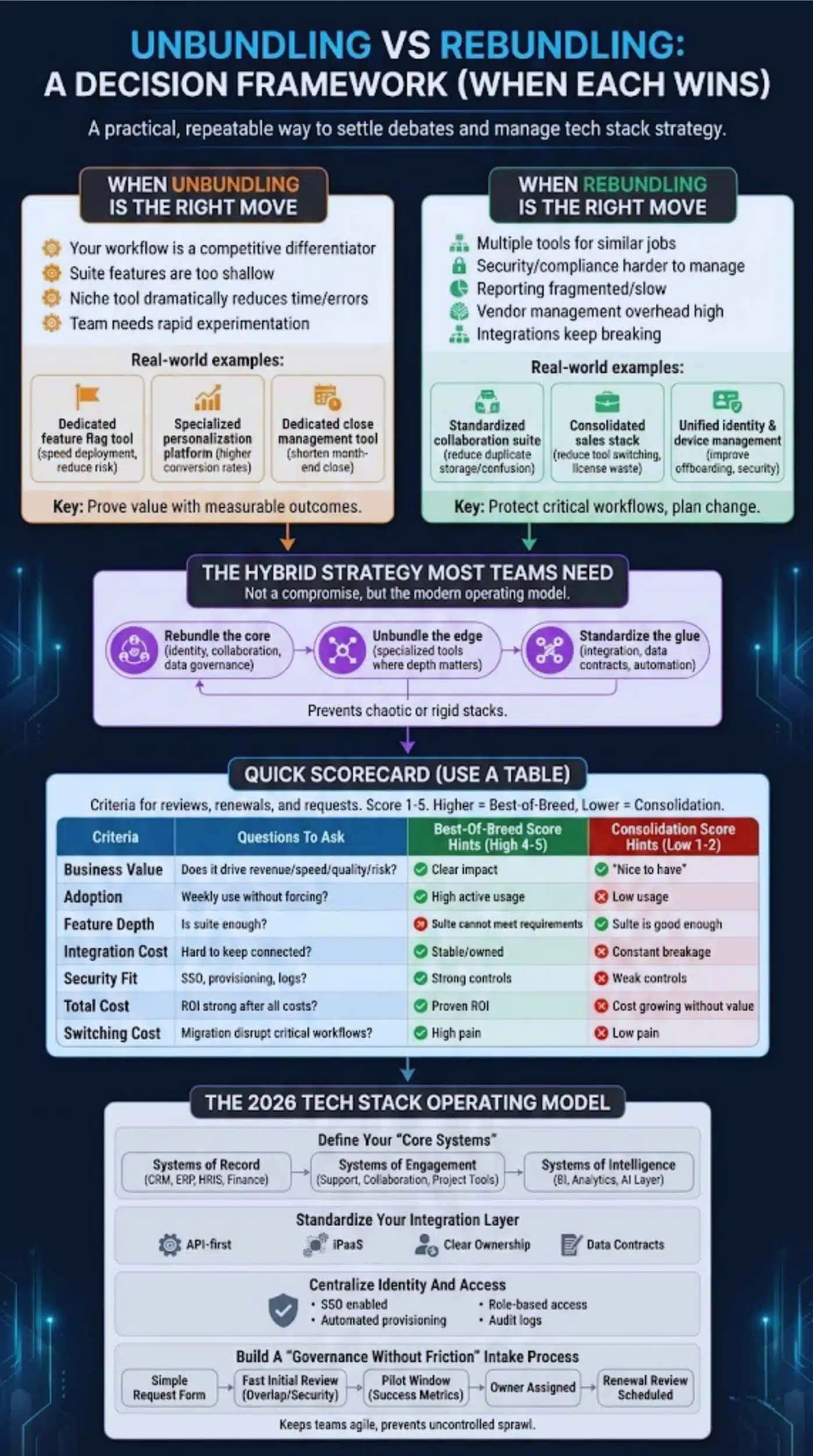
This is where strategy becomes practical. You need a repeatable way to decide what stays, what goes, and what becomes part of the core platform.
A strong decision framework is also the fastest way to settle debates about tech stack consolidation vs best-of-breed without turning every renewal into a political fight.
When Unbundling Is The Right Move
Choose best-of-breed when the specialized tool produces clear, measurable advantages.
Unbundling tends to win when:
- Your workflow is a competitive differentiator
- Suite features are too shallow for your use case
- A niche tool reduces time or errors dramatically
- A team needs rapid experimentation without long change cycles
Real-world examples:
- A product team adopts a dedicated feature flag tool to reduce deployment risk and speed testing.
- A marketing team uses a specialized personalization platform that increases conversion rates beyond what the suite can do.
- A finance team adopts a dedicated close management tool to shorten month-end close.
The key is proof. If a point tool stays, it should earn its place with outcomes.
When Rebundling Is The Right Move
Choose consolidation when your biggest pain is operational complexity, not lack of features.
Rebundling tends to win when:
- You have multiple tools doing similar jobs
- Security and compliance are getting harder to manage
- Reporting is fragmented and slow
- Vendor management overhead is too high
- Integrations keep breaking and slowing teams down
Real-world examples:
- A company standardizes on one collaboration suite to reduce duplicate storage and access confusion.
- A sales org consolidates sales engagement and CRM add-ons to reduce tool switching and license waste.
- IT consolidates identity and device management to improve offboarding and reduce security gaps.
Rebundling works best when you protect critical workflows and plan change management early.
The Hybrid Strategy Most Teams Actually Need
Hybrid is not a compromise. It is the model that matches how modern companies operate.
A practical hybrid approach looks like this:
- Rebundle the core: identity, collaboration, data governance, monitoring, and core business systems.
- Unbundle the edge: specialized tools where depth matters and outcomes are measurable.
- Standardize the glue: integration layer, data contracts, and automation ownership.
This prevents a stack that is either chaotic or rigid.
Quick Scorecard (Use A Table)
Use this scorecard during tool reviews, renewals, and new tool requests. Score each area 1 to 5. Higher totals point toward keeping a best-of-breed tool. Lower totals point toward consolidation.
| Criteria | Questions To Ask | Best-Of-Breed Score Hints | Consolidation Score Hints |
| Business Value | Does it drive revenue, speed, quality, or risk reduction? | Clear measurable impact | “Nice to have” |
| Adoption | Do people use it weekly without forcing? | High active usage | Low usage or only one team |
| Feature Depth | Is the suite feature enough? | Suite cannot meet requirements | Suite is good enough |
| Integration Cost | How hard is it to keep connected? | Stable, owned integrations | Constant breakage |
| Security Fit | Can you enforce SSO, provisioning, least privilege? | Strong controls, clear logs | Weak controls or manual access |
| Total Cost | Is the ROI strong after licenses and support? | ROI is proven | Cost is growing without value |
| Switching Cost | Would migration disrupt critical workflows? | High switching pain | Low switching pain |
Tip: Run this scorecard quarterly for your top 20 spend tools. Most waste is concentrated there.
The 2026 Tech Stack Operating Model
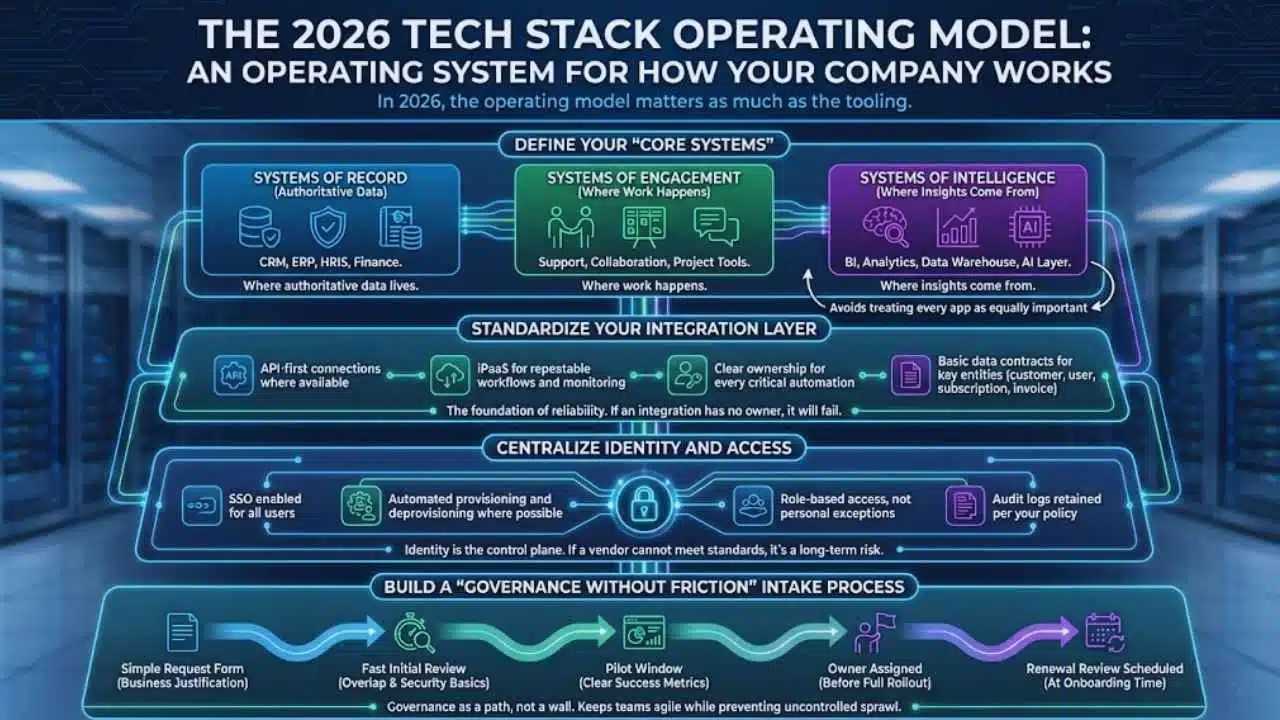
A tech stack is not just a list of tools. It is an operating system for how your company works. In 2026, the operating model matters as much as the tooling.
Define Your “Core Systems” (Systems Of Record / Engagement / Intelligence)
Start by grouping systems into three roles:
- Systems of Record: where authoritative data lives (CRM, ERP, HRIS, finance).
- Systems of Engagement: where work happens (support, collaboration, project tools).
- Systems of Intelligence: where insights come from (BI, analytics, data warehouse, AI layer).
This helps you avoid a common failure: treating every app as equally important.
Standardize Your Integration Layer
In 2026, integration is not optional. It is the foundation of reliability.
A modern integration posture typically includes:
- API-first connections where available
- iPaaS for repeatable workflows and monitoring
- Clear ownership for every critical automation
- Basic data contracts for key entities (customer, user, subscription, invoice)
If an integration has no owner, it will fail at the worst time.
Centralize Identity And Access
Identity is the control plane of your stack.
Minimum standards for any serious tool:
- SSO enabled for all users
- Automated provisioning and deprovisioning where possible
- Role-based access, not personal exceptions
- Audit logs retained per your policy
If a vendor cannot meet basic access standards, that tool becomes a long-term risk.
Build A “Governance Without Friction” Intake Process
Governance fails when it feels like a wall. It succeeds when it feels like a path.
A lightweight intake process can include:
- A simple request form with business justification
- A fast initial review for overlap and security basics
- A pilot window with clear success metrics
- An owner assigned before full rollout
- A renewal review scheduled at onboarding time
This keeps teams agile while preventing uncontrolled sprawl.
Step-By-Step: How To Rationalize And Modernize Your Stack
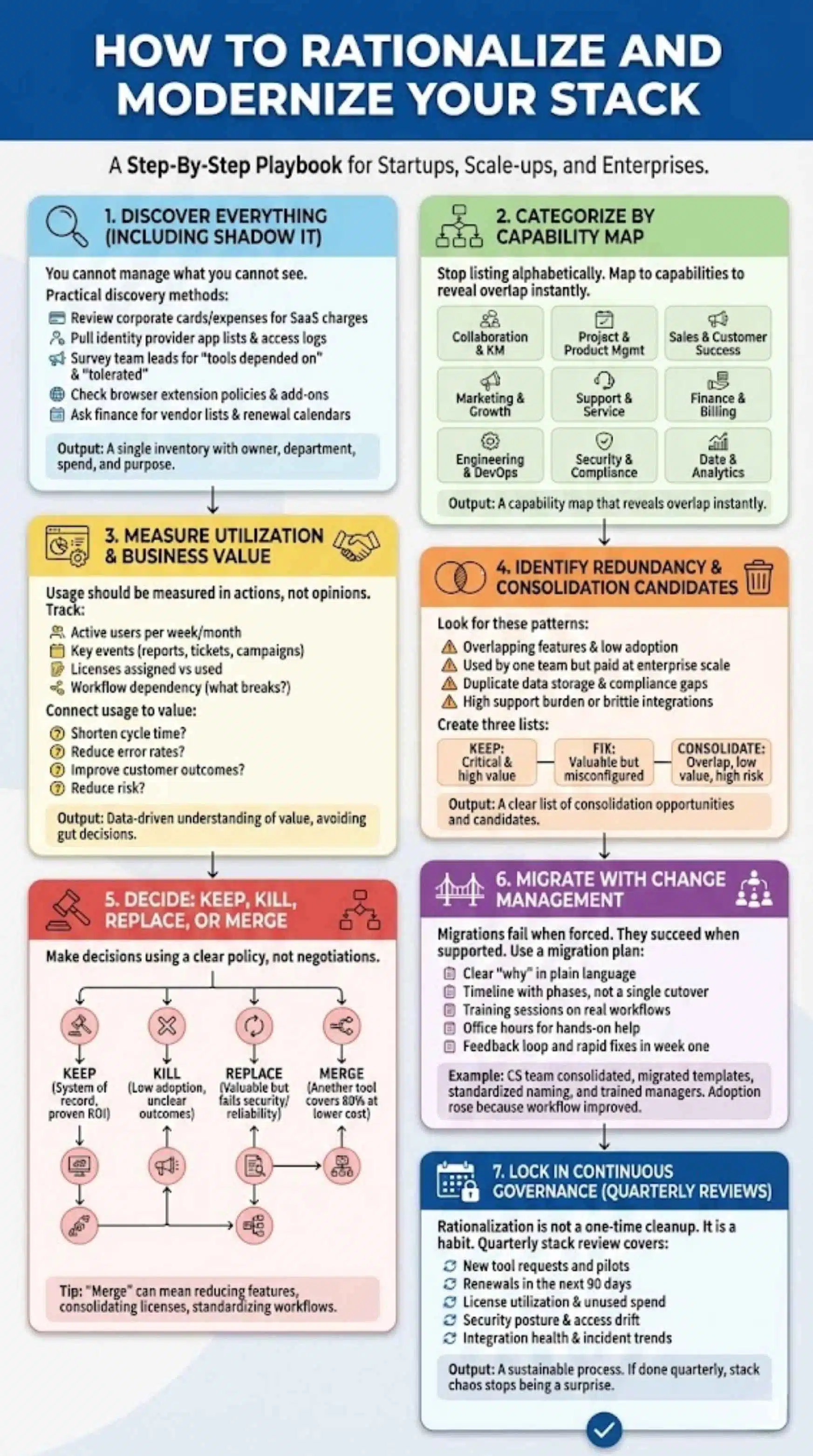
This is the playbook. It works for startups, scale-ups, and enterprises. The difference is how formal the process becomes.
Step 1 — Discover Everything (Including Shadow IT)
You cannot manage what you cannot see.
Practical discovery methods:
- Review expense reports and corporate cards for recurring SaaS charges
- Pull identity provider app lists and access logs
- Survey team leads for “tools we depend on” and “tools we tolerate”
- Check browser extension policies and common add-ons
- Ask finance for vendor lists and renewal calendars
Output: a single inventory with owner, department, spend, and purpose.
Step 2 — Categorize By Capability Map
Stop listing tools alphabetically. Map them to capabilities.
Example capability categories:
- Collaboration and knowledge management
- Project and product management
- Sales and customer success
- Marketing and growth
- Support and service
- Finance and billing
- Engineering and DevOps
- Security and compliance
- Data and analytics
Output: a capability map that reveals overlap instantly.
Step 3 — Measure Utilization And Business Value
Usage should be measured in actions, not opinions.
Track:
- Active users per week or month
- Key events (reports created, tickets resolved, campaigns shipped)
- Licenses assigned vs licenses used
- Workflow dependency (what breaks if the tool goes away)
Then connect usage to value:
- Does it shorten cycle time?
- Does it reduce error rates?
- Does it improve customer outcomes?
- Does it reduce risk?
This is where you avoid gut decisions.
Step 4 — Identify Redundancy And Consolidation Candidates
Look for these patterns:
- Tools with overlapping features and low adoption
- Tools used by one team but paid at enterprise scale
- Tools that duplicate data storage and create compliance gaps
- Tools with high support burden or brittle integrations
Create three lists:
- Keep: critical and high value
- Fix: valuable but misconfigured or under-adopted
- Consolidate: overlap, low value, or high risk
This is also a good point to revisit tech stack consolidation vs best-of-breed decisions using the scorecard, especially for expensive categories like collaboration, analytics, and security.
Step 5 — Decide: Keep, Kill, Replace, Or Merge
Make decisions using a clear policy, not negotiations.
A simple decision policy:
- Keep if it is a system of record or has proven ROI
- Kill if adoption is low and outcomes are unclear
- Replace if the tool is valuable but fails security or reliability needs
- Merge if another tool can cover 80 percent of needs with lower total cost
Tip: “Merge” does not always mean switching vendors. It can mean reducing features, consolidating licenses, and standardizing workflows.
Step 6 — Migrate With Change Management
Migrations fail when teams feel forced. They succeed when teams feel supported.
Use a migration plan that includes:
- A clear “why” written in plain language
- A timeline with phases, not a single cutover date
- Training sessions focused on real workflows
- Office hours for hands-on help
- A feedback loop and rapid fixes in week one
Real-world example:
A customer success team used two separate tools for notes and task management. They consolidated into one system, but only after they migrated templates, standardized naming, and trained managers to coach new habits. Adoption rose because the workflow became easier, not because the tool was mandated.
Step 7 — Lock In Continuous Governance (Quarterly Reviews)
Rationalization is not a one-time cleanup. It is a habit.
A quarterly stack review should cover:
- New tool requests and pilots
- Renewals in the next 90 days
- License utilization and unused spend
- Security posture and access drift
- Integration health and incident trends
If you do this quarterly, stack chaos stops being a surprise.
Metrics That Prove Your Stack Is Healthier
If you cannot prove improvement, you will lose momentum. Choose a small set of metrics that matter to leaders and teams.
Cost Metrics
Track:
- License utilization rate (used licenses ÷ paid licenses)
- Cost per active user by category
- Renewal risk (renewals without clear owner or ROI)
- Consolidation savings realized vs projected
Security Metrics
Track:
- Percent of apps behind SSO
- Percent of apps with automated provisioning
- Offboarding completion time
- High-risk apps storing sensitive data
Delivery Metrics
Track:
- Time to onboard a new tool (request to production use)
- Integration incident rate
- Time to fix broken automations
- Reporting latency for key dashboards
Adoption Metrics
Track:
- Weekly active users for core tools
- Completion of key workflows
- Support tickets by tool category
- Team sentiment surveys after major changes
Tip: Put these metrics in a simple monthly “stack health” report. Keep it short. Leaders will read it.
Common Tech Stack Patterns For 2026 (Examples)
Patterns help teams visualize what “good” looks like without copying someone else’s stack.
Lean Startup Stack (Minimal Vendors, Fast Iteration)
Traits:
- One collaboration suite
- A single CRM or lightweight customer database
- A simple analytics setup
- A small set of specialized tools only where they prove value
What makes it work:
- Strong ownership and minimal exceptions
- Fast pilots with clear success metrics
- Fewer “enterprise” features, more speed
Scaling Company Stack (Platform Core + Specialized Edge)
Traits:
- Core platform for identity, collaboration, and data
- Best-of-breed tools for differentiated workflows (product, growth, support)
- Standard iPaaS and data contracts to keep systems aligned
What makes it work:
- A clear capability map
- A quarterly rationalization cadence
- A shared scorecard for renewals and new tool requests
Enterprise Stack (Governance, Security, Procurement-Led Controls)
Traits:
- Centralized procurement and vendor management
- Formal security reviews and risk scoring
- Standard architecture patterns for integrations and data
- Strict access controls and logging requirements
What makes it work:
- Governance that is consistent, not slow
- Strong identity lifecycle management
- Clear exceptions process with deadlines and owners
Mistakes To Avoid (What Derails Unbundling Or Rebundling)
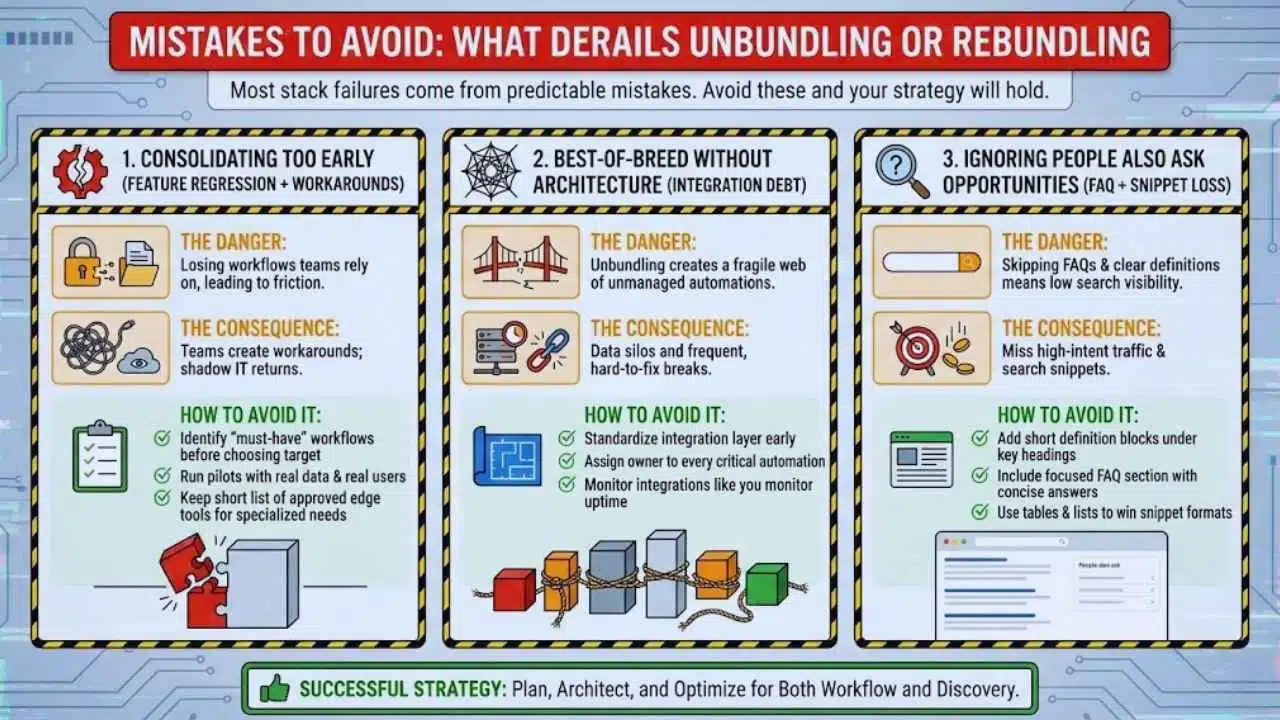
Most stack failures come from predictable mistakes. Avoid these and your strategy will hold.
Consolidating Too Early (Feature Regression + Workarounds)
The danger of rebundling is losing workflows that teams rely on. When that happens, teams create workarounds, and shadow IT returns.
How to avoid it:
- Identify “must-have” workflows before choosing a consolidation target
- Run pilots with real data and real users
- Keep a short list of approved edge tools for specialized needs
Best-Of-Breed Without Architecture (Integration Debt)
The danger of unbundling is a fragile web of automations.
How to avoid it:
- Standardize your integration layer early
- Assign an owner to every critical automation
- Monitor integrations like you monitor uptime
Ignoring People Also Ask Opportunities (FAQ + Snippet Loss)
In 2026, search visibility often comes from answering questions directly. If you skip FAQs and clear definitions, you miss high-intent traffic.
How to avoid it:
- Add short definition blocks under key headings
- Use tables and lists to win snippet formats
Final Words: The Practical Way To Manage Your Stack In 2026
In 2026, the winning move is not choosing unbundling forever or rebundling forever. It is building a system that supports both.
Rebundle your core to reduce complexity and risk. Unbundle at the edge where specialization produces real outcomes. Standardize identity, integrations, and governance so your stack stays stable as your company grows.
If you take one action this week, run the scorecard on your top 10 tools by spend. That single step will clarify your next moves in tech stack consolidation vs best-of-breed decisions and create momentum you can measure.