Google has broadened access to its AI-powered video creation tool, Google Vids, by making a free consumer version available globally. Until recently, this tool was only available to those subscribed to paid Workspace tiers such as Business and Enterprise, or to those using the Google AI Pro and Ultra plans. The company’s decision to open it up to a wider audience represents a major shift in strategy, as it signals Google’s intent to bring more people into its AI ecosystem.
Google Vids is integrated into the Google Workspace suite and is designed as a collaborative platform that helps users create videos by generating content from text-based scripts. A user can enter a script, choose a preferred voice style or tone, and the system automatically produces a structured video output.
With the free version, users gain access to essential tools including:
-
A variety of templates designed for personal, educational, and business use.
-
Font libraries that allow users to experiment with different design styles.
-
A collection of stock media assets that can be embedded into projects.
-
A timeline editor to arrange clips, images, and audio in sequence.
-
Real-time collaboration for teams working on the same video.
The free plan does not include the full suite of premium features. Users will not have access to AI-generated avatars, advanced voiceover syncing, or high-resolution exports. Nor will they benefit from automated filler-word removal or advanced background music matching. Despite this, the free tier still provides more than enough for individuals, students, small creators, and businesses who want to experiment with AI-powered video editing without a financial commitment.
Veo 3 Integration for Smarter Video Creation
Behind the scenes, Google Vids is supported by Veo 3, Google DeepMind’s text-to-video model capable of producing short video clips. Veo 3 is designed to transform images and text into motion sequences with synchronized audio, ranging from natural dialogue to ambient background sound. While the free version limits the scope of what users can do with Veo 3, it still provides a strong introduction to AI-generated media.
Premium subscribers continue to receive the full Veo 3 experience, including image-to-video transformations, custom avatars capable of narrating scripts, and extended editing options. For professional creators, this allows for polished outputs that can be directly used in commercial projects.
Why Google’s Free Rollout Matters
The release of Google Vids in a free version is significant for several reasons:
-
Wider Accessibility – By lowering the entry barrier, Google allows students, teachers, entrepreneurs, and hobbyists to engage with video editing in ways previously restricted to professionals with access to costly software.
-
Skill Development – Users can begin by working with templates, stock media, and AI-assisted editing tools. These foundational skills can later be applied to more advanced editing platforms.
-
Ecosystem Growth – The more users interact with Google’s AI tools, the more feedback and training data the company receives, which ultimately helps refine the accuracy and efficiency of its models.
-
Competitive Strategy – The move positions Google against platforms like Canva, Adobe Express, and CapCut, which already offer free or freemium video editing options. By leveraging the power of its Workspace suite and deep AI models, Google aims to gain a strong foothold in this competitive market.
In addition, Google is launching an educational series on YouTube called “Vids on Vids”, which will provide tutorials ranging from beginner tips to advanced techniques. This ensures that new users can quickly adapt to the platform and maximize their creative output.
Google Photos Gets Gemini-Powered Editing
Alongside the video editor, Google is rolling out new AI-driven photo editing tools in Google Photos, powered by the Gemini AI model. This feature is debuting first on the Pixel 10 smartphones in the United States, with global rollout expected later.
The new feature allows users to edit photos using conversational prompts. Instead of manually selecting filters, cropping tools, or retouching options, users can type or speak commands such as:
-
“Remove background distractions.”
-
“Change the sky to sunset colors.”
-
“Sharpen the subject and blur the rest.”
-
“Restore this old photograph.”
The Gemini AI model processes these requests and applies multiple edits simultaneously, saving time and reducing the technical effort required from users.
Transparency and Content Credentials
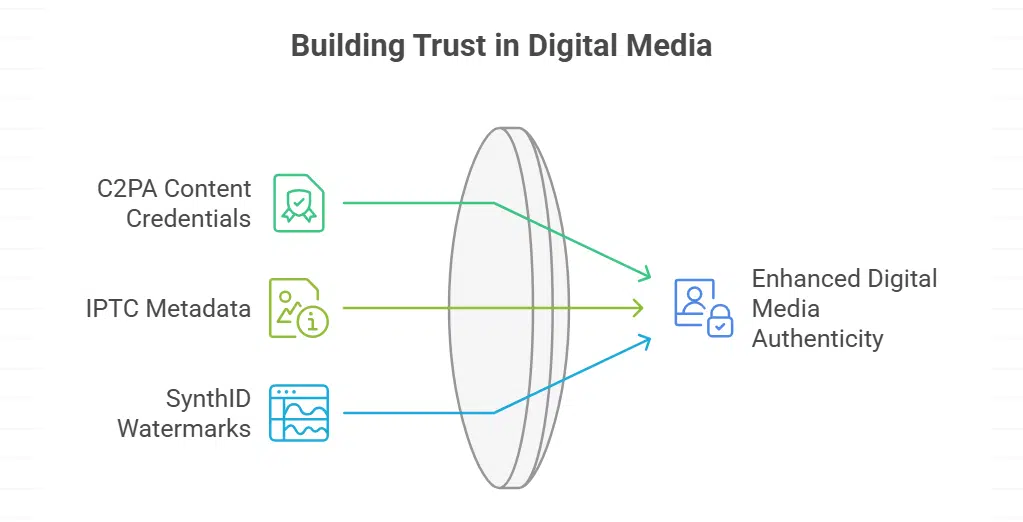
To address growing concerns about authenticity in digital media, Google is embedding C2PA Content Credentials into edited images. These credentials display information about how a photo was captured and what modifications were applied, including whether AI was involved.
In addition to C2PA, Photos will also use IPTC metadata and SynthID watermarks, ensuring that edits remain traceable. This move reflects Google’s commitment to responsible AI use, especially as generative editing tools become more powerful and widespread.
Availability and User Impact
-
Google Vids (Free): Accessible via browser to all Google users worldwide, with basic editing features included.
-
Google Vids (Premium): Available to Workspace subscribers, offering advanced AI avatars, full Veo 3 integration, and enhanced editing tools.
-
Google Photos Gemini Editing: Rolling out with Pixel 10 devices in the U.S. before expanding to other Android and iOS platforms.
These tools are expected to significantly change how everyday users approach media creation. For casual users, they provide a fun and accessible way to create content. For professionals, they offer an opportunity to speed up production workflows and experiment with AI in new creative directions.
The Bigger Picture
Google’s expansion of AI tools reflects a broader industry trend where AI becomes an everyday assistant rather than a premium luxury. By offering video editing and photo retouching features in accessible formats, Google is effectively democratizing creativity.
The company’s strategy also signals that AI tools are moving away from being experimental add-ons and are becoming core features of mainstream digital platforms. Whether through Workspace productivity apps or Pixel hardware, Google aims to ensure that AI assistance is woven into daily digital interactions.
The launch of a free version of Google Vids and the integration of Gemini-powered conversational editing in Google Photos highlight Google’s intent to make AI-driven creativity widely accessible. With templates, stock media, and basic video editing tools now free, millions of users can experiment with video creation without cost barriers. Meanwhile, Pixel 10 users in the U.S. will be the first to experience intuitive AI photo editing simply by describing the changes they want.
By combining accessibility with responsible practices like content credentials and watermarks, Google is positioning itself not only as a technology innovator but also as a leader in responsible and transparent AI deployment.