We have all been there: the glazing eyes, the stiff neck, and the exhaustion that sets in after hours of staring at a grid of faces on a screen. This phenomenon, known widely as “Zoom fatigue,” defined the remote work experience during the pandemic. But as we transition from 2D video calls to 3D immersive environments, a new challenge is emerging. The promise of the metaverse is to make remote interactions feel more natural, yet early adopters are finding that Zoom fatigue in the metaverse is not just possible—it can be even more physically demanding if not managed correctly.
The shift to virtual reality (VR) brings incredible opportunities for collaboration, but it also introduces new sensory inputs that our brains must process. While you might escape the pressure of constantly staring at your own reflection, you trade it for the weight of a headset and the potential for cybersickness. Understanding how to navigate this new digital terrain is essential for maintaining productivity and mental well-being in the next generation of work.
Understanding the Shift: From 2D Grid to 3D Immersion
The transition from flat video conferencing to volumetric, spatial computing is one of the most significant technological leaps in workplace communication. Instead of interpreting non-verbal cues from a small thumbnail image, employees can now share a virtual room, read body language through avatars, and manipulate 3D objects together. However, this deeper level of immersion requires your brain to work harder to “suspend disbelief,” constantly processing artificial depth and spatial positioning that doesn’t perfectly match the real world.
The Persistence of Fatigue in New Forms
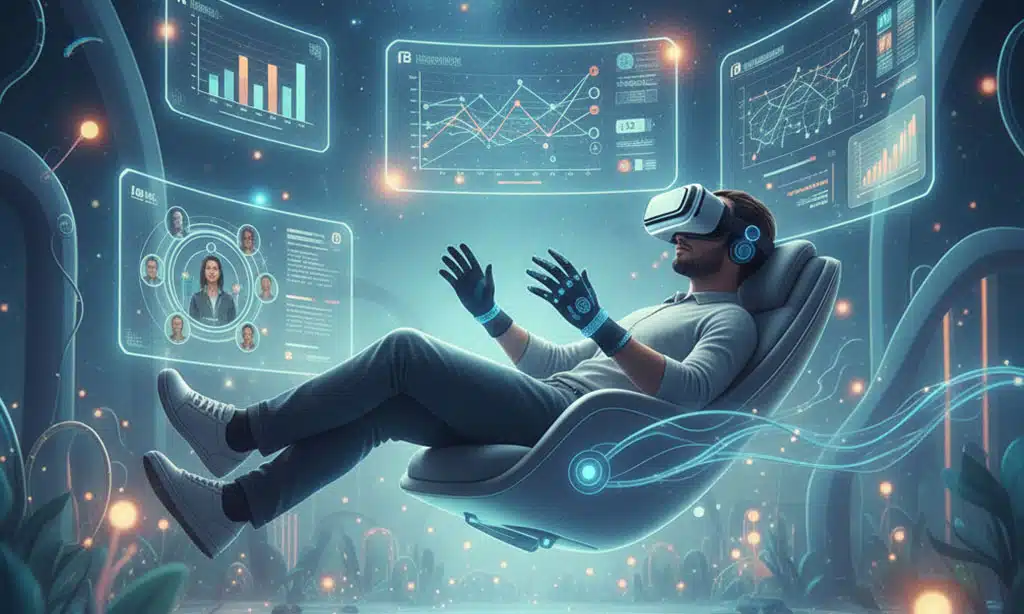
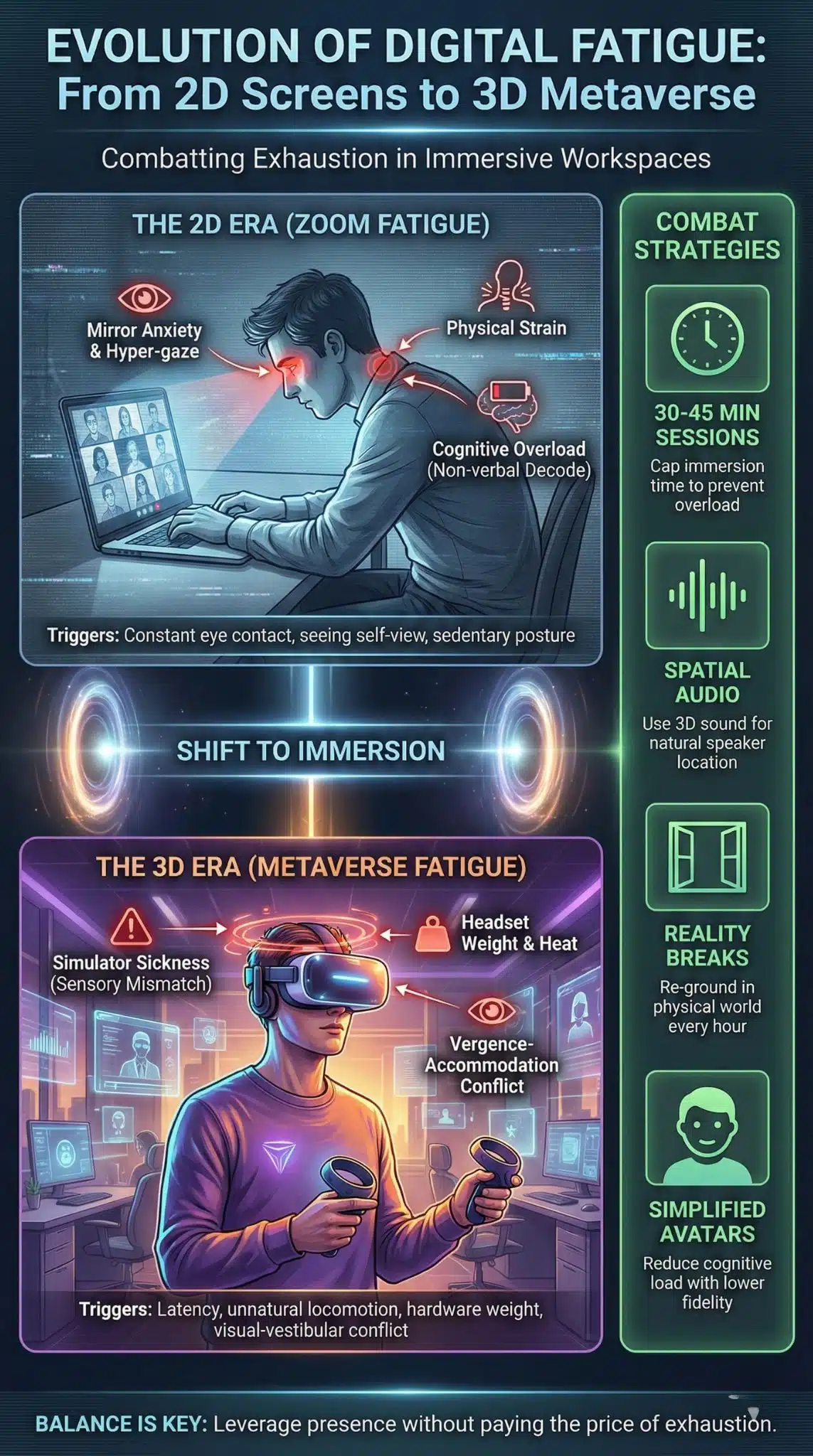
While the metaverse solves the “staring contest” problem of traditional video calls—where direct eye contact is unnaturally prolonged—it introduces physical barriers. Current headsets still have weight and heat issues that cause “form factor fatigue.” Furthermore, while your avatar might look fresh and engaged, your physical body may feel disconnected, leading to a dissonance that drains energy differently than a standard video call does.
Comparing Fatigue Triggers in 2D vs. 3D Environments
| Feature | 2D Video Calls (Zoom/Teams) | 3D Metaverse (VR/AR) |
| Visual Stress | “Hyper-gaze” (constant eye contact), seeing self-view. | Vergence-accommodation conflict (focusing eyes on a near screen that simulates depth). |
| Physical Strain | Sedentary posture, neck strain from looking down/forward. | Headset weight (neck torque), eye strain from lenses, motion sickness. |
| Social Pressure | Performance anxiety (always “on” camera). | Lower anxiety due to avatars, but higher cognitive load to navigate the interface. |
| Mobility | Tethered to the webcam frame. | tethered to a safe play area, but allows for hand gestures and head movement. |
The Science Behind Metaverse Fatigue
To combat Zoom fatigue in the metaverse, we must first understand the biological conflict happening when we put on a headset. Our brains rely on a synchronization between our visual system (what we see) and our vestibular system (inner ear balance). In a poorly optimized metaverse environment, your eyes might see movement—like “walking” down a virtual hallway—while your inner ear tells you that you are sitting still. This sensory mismatch is the primary driver of nausea and rapid exhaustion.
Cybersickness and Sensory Mismatch
This phenomenon is often called “simulator sickness.” It is distinct from general tiredness; it is a physiological rejection of the artificial environment. It happens most often when frame rates drop below 90Hz or when latency (lag) creates a delay between your head movement and the visual response. Even a delay of 20 milliseconds can be enough to trigger a subconscious “poison response” in the body, where the brain suspects hallucination due to toxicity and induces nausea.
Physiological Symptoms of Immersive Fatigue
| Symptom | Cause in VR/Metaverse | Prevention Strategy |
| Nausea (Cybersickness) | Sensory mismatch (visual motion vs. static body). | Use “teleportation” movement instead of smooth walking; enable “tunnel vision” during motion. |
| Dry/Irritated Eyes | Reduced blink rate while concentrating on screens. | Follow the 20-20-20 rule; use headsets with proper IPD (interpupillary distance) adjustment. |
| Headaches | Screen flicker, low resolution, or tight straps. | Ensure hardware runs at 90Hz+ refresh rate; limit sessions to 20-30 minutes. |
| Neck/Shoulder Pain | Heavy hardware shifting center of gravity. | Balance headset weight; use supportive seating that allows rotation. |
Strategies for Reducing Cognitive Load in VR
Reducing the mental effort required to participate in virtual spaces is the most effective way to prolong endurance and keep meetings productive. Cognitive load theory suggests that our working memory has limited capacity. In the metaverse, if a user has to spend 40% of their brainpower just figuring out how to pick up a virtual pen or keep their avatar from glitching, they have less energy left for the actual meeting content. Simplification is key.
Optimizing Avatar Interactions
One of the hidden benefits of the metaverse is the ability to use avatars to mask physical fatigue. In a video call, if you look tired, your colleagues see it. In the metaverse, your avatar maintains a professional appearance regardless of your physical state. This decoupling allows users to relax their facial muscles and posture without worrying about appearing “unengaged.” However, to prevent Zoom fatigue in the metaverse effectively, teams should standardize simple, low-fidelity avatars for daily syncs rather than hyper-realistic ones that can fall into the “uncanny valley” and creep users out.
Best Practices for VR Meeting Management
| Parameter | Recommendation | Why it Helps |
| Meeting Duration | Max 30-45 minutes. | Prevents headset heat buildup and eye strain accumulation. |
| Frequency | 1-2 immersive sessions per day max. | Allows the vestibular system to reset; prevents “digital hangover.” |
| Audio Format | Spatial Audio (3D Sound). | Helps the brain naturally locate speakers, reducing the effort needed to identify who is talking. |
| Breaks | 10-minute “reality breaks” between sessions. | Re-grounds the user in the physical world to reset depth perception. |
Designing Human-Centric Immersive Workspaces
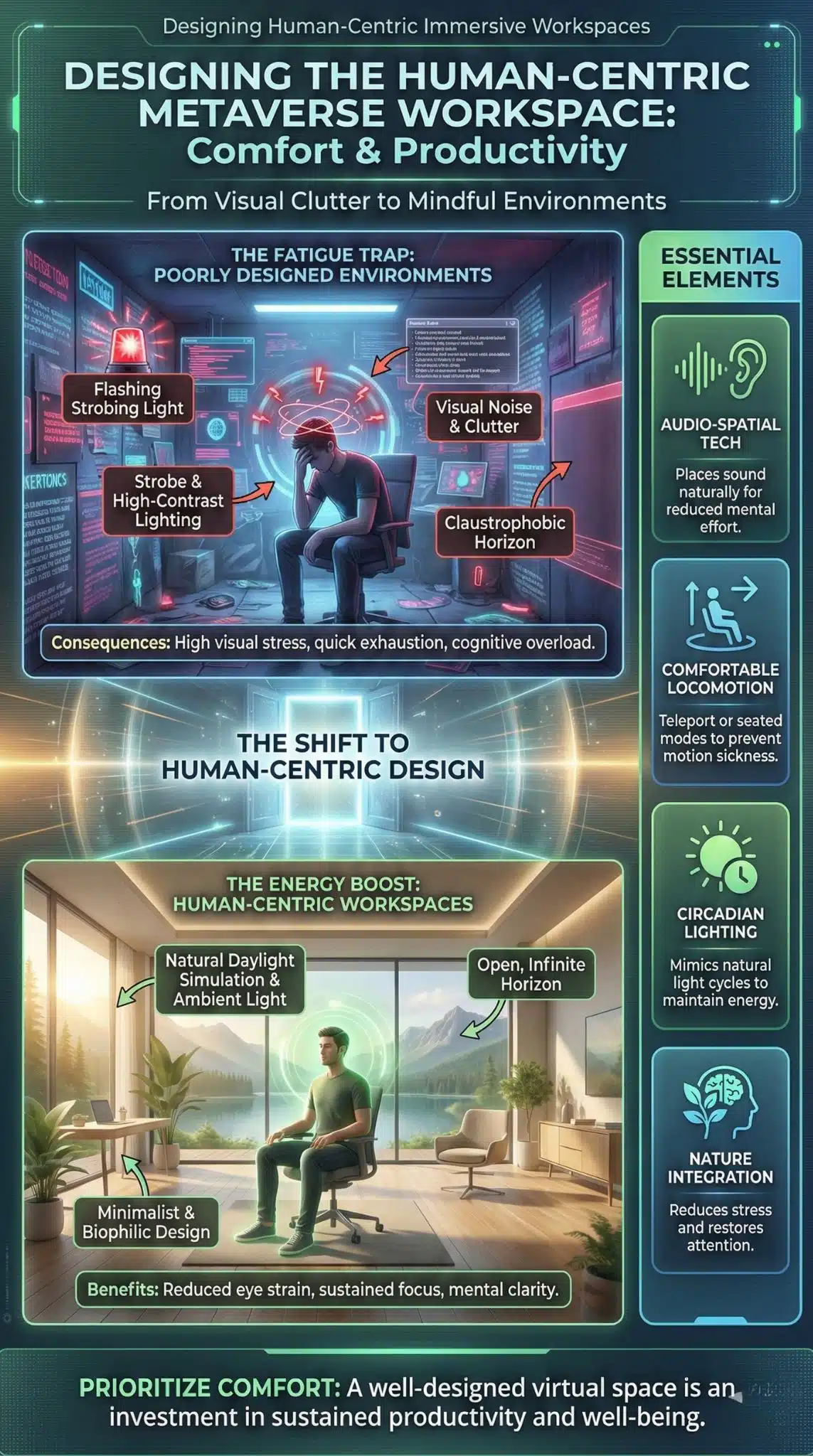
The design of the virtual room itself plays a massive role in how quickly fatigue sets in. Just as a cramped, windowless physical conference room is depressing, a poorly lit or texturally busy virtual room creates visual noise that tires the eyes. The best virtual workspaces mimic the open, airy feeling of nature or high-end architecture, utilizing “infinite” horizon lines to help the eyes relax rather than boxing them in with virtual walls.
The Role of Audio-Spatial Technology
Sound is often more important than visuals in preventing fatigue. In traditional video calls, all voices are compressed into a single mono or stereo stream, forcing your brain to perform “auditory scene analysis” to separate overlapping voices. Spatial audio in the metaverse places voices in specific locations (e.g., John is to your left, Sarah is to your right). This leverages natural human hearing instincts, allowing you to focus on a speaker with significantly less mental effort, thereby delaying the onset of fatigue.
Environmental Design Checklist for Metaverse Offices
| Design Element | Bad Practice (High Fatigue) | Good Practice (Low Fatigue) |
| Lighting | Strobe effects, neon colors, high contrast. | Natural daylight simulation, soft ambient lighting. |
| Locomotion | Joystick walking (gliding). | Teleportation points or seated-table configurations. |
| Visuals | High-clutter textures, floating text. | Clean lines, minimalist decor, clear focal points. |
| Horizon | Enclosed boxes (claustrophobic). | Open windows, outdoor settings, distant horizon lines. |
Final Thoughts
The metaverse offers a compelling solution to the isolation of remote work, but it is not a magic cure for digital burnout. In fact, without intentional design and disciplined usage, Zoom fatigue in the metaverse can become a significant hurdle to adoption. The key lies in treating immersive technology as a tool for specific, high-value collaborative moments—like brainstorming or design reviews—rather than a default replacement for every email or quick sync.
By respecting the biological limits of the human brain and optimizing our virtual environments for comfort rather than just novelty, we can harness the power of presence without paying the price of exhaustion. As hardware gets lighter and resolution gets higher, the friction will decrease, but the discipline of managing our digital energy will always remain a human responsibility.