
Finding the right keywords is the difference between a website that collects dust and one that drives revenue. In 2026, the SEO landscape is more competitive than ever, making your choice of seo tools for keyword research critical for staying ahead.
Keyword research is the process of discovering the specific terms and phrases people type into search engines to find information, products, or services. It allows you to align your content strategy with actual user demand rather than guessing what might work.
In this guide, you will get:
- Quick Picks: A “decision in 30 seconds” breakdown by use case.
- Free vs. Paid Comparison: A detailed look at what you get for your money.
- Tool-by-Tool Breakdown: Deep dives into the 12 best SEO tools currently dominating the market.
Quick Picks (Best Tools By Use Case)

Choosing a tool depends entirely on your current goals and budget. If you need a fast recommendation to get started, here is our expert selection based on specific needs.
Best Free Option (First-Party Data)
Google Search Console + Keyword Planner
For those on a $0 budget, this is the essential “free stack.” Search Console tells you what you’re already ranking for, while Keyword Planner provides raw data on what people are searching for. Together, they offer the most accurate directional data available because it comes directly from the source: Google.
Best All-In-One Paid Suite
Semrush
If you want one tool to rule them all, Semrush is it. It excels in keyword depth, providing a massive database with high-level search intent classification (Informational, Navigational, Commercial, Transactional). Its “Keyword Magic Tool” and competitive gap analysis make it the gold standard for full-funnel marketing workflows.
Best For SEO Pros
Ahrefs
Ahrefs is the favorite of technical SEOs and power users. While Semrush is great for broad marketing, Ahrefs offers a slightly cleaner interface for SERP (Search Engine Results Page) analysis and click metrics. Their “Keyword Difficulty” (KD) score is famously reliable for predicting how hard it will be to rank on page one.
Best For Question Keywords
AnswerThePublic
When you need to know exactly what questions your audience is asking, AnswerThePublic is unbeatable. It visualizes “Who, What, Where, When, and Why” queries in a beautiful wheel, making it a powerhouse for brainstorming blog topics and FAQ sections.
Best For Low-Competition Long-Tails
KWFinder
For niche sites and small businesses, finding “hidden gems” is the goal. KWFinder specializes in discovering long-tail keywords with low competition. Its interface is incredibly intuitive, making it the best choice for users who want to find easy-to-rank terms without the steep learning curve of larger suites.
Free Vs. Paid Keyword Research Tools (What You Actually Get)
The gap between free and paid tools has widened as search engines hide more data behind “not provided” walls. While free tools are great for starting, paid tools are built for scaling.
Free vs. Paid
| Feature | Free Tools (GSC/Planner) | Paid Tools (Semrush/Ahrefs) |
| Data Depth | Limited to your site or broad ranges | Millions of keywords across any site |
| Competitor Insights | Minimal (Manual only) | Deep (See every keyword they rank for) |
| Usage Limits | Usually unlimited but restricted data | Monthly quotas; varies by tier |
| Workflow | Clunky; requires manual merging | Streamlined; lists and clusters built-in |
| Exporting | CSV/Sheets only | Advanced PDF reporting and APIs |
| SERP Tracking | Static (Historical only) | Daily/Weekly rank tracking alerts |
Where Free Tools Shine
Free tools are unbeatable for directional accuracy. Because Google Search Console uses your actual site data, it is 100% accurate for the terms you currently trigger. Google Trends is another free powerhouse for trend-spotting; it helps you see if a topic is rising in popularity or dying out before you invest in content.
Where Paid Tools Win
Paid tools win on competitor intelligence. You can plug in a competitor’s URL and see exactly which keywords drive their traffic. They also provide scalable workflows—features like keyword clustering and automated difficulty scoring save dozens of hours that would otherwise be spent in spreadsheets.
When To Upgrade
You should consider moving to a paid tool when:
- Scale: You are managing more than 20–30 pages and need to track positions daily.
- Team Reporting: You need professional, automated reports for clients or stakeholders.
- Competitor Monitoring: You need to react quickly to competitors’ new content or ranking shifts.
How To Choose The Right Keyword Research Tool
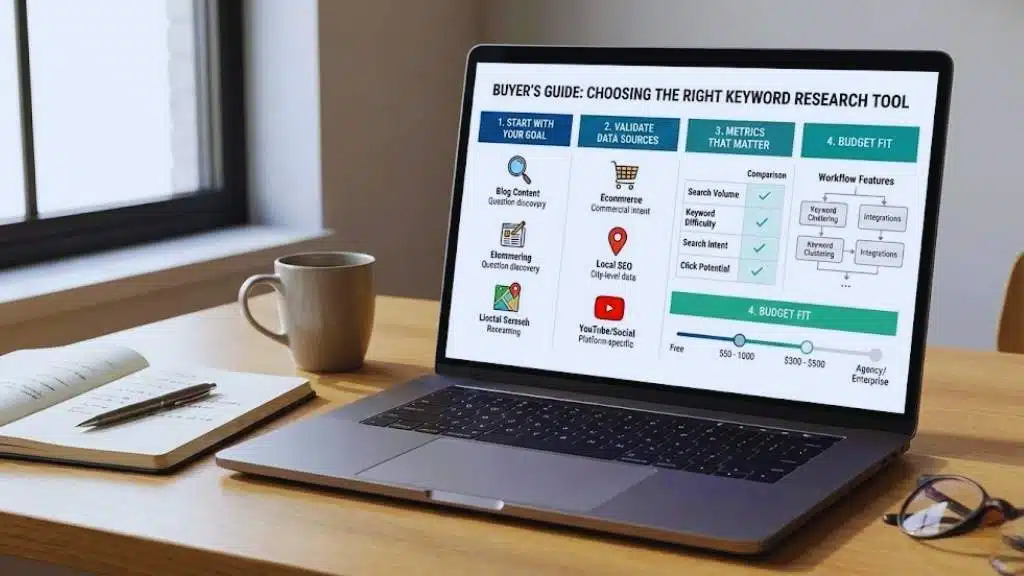
With so many options, the “best” tool is the one that fits your specific business model. Follow this buyer’s guide to ensure you don’t overpay for features you won’t use.
Start With Your Goal
- Blog Content: Focus on question discovery and long-tail tools (AnswerThePublic, KWFinder).
- Ecommerce: Look for tools with high commercial intent filtering and product-based keyword volume (Semrush, KeywordTool.io).
- Local SEO: You need tools that can drill down to the city or zip code level (Google Keyword Planner, Moz).
- YouTube/Social: Look for platform-specific scrapers (KeywordTool.io).
Validate Data Sources And Limitations
Not all “Search Volume” is created equal. Google Keyword Planner often gives volume ranges (e.g., 1k–10k) rather than exact numbers. Third-party tools use clickstream data and sampling to estimate volume. Be aware that regional variation can be significant—ensure your tool allows for country-level or city-level filtering.
Metrics That Matter (And What To Ignore)
- Search Volume: Important, but don’t chase it blindly. 100 high-intent visits are better than 10,000 “bouncing” visits.
- Keyword Difficulty: Use this as a guide, not a rule. If your site has high authority, you can ignore “high difficulty” labels.
- Search Intent: This is the most critical metric. Does the user want to buy, learn, or find a specific site?
- Click Potential: Some keywords have high volume but low clicks because Google answers the query in a “featured snippet” (zero-click searches).
Workflow Features That Save Time
Look for tools that offer Keyword Clustering. This allows you to group similar keywords into a single “topic,” so you don’t write five different articles for essentially the same search query. Integration with tools like Google Docs or WordPress is also a major plus for content creators.
Budget Fit
- Free: Best for hobbyists and side projects.
- Low-Cost ($10–$50/mo): Perfect for freelancers and small niche sites (Keywords Everywhere, KWFinder).
- Mid-Tier ($100–$250/mo): The sweet spot for growing businesses and in-house teams (Semrush, Ahrefs).
- Agency/Enterprise ($500+/mo): Required for high-volume tracking and multiple user seats.
12 Best SEO Tools For Keyword Research (Free Vs Paid)
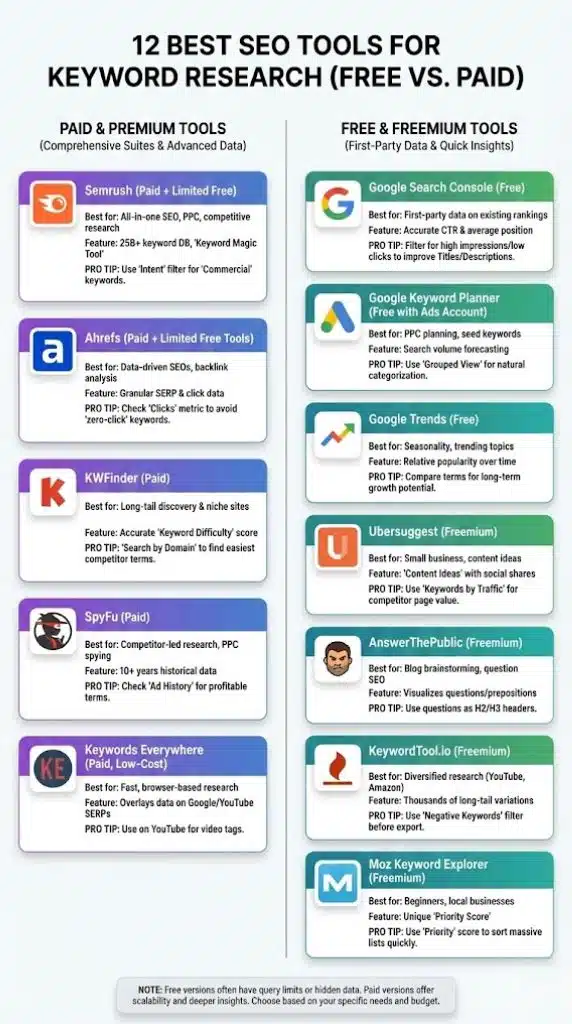
1. Semrush (Paid + Limited Free)
Semrush is widely considered the most comprehensive digital marketing suite on the market. Its Keyword Magic Tool offers a database of over 25 billion keywords, categorized by intent and difficulty.
- Best for: All-in-one SEO, PPC, and competitive research.
- Standout Features: Automatic keyword clustering and “Keyword Gap” analysis to find what your competitors are ranking for that you aren’t.
- Limitations: The interface can be overwhelming for beginners; the price point is on the higher end.
- Free vs. Paid: Free version allows 10 searches per day with limited results.
- Pro Tip: Use the “Intent” filter to specifically find “Commercial” keywords when looking for product-review ideas.
2. Ahrefs (Paid + Limited Free Tools)
Ahrefs is the tool of choice for data-driven SEOs. It provides granular SERP analysis, showing exactly how many backlinks you need to rank for a specific term.
- Best for: SEO pros, link builders, and backlink analysis.
- Standout Features: “Parent Topic” identification helps you target the broad topic that encompasses several smaller keywords.
- Limitations: No longer offers a cheap trial; the credit-based pricing model can be restrictive for power users.
- Free vs. Paid: Offers some free tools (like a limited keyword generator) and free access to your own site’s data via Ahrefs Webmaster Tools.
- Pro Tip: Look at the “Clicks” metric to avoid “zero-click” keywords where Google’s AI answers the question on the SERP.
3. Google Search Console (Free)
This is the only tool that gives you first-party data directly from Google. It shows you which queries are actually bringing people to your site.
- Best for: Finding “low-hanging fruit” (keywords where you rank on page 2).
- Standout Features: Accurate CTR (Click-Through Rate) and average position data.
- Limitations: Doesn’t provide data for keywords you don’t rank for yet.
- Free vs. Paid: 100% Free.
- Pro Tip: Filter for queries with high impressions but low clicks—these are pages that need a better Meta Title or Description to win the click.
4. Google Keyword Planner (Free)
Originally built for Google Ads, this tool provides search volume and forecasting data straight from the source.
- Best for: PPC planning and finding high-volume “seed” keywords.
- Standout Features: “Top of Page Bid” estimates help you identify the commercial value of a keyword.
- Limitations: Volume data is often grouped into broad ranges unless you are running active ads.
- Free vs. Paid: Free, but requires a Google Ads account.
- Pro Tip: Use the “Grouped View” to see how Google naturally categorizes keywords within your niche.
5. Google Trends (Free)
Trends shows you the relative popularity of search terms over time. It’s essential for seasonal businesses.
- Best for: Seasonality and identifying trending topics.
- Standout Features: “Related Queries” and “Breakout” topics.
- Limitations: Doesn’t give exact search volume numbers.
- Free vs. Paid: 100% Free.
- Pro Tip: Compare two keywords to see which one has more long-term growth potential before choosing a primary target.
6. Keywords Everywhere (Paid, Low-Cost)
This browser extension overlays keyword data directly onto Google, YouTube, and Amazon search results.
- Best for: Fast, on-the-fly research without leaving your browser.
- Standout Features: “People Also Search For” and “Related Keywords” widgets on the Google SERP.
- Limitations: Data is less deep than full suites like Semrush.
- Free vs. Paid: Uses a “pay-as-you-go” credit system that is very affordable ($15 for 100,000 credits).
- Pro Tip: Use it while browsing YouTube to find video tags and high-volume video topics.
7. Moz Keyword Explorer (Freemium)
Moz offers a very beginner-friendly interface with unique metrics like “Priority Score,” which balances volume, difficulty, and your own custom “Importance” score.
- Best for: SEO beginners and local businesses.
- Standout Features: The “Organic CTR” estimate is very accurate.
- Limitations: Smaller keyword database compared to Semrush or Ahrefs.
- Free vs. Paid: 10 free queries per month.
- Pro Tip: Use the “Priority” score to quickly sort through massive lists and find the keywords most worth your time.
8. KWFinder (Paid)
Part of the Mangools suite, KWFinder focuses on ease of use and finding long-tail keywords.
- Best for: Long-tail discovery and niche site owners.
- Standout Features: Very accurate “Keyword Difficulty” score for low-competition terms.
- Limitations: Not built for large-scale enterprise competitor analysis.
- Free vs. Paid: Limited free trial; paid plans are cheaper than the “big two” (Ahrefs/Semrush).
- Pro Tip: Use the “Search by Domain” feature to find the “easiest” keywords your competitors are currently ranking for.
9. SpyFu (Paid)
SpyFu’s unique selling point is its historical data on what your competitors have done in both SEO and PPC over the last decade.
- Best for: Competitor-led research and PPC spying.
- Standout Features: “Kombat” mode shows keywords where all your competitors rank, but you don’t.
- Limitations: Database is smaller outside of major Western markets.
- Free vs. Paid: Limited free version; paid version is very competitively priced.
- Pro Tip: Look at a competitor’s “Ad History” to see which keywords they’ve spent money on for years—those are almost certainly their most profitable terms.
10. Ubersuggest (Freemium)
Owned by Neil Patel, Ubersuggest is an entry-level SEO tool that combines keyword research with content ideas.
- Best for: Small business owners and content creators.
- Standout Features: “Content Ideas” section shows which pages are getting the most social shares for a keyword.
- Limitations: Data accuracy can sometimes lag behind premium tools.
- Free vs. Paid: Very generous free tier; low-cost “lifetime” deal often available.
- Pro Tip: Use the “Keywords by Traffic” report to see which specific pages on a competitor’s site are driving the most value.
11. AnswerThePublic (Freemium)
This tool scrapes “Autocomplete” data to find the questions people are asking around a topic.
- Best for: Blog brainstorming and question-based SEO.
- Standout Features: Visual data maps of “Questions,” “Prepositions,” and “Comparisons.”
- Limitations: No keyword volume or difficulty data in the free version.
- Free vs. Paid: 3 free searches per day.
- Pro Tip: Use these questions as H2 or H3 headers in your blog posts to win Featured Snippets.
12. KeywordTool.io (Freemium)
This is the ultimate tool for autocomplete research across multiple platforms beyond just Google.
- Best for: Diversified keyword research (YouTube, Amazon, App Store).
- Standout Features: Generates thousands of long-tail terms by appending every letter of the alphabet to your seed keyword.
- Limitations: The free version hides all volume and CPC data.
- Free vs. Paid: Free for keyword lists; paid for metrics.
- Pro Tip: Use the “Negative Keywords” feature to filter out irrelevant terms before you export your list.
Best Tool By Scenario
| Scenario | Recommended Tool |
| Absolute Beginner | Ubersuggest or Moz |
| SEO Agency | Semrush or Ahrefs |
| Ecommerce Site | Semrush or KeywordTool.io |
| Local Business | Google Keyword Planner |
| YouTube Creator | KeywordTool.io or Keywords Everywhere |
| Content Marketer | AnswerThePublic |
Step-By-Step Keyword Research Workflow (Using Any Tool)
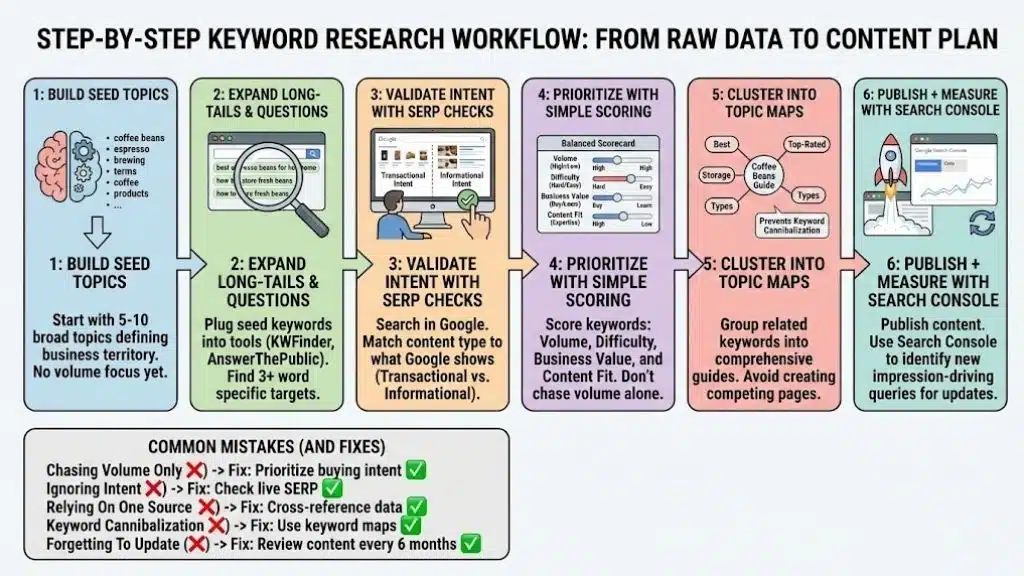
Tools are only as good as the process you apply to them. Here is a universal 6-step workflow to turn raw data into a content plan.
Step 1: Build Seed Topics
Start with 5–10 broad “seed” topics that define your business. If you sell coffee beans, your seeds might be “espresso beans,” “light roast,” and “coffee brewing guides.” Don’t worry about volume yet; just define your territory.
Step 2: Expand Long-Tails And Questions
Plug your seed keywords into a tool like KWFinder or AnswerThePublic. Look for longer phrases (3+ words). For “espresso beans,” you might find “best espresso beans for home machines” or “how to store espresso beans for freshness.” These are your specific article targets.
Step 3: Validate Intent With SERP Checks
Before you write, search the keyword in Google.
- If the results are all products, the intent is Transactional (don’t write a blog post; make a product page).
- If the results are all “How-to” guides, the intent is Informational.
- If your content doesn’t match the intent Google is already showing, you will never rank.
Step 4: Prioritize With A Simple Scoring Model
Don’t just pick the highest volume keyword. Use a simple score:
- Volume: Is there enough traffic?
- Difficulty: Can I actually rank?
- Business Value: If I rank #1, will this person actually buy from me?
- Content Fit: Does this topic match my brand’s expertise?
Step 5: Cluster Into Topic Maps
Group related keywords together. Instead of writing one post for “best coffee beans” and another for “top rated coffee beans,” group them into one comprehensive guide. This prevents keyword cannibalization (where your own pages compete with each other).
Step 6: Publish + Measure With Search Console
Once the content is live, use Google Search Console to monitor it. Look for the queries that are driving impressions but not clicks. This is your signal to update the post with those specific terms to capture more traffic.
Common Mistakes (And Fixes)
- Chasing Volume Only: High volume often means high competition and low intent.
- Fix: Prioritize keywords with clear “buying” intent, even if the volume is lower.
- Ignoring Intent: Writing a blog post for a keyword where Google only shows product pages.
- Fix: Always check the live SERP before starting a draft.
- Relying On One Data Source: No tool is 100% accurate.
- Fix: Cross-reference “Volume” between Google Keyword Planner and a tool like Semrush.
- Keyword Cannibalization: Creating multiple pages for the same keyword.
- Fix: Use a keyword map to ensure every page on your site has a unique primary keyword target.
- Forgetting To Update: Keyword trends change.
- Fix: Review your top-performing content every 6 months to ensure it still targets relevant terms.
Final Thoughts
Choosing the right keyword research tool isn’t about finding the one with the most features; it’s about finding the one that fits your current workflow and growth stage. If you are just starting out, don’t feel pressured to invest in a $120/month subscription. Mastering the “free stack” of Google Search Console and Keyword Planner will teach you the fundamentals of search intent and data interpretation that no paid tool can replace.
However, as your site grows, your time becomes your most valuable asset. Transitioning to a powerhouse like Semrush or Ahrefs allows you to stop guessing and start executing with precision. These tools provide the competitive intelligence and automated clustering necessary to scale a content engine without burning out.
The most successful SEOs in 2026 are those who combine these data-driven insights with high-quality, human-centric content. Use these tools to find the path, but use your unique expertise to walk it. No matter which tool you choose, stay focused on the user’s needs, and the rankings will follow.