In 2026, the global freelance economy has reached an unprecedented scale. Professionals are increasingly moving away from traditional employment to embrace the flexibility of solopreneurship. However, with this freedom comes the significant responsibility of managing complex financial records. Finding the best accounting software for freelancers is no longer just about tracking income. It is about ensuring tax compliance, managing international payments, and maintaining a clear view of your business health in an increasingly digital world.
The right platform acts as a digital CFO. It automates the tedious tasks of receipt categorization and invoice follow-ups. For the modern freelancer, time is literally money. Every hour spent wrestling with spreadsheets is an hour not spent on billable client work. By implementing a professional accounting solution, you create a foundation for growth and protect yourself from the stress of tax season.
Here’s a quick overview:
| Software | Best For | Key Smart Feature | Monthly Starting Price |
| FreshBooks | Service Providers | Automated Proposals | $19.00 |
| QuickBooks Solopreneur | Tax Compliance | Real-time Tax Estimation | $20.00 |
| Xero | Scaling Businesses | Hubdoc Integration | $15.00 |
| Wave | Budget-Conscious | Zero-Fee Bookkeeping | $0.00 |
| Bonsai | All-in-One Users | Project & Finance Sync | $25.00 |
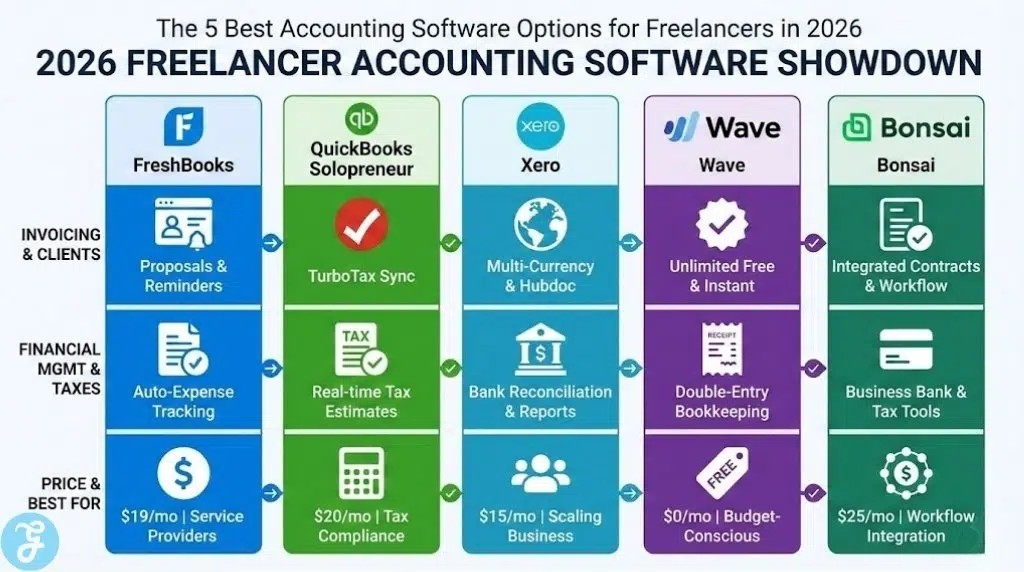
5 Best Accounting Software Options for Freelancers in 2026
Choosing the right tool requires an understanding of your specific business workflow. Whether you prioritize low costs or high automation, the following platforms represent the best accounting software for freelancers available today. They have been selected for their reliability, ease of use, and advanced feature sets designed for the self-employed.
1. FreshBooks
FreshBooks has long been a favorite for service-based freelancers. In 2026, it continues to lead the pack due to its incredibly intuitive design. It focuses on the “client-facing” side of accounting. This includes professional proposals, automated late payment reminders, and sleek invoices that accept credit card payments. This focus makes it one of the best accounting software for freelancers who want to present a polished image to their clients.
The platform also offers robust time tracking. This is essential for those who bill by the hour. You can log your time directly against a project and then pull those hours into an invoice with one click. FreshBooks also features an automated expense tracker. By linking your bank account, the software categorizes your spending using machine learning. This reduces the manual labor involved in monthly bookkeeping.
Best For: Freelance writers, designers, and consultants who need high-quality invoicing and time tracking.
Pros:
- Ease of Use: The interface is clean and requires no prior accounting knowledge.
- Client Portal: Clients can view invoices and make payments in a secure online environment.
- Automated Billing: Set up recurring invoices for long-term retainer clients.
Cons:
- The lower-priced plans limit the number of active clients you can have.
2. QuickBooks Solopreneur
QuickBooks is the most recognized name in accounting for a reason. Their Solopreneur plan is specifically built for the self-employed individual. In 2026, its standout feature is the real-time tax estimation tool. As you categorize your income and expenses, the software calculates exactly how much you should set aside for quarterly taxes. This proactive approach prevents a massive surprise when tax season arrives.
Because QuickBooks is the industry standard, almost every professional accountant knows how to use it. This makes it a great choice if you plan on hiring a CPA in the future. It also integrates perfectly with TurboTax. This allows you to export your data directly into your tax return. For many, this integration alone makes it the best accounting software for freelancers concerned with federal and state compliance.
Best For: Freelancers who want the most powerful tax features and plan to work with an accountant.
Pros:
- Tax Integration: Seamless data transfer to TurboTax for easy filing.
- Mileage Tracking: Automatically logs business trips using your phone’s GPS.
- Bank Sync: Reliable connections with thousands of financial institutions worldwide.
Cons:
-
The interface can be complex and may have a steeper learning curve for beginners.
3. Xero
Xero is often cited as the top alternative to QuickBooks. It is known for its “cloud-first” approach and beautiful reporting. In 2026, Xero is a top choice for freelancers who are growing their business. It allows for an unlimited number of users. This is perfect if you eventually hire a virtual assistant or a bookkeeper. Its Hubdoc integration allows you to snap photos of receipts and have the data extracted automatically.
The platform excels at bank reconciliation. It provides a side-by-side view of your bank statement and your Xero records. This makes it easy to confirm that your books are accurate. For those doing international work, Xero offers excellent multi-currency support. This ensures that you are always seeing your true profit regardless of the currency your client pays in. This flexibility cements its place among the best accounting software for freelancers.
Best For: Tech-savvy freelancers and those who manage multiple currencies or a small team.
Pros:
- Collaboration: Easy to share access with an accountant or business partner.
- Reporting: Detailed financial reports that give you deep insights into your cash flow.
- App Marketplace: Connects with over 1,000 third-party apps for additional functionality.
Cons:
- The “Early” plan is quite restrictive regarding the number of invoices you can send.
4. Wave
Wave is a unique entry in this list because its core accounting and invoicing features are free. This makes it an incredible value for new freelancers. In 2026, Wave remains the best accounting software for freelancers on a tight budget. They generate revenue through payment processing fees and payroll services. This means you can manage your bookkeeping, track expenses, and send unlimited professional invoices without a monthly subscription fee.
Despite being free, the software is surprisingly powerful. It offers a double-entry accounting system that is technically sound. You can link your bank accounts to import transactions automatically. The mobile app is also highly rated. It allows you to scan receipts and manage your business from anywhere. If you are just starting your freelance journey, Wave provides all the professional tools you need without the overhead.
Best For: New freelancers, those with simple financial needs, and budget-conscious solopreneurs.
Pros:
- Cost: The accounting and invoicing software is completely free.
- Unlimited Invoicing: There are no limits on the number of clients or invoices.
- Simple Setup: You can have your account running and send an invoice in minutes.
Cons:
- Customer support is limited for users on the free tier.
5. Bonsai
Bonsai is more than just accounting software. It is a full business management suite designed specifically for freelancers. In 2026, it is highly valued for its ability to link every part of the freelance lifecycle. You can create a contract, have the client sign it electronically, track your time on the project, and then generate an invoice automatically. All of this data feeds directly into your accounting dashboard.
This “all-in-one” approach saves a massive amount of time. You do not have to copy data between different apps. Bonsai also offers a dedicated business bank account for its users. This helps keep your personal and business finances separate from day one. By combining project management with bookkeeping, Bonsai offers a unique value proposition. It is often the best accounting software for freelancers who want to manage their entire business from a single tab.
Best For: High-volume freelancers who want to streamline their entire workflow in one app.
Pros:
- Integrated Workflow: Connects contracts, projects, and payments seamlessly.
- Tax Tools: Includes a tax assistant that identifies potential write-offs.
- Professional Look: Everything from the contracts to the invoices looks high-end.
Cons:
- The monthly price is higher than that of standalone accounting apps.
How to Choose the Best Accounting Software for Freelancers
Selecting the right platform is a strategic decision for your business. You should consider your current volume of work and your plans for the future. Use the following guidelines to find your perfect match.
-
[ ] Bank Feed Connectivity: Does the software link reliably to your specific bank?
-
[ ] Mobile Functionality: Can you manage your finances and scan receipts from your phone?
-
[ ] Tax Estimation: Does the tool provide real-time updates on what you owe the government?
-
[ ] Payment Integration: Does it connect with processors like Stripe or PayPal?
Top Accounting Solutions At A Glance
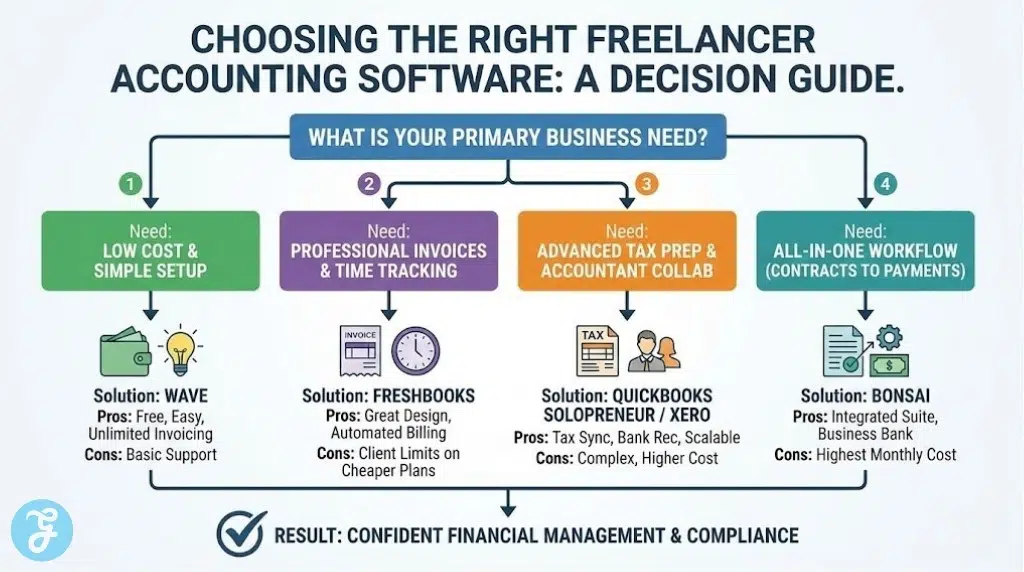
If you can’t make up your mind then here are some suggestions to get you started:
-
Best for Invoicing: FreshBooks (Easiest interface for creating and tracking professional invoices).
-
Best for Tax Preparation: QuickBooks Solopreneur (Directly syncs with TurboTax for seamless filing).
-
Best for Mobile Use: Wave (Excellent free mobile app for scanning receipts on the go).
-
Best for Collaborative Work: Xero (Great for freelancers who occasionally work with contractors or an accountant).
-
Best for Workflow Integration: Bonsai (Combines contracts, time tracking, and accounting in one place).
Still confused?
| Freelance Type | Primary Need | Best Match |
| New Starter | Low Overhead | Wave |
| Creative Pro | High-End Invoices | FreshBooks |
| High Earner | Expert Tax Prep | QuickBooks |
| Global Nomad | Multi-Currency | Xero |
| Project Focused | Workflow Sync | Bonsai |
Wrap-Up: Building a Financial Foundation
The best accounting software for freelancers provides more than just a place to store numbers. It provides clarity and confidence. By automating your bookkeeping in 2026, you free up mental space to focus on the creative and strategic work that actually grows your income. Whether you choose the power of QuickBooks or the simplicity of FreshBooks, the goal is the same. You want to spend less time on admin and more time on the work you love.