Have you ever dreamed of sharing your skills with the world, but felt stuck on where to start? Many people face this hurdle; they have great ideas for teaching, yet building an online course seems like a big puzzle with missing pieces. You might worry about tech glitches, boring lessons, or no one signing up. It’s common to feel overwhelmed by the steps needed to turn your knowledge into a thriving course.
Did you know that online courses generated over $300 billion in revenue last year alone? This shows the huge demand for digital learning. Our guide breaks down how to Build And Launch An Online Course, step by step, from picking your audience to promoting your work.
We’ll make it easy and fun, like chatting with a friend over coffee. Ready to jump in?
Define Your Goals and Objectives
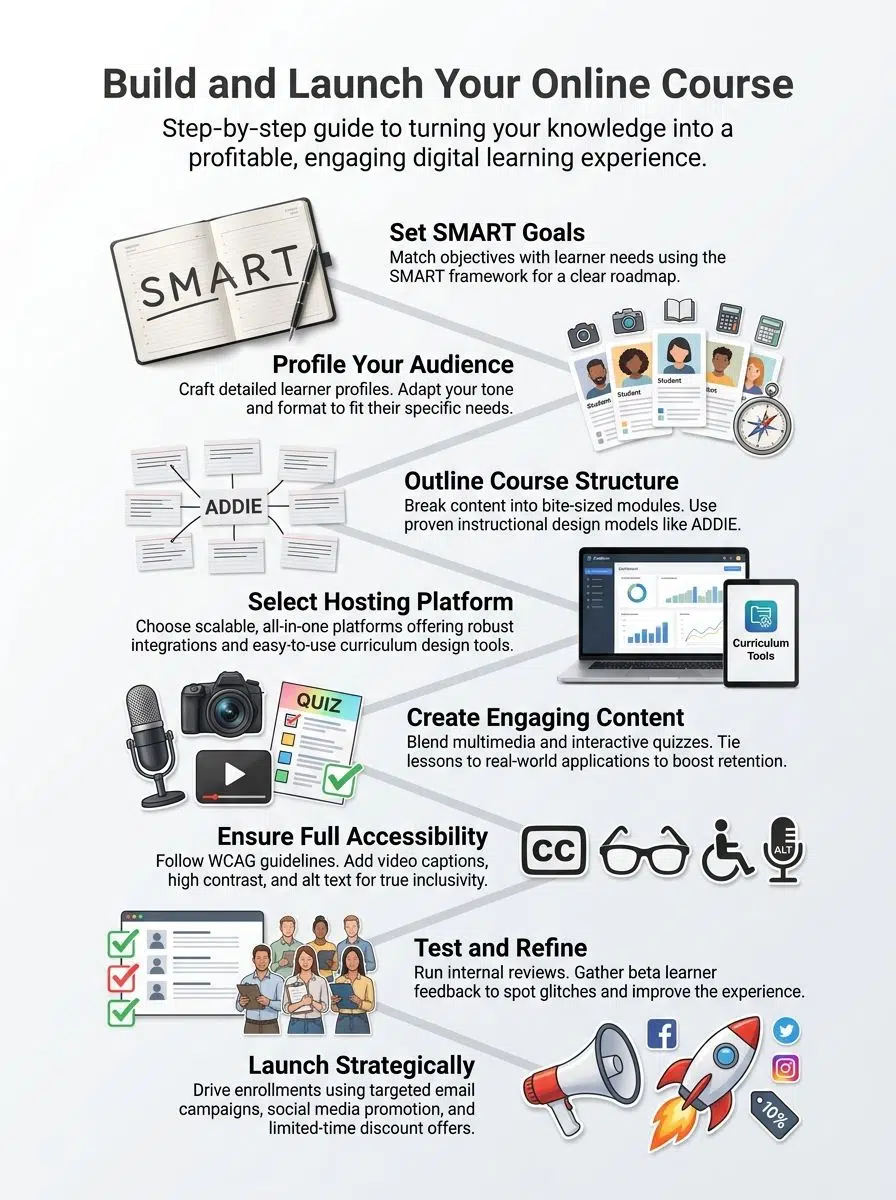
Start by figuring out what you want your course to achieve, like hitting the bullseye on a dartboard. Match those aims with what your learners crave, and throw in the SMART framework to keep everything sharp and on track.
Align course objectives with learner needs
Think about what your learners truly want from your online education course. Match your goals to their needs, like solving real problems or building key skills. Consider a student stuck in a job rut; your course could light the path out.
Talk to potential learners through surveys or chats to grasp their pain points. This step boosts engagement in course development and keeps dropouts low. Use simple language that speaks to their daily lives, making the material feel like a helpful friend.
Learners come with different backgrounds in e-learning, so adapt objectives to fit. For example, beginners might need basic instructional design tips, while pros seek advanced curriculum design ideas.
Keep empathy high; visualize their excitement when the course clicks. Add real-world examples to show value right away. This creates strong learning objectives that drive success.
The goal of education is the advancement of knowledge and the dissemination of truth. – John F. Kennedy
Now, apply the SMART goal framework to make those objectives even sharper.
Use the SMART goal framework
Once you’ve aligned your course objectives with what learners truly need in online education, the next step sharpens those goals into something crystal clear and actionable. Goals in course development work best when they guide your e-learning efforts like a trusty roadmap. This keeps your instructional design on track and boosts learner success.
- Make goals specific to cut through the fog in curriculum design; spell out exactly what learners will achieve, such as mastering key skills in digital learning through targeted modules, so everyone knows the target without guessing.
- Set measurable milestones to track progress in your learning management system; use numbers like completion rates or quiz scores to see if 80% of students grasp the educational content after each section, turning vague hopes into solid proof.
- Keep goals achievable to avoid overwhelming your audience in online education; factor in realistic resources and time, like designing a course that fits busy schedules with short, interactive webinars, so creators and learners both win without burnout.
- Ensure goals stay relevant to real-world needs in instructional design; tie them to practical outcomes, such as applying teaching strategies in everyday jobs, which makes your training programs feel vital and connected to learners’ lives.
- Add time-bound deadlines to fuel urgency in course creation; set clear timelines, like finishing e-learning modules within three months, to maintain momentum and help everyone celebrate wins along the way in educational technology.
Understand Your Target Audience
Picture your learners as real people with busy lives, dreams, and maybe a coffee addiction just like yours. Get inside their heads, craft profiles that feel alive, and tweak your course’s vibe to match, so they stick around and actually learn something fun.
Identify learner profiles
You need to know your learners inside out for top-notch online education. This step in course development helps you craft content that hits home.
- Start by gathering data on who your audience is, like their age, job roles, and skill levels, so your e-learning course feels like it speaks right to them, almost like a chat over coffee.
- Ask questions through surveys or social media polls to uncover what problems they face in digital learning, turning those insights into a curriculum design that solves real pains, not just throws facts at them.
- Look at their motivations, say, if they’re busy pros seeking quick training programs or students hungry for deep instructional design knowledge, and adjust your teaching strategies to match that drive.
- Consider their tech comfort, because not everyone is a whiz with educational technology, so you might add simple guides to make course management a breeze for beginners.
- Think about cultural backgrounds to boost inclusivity in your educational resources, maybe by using examples from different parts of the world that resonate in a webinar or video lesson.
- Profile their learning styles, whether they prefer visual aids in content creation or hands-on activities, ensuring your online course keeps them hooked with varied instructional materials.
- Check out any barriers they might hit, like time constraints for working parents, and build flexibility into your learning management system to let them pace themselves.
- Use this profile to set clear learning objectives that align with their goals, making the whole e-learning experience feel personal and effective, like a custom-fit suit.
Adapt course tone and format accordingly
Match your course tone to fit your audience’s vibe. Busy professionals crave a direct, no-nonsense style in online education. Kids, on the other hand, thrive with fun, playful language that sparks joy.
Think of it like chatting with friends over coffee; keep things light and relatable. Adjust the format, too, maybe short videos for quick learners or detailed PDFs for thorough explorations in course development.
Consider a retiree exploring e-learning for hobbies; they might prefer a warm, encouraging tone with simple steps. Switch to interactive quizzes for young adults in digital learning.
This tweak boosts engagement in instructional design. Learners stick around when the course feels customized for them, turning education into an exciting journey.
Plan Your Course Structure
Start by sketching out a module-based outline that breaks your content into bite-sized chunks, like chapters in a gripping novel, so learners stay hooked from start to finish. Then, pick an instructional design model, say ADDIE, to guide you, making sure your course flows smoothly as a river, with each part building on the last for real impact.
Create a module-based outline
You need a solid plan to make your online course shine. Break it down into modules to keep things clear and easy for learners.
- Grab a pen and paper, or open your favorite digital tool, and list out the main topics in your course development. Think of each module as a chapter in a book that builds on the last one, helping with learning objectives in e-learning. For example, if you’re teaching digital learning basics, module one could cover key concepts, while module two explores practical tools.
- Decide how many modules fit your online education goals. Keep it to five or six for most courses to avoid overwhelming your audience, and make sure each one ties back to the general curriculum design. Think of it like a roadmap, where learners feel progress with every step.
- Start each module with clear goals that match learner needs in instructional design. Write them as simple statements, like “By the end, you’ll create your first webinar.” This sets expectations and boosts engagement in course creation.
- Add lessons within modules that flow logically for better course management. Use real-life examples to explain ideas, turning dry facts into stories that stick in educational technology. Hey, who hasn’t learned more from a good tale than a boring list?
- End modules with quick checks or quizzes to reinforce digital learning. These act like friendly nudges, ensuring people grasp the material before moving on in training programs. It’s like a high-five at the finish line, keeping motivation high.
- Mix in resources like videos or readings to enrich instructional materials. Vary them to suit different styles, making your educational content more inclusive and fun. Think of a learner smiling as they watch a short clip that nails the point.
- Review the outline for gaps in learning management. Ask a friend to look it over, spotting areas that might confuse in e-learning setups. This step polishes your work, turning good into great for curriculum development.
- Adjust based on time estimates for each module in online education. Aim for 30 to 60 minutes per lesson to respect busy schedules in teaching strategies. Short bursts keep energy up, like quick chats over coffee.
Use effective instructional design models
Pick a solid instructional design model to shape your online course. Models like ADDIE guide you step by step. First, analyze what learners need. Then design the content. Develop it next. Implement the course, and evaluate results. This keeps your e-learning structured and effective.
Try the SAM model for faster course development. It uses quick prototypes and feedback loops. You build a bit, test it out, and tweak based on input. Think of crafting a puzzle, piece by piece, until it fits just right.
Such approaches boost engagement in digital learning and help with clear learning objectives.
Choose the Right Course Hosting Platform
Picking the best platform feels like finding a cozy spot for your ideas to grow. Compare all-in-one options, check scalability and integrations, and watch your course take off with ease.
Evaluate all-in-one platforms
You need a solid platform for your online course. All-in-one platforms handle everything from course creation to payments. Think of them as a one-stop shop for e-learning. Look at options like Teachable or Thinkific.
They offer tools for digital learning and course management. Check user reviews to see real experiences. Focus on ease of use first. These platforms support curriculum design with drag-and-drop features. Pick one that fits your budget and skills.
Scalability matters as your course grows. Compare integrations with tools like email marketing. Some platforms connect to Zoom for webinars. Others boost learning management systems with analytics.
Test free trials to feel the interface. Ask if they handle educational content well. Interactivity features can make your training programs shine. Go for platforms that evolve with online education trends.
Compare features like scalability and integrations
Picking the right platform means sizing up scalability and integrations, so you can grow without headaches.
| Platform | Scalability | Integrations |
|---|---|---|
| Teachable | Handles thousands of students easily, with auto-scaling servers that kick in during traffic spikes. | Links up with Zapier, Mailchimp, and Google Analytics for smooth workflows. |
| Thinkific | Grows with your audience, supporting unlimited courses and students on higher plans. | Connects to ActiveCampaign, ConvertKit, and payment gateways like Stripe. |
| Kajabi | Scales big time, managing high-volume sales and memberships without slowdowns. | Integrates with tools like Facebook Pixel, Infusionsoft, and webinar software. |
| Udemy | Built for massive scale, hosting millions of users worldwide on their global network. | Offers API access and ties into email services, but limits custom integrations. |
Develop Engaging Course Content
Mix videos, quizzes, and stories to grab attention, like adding spice to a bland meal. Keep learners active with hands-on tasks that link straight to everyday challenges, turning “aha” moments into daily wins.

Incorporate multimedia elements
Multimedia elements boost engagement in your online education course. They make course development more dynamic and help with digital learning retention.
- Videos bring lessons to life, like short clips explaining key concepts in instructional design; think of them as the heartbeat of your e-learning content, pulling learners in with visuals that stick better than text alone.
- Images and infographics simplify complex ideas in curriculum design, acting as quick visual aids that learners can grasp at a glance, much like a roadmap guiding them through educational resources.
- Audio elements, such as podcasts or voiceovers, add a personal touch to course creation, letting you share stories or tips in a cozy chat style that feels like talking over coffee.
- Interactive quizzes embedded in multimedia spice up learning management, turning passive viewing into active participation and helping track progress in training programs.
- Slideshows with animations enhance educational technology, breaking down modules into bite-sized pieces that keep attention from wandering during digital learning sessions.
- Charts and graphs in your content creation clarify data-driven points, offering clear snapshots that make abstract ideas in instructional materials feel real and approachable.
Multimedia sets the stage, so now focus on interactivity and real-world applications to keep learners hooked.
Focus on interactivity and real-world applications
Add quizzes and polls to your online education course. Students love these tools because they spark quick thinking. You build stronger connections this way. Course development thrives on such interactive bits.
They turn passive viewers into active players. Think of it like a game where everyone wins knowledge. E-learning experts say interactivity boosts retention by up to 60 percent. Mix in group discussions, too. Learners share ideas and grow together.
Apply real-world examples in your digital learning setup. Tie lessons to everyday jobs or problems. This makes content stick. Instructional design shines when you show practical uses.
For instance, teach marketing with a live campaign case. Students see the impact right away. Course creation gets fun with these ties. You help people solve actual issues. Keep it relatable, and watch engagement soar.
Ensure Accessibility and Inclusivity
Make your course open to everyone, like a welcoming door that swings wide for all walks of life. Add captions to videos and alt text to images, so no one misses out on the fun of learning.
Follow accessibility guidelines (e.g., WCAG)
Accessibility matters a lot in online education. You want every learner to access your course without barriers.
- Follow WCAG guidelines to make your course creation inclusive for all users in e-learning. These rules help people with disabilities, like those who are blind or hard of hearing, enjoy your content fully. For example, add alt text to images so screen readers can describe them. This step boosts learner satisfaction and widens your audience in digital learning.
- Add captions to videos as part of instructional design. Captions aid deaf learners and those in noisy spots. They also improve SEO for your course development. Think of it like subtitles in a movie; they keep everyone in the loop, no one left out.
- Use high contrast colors in your curriculum design. Low contrast text can strain eyes, especially for people with low vision. Pick black text on white backgrounds, or vice versa. This simple choice makes educational content easier to read and more engaging.
- Structure content with clear headings in your learning management system. Headings act like signposts, guiding users through modules. They help screen readers navigate, too. Think of your course as a roadmap; good headings prevent anyone from getting lost in the educational resources.
- Include keyboard navigation options for better course management. Not everyone uses a mouse; some rely on keyboards due to motor issues. Test that all links and buttons work without a mouse. It’s like ensuring every door in a house opens with a key, not just a fancy knob.
- Provide text alternatives for audio in training programs. Transcripts let users read what they can’t hear. This covers podcasts or voiceovers in your online course. Consider a student studying on a quiet train; transcripts keep the learning flowing without sound.
- Avoid time limits on quizzes unless needed in instructional materials. Time pressure can frustrate learners with cognitive challenges. If you must use timers, offer extensions. This approach shows empathy, turning potential roadblocks into smooth paths in e-learning.
- Test your course with real users for feedback on educational technology. Gather input from diverse groups to spot issues. Fix them before launch. It’s akin to a dress rehearsal; you catch the snags early, making your digital learning shine for everyone.
Include subtitles and translations for videos
Add subtitles to your videos right from the start. They help people who are hard of hearing catch every word. Think of it like adding a safety net, catching those who might otherwise slip through the cracks in your online education setup.
Translations open doors for global learners, turning your e-learning course into a welcoming space for everyone. Think of a student in Spain engaging with your content without missing a beat, all thanks to Spanish subtitles.
You boost engagement when videos speak multiple languages. Course development thrives on this inclusivity, drawing in diverse crowds eager for digital learning. Mix in accurate translations, and watch your instructional design shine brighter.
Learners feel seen, like you’re chatting directly to them over coffee. Keep it simple, people; tools like auto-caption software make this step a breeze in your learning management system.
Test and Refine Your Course
You’ve poured your heart into this course, so run some internal reviews to spot those pesky rough edges before anyone else does. Gather feedback from a small group of learners, tweak based on what they say, and watch your creation transform into something they can’t get enough of.
Conduct internal reviews
Internal reviews catch problems before your online course goes live. They boost quality in e-learning and course development.
- Gather a small team of trusted peers or experts in instructional design to review your course materials; they spot gaps in learning objectives that you might miss, like confusing explanations or weak real-world applications.
- Walk through each module yourself, pretending to be a student from your target audience; this helps you fix navigation issues in your learning management system and ensures smooth flow in digital learning content.
- Check all multimedia elements, such as videos and quizzes, for technical glitches; fix them right away to keep educational resources engaging and free from distractions.
- Test accessibility features, like subtitles on webinars, against guidelines; this step makes your training programs inclusive for everyone, no matter their needs.
- Simulate the full learner experience on different devices; you discover if course management works well on mobiles, preventing drop-offs in online education.
- Document every issue you find, big or small, and prioritize fixes based on impact; this organized approach refines curriculum design and strengthens educational technology as a whole.
Collect and act on learner feedback
Gather learner feedback early in your course development process. Send out surveys after beta tests, or ask for comments in forums. This step builds better online education experiences.
Learners might point out confusing parts in your e-learning modules. Act on their input right away. For example, if videos feel too long, shorten them to boost engagement. Use tools like Google Forms for quick responses.
Keep the tone friendly, like chatting with a friend over coffee. Make changes based on real insights from your audience. In instructional design, this refines your curriculum design. One creator got feedback on a dull section and added fun quizzes.
Suddenly, completion rates jumped. Track patterns in comments to spot trends. Adjust content creation to fit what works. Empathy drives this; put yourself in their shoes. Your course management improves with each tweak, leading to stronger digital learning outcomes.
Launch Your Course Strategically
You’ve poured your heart into creating this course, so now fire it up with smart email blasts and social media hype to draw in eager students. Add a dash of urgency with flash sales or countdown timers, and you’ll see those sign-ups roll in like a wave at high tide.
You built a great online course. Now spread the word with email campaigns and social media promotions to boost enrollments in your e-learning program.
- Build an email list early in your course development process, perhaps by offering a free webinar or teaser content on educational technology to attract potential students in digital learning.
- Craft compelling email subject lines that promise value, like “Master Your Skills with My New Course Creation Guide,” to draw in readers interested in curriculum design and instructional materials.
- Segment your email audience based on their interests, sending customized messages about learning objectives to those who engaged with your past training programs.
- Time your email campaigns wisely, such as launching them on Tuesdays when open rates peak for online education topics, and follow up with reminders to nurture leads.
- Integrate social media promotions by posting short video clips from your course on platforms like Instagram or LinkedIn, highlighting real-world applications in educational resources.
- Use eye-catching visuals and hashtags, for example #Elearning and #CourseManagement, to expand reach and engage communities passionate about instructional design.
- Collaborate with influencers in the digital learning space, asking them to share your course launch post for authentic endorsements that build trust.
- Run targeted ads on social media, focusing on demographics that match your learner profiles in curriculum development, to drive traffic to your enrollment page.
- Encourage user-generated content by prompting early enrollees to share their experiences with your learning management system, amplifying word-of-mouth promotion.
- Track performance metrics from both email and social efforts, adjusting strategies based on click-through rates to refine your approach for future educational content launches.
Create enrollment urgency with limited-time offers
Create enrollment urgency with limited-time offers to boost sign-ups in your online education venture. Offer discounts that expire in 48 hours, and watch potential students jump on board.
This tactic taps into fear of missing out, a classic move in course development. Pair it with email blasts that highlight exclusive bonuses, like extra webinars or bonus materials in your learning management system. Students love feeling they snag a deal, so time your promotions around holidays or course launches for maximum impact.
Mix in scarcity, such as capping spots at 50 enrollments, to spark quick decisions in e-learning. Share stories of past students who grabbed similar offers and transformed their skills through your instructional design.
Keep offers simple, like a 20% off for the first 100 sign-ups, tied to real-world training programs. This approach fills your digital learning course fast and builds buzz on social media.
The Closing Thoughts
You built an online course, now spread the word. Online education thrives on connections, so share your e-learning passion with the world. Picture your course as a lighthouse, guiding learners through digital learning storms.
Course development demands heart, and yours shines through. E-learning grows fast, with millions joining platforms each year. Tap into that energy. Instructional design keeps things fresh, so tweak as you go.
Curriculum design evolves, and so does your teaching. Learning management systems help track progress, making adjustments simple. Educational resources abound; grab them to boost your game.
Content creation feels like magic when students light up. Training programs succeed with real feedback and listening closely. Course creation journeys twist, but you steer the ship.
Stay curious in this digital learning adventure. Educational technology shifts daily, explore new tools. Webinar sessions add spark, connect live with your crowd. Teaching strategies vary; mix them up for fun.
Learning objectives guide you; keep them sharp. Course management gets easier with practice. Trust the process. Instructional materials make or break engagement; polish yours often. E-learning opens doors; step through boldly. Online education waits for your voice; make it heard.
Frequently Asked Questions (FAQs) on Build And Launch An Online Course
1. What’s the first step to building your own online course?
Start by picking a topic you know well, like turning your hobby into lessons that help others. Think of it as sharing your secret recipe with friends who want to cook better.
2. How do I choose a platform to launch my course?
Look for easy tools like Teachable or Thinkific that fit your budget and tech skills. They handle the heavy lifting, so you focus on teaching. Imagine them as your backstage crew, making sure the show runs smoothly.
3. What’s the best way to create content for my online course?
Break it into short videos and quizzes to keep students hooked. Add stories from your life to make lessons stick, like that time you messed up and learned a big lesson. Always check if it flows well, keeping things simple and fun.
4. How can I market my online course to find students?
Share teasers on social media and email lists to build buzz. Offer a free preview to hook potential learners, turning curious folks into eager sign-ups.