Logistics teams operate in a high-pressure environment where speed, accuracy, and safety are non-negotiable. We know that traditional classroom training often fails to keep pace with the dynamic nature of supply chains. To bridge this gap, we selected the top training tools that blend operational efficiency with skill development to ensure your team stays ahead of the curve.
These platforms range from mobile-first microlearning apps to advanced virtual reality simulators. They are all designed to improve logistics team performance on the warehouse floor and the road.
3 Things to Consider When Choosing Tools that Improve Logistics Team Performance
Selecting the right technology requires looking beyond features and considering the specific context of your operations.
Operational Reality vs Classroom Theory
The most beautiful software is useless if it requires a desktop computer for a team that spends 100% of their time driving or on a forklift. We recommend prioritizing mobile-first or kiosk-based solutions that fit into the natural workflow of your frontline staff.
Integration with Performance Data
Training should not happen in a vacuum. The best tools can talk to your Transportation Management System (TMS) or warehouse software. This allows you to trigger specific training modules automatically when a performance metric drops.
For example, you could assign a cornering safety module immediately after a driver triggers a harsh turning alert.
Scalability and Language Support
Logistics is often a global game with a multilingual workforce. We advise looking for platforms that offer automatic translation or multi-language content libraries. This ensures that safety and protocol nuances are not lost in translation. It keeps your entire team on the same page regardless of their native language.
Pro Tip: Start small. Instead of overhauling your entire training program at once, pick one high-impact area. Focus on driver safety or onboarding and implement a specialized tool for that first. Success there will build the business case for further investment.
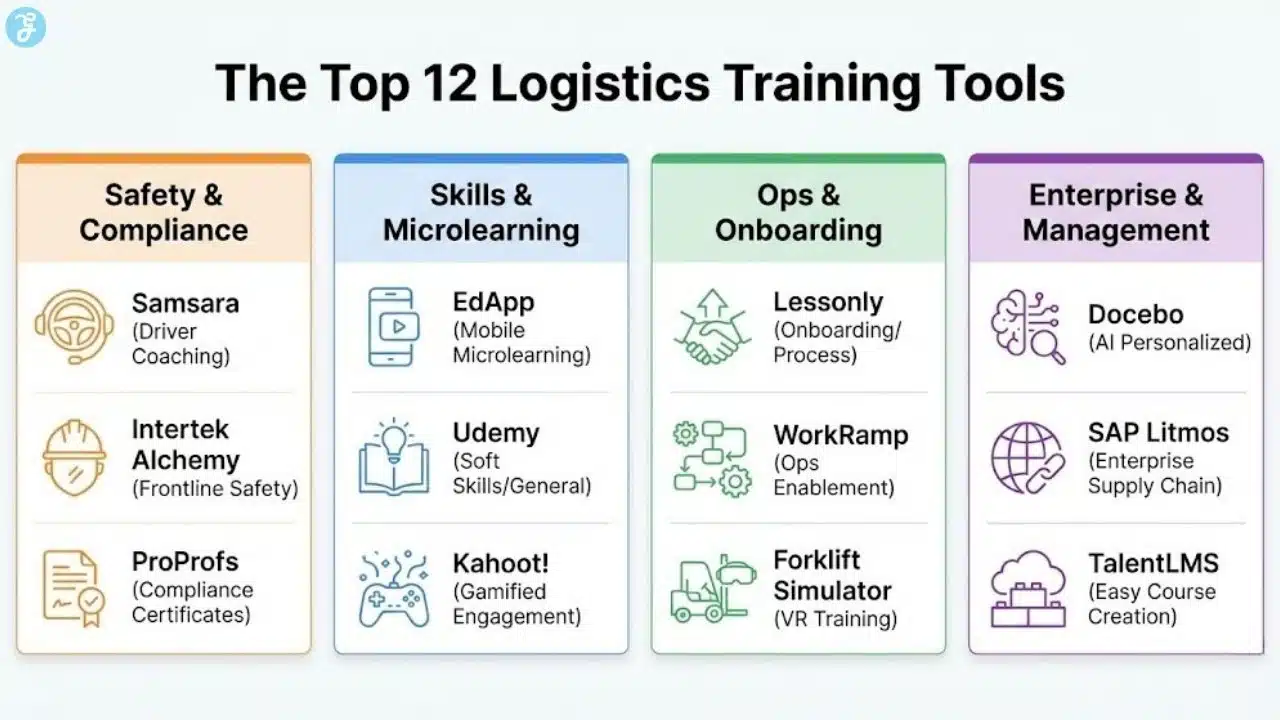
12 Training Tools That Improve Logistics Team Performance
Here are 12 Training Tools That Improve Logistics Team Performance:
1. Samsara: Best for Driver Safety and Real-Time Coaching
We selected Samsara because it transforms standard fleet management into an active coaching tool. Rather than waiting for annual reviews to discuss driving habits, Samsara uses AI dash cams and telematics to provide instant feedback to drivers. This immediate correction helps prevent accidents before they happen.
The platform scores drivers based on safety metrics like harsh braking, speeding, and distracted driving. Managers can then use this data to assign targeted coaching sessions within the app itself.
By turning daily operations into a continuous learning loop, we found that teams can significantly reduce accident rates and insurance costs while improving overall fleet efficiency.
| Pros | Cons |
| Provides real-time in-cab audio coaching | Hardware installation can be expensive up front |
| Reduces insurance premiums through safety data | Privacy concerns may arise among drivers |
| Automates accident reporting and video retrieval | Requires reliable cellular connectivity for real-time features |
2. EdApp: Best for Mobile-First Microlearning
We chose EdApp for its ability to deliver bite-sized training directly to the smartphones of deskless workers. In logistics, pulling staff off the floor for hour-long seminars is rarely feasible. EdApp solves this by breaking complex procedures into 5-minute lessons that employees can complete during downtime.
The platform features a vast library of editable course templates. This makes it easy for managers to deploy new safety protocols or handling procedures in minutes. We particularly like its gamification features, which reward learners for consistency. This keeps engagement high among warehouse staff and drivers who might otherwise find compliance training tedious.
| Pros | Cons |
| Completely mobile-responsive for deskless teams | Reporting on the free plan is somewhat limited |
| Built-in gamification increases engagement | Course customization requires some design effort |
| Offline mode is perfect for areas with a poor signal | Not ideal for long-form academic content |
3. Docebo: Best for AI-Powered Personalized Learning
We selected Docebo for its advanced artificial intelligence that tailors the learning experience to individual employee needs. In a diverse logistics workforce, a one-size-fits-all approach rarely works. Docebo analyzes user performance and suggests relevant content to fill skill gaps automatically.
For large logistics firms, this means a warehouse manager gets different training recommendations than a procurement specialist. The platform also supports social learning. This allows experienced team members to upload short videos or tips to capture institutional knowledge that would otherwise be lost when senior staff retire.
| Pros | Cons |
| AI automates personalized learning paths | Higher price point suited for enterprise only |
| Supports user-generated content (Social Learning) | Implementation can be complex and time-consuming |
| Excellent scalability for global teams | Setup requires a dedicated administrator |
4. Lessonly by Seismic: Best for Onboarding and Process Training
We included Lessonly because it excels at simplifying the onboarding process for rapidly scaling teams. When logistics companies ramp up for peak seasons, they need to get new hires up to speed immediately. Lessonly provides a clean and simple interface for practicing scenarios and memorizing standard operating procedures.
The tool allows managers to create practice scenarios where employees can record themselves handling a customer service issue or explaining a safety protocol. We value this feature because it provides a safe space for mistakes. It ensures staff are confident and competent before they ever touch a package or speak to a client.
| Pros | Cons |
| Incredible user-friendly interface | Limited advanced reporting features |
| “Practice” mode allows video role-playing | Less customization than heavy-duty LMS platforms |
| Fast content creation for new SOPs | Primarily focused on sales and support use cases |
5. SAP Litmos: Best for Enterprise Supply Chain Training
We chose SAP Litmos for its robust integration capabilities with existing ERP and supply chain management systems. For global logistics enterprises, training cannot exist in a silo. SAP Litmos connects learning data with operational metrics. This allows leadership to see exactly how training correlates with performance improvements.
The platform offers a massive library of off-the-shelf content specifically designed for compliance, safety, and operations. We appreciate that it scales effortlessly. It supports thousands of users across different languages and regions, which is essential for multinational supply chain operations.
| Pros | Cons |
| Integrates seamlessly with SAP and Salesforce | Interface feels dated compared to modern startups |
| Massive library of pre-made compliance courses | Can feel “heavy” or bloated for small teams |
| Robust security features for large enterprises | Pricing structure is often opaque |
6. WorkRamp: Best for Operations Enablement
We selected WorkRamp because it focuses specifically on enablement. It gives teams the resources they need to do their jobs better rather than just checking a compliance box. It bridges the gap between learning and doing by allowing companies to build centralized operational playbooks.
For logistics teams, this means having a single source of truth for complex shipping workflows or inventory management protocols. We found that WorkRamp is particularly effective for training account managers and logistics coordinators. These roles need to master complex software stacks to keep freight moving efficiently.
| Pros | Cons |
| Combines LMS with content management | Steeper learning curve for administrators |
| Excellent for creating “Playbooks” and guides | Integrations are focused on tech stacks (Salesforce/Slack) |
| Strong analytics on content usage | It might be overkill for simple warehouse safety needs |
7. Intertek Alchemy: Best for Frontline Worker Safety
We picked Intertek Alchemy because it is purpose-built for the manufacturing and logistics frontline. Unlike general corporate LMS platforms, Alchemy focuses heavily on workplace safety and productivity for floor staff. It utilizes group-based training kiosks, which are ideal for facilities where workers do not have individual computers.
The content is highly visual and interactive. It is designed to overcome language barriers and literacy challenges often found in diverse workforces. We value how it integrates with on-the-floor observations. This allows supervisors to verify that the training is actually being applied during daily operations.
| Pros | Cons |
| Designed specifically for deskless/factory workers | Hardware dependencies (kiosks/remotes) |
| Visual content bridges language barriers | Not suitable for white-collar office training |
| Includes tools for verifying floor behavior | Content library is very niche (safety/compliance) |
8. TalentLMS: Best for Easy Course Creation
We included TalentLMS for its intuitive design that allows managers to build custom courses without needing technical expertise. Smaller logistics companies often lack a dedicated instructional design team. TalentLMS fills this void by being incredibly user-friendly.
You can drag and drop videos, presentations, and quizzes to create a comprehensive training module in an afternoon. We also like its offline capabilities. This allows drivers to download training materials and complete them when they are at rest stops without reliable internet access.
| Pros | Cons |
| Very affordable, with a free tier available | Reporting and analytics are basic |
| Extremely easy to set up and use | Customization options for branding are limited |
| Strong mobile app with offline support | Lack of advanced automation features |
9. Kahoot!: Best for Gamified Team Engagement
We chose Kahoot! Because it injects energy and competition into the training process. Logistics work can be repetitive, and keeping morale high is a challenge. Kahoot! Turns safety quizzes and process reviews into live and game-show-style competitions that teams actually enjoy.
It is particularly effective for morning stand-up meetings or shift briefings. We found that using a quick 5-minute Kahoot! A session to review the previous day’s errors or introduce a new protocol drastically improves information retention compared to a standard lecture.
| Pros | Cons |
| extremely high engagement and fun factor | Not suitable for complex or lengthy topics |
| Instant feedback on knowledge gaps | Can be seen as “unprofessional” by some |
| promoting healthy team competition | Requires a host to run live sessions effectively |
10. ProProfs Training Maker: Best for Compliance and Certification
We selected ProProfs Training Maker for its robust testing and certification features. In logistics, maintaining compliance with regulations like DOT, OSHA, and hazmat handling is critical. ProProfs makes it simple to create rigorous assessments that ensure every employee meets the required standards.
The platform automatically generates certificates upon completion. This helps specialized logistics providers maintain audit-ready records. We appreciate the question bank feature. It allows managers to randomize test questions to prevent answer sharing and ensure true competency.
| Pros | Cons |
| Excellent for generating audit-ready certificates | The user interface looks slightly outdated |
| Huge library of pre-made templates | The free version is ad-supported |
| robust cheating prevention settings | Mobile experience can be clunky |
11. Udemy for Business: Best for Soft Skills and General Logistics
We included Udemy for Business to cover the broader skill sets that specialized tools often miss. While operational training is vital, logistics leaders also need skills in negotiation, communication, and general supply chain theory. Udemy offers thousands of courses taught by industry experts.
It is an excellent resource for upskilling employees who want to move from the warehouse floor to management roles. We like that it empowers self-directed learning. This allows motivated team members to explore topics like Lean Six Sigma or Excel data analysis on their own time.
| Pros | Cons |
| Massive variety of topics beyond logistics | Course quality varies by instructor |
| Encourages self-directed career growth | Not customizable for your company’s specific SOPs |
| High-quality video production | No control over content updates or changes |
12. Forklift Simulator: Best for VR Equipment Training
We chose Forklift Simulator to represent the cutting edge of logistics training technology. Operating heavy machinery carries high risks, and traditional training can be dangerous and disruptive. Virtual Reality simulators allow operators to practice complex maneuvers in a completely safe digital environment.
This tool sets the user in a realistic chassis with actual controls and immerses them in a virtual warehouse. We found this incredibly valuable for screening new hires. It is also great for training existing staff on rare and dangerous scenarios, such as equipment failure or pedestrian incursions, without risking physical injury or inventory damage.
| Pros | Cons |
| Zero risk of injury or product damage | Very high initial hardware investment |
| Realistic physics builds muscle memory | Cannot legally replace certification tests |
| Great for screening candidates before hiring | Requires physical space to set up the rig |
How To Choose The Best Logistics Training Tool For Your Team?
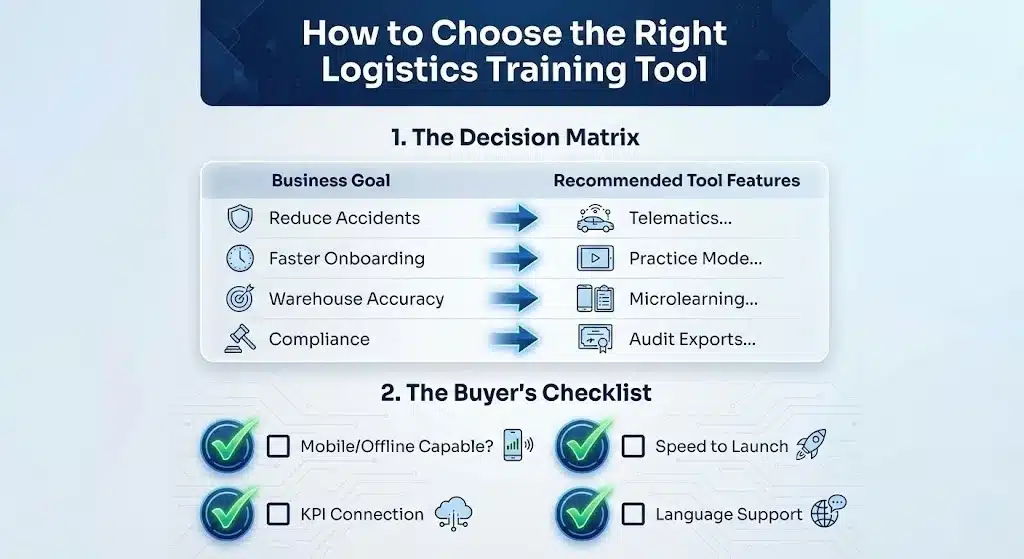
Start by picking the tool that matches your highest-cost problem (safety, onboarding speed, warehouse accuracy, compliance). Then confirm it works in your team’s daily reality (mobile/offline/kiosk) and can scale across locations and languages.
Quick-fit decision table
| Your main goal | Best-fit tool traits | What to avoid |
|---|---|---|
| Reduce driver incidents | Telematics + real-time coaching + safety scoring | LMS that only tracks videos/quizzes |
| Faster onboarding | Practice mode + SOP templates + easy content creation | Platforms that require complex setup |
| Improve warehouse accuracy | Microlearning + assessments + floor verification | Long classroom-style modules |
| Compliance readiness | Testing + certificates + audit exports + re-cert reminders | Weak reporting / no record controls |
| Upskill supervisors/coordinators | Playbooks + searchable guides + analytics | Tools with no knowledge hub |
Selection checklist (use this in procurement)
-
Workflow fit: mobile, offline, kiosk/shared-device support
-
Speed to launch: can you deploy training in days, not months?
-
Measurement: does it connect training to KPIs you already track?
-
Admin effort: who will maintain content and user management?
-
Total cost: include hardware, implementation, and content-building time
Now that you have an understanding of how to choose, here are 12 picks that improve Logistics Team Performance.
What Functions Should Logistics Training Tools Have?
Logistics training tools should fit frontline workflows (drivers, warehouse, dispatch) and reduce real operational risk—incidents, mis-picks, damage, delays—not just “course completion.”
Core functions to look for
-
Mobile-first + offline mode (critical for drivers and low-signal facilities)
-
Microlearning (3–10 min lessons for breaks/shift handovers)
-
Role-based paths (driver vs forklift vs pick/pack vs coordinator)
-
Scenario practice (safe rehearsal before real work)
-
Assessments + certification tracking (pass scores, renewals, audit exports)
-
Behavior reinforcement (coaching loops, reminders, refreshers)
-
Multi-language + visual learning (reduces errors from misunderstanding)
-
Reporting that ties to outcomes (incidents, claims, mis-ships, picking accuracy)
-
Automation triggers (assign training when performance drops)
-
Integrations (TMS/WMS/ERP/telematics/HR)
Pro tip: If your team is deskless, desktop-dependent software will fail no matter how “feature-rich” it looks.
How To Understand The Needs of Your Team?
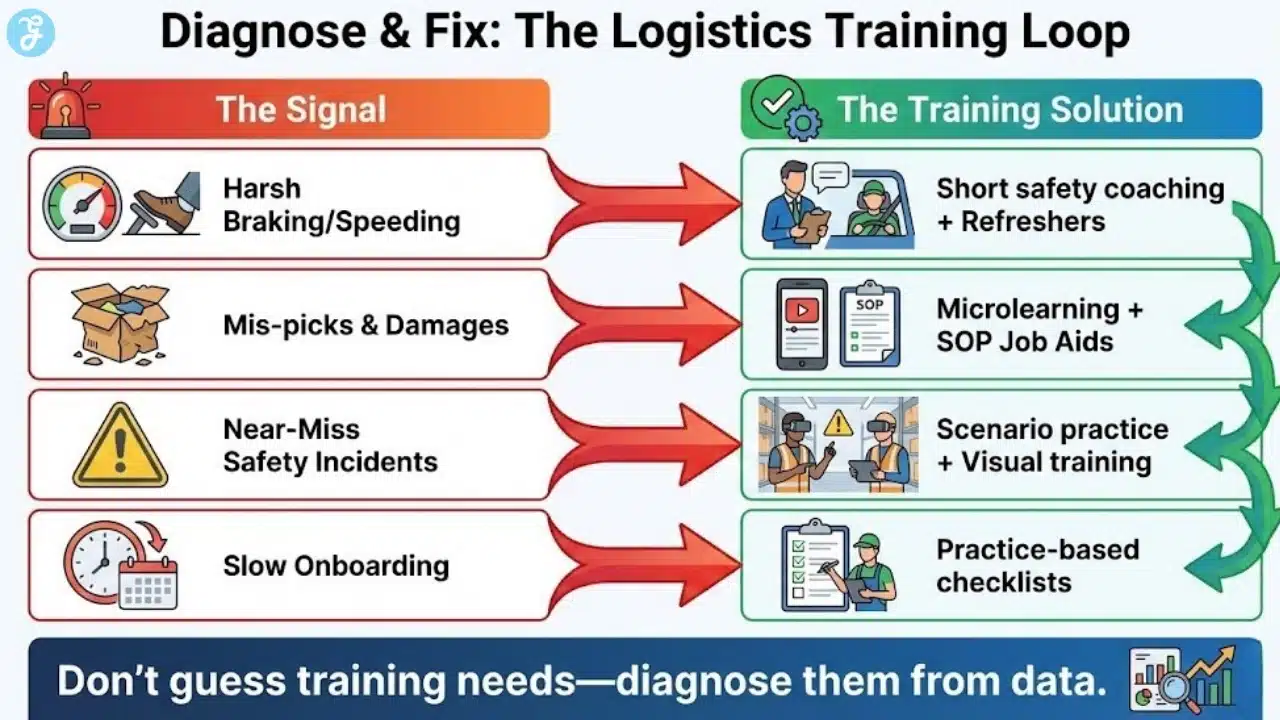
You don’t “guess” training needs—you diagnose them from real work signals. Combine operational metrics with frontline observation to identify what’s breaking and why.
What to check first (and why)
| Signal | What it usually means | Training response |
|---|---|---|
| Harsh braking/turning, speeding alerts | risky habits, poor hazard awareness | short safety coaching modules + refreshers |
| Mis-picks/mis-ships, returns | SOP confusion, scanning gaps | microlearning + quick quizzes + SOP job aids |
| Damage claims / near-misses | handling technique + layout issues | scenario practice + visual safety training |
| Slow onboarding productivity | unclear standards, no practice space | practice-based onboarding + checklists |
How to Collect the Insights:
Ask supervisors 3 questions:
- “What do new hires fail at in week 1–2?”
- “What errors keep repeating each shift?”
- “What safety rule is misunderstood or ignored most?”
Use data: incident logs, telematics alerts, mis-ship rates, damage, overtime spikes, customer complaints
Walk the workflow: watch where mistakes happen (loading, staging, scanning, exception handling)
Outcome: you end up with a ranked training plan tied to business impact—start with one area (driver safety, onboarding, or warehouse accuracy), prove ROI, then scale.
Final Words
Choose a logistics training tool that matches real workflows (mobile/offline, role-based learning) and connects training to performance data. Start with one high-impact area, prove ROI, then scale—so training drives safer, faster, more consistent operations.
Frequently Asked Questions
Here are the most frequently asked questions people have about logistics training tools.
Do we really need a specialized LMS for logistics?
Yes, because general platforms often lack the necessary offline capabilities. Logistics staff frequently work in areas with poor connectivity. Warehouses or remote roads make offline mobile access a critical feature that generic corporate tools often miss.
How often should logistics teams undergo training?
Continuous microlearning is more effective than annual sessions. We suggest implementing short and weekly training bursts of 5 to 10 minutes to reinforce safety habits. This is better than relying solely on a once-a-year compliance day that employees often dread and forget.
Can VR training replace real-world forklift practice?
No, it should strictly be used as a supplement to hands-on experience. While VR is excellent for muscle memory and hazard perception, OSHA and other regulatory bodies typically require an evaluation of the actual equipment before certifying an operator.
How do I measure the ROI of these training tools?
Measure the reduction in incidents and errors rather than just course completion rates. Look at hard metrics like reduced accident claims, lower insurance premiums, faster picking times, and decreased mis-ships to determine the true financial impact of your training investment.
Are gamified tools appropriate for serious safety training?
Yes, when used to reinforce retention rather than trivialize the topic. Gamification helps combat training fatigue. It ensures that employees are paying attention to critical safety data rather than clicking through slides just to finish.