Selecting the best educational apps for kids in 2026 requires a shift in perspective. We are no longer just looking for digital babysitters or simple flashcard replacements. Instead, the focus has moved toward “Active Screen Time”—platforms that foster critical thinking, coding logic, and emotional intelligence alongside traditional core subjects. For children in the 5-10 age range, the goal is to bridge the gap between playful exploration and the more structured academic requirements of elementary school.
The right app shouldn’t just deliver content; it should spark a curiosity that continues long after the tablet is turned off.
How We Evaluated the Top Learning Apps
To curate this list for 2026, we focused on apps that offer a balance of high-engagement gamification and rigorous pedagogical standards.
| Criteria | Evaluation Metric | Why It Matters |
| Curriculum Alignment | Adherence to Common Core or NGSS | Ensures the app supplements what the child is actually learning in their physical classroom. |
| Adaptive Learning | AI-driven difficulty scaling | Prevents frustration by ensuring the material is neither too easy (boring) nor too hard (discouraging). |
| Safety & Privacy | COPPA compliance and ad-free status | Essential for protecting young users from data tracking and inappropriate content. |
| Offline Capability | Downloadable lessons and modules | Crucial for learning during travel or in environments without reliable high-speed internet. |
The 13 Best Educational Apps for Kids in 2026
From deep-space math adventures to digital libraries with tens of thousands of titles, these 13 apps represent the gold standard of early childhood education.
1. Khan Academy Kids
Khan Academy Kids remains the absolute benchmark for free, high-quality education. In 2026, its “Age-Adaptive Curriculum” has expanded to offer a more robust bridge for 2nd and 3rd graders. It covers everything from foundational phonics to advanced problem-solving through a cast of lovable animated characters. It is 100% free, forever, with zero ads or in-app purchases, making it the most accessible tool on this list.
-
Best features: Character-guided learning paths and an extensive library of National Geographic books.
-
Pros: Completely free; covers social-emotional learning alongside academics.
-
Things to consider: The content starts to lean a bit “young” for advanced 9 or 10-year-olds.
2. Duolingo ABC
While the main Duolingo app is for languages, Duolingo ABC is a dedicated literacy tool designed specifically for ages 4-7. It utilizes the same “streak” and reward mechanics that make the original app addictive, but applies them to letter tracing, phonics, and sight words. It is the perfect daily companion for children who are just starting their independent reading journey.
-
Best features: Over 700 bite-sized reading lessons and multi-sensory tracing activities.
-
Pros: Highly motivating for reluctant readers; purely focused on literacy.
-
Things to consider: It is strictly an English literacy app; it does not offer the multi-subject breadth of ABCmouse.
3. Prodigy Math
Prodigy Math is a phenomenon because it disguises rigorous math practice as a massive multiplayer online role-playing game (MMORPG). Children create a wizard avatar and participate in “math battles” where they must solve curriculum-aligned problems to cast spells. For kids who “hate math,” Prodigy is often the only tool that can consistently get them to practice for 30+ minutes a day.
-
Best features: Battle-based gameplay and a robust parent dashboard for tracking skill mastery.
-
Pros: Incredibly engaging; teachers can sync the in-game questions to their classroom lessons.
-
Things to consider: The free version has frequent “Membership” prompts that can be frustrating for kids.
4. Epic! Digital Library
Epic! is the world’s leading digital library for kids under 12, offering instant access to over 40,000 high-quality books, audiobooks, and learning videos. In 2026, it remains the best way to encourage “free-choice” reading. Whether your child is obsessed with National Geographic, Big Nate, or Sesame Street, Epic! ensures they always have something new to read.
-
Best features: “Read-To-Me” functionality and personalized reading recommendations.
-
Pros: Massive selection of popular, recognizable titles; excellent for multilingual families.
-
Things to consider: It requires a paid subscription for full home access outside of school hours.
5. Tynker
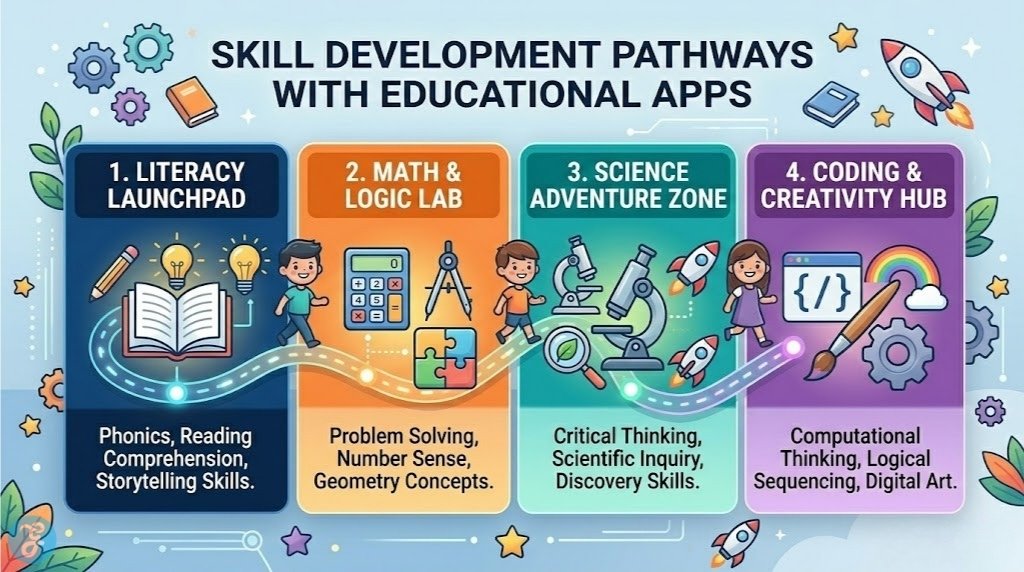
For parents looking to introduce coding, Tynker is the premier choice for ages 5-10. It transitions kids from simple icon-based coding (Tynker Junior) to block-based logic, and eventually into real Python and JavaScript. By 2026, its Minecraft Modding courses have become a staple for older kids in this bracket who want to build their own games rather than just play them.
-
Best features: Gamified coding puzzles and deep integration with Minecraft and LEGO.
-
Pros: Builds critical “computational thinking” skills; excellent progression of difficulty.
-
Things to consider: The advanced courses require a more powerful tablet or laptop to run smoothly.
6. Mystery Science
Mystery Science is designed to answer the “Why?” questions that 5-10 year olds ask constantly. It offers “Open-and-Go” video-based lessons that lead into hands-on experiments using common household items. It is highly visual and uses real-world phenomena to explain complex scientific concepts like gravity, plant biology, and light.
-
Best features: Engaging “Mystery Doug” videos and standard-aligned K-5 curriculum.
-
Pros: Encourages children to get off the screen and perform physical experiments.
-
Things to consider: Most effective when a parent or educator is present to facilitate the discussion.
7. ABCmouse
ABCmouse provides a comprehensive, “Full-Circle” curriculum for younger children (ages 2-8). It uses a “Step-by-Step Learning Path” with over 10,000 individual activities. It is a structured environment where kids earn tickets for completing lessons, which they can then spend on decorating their digital classroom or caring for virtual pets.
-
Best features: 10 progressive levels covering reading, math, science, and art.
-
Pros: Very well-rounded; provides a sense of accomplishment through its reward system.
-
Things to consider: The interface can feel a bit dated and cluttered compared to newer apps.
8. Hopscotch
While Tynker is great for structured coding, Hopscotch is the “creative sandbox” of kids’ programming. It allows children to build their own games and animations from scratch using a block-based language on the iPad. It has a vibrant, moderated community where kids can play games made by other children, providing immediate inspiration for their own projects.
-
Best features: Creative freedom and a safe social community for sharing projects.
-
Pros: Focuses on “making” rather than just “solving”; great for artistic kids.
-
Things to consider: It is currently an iOS-exclusive app; not available on Android.
9. Reading Eggs
Reading Eggs is a multi-award-winning literacy program that has a proven track record of teaching kids to read in just weeks. It uses a highly structured approach with “maps” that kids progress through. In 2026, its library has grown to over 3,500 e-books, ensuring that as soon as a child learns to decode words, they have access to leveled readers to build fluency.
-
Best features: Scientific-based reading instruction and highly interactive phonics games.
-
Pros: Excellent for building confidence in struggling readers; very thorough.
-
Things to consider: The repetitive nature of the lessons can occasionally be tedious for some kids.
10. Starfall
Starfall has been a staple of early childhood classrooms for two decades, but its 2026 app remains one of the best for foundational phonics and math. It is particularly effective for children with learning differences like dyslexia because of its slow, methodical, and highly auditory-visual approach to teaching letters and sounds.
-
Best features: Focus on phonemic awareness and a very simple, non-distracting interface.
-
Pros: Extremely effective for the “pre-reading” stage; very low cost for the full version.
-
Things to consider: The graphics are very basic and lack the “wow factor” of apps like Khan Academy Kids.
11. Simply Piano
For children in the upper end of this age bracket (8-10), Simply Piano is a revolutionary way to learn a real-world skill. Using the microphone on the tablet to “listen” to a real piano or keyboard, it provides instant feedback as the child plays. It turns learning an instrument into a game, complete with background tracks that make even a beginner feel like they are in a band.
-
Best features: Real-time acoustic note recognition and a library of popular modern songs.
-
Pros: Makes practicing fun; allows kids to progress much faster than with traditional books alone.
-
Things to consider: Requires a physical keyboard or piano to be effective.
12. Night Sky
Night Sky is a powerful Augmented Reality (AR) app that turns any backyard into a personal planetarium. By 2026, its AR features allow kids to “walk” through constellations or view the internal structure of the Space Station. It’s an incredible tool for fostering a love of astronomy and space science in a way that feels like magic.
-
Best features: AR Grand Orrery and real-time satellite tracking.
-
Pros: Stunning visuals; encourages outdoor exploration at night.
-
Things to consider: Requires a relatively modern device with good AR capabilities.
13. Duolingo (Language Lessons)
While Duolingo ABC is for reading, the main Duolingo app is fantastic for kids ages 8-10 who want to learn a second language. In 2026, it has added Math, Music, and Chess courses, making it a “multi-brain” workout app. Its competitive leagues and gamified rewards are perfect for older kids who are beginning to enjoy a sense of achievement and competition.
-
Best features: Gamified language, math, and music courses in one app.
-
Pros: Free to use; great for building a daily learning habit.
-
Things to consider: The social “Leagues” can be stressful for some children.
Quick Overview
The following table summarizes these top learning tools to help you build the perfect educational stack for your child.
Comparison Table
| App Name | Primary Subject | Best Age | Core Strength |
| Khan Academy Kids | Multi-Subject | 5–8 | Best Free All-in-One |
| Duolingo ABC | Literacy | 5–7 | Phonics & Tracing |
| Prodigy Math | Mathematics | 6–12 | High-Engagement RPG |
| Epic! Library | Reading | 5–12 | 40,000+ Book Library |
| Tynker | Coding | 5–10 | Block-to-Text Progression |
| Mystery Science | Science | 5–11 | Video-Based Inquiry |
| ABCmouse | Multi-Subject | 5–8 | Structured Learning Path |
| Hopscotch | Coding/Creative | 8–12 | Game Creation Sandbox |
| Reading Eggs | Literacy | 5–9 | Research-Backed Phonics |
| Starfall | Literacy/Math | 5–7 | Special Education Friendly |
| Simply Piano | Music | 8–12 | Real-Time Note Feedback |
| Night Sky | Astronomy | 6–12 | Immersive AR Exploration |
| Duolingo | Languages/Math | 8+ | Gamified Daily Habits |
Quick Picks
-
Best for All-Around Learning (Free): Khan Academy Kids
-
Best for Reluctant Mathematicians: Prodigy Math
-
Best for Budding Engineers: Tynker
-
Best for Bookworms: Epic! Digital Library
Final Thoughts
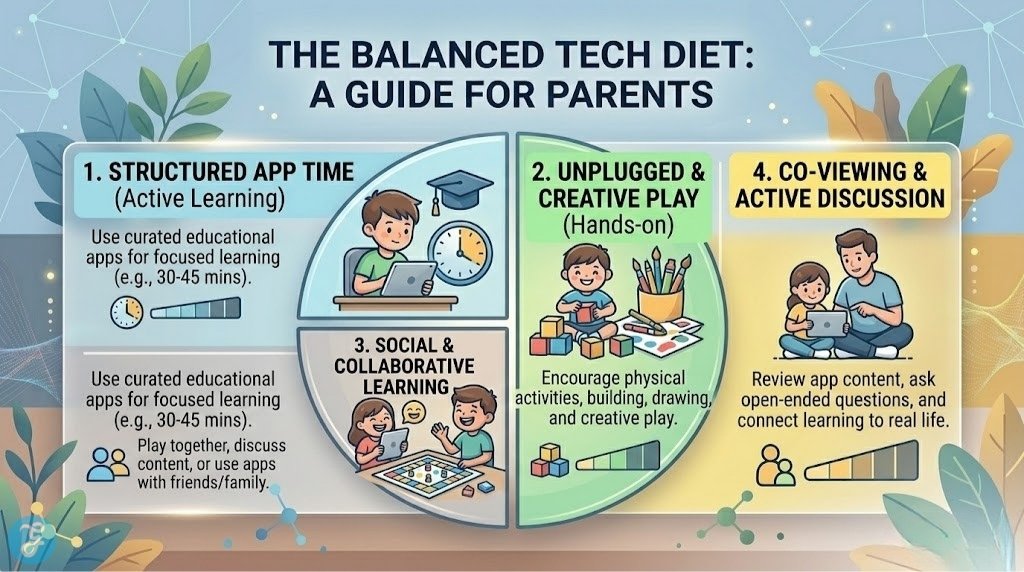
Selecting the best educational apps for kids is about finding the “sweet spot” where a child’s natural interests meet quality pedagogical design. In 2026, the best tools are those that leverage technology—like AR, adaptive AI, and real-time audio recognition—to do things a traditional textbook simply cannot. By curating a balanced mix of apps that cover literacy, STEM, and creative arts, you can transform screen time from a passive activity into a powerful engine for your child’s growth and discovery.