Selecting the best Slack alternatives of 2026 is a strategic move for businesses looking to optimize their digital workspace and reduce rising software costs. While Slack remains a powerful tool for real-time collaboration, many teams now require deeper ecosystem integration or specialized features that standard platforms lack. Whether you are a small startup or a global enterprise, finding a tool that aligns with your specific communication style can significantly boost team productivity.
The current digital landscape in 2026 has seen a major push toward “ecosystem consolidation” and AI-driven workflow automation. The best Slack alternatives of 2026 no longer just offer chat; they act as centralized hubs that manage tasks, documents, and meetings within a single interface. By choosing the right platform, you can eliminate “app fatigue” and ensure that your team’s valuable information is never lost in a sea of disconnected notifications.
Selection Criteria For Our Top Rankings
We evaluated dozens of messaging platforms based on their performance in a modern, remote-first work environment. Our team prioritized tools that offer a balance between high-speed communication and deep project management capabilities. The following table illustrates the weighting we applied to determine the top contenders for this year.
| Criterion | Weighting |
| Ecosystem Integration | 35% |
| Security & Data Privacy | 25% |
| AI-Powered Productivity | 20% |
| Cost-to-Value Ratio | 20% |
Analyzing The 10 Best Slack Alternatives of 2026 For Efficiency
The following list highlights the most effective communication platforms currently available to teams. Each selection addresses a specific pain point—from the chaos of endless notifications to the high costs of enterprise licenses. These options will help you build a more focused and collaborative work environment.
1. Microsoft Teams
Microsoft Teams has become the default choice for large organizations that are already deeply embedded in the Microsoft 365 ecosystem. Its primary strength lies in its “unified” experience, where chat and video and file co-editing happen in one place. In 2026, the platform features advanced AI-driven meeting summaries and a revamped, faster interface that addresses past performance concerns. This is a vital resource for any enterprise looking to scale without adding new vendors.
Special Features:
-
Deep, native integration with Word and Excel and SharePoint for real-time co-authoring
-
Enterprise-grade security and compliance features included in existing 365 plans
-
Advanced “Together Mode” for more natural and engaging video conferencing
Things To Consider:
-
The user interface can feel overwhelming for smaller teams with simpler needs
-
Requires a commitment to the broader Microsoft ecosystem for maximum value
Best For: Large enterprises and organizations already using Microsoft 365
2. Google Chat
Google Chat is the most seamless alternative for teams that live in Google Workspace. It eliminates the friction of switching between tabs by integrating directly with Gmail and Drive and Meet. The 2026 version of “Spaces” allows for complex project organization with integrated task lists and shared files. It remains a reliable staple for those who value simplicity and a “clean” digital environment.
Special Features:
-
Instant file sharing with automatic permission management for Google Drive docs
-
Powerful search capabilities that span across your entire chat and email history
-
Included at no extra cost for most Google Workspace subscription tiers
Things To Consider:
-
Has fewer third-party integrations compared to Slack’s massive app directory
-
Lacks some of the more advanced “fun” features like custom emoji sets
Best For: Startups and small businesses using Google Workspace
3. Discord
Originally built for gamers, Discord has evolved into a powerhouse for startups and creative teams who need “always-on” collaboration. Its voice channels allow for spontaneous “drop-in” conversations that mimic the feel of a physical office. The 2026 business version offers a more professional aesthetic while retaining the high-fidelity audio that made it famous. It simplifies the bridge between casual chat and deep collaborative work.
Special Features:
-
Low-latency, always-on voice channels for instant remote coworking
-
High-quality screen sharing with support for multiple simultaneous streams
-
Extremely generous free plan that includes unlimited message history
Things To Consider:
-
Lacks the enterprise compliance certifications found in Teams or Slack
-
Can feel “too casual” for more traditional or conservative business cultures
Best For: Tech startups and creative teams who value spontaneous collaboration
4. Rock
Rock is a unique “all-in-one” platform that combines messaging with professional task management and notes. It is designed to replace the need for separate tools like Trello or Asana by putting your tasks directly inside your chat channels. This is an essential tool for project managers who are tired of moving data between different apps. It provides a great user experience by keeping the “context” of a conversation right next to the work being done.
Special Features:
-
Integrated Kanban boards and task lists within every chat space
-
Built-in note-taking feature for documenting processes and project briefs
-
Flat-rate pricing for unlimited users that can save teams thousands annually
Things To Consider:
-
The mobile app is not as polished as some of the more established players
-
May require a shift in team habits to fully utilize the task features
Best For: Project-based teams and agencies who want to consolidate their stack
5. Rocket.Chat
For organizations that handle sensitive data, Rocket.Chat is the gold standard for secure, self-hosted communication. It allows you to host the entire platform on your own servers, giving you total control over your data and encryption keys. The 2026 edition includes a powerful “Omnichannel” feature that lets you talk to customers on WhatsApp or Telegram from the same dashboard. It is a masterclass in security and flexibility.
Special Features:
-
Complete data sovereignty with on-premises or private cloud deployment
-
Fully open-source codebase that can be customized to meet specific needs
-
“Matrix” federation support for secure communication with external partners
Things To Consider:
-
Requires internal IT resources to manage the server and infrastructure
-
The interface can be less “slick” than pure SaaS competitors like Slack
Best For: Government and healthcare and IT teams with strict security needs
6. Pumble
Pumble has disrupted the market by offering a feature-rich experience that looks and feels exactly like Slack but at a significantly lower price point. One of its biggest advantages is that it offers unlimited message history on its free plan, which is a major pain point for Slack users. It is a solid choice for budget-conscious businesses that don’t want to re-train their employees on a new interface. It bridges the gap between high-end features and small business budgets.
Special Features:
-
Unlimited users and message history available on the free version
-
Familiar “channel-based” layout that makes migration from Slack instant
-
High-quality sidebar customization and thread management
Things To Consider:
-
Lacks some of the more advanced workflow automation found in Slack AI
-
Smaller integration library compared to the major industry leaders
Best For: Cost-sensitive small businesses and non-profits
7. Twist
Twist is the leading alternative for teams that are struggling with “notification burnout.” It is designed specifically for asynchronous communication, meaning it encourages deep work by removing the pressure for instant replies. The platform uses a “thread-first” structure that keeps conversations organized by topic rather than time. It is a futuristic addition to any team focused on mental well-being and productivity.
Special Features:
-
No “online/offline” status indicators to reduce the pressure of being “always on”
-
Deeply threaded conversations that prevent important decisions from getting buried
-
Integration with Doist’s other productivity tools like Todoist
Things To Consider:
-
Not ideal for teams that require constant, high-speed “g-pong” chatting
-
The asynchronous nature can be a difficult cultural shift for some teams
Best For: Remote teams who prioritize deep work and reduced distractions
8. Troop Messenger
Troop Messenger is a high-security business messenger that provides a specialized suite of tools for collaboration. It features a unique “Burnout” chat for self-destructing messages and a “Jointly” feature for real-time document editing. The platform is designed to be a “one-stop-shop” for messaging and calling and file management. It makes complex collaboration easy for teams in highly regulated industries.
Special Features:
-
“Burnout” feature for sensitive conversations that need to stay off the record
-
Advanced administrative dashboard for granular control over user permissions
-
Integrated audio and video calling with professional screen sharing
Things To Consider:
-
The user interface is functional but can feel “utilitarian” compared to Slack
-
Brand recognition is lower which can make onboarding external guests harder
Best For: Defense and legal and financial firms requiring maximum privacy
9. Chanty
Chanty is a simple and fast team chat app that includes a built-in task manager for small and medium-sized businesses. It is known for its “Teambook” feature, which centralizes all your tasks and files and pinned messages in one scannable location. This is an excellent choice for teams that want more than just chat but find platforms like MS Teams too complex. It helps bridge the gap between simple chat and project management.
Special Features:
-
Built-in task manager with the ability to turn any message into a task
-
“Teambook” hub for easy access to all shared project content
-
High-speed performance even on older hardware or slower connections
Things To Consider:
-
The free version is limited to teams of 10 people or fewer
-
Does not offer the deep compliance features needed by large enterprises
Best For: Small to mid-sized teams who want a simple chat and task hybrid
10. Mattermost
Mattermost is an open-source, self-hosted platform designed specifically for technical teams and developers. It offers deep integrations with developer tools like GitHub and GitLab and Jira. The 2026 version features “Mattermost Playbooks,” which are automated checklists for incident response and technical workflows. It is the ultimate platform for “technical collaboration” in a secure environment.
Special Features:
-
“Playbooks” for automating complex technical processes and incident response
-
Complete control over data and hosting for strict regulatory compliance
-
Massive library of “Community Integrations” built specifically by and for developers
Things To Consider:
-
Primarily designed for technical users—may be too complex for non-tech departments
-
Requires dedicated server management and maintenance by an IT team
Best For: Engineering and DevOps and technical operations teams
2026 Team Communication Market Overview
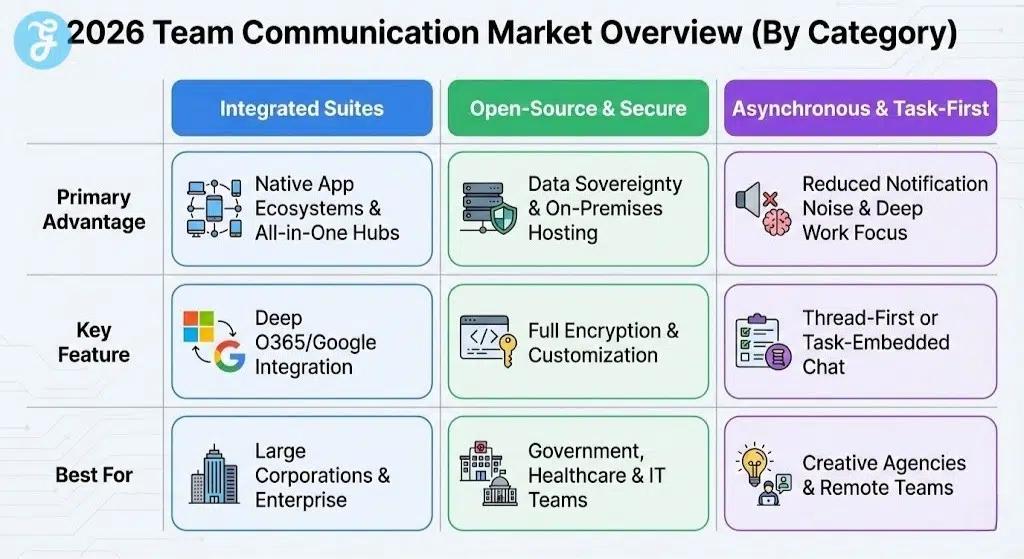
The 2026 market is characterized by three distinct categories of communication tools. Traditional “Big Tech” suites offer the most stability for enterprises, while open-source platforms cater to organizations that prioritize data sovereignty. Finally, specialized “mobile-first” tools have emerged to serve the needs of frontline and deskless workforces.
| Platform Type | Primary Advantage | Best For |
| Integrated Suites | Native App Ecosystems | Large Corporations |
| Open-Source / Secure | Data Sovereignty | Govt & IT Teams |
| Asynchronous / Task-First | Reduced Notification Noise | Creative Agencies |
How To Choose The Right Communication Tool
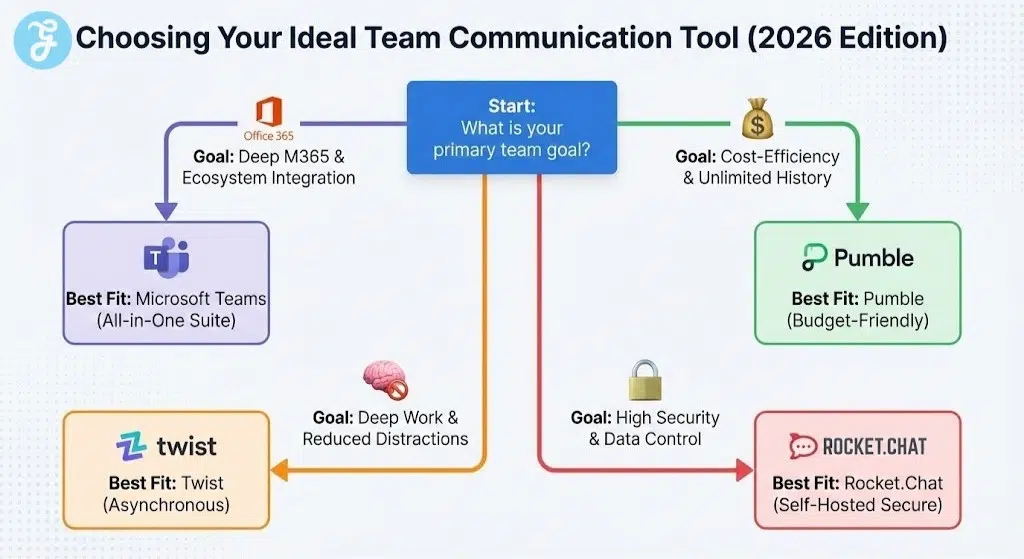
Selecting the right alternative depends on whether you prioritize ecosystem integration or cost-efficiency or data security. You should always audit your current software stack to see where your team is already spending their time. This comparison matrix helps you align your specific organizational goals with the most appropriate communication software.
| Primary Goal | Recommended Tool | Primary Advantage |
| M365 Integration | Microsoft Teams | All-in-One Workflow |
| Budget & History | Pumble | Unlimited Free History |
| Deep Work / Focus | Twist | Asynchronous Design |
| High Security | Rocket.Chat | Total Data Control |
Final Thoughts On Team Collaboration
Winning the productivity battle in 2026 means choosing a tool that empowers your team rather than distracting them. The best Slack alternatives of 2026 offer a variety of ways to organize information and streamline your daily workflows. By matching your tool to your specific communication culture you can create a more engaged and efficient workforce.