Money management used to be a fragmented mess. You had a checking account here, a credit card there, a savings goal somewhere else, and a vague anxiety that you were paying too much in fees or missing out on better rates. To get a clear picture, you had to log into five different apps or, worse, manually type numbers into a spreadsheet.
Enter Open Banking.
While the first wave of Open Banking was about building the pipes to connect these accounts, we are now entering Open Banking 2.0. This isn’t just about seeing your balance in a different app; it’s about using your data to actively save money, automate financial health, and access products that were previously out of reach.
This guide explores how this new era of data sharing works, why it is safer than the old methods, and exactly how you can use it to keep more money in your pocket.
What Open Banking 2.0 Means (And Why It’s Different From “Open Banking 1.0”)
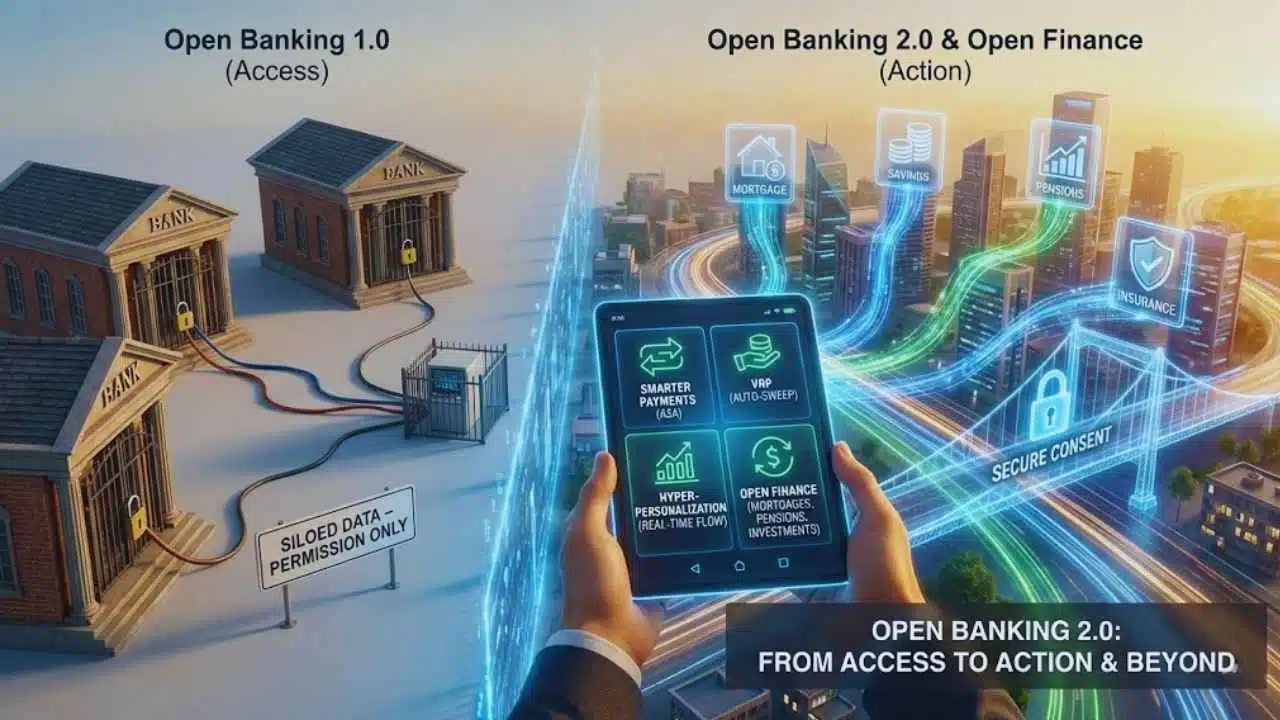
To understand where we are going, we have to look at where we started. “Open Banking 1.0” was largely an infrastructure project. It was the technical and regulatory heavy lifting required to force banks to open up their data siloes so third parties could access them—if you gave permission.
Open Banking In One Sentence (Plain English)
Open Banking is a secure way to give providers (like budgeting apps or lenders) access to your financial information so they can help you manage your money better, without you ever sharing your bank login password.
What’s New In “2.0” (Better UX, More Use Cases, Wider Data Scope)
If 1.0 was about access, 2.0 is about action.
In the early days, Open Banking meant you could view your checking account balance inside a budgeting app. That was neat, but it didn’t necessarily change your financial life. Open Banking 2.0 shifts the focus to:
- Smarter Payments: Moving money directly from bank to bank (A2A payments) to avoid card fees.
- Variable Recurring Payments (VRP): Smart transfers that automatically sweep excess cash into savings or pay off bills based on your actual liquidity, not just a fixed date.
- Hyper-Personalization: Lenders looking at your real-time cash flow to approve loans, rather than relying solely on a static credit score.
- Frictionless User Experience (UX): The “consent screens” are becoming clearer, faster, and easier to manage, reducing the headache of constantly reconnecting accounts.
Open Banking vs Open Finance (Quick Boundary + Why Users Hear Both)
You will often hear “Open Banking” and “Open Finance” used interchangeably, but there is a distinction.
- Open Banking usually refers to payment accounts (checking, current accounts, credit cards).
- Open Finance is the broader destination. It includes everything else: mortgages, savings, pensions, investments, and insurance policies.
While Open Banking 2.0 is here now, the world is moving toward Open Finance—a state where your entire financial life can be aggregated, analyzed, and optimized in one dashboard. In the EU and UK, regulators are explicitly building frameworks to make this transition seamless.
How Data Sharing Works (Without The Tech Headache)
The biggest barrier to adopting Open Banking is usually fear. “Wait, I’m supposed to let this app see my bank account? Is that safe?”
To answer that, you need to understand the mechanics. It is not magic, and you are not handing over the keys to the vault.
The 3 Parties: You, Your Bank, And The App/Provider
In every Open Banking transaction, there is a triangle of trust:
- The PSU (Payment Service User): That’s you. You own the data and the money.
- The ASPSP (Account Servicing Payment Service Provider): That’s your bank. They hold the money and the data. They are required (in many jurisdictions) to release the data if you say so.
- The TPP (Third Party Provider): That’s the app. This could be a budgeting tool (AISP – Account Information Service Provider) or a payment tool (PISP – Payment Initiation Service Provider). They want access to help you.
When you connect an account, you are not opening your entire financial diary. The data shared is specific and limited.
Typically Shared (With Consent):
- Account Holder Name
- Account Number/Sort Code/Routing Number
- Transaction History (Dates, Merchants, Amounts)
- Balance Information
NOT Shared:
- Your Login Credentials: The app never sees your bank username or password.
- Unrelated Accounts: If you authorize access to your checking account, they cannot see your savings account unless you explicitly authorize that too.
- Control Rights: An information provider (AISP) cannot move your money; they can only look at it.
Consent Screens: Duration, Scope, And Revoking Access
The “Consent Screen” is the most critical part of Open Banking 2.0. When you add a bank account to an app, you are redirected to your actual bank’s app or website. You log in there (biometrics or password).
Your bank then asks: “Do you want to give [App Name] access to your transaction history for 90 days?”
- Duration: Access is rarely indefinite. In many regions (like the UK/EU under PSD2/PSD3), you must re-authenticate periodically (often every 90 days, though this is being extended in 2.0 revisions to 180 days to reduce friction).
- Revocation: You can cut the connection instantly. You can do this from the app, but importantly, you can also do it from your bank’s portal. This acts as a “kill switch” for data sharing.
APIs vs Screen Scraping (Why Modern Sharing Is Safer When Done Right)
In the “bad old days” of fintech, apps used Screen Scraping. You would give the app your bank username and password, and a bot would log in as you, scrape the data off the screen, and store it. This was a security nightmare because you were sharing your credentials.
Open Banking 2.0 uses APIs (Application Programming Interfaces). Think of an API as a secure, dedicated data pipe.
- Screen Scraping: Giving a delivery driver the keys to your house so they can leave a package in the hall.
- APIs: Installing a secure delivery locker on the porch. The driver can put the package in, but they can never enter your house.
APIs are faster, more reliable, and infinitely more secure because your credentials never leave your bank.
The “Saving You Money” Part: 10 Real Use Cases
This is where the rubber meets the road. Open Banking isn’t just about neat graphs; it is about measurable financial efficiency.
Stop Overdrafts And Late Fees Before They Hit
Banks made billions from overdraft fees by relying on your forgetfulness. Open Banking apps analyze your recurring bills and your typical spending habits to forecast your balance.
- The Save: The app alerts you: “You have a $120 utility bill due in 3 days, but your projected balance is only $50.”
- The Action: You transfer money before the bill hits, avoiding a $35 overdraft fee.
Find Cheaper Credit (With Better Affordability Checks)
Traditional credit scores (FICO, etc.) are backward-looking. They punish you for past mistakes and don’t always see your current income.
- The Save: Lenders using Open Banking data can see your real-time cash flow. They see you pay rent on time and have steady income, even if you have a “thin” credit file. This allows you to access loans with lower interest rates (APRs) that you might otherwise be denied.
Automate Budgeting With A Full Financial Picture
You can’t save what you can’t see. If your spending is split across three credit cards and two banks, you have blind spots.
- The Save: Aggregation apps pull everything into one view. They auto-categorize spending, showing you exactly how much you spent on “Dining Out” across all cards. Seeing the total number is often the psychological trigger needed to cut back.
Kill “Silent Spending” (Subscriptions + Recurring Charges)
We all have that gym membership we haven’t used since 2019 or the streaming service we forgot to cancel after the free trial.
- The Save: Apps scan 12 months of transaction data to identify recurring payments. They present a list of “Subscriptions” you might not even realize are active. Canceling a single unused $15/month subscription saves you $180 a year.
Switch Products Faster (Savings Accounts, Cards, Loans)
Banks count on inertia. They know it’s a hassle to switch, so they leave you on 0.01% interest rates.
- The Save: Open Banking platforms can scan the market for savings accounts with higher yields. Because they already have your ID and financial data, the “Switch” process is often reduced to a few clicks, moving your emergency fund from a 0.5% account to a 4.5% High-Yield Savings Account (HYSA).
Pay By Bank And Cut Payment Costs (Where Available)
When you pay by credit card, the merchant pays a fee (1.5%–3%). Eventually, these fees are passed to you in higher prices.
- The Save: “Pay by Bank” (Account-to-Account or A2A payments) allows you to pay merchants directly from your bank app. In some cases, merchants incentivize this by offering discounts or loyalty points because you are saving them the card processing fees.
Smarter Bill Negotiation And Personalized Recommendations
Some advanced apps act as financial concierges.
- The Save: The app notices you are paying $80/month for internet. It compares this against a database of current rates in your area and suggests you switch to a provider offering the same speed for $50, or it even negotiates the bill on your behalf using the data as leverage.
Improve Cash Flow For Freelancers And Small Businesses
Freelancers often struggle to get credit because their income is irregular.
- The Save: By sharing banking data, a freelancer can prove their income volatility is normal and that their average revenue supports a loan. This grants access to working capital to buy equipment or inventory when it’s on sale, rather than waiting for invoices to clear.
Reduce Fraud Impact With Faster Detection Signals
While Open Banking is about sharing, it’s also about monitoring.
- The Save: Aggregation apps can alert you to suspicious transactions across all connected accounts instantly. Catching a fraudulent charge early can prevent the headache of frozen funds and lengthy dispute processes.
One Dashboard To Prevent Duplicate Fees And “Forgotten” Accounts
It is surprisingly common for people to lose track of old 401(k)s or small savings accounts.
- The Save: Connecting everything ensures you don’t get hit with “dormancy fees” on old accounts, and ensures every dollar you own is actually working for you.
The Money-Saving Matrix
| Use Case | What Data Is Needed | How It Saves Money | What To Watch For |
| Overdraft Prevention | Balance & Recurring Payments | Alerts you to top up funds before a fee hits. | App subscription fees (ensure the save > the cost). |
| Subscription Audit | 12+ Months Transaction History | Identifies and helps cancel unused recurring charges. | Some apps charge a “success fee” for canceling bills. |
| Credit/Loan Offers | Income & Expense Cash Flow | Unlocks lower APRs based on real affordability. | Hard credit checks vs. Soft checks (know the difference). |
| Pay by Bank | Payment Initiation (PISP) | Avoids card fees; sometimes unlocks merchant discounts. | Loss of credit card protections (Section 75/Chargebacks). |
| Smart Saving | Transaction Analysis | “Sweeps” spare change or unneeded cash into high-interest accounts. | Ensure the destination account is FSCS/FDIC insured. |
Is Open Banking 2.0 Safe? The Real Risks And The Real Protections
Trust is the currency of Open Banking. If you don’t trust the system, you won’t use it. The good news is that Open Banking 2.0 is designed with security as the primary foundation, not an afterthought.
What “Safe” Means Here (Security, Privacy, Liability, Permissions)
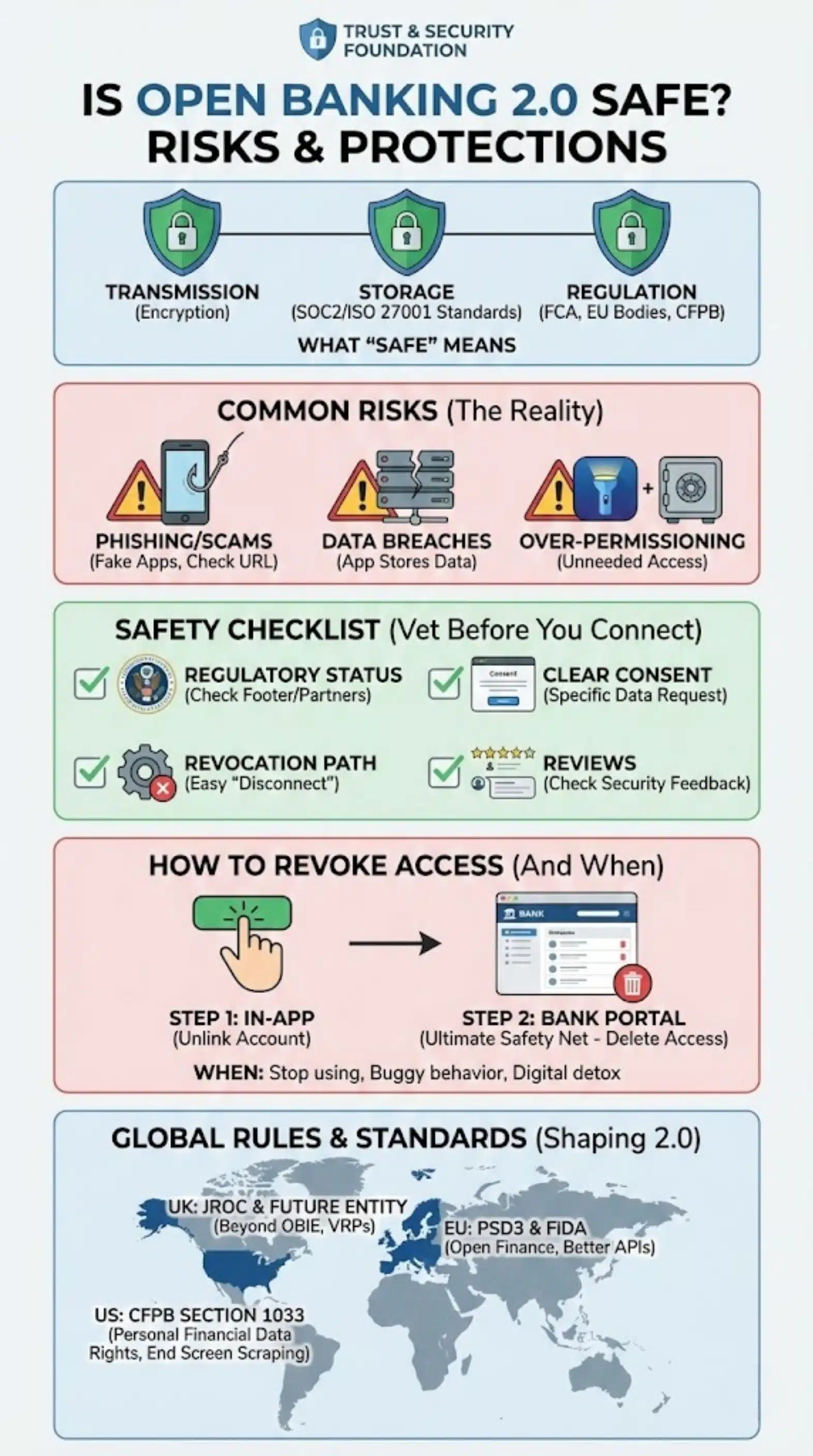
Safety in this context means three things:
- Transmission: Your data is encrypted in transit. It cannot be intercepted easily.
- Storage: Providers must adhere to strict data security standards (like SOC2 or ISO 27001).
- Regulation: Legitimate providers are regulated by government bodies (FCA in the UK, various bodies in the EU, and emerging frameworks in the US).
Common Risks (Scams, Over-Permissioning, Weak Providers)
No system is 100% risk-free.
- Phishing/Scams: Bad actors might create fake apps that look like Open Banking flows to steal credentials. Always check the URL.
- Data Breaches: Even if the transmission is safe, if the app stores your data and gets hacked, your transaction history could be exposed.
- Over-Permissioning: Granting access to data an app doesn’t need. A flashlight app doesn’t need your bank details; similarly, a simple budgeting app doesn’t necessarily need the ability to make payments.
Safety Checklist: How To Vet An App Before You Connect
Before you tap “Connect Bank,” run this mental checklist:
- Regulatory Status: Look for the footer on their website. In the UK, it should say “Authorized and regulated by the Financial Conduct Authority.” In the US, look for partnerships with major aggregators like Plaid, MX, or Yodlee.
- Clear Consent: Does the app explain exactly what it wants (e.g., “Read-only access to transactions”)?
- Revocation Path: Can you easily find the “Disconnect” button in the settings?
- Reviews: Check App Store/Google Play reviews specifically for “security” or “glitches.”
How To Revoke Access (And When You Should)
You should revoke access if:
- You stop using the app.
- You notice the app acting buggy or asking for weird permissions.
- You just want a “digital detox.”
To revoke:
- Go to the third-party app settings and select “Unlink Account.”
- Crucially: Log into your bank’s app/website. Look for “Third Party Access,” “Linked Apps,” or “Data Sharing.” You will see a list of everyone who has access. Delete any you don’t recognize or use. This is your ultimate safety net.
What Rules And Standards Are Shaping Open Banking 2.0
Open Banking availability and features depend heavily on where you live.
UK: The Future Entity And The JROC Direction
The UK is often considered the global leader in Open Banking.
- The OBIE: The Open Banking Implementation Entity set the initial standards.
- JROC (Joint Regulatory Oversight Committee): This body is now steering the ship toward “Open Banking 2.0” and beyond. Their focus is on creating a permanent “Future Entity” to replace the OBIE, ensuring the system is sustainable, and pushing for more advanced payment types (like VRP for non-sweeping use cases, e.g., one-click e-commerce payments).
EU: PSD2 Foundations And The Push Toward PSD3 + Financial Data Access
Europe started the revolution with PSD2 (Payment Services Directive 2).
- PSD3: The upcoming revision aims to fix the uneven quality of APIs across different countries and banks. It focuses on improving API performance and reducing friction for users.
- FiDA (Financial Data Access): This is the EU’s move toward “Open Finance.” It proposes that consumers should have the right to share data not just from banks, but from insurance, pension, and investment providers.
US: Section 1033 “Personal Financial Data Rights” (Why It’s A Big Deal)
The US has been market-led (industry-driven) rather than regulation-led, meaning it was a bit of a “wild west” of screen scraping.
- CFPB Section 1033: The Consumer Financial Protection Bureau is finalizing rules to activate Section 1033 of the Dodd-Frank Act. This essentially creates a legal right for US consumers to share their financial data. It mandates banks to provide safe APIs and move away from screen scraping. This is the “Open Banking 2.0” moment for the USA, bringing legal certainty and standardization to the market.
How To Actually Use Open Banking To Save Money (A Simple Starter Plan)
Ready to stop reading and start saving? Here is a low-risk plan to get started.
Start With One Low-Risk Connection (Budgeting Or Account View)
Don’t connect everything at once. Download a reputable, well-reviewed aggregation app (like YNAB, Monarch, Emma, or Copilot). Connect one main checking account.
- Goal: Get comfortable with the consent flow and see if the insights (spending categorization) are actually useful to you.
Set Guardrails (Permissions, Expiration, Notifications)
Once connected, go into the app settings.
- Turn on Notifications: Enable alerts for “Low Balance,” “Large Transaction,” and “Fee Charged.” These are your early warning systems.
- Check Expiration: Note when your 90-day (or similar) consent expires so you aren’t surprised when the data stops syncing.
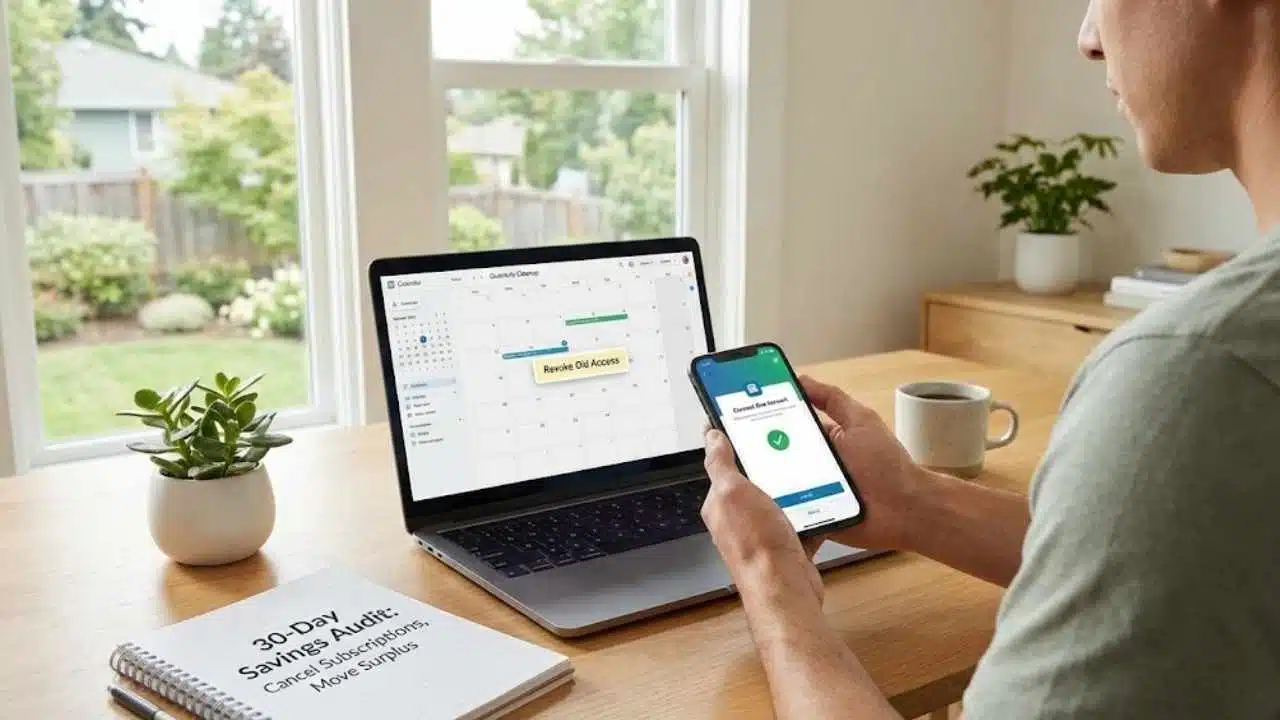
Run A 30-Day “Savings Audit” (Fees, Subscriptions, Rates)
Use the app to look back at the last 30 days.
- List all subscriptions: Cancel at least one.
- Sum up fees: Look for ATM fees, overdraft fees, or maintenance fees. If you see them, switch banks.
- Check your surplus: If the app shows you have $500 sitting in a 0% checking account every month, move it to a high-yield savings account immediately.
Recheck Connections Quarterly (Clean Up + Revoke Old Access)
Make a calendar appointment for “Financial Cleanup” every 3 months.
- Review which apps have access to your data.
- If you tried a mortgage broker app to get a quote and are done with it, revoke the access. Keep your digital footprint small.
Glossary
- AISP (Account Information Service Provider): A regulated entity authorized to view your account data (e.g., budgeting apps) but not move money.
- PISP (Payment Initiation Service Provider): A regulated entity authorized to move money on your behalf (e.g., an app that pays your bills directly from your bank).
- API (Application Programming Interface): The software bridge that allows two applications (your bank and the app) to talk to each other securely without sharing passwords.
- Consent: The explicit permission you give to a provider to access your data. It must be informed, specific, and freely given.
- Tokenization: The security process where sensitive data (like your account number) is replaced with a unique string of characters (a token) so the real data isn’t exposed during transactions.
- A2A Payments (Account-to-Account): Moving money directly from one bank account to another, bypassing card networks like Visa or Mastercard.
- Open Finance: The extension of Open Banking principles to other financial products like mortgages, insurance, pensions, and investments.
Final Thoughts
Open Banking 2.0 is more than just a buzzword; it is a fundamental shift in who owns your financial story. For decades, banks held your data and used it to their advantage. Now, the power has shifted to you.
By leveraging secure data sharing, you can uncover waste, automate savings, and access financial products that treat you as an individual, not just a credit score. While it requires a mindset shift—and a healthy dose of digital hygiene—the potential to save hundreds or even thousands of dollars a year is real.
The technology is here. The regulations are tightening to protect you. The next step? Pick one use case—whether it’s killing zombie subscriptions or stopping overdrafts—and let your data start working for you.