
You want to build apps fast, but coding feels like trying to read another language. Maybe your boss needs a new tool for business process management yesterday, or your team struggles with legacy systems that slow everything down.
Sound familiar? Folks everywhere look for simple ways to speed up software development without learning all those tricky programming languages.
Here’s one fact: low-code platforms and no-code platforms use drag-and-drop tools and visual blocks, letting almost anyone create working web apps or even automate processes. This blog will help you choose the best fit by explaining the key differences in their workflow automation, who can use them, and where each shines—no computer science degree required! Keep reading—you might find making an app is easier than baking apple pie.
Key Takeaways
- Low-code tools need some coding skills and are used by IT teams or developers. They work well for building big apps, linking old systems, or using APIs (like Microsoft Power Apps or OutSystems).
- No-code platforms use drag-and-drop features with no coding needed. Business users can build simple apps fast, like forms or dashboards (for example, Appgyver, Wix, Airtable).
- Low-code is better if you want more control and must connect to other programs or handle hard tasks. It helps when you need custom features or strong security.
- No-code is best for quick fixes and small projects when speed matters most. It lets anyone make an app in days instead of months without tech help.
- Both save time and money but have limits: low-code can cost more and may still need experts; no-code has less power for tricky jobs or deep changes. Choose based on your team’s skills, project needs, how much you want to customize things, and if the app connects to other software.
What is Low-Code Development?

Low-code development lets people build apps fast using simple tools. Drag-and-drop interfaces, pull-down menus, and visual programming blocks do the heavy lifting. Instead of writing long lines of code by hand, users connect pieces like building with toy bricks.
Platforms such as IBM Blueworks Live or Microsoft Power Apps offer these features as cloud services (PaaS). Professional developers and citizen developers both use them to speed up app development for businesses.
Many low-code platforms provide integrated development environments (IDEs), API connectors, plug-in modules, and ready-made templates. These help automate complex business processes, support mobile app creation, enable robotic process automation (RPA), connect legacy systems to new digital workflows, and handle enterprise-level scaling needs.
People can add machine learning or analytics without needing expert coding skills—a welcome relief for busy teams who need solutions yesterday.
What is No-Code Development?
No-code development uses simple, visual tools like drag-and-drop interfaces. You do not need any coding knowledge to build apps. These platforms help business users and hybrid teams make web apps, mobile apps, dashboards and even bots fast.
Anyone in a team can create self-service applications or automate tasks without calling for software experts every time. Most no-code platforms offer plug-and-play features which means you can connect data and set up business logic using only your mouse and keyboard.
Think about building an app as easy as stacking blocks or arranging shapes on a screen—that’s what no-code feels like. Big names call these citizen automation and development platforms (CADPs), because almost anyone in the business can use them.
Companies often pick no-code for user-friendly projects like content management systems or small workflow automations that don’t link deeply with legacy systems or complicated APIs.
No-code suits when speed is key—like testing new ideas—or when regular folks want control over their own work tools instead of waiting weeks for developers to write code from scratch.
Key Differences Between Low-Code and No-Code
Grasping the major gaps between visual development tools, such as low-code app makers and no-code platforms, is like choosing between a Swiss Army knife and a quick-fix toolkit—stick with us to get the full scoop.
Target Users
Low-code platforms speak the language of professional developers. These folks often work in IT departments or software development teams. They use low-code tools like OutSystems or Microsoft Power Apps to speed up application development and connect with things like APIs, legacy systems, or enterprise architecture.
Low-code makes workflow automation easier for them while letting them customize business logic.
No-code platforms roll out the red carpet for business users who have little to no coding experience. Office managers, finance staff, supply chain coordinators, and even HR pros step into app creation using drag-and-drop interfaces such as Appgyver or Wix.
No one needs a computer science degree here—just some imagination and a clear idea of what they want their apps to do for customer experience or simple process automation on public cloud platforms.
Coding Knowledge Requirements
No-code platforms open the door for anyone, even those who have never seen a single line of code. With drag-and-drop interfaces and visual programming tools, business users build applications fast—no computer science degree needed.
Citizen developers use these no-code platforms to automate tasks or create simple applications.
Low-code development platforms are another story. You can get far with drag-and-drop functionality and visual development tools like Microsoft Power Apps or IBM Watsonx. But at some point, you’ll need light coding skills to set up things like APIs or special business logic.
Software developers often step in here to create more complex software applications, link legacy systems, or extend workflow automation across different departments.
Flexibility and Customization
Low-code platforms act like an open box. You can add new features or connect APIs for machine learning or supply chains. Professional developers can write extra code, making apps more complex if needed.
Business logic and workflow automation fit right in since you get more freedom to shape them.
Platforms that need no coding work differently. They depend on ready-made templates and visual programming with drag-and-drop functionality. Changing how things look or work is easy only up to a point, but true extensibility stays out of reach without traditional development skills.
For simple applications or quick mobile app development, business users find these tools flexible enough—but adding custom behavior gets tricky fast.
Speed of Development
No-code platforms work like magic for speed. Need a simple app? Drag-and-drop interfaces let business users build in just hours, not days. Click, connect business logic, and boom—your online learning or workflow automation tool is ready to roll.
No coding skills needed. Testing takes less time too because there’s less to break.
Low-code development still runs circles around traditional application development. Professional developers can use visual programming tools and integrated development environments (IDEs) to build more complex solutions fast.
These low code platforms offer flexibility while trimming weeks off project timelines compared to writing every line by hand. It means rapid application development becomes the norm whether you want machine learning apps, private cloud integrations, or classic business process management tools.
Benefits of Low-Code Platforms
Low-code platforms help people make apps fast. They need little or no coding skills and save time and money.
- People can finish a project in days, not months. Low-code development lets teams move at the speed of thought.
- Business users and citizen developers can work together with professional developers. This improves teamwork between business and IT.
- Visual programming and drag-and-drop interfaces make it easy for anyone to use, even if they have never seen an IDE before.
- Smaller teams can build more with fewer resources, which saves money for companies both big and small.
- In-house customization becomes possible, so businesses do not need to buy expensive commercial off-the-shelf solutions all the time.
- Consistent architectural designs grow across different parts of an app. Reusing building blocks helps keep things neat.
- Faster app building means faster digital transformation for banks, retailers—even government offices—right down to automating boring tasks like data entry.
- Many low-code app development platforms connect easily with APIs, cloud services like Platform as a Service (PaaS), Internet of Things devices, and machine learning models.
- These platforms often come with strong business logic tools that make workflow automation simple for testers and process managers alike.
- Security features protect apps from cybercrime, making privacy less of a worry during application development across different industries.
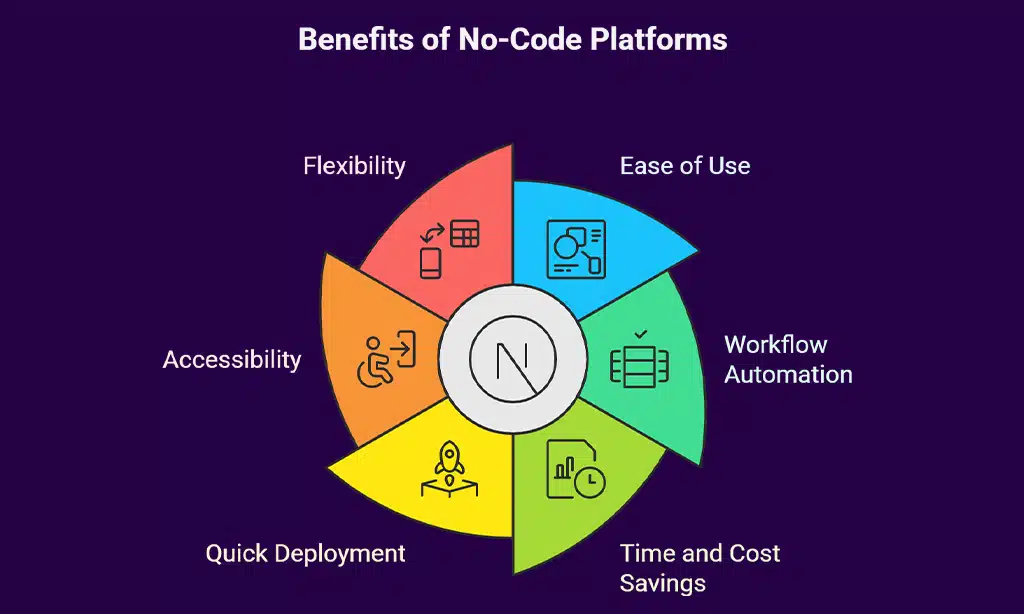
Benefits of No-Code Platforms
No-code platforms are easy to use and save time. People with little tech skill can make apps fast, using visual tools.
- Anyone can build an app with drag-and-drop interfaces and visual development, so citizen developers get power once held by professional developers.
- No need for coding knowledge keeps things simple; business users can skip long training.
- Speed of development gets a boost—projects go from idea to beta in days instead of months, making digital transformation real quick.
- Early customer feedback comes fast, which cuts down financial risks before you spend big money.
- Teams work better together because no-code platforms open doors for non-technical staff to join in app creation.
- Small teams do more with fewer resources, which lowers costs for companies looking to modernize or replace legacy systems without hiring large developer groups.
- Drag-and-drop functionality and graphical interface make workflow automation and business process management (BPM) as easy as pie.
- Cloud-based platforms offer access anywhere, helping companies use the internet of things (IoT) or artificial intelligence (AI) features without fussing over infrastructure.
- Security options are often built-in, helping reduce common security vulnerabilities that come with traditional development methods.
When to Use Low-Code
Low-code tools shine for tasks that need more control and flexibility. They work best in tricky projects where a basic drag-and-drop app just will not cut it.
- Complex needs call for low-code platforms, especially if application development must work with old legacy systems but keep their architecture.
- Businesses who want to build customer-facing apps on a large scale should use low-code development. These platforms handle cloud services, APIs, and mobile features much better.
- Companies that must mix business process automation, workflow tools, and many plugins find low-code solutions helpful. Platforms let teams make cross-department software without heavy code knowledge.
- Integrating artificial intelligence or machine learning with digital transformation projects is easier using low-code app development frameworks like those from OutSystems or Mendix.
- Creating advanced web or mobile apps for internal company use works well with these solutions because you get both speed and deeper customization options than no-code platforms provide.
- Low-code development lets citizen developers and professional developers work together inside an integrated development environment (IDE) for greater traceability and user-friendliness throughout the project’s life cycle.
- If your business uses many outside apps or external cloud technology for daily tasks, these platforms help tie all moving parts together quickly without outsourcing everything to outside teams.
- Enterprise organizations needing secure, high-functioning systems built faster than traditional programming methods see great results using low code development platform approaches backed by strong vendor support and workflow automation tools like Appian or Microsoft Power Apps.
When to Use No-Code
No-code platforms make it easy for people with no coding background to build simple apps. They help speed up digital transformation for business users and citizen developers.
- Use no-code tools to create expense approval flows, meeting schedulers, or basic workflow automation without writing any code.
- Self-service apps, dashboards, mobile tools, and web pages built on no-code platforms save both time and money.
- Content management systems for blogs or small business sites are a quick win with drag-and-drop interfaces.
- No need to hire professional developers for simple applications that do not require custom logic or deep system integration.
- Cloud-based visual development platforms like Airtable and Microsoft Power Apps let you launch projects in days instead of weeks.
- Build data pipeline builders or automate tasks across services with point-and-click actions using APIs or platform-as-a-service features.
- Standalone apps and automations thrive here; these tools work best outside complex legacy systems or deep backend needs.
- Administrative tasks like leave requests, contact forms, or inventory tracking can be set up by almost anyone using low code app development technology.
- Quick changes or updates are painless since most no-code solutions offer user-friendly interfaces and clear step-by-step guides.
- Ideal choice if you want ease of use, basic workflow automation, fast results, and minimum headaches building an app start to finish.
Challenges of Low-Code and No-Code Platforms
Shadow IT grows like weeds in a garden, especially with no-code tools in play. Less oversight from IT means business users might spin up their own solutions using drag-and-drop interfaces, leaving professional developers unaware and possibly causing a headache later on.
Scalability stands out as another major issue—low-code platforms can handle big jobs across the whole enterprise, but these scripted applications often demand more training and time to change or improve.
No-code platforms use visual development and templates for faster workflow automation, yet they lock teams into closed systems with little room to stretch or connect with outside APIs.
This tight design keeps things simple for citizen developers but puts strict limits on heavy customization and integration seen with legacy systems or enterprise-wide digital transformation projects.
It’s like trying to fit a square peg in a round hole—quick fixes sometimes work only until you need something special that drags the team back to traditional methods or extra outsourced help.
The Role of Citizen Developers
People in sales, human resources, and other business roles have started building their own tools. No-code platforms with drag-and-drop interfaces make this possible. These DIY builders are called citizen developers.
They do not need expert coding skills to create simple applications or automate tasks.
Business logic gets shaped by those who use it every day, not just professional developers tucked away behind screens full of code. Companies notice quicker results and stronger teamwork between IT teams and non-tech staff using no-code and low-code development platforms.
This approach helps speed up digital transformation efforts across enterprises, letting more people fix old legacy systems or streamline workflow automation with visual programming—almost like giving everyone a brush at a big mural wall instead of only the traditional artists painting alone.
Low-Code vs. No-Code in Enterprise Applications
Low-code platforms give enterprise businesses strong tools for app development. These platforms use visual programming, drag-and-drop functionality, and connect easily with APIs. This allows big teams to link legacy systems or add cloud features fast.
Think about companies like banks needing workflow automation that connects old databases with new web apps—low-code delivers on scale, speed, and deep customization. You get support for machine learning models and platform-as-a-service (PaaS), too.
No-code platforms suit small departments or solo business users better. They focus on simple applications, such as data entry forms or approval processes. Drag-and-drop interfaces keep things easy but limit building complex business logic found in low-code solutions.
No need to learn code; no-code lets citizen developers move quickly without IT help—but only for standalone tools or user-friendly dashboards. Enterprises find no-code perfect for fast jobs but soon hit a wall if they want more power, control, or custom integrations with other systems in the cloud or across their company’s stack.
Factors to Consider When Choosing Between Low-Code and No-Code
Picking the right platform saves money and time. You want your software to fit your needs.
- Project goals shape your choice, so set clear targets before starting with low-code platforms or no-code platforms.
- User expertise matters; business users often prefer drag-and-drop interfaces in no-code platforms, while professional developers use low-code app development for more control.
- Scope helps decide; simple applications need less work, but big enterprise projects might need low-code development.
- Integration needs with legacy systems or external APIs could steer you toward low-code solutions for extra muscle.
- Time to deployment is key; no-code tools get apps out faster if workflow automation is all you want.
- Customization level makes a difference; low-code gives greater flexibility for adding business logic or machine learning features.
- Security rules count; applications that handle sensitive data may call for the control found in low code app development platforms.
- Cost calculation can tip the scales: small teams often save more with no-code, while advanced features in low-code may increase expenses.
- Citizen developers thrive with visual programming and drag-and-drop functionality in no-code environments.
- Control over source code tends to be higher in low code app development, which can matter for digital transformation at scale.
- Support resources from vendors such as Appian or Mendix can impact ongoing maintenance of both types of platforms.
- Use cases drive decisions: customer-facing apps and enterprise-wide deployments usually require the power of a seasoned low code tool over a basic solution like Zapier or Airtable designed for speed and ease-of-use.
Choosing wisely keeps projects on track and frustration at bay!
Takeaways
Choosing between low-code and no-code is like picking the right shoes for a walk—both get you moving, but one may fit better. Low-code suits professional and citizen developers who need more control or want to connect with APIs and legacy systems.
No-code helps business users build simple applications fast using drag-and-drop interfaces. Think about your team’s skill set, your goals for digital transformation, and how much customization you need.
Whichever path fits best, workflow automation gets smoother when you have the right tool in hand.
FAQs on No-Code vs. Low-Code
1. What is the main difference between no-code and low-code platforms?
No-code platforms let business users build simple applications with drag-and-drop interfaces, while low-code development gives professional developers more control to add business logic or connect APIs.
2. Who usually uses no-code tools, and who prefers low-code?
Citizen developers like using no-code tools for quick workflow automation or visual programming. Professional developers often pick low-code when they need to work with legacy systems or do digital transformation projects.
3. Can I use both no-code and low-code for application development at my company?
Yes, you can mix them! No-code works great for fast solutions by business users, but if your team needs deep customization or machine learning features, then a low code platform fits better.
4. How do these platforms handle traditional development problems?
Both help avoid slow traditional development steps. With drag-and-drop functionality and visual development, teams skip much of the coding headaches that used to slow down information flow.
5. Are there limits when using these tools compared to regular coding?
There are some limits—no surprise there! No code makes it hard to zoom in on complex tasks needing custom APIs or detailed business logic; that’s where professional developers step in with a little more elbow grease using low code methods.