
If you’re searching for how to start a career in tech, you’re not alone—and you don’t need to “learn everything” to break in. Tech is a wide world of roles, from IT support and data analytics to web development, UI/UX design, QA testing, and cybersecurity. The key is choosing a direction, learning the right foundations, and building proof that employers can actually see.
In this guide, you’ll get a simple step-by-step roadmap to pick a beginner-friendly path, develop job-ready skills, create a portfolio with real projects, and start applying with confidence. Whether you’re switching careers, starting from scratch, or coming back after a break, you’ll find practical actions you can take immediately—without wasting months on random tutorials or confusing advice.
Why Tech Is Still A Smart Career Move Right Now
Tech keeps evolving, but demand for tech talent stays strong because nearly every industry runs on software, data, and networks.

A few helpful reality checks:
-
Computer and IT jobs in the U.S. have high median pay (over $100K as reported by the Bureau of Labor Statistics) and are projected to have hundreds of thousands of openings per year.
-
Employers increasingly value skills like AI & data, cybersecurity, tech literacy, and automation—not just “coding.”
Translation: you don’t need to become a “genius programmer.” You need to become useful in a specific role.
What To Expect When Starting In Tech
Getting into tech is less about being naturally “good at computers” and more about building momentum with a clear system. In the beginning, you’ll feel like there’s too much to learn—tools, terms, and different career paths—but that overwhelm is normal. What matters is choosing one direction, learning the basics that support it, and practicing through small projects so your skills become real, not just theoretical.
Expect a learning curve, occasional confusion, and mistakes along the way; those are signs you’re stretching into new territory. If you set a realistic schedule, focus on consistent progress, and document what you build, you’ll improve faster—and you’ll have tangible proof to show employers when you start applying.
Step 1: Pick Your First Tech Path (Don’t Start With “Everything”)
Most beginners get stuck because they try to learn a little of everything. Instead, pick one path and commit for 8–12 weeks.
Here are the most beginner-friendly ways to get into tech:
1) IT Support (fastest entry for many)
What you do: troubleshoot devices, networks, and user issues, set up systems
Great if you like: practical problem-solving, helping people, hands-on work
Common first roles: Help Desk, IT Support Specialist, Tech Support
What to learn first
-
Windows/macOS basics, common troubleshooting patterns
-
Networking basics: IP, DNS, Wi-Fi, routers
-
Ticketing tools + writing clear notes
Portfolio idea: a small “IT knowledge base” (10 troubleshooting guides + screenshots)
2) Web Development / Software Development
What you do: build websites, apps, internal tools
Great if you like: building things, logic, solving puzzles
Common first roles: Junior Frontend Dev, Junior Full-Stack Dev, Intern Dev
What to learn first
-
HTML + CSS + JavaScript (core)
-
Git/GitHub
-
APIs (how your app talks to data)
Portfolio idea: a small web app that solves a real problem (with live demo + README)
3) Data Analyst (highly practical and business-friendly)
What you do: analyze data, build dashboards, answer business questions
Great if you like: patterns, insights, decision-making
Common first roles: Data Analyst, BI Analyst, Reporting Analyst
What to learn first
-
Spreadsheets (Excel/Google Sheets)
-
SQL (the #1 “data job” skill)
-
Dashboard tool (Power BI / Tableau / Looker Studio)
Portfolio idea: dashboard + short case study (problem → analysis → recommendation)
4) Cybersecurity (often a step after IT fundamentals)
What you do: protect systems, reduce risk, monitor threats
Great if you like: investigation, defense mindset, structured thinking
Common first roles: SOC Analyst (entry), Security Analyst (junior), IT → Security transition
What to learn first
-
Networking + OS fundamentals (don’t skip these)
-
Basic security concepts (CIA triad, authentication, least privilege)
-
Log basics + threat awareness
Portfolio idea: simple threat model write-up + home lab notes (what you configured and why)
5) QA / Software Testing (manual → automation later)
What you do: test software, write test cases, find bugs, improve quality
Great if you like: detail, breaking things, systematic checks
Common first roles: QA Tester, QA Analyst
What to learn first
-
Writing test cases and bug reports
-
Basics of how web apps work
-
Later: automation tools like Cypress/Selenium
Portfolio idea: test plan + documented bug reports for a demo app (with evidence)
6) UI/UX Design
What you do: design user experiences and interfaces
Great if you like: design + psychology + user research
Common first roles: Junior UX Designer, UI Designer, Product Design intern
What to learn first
-
Figma fundamentals
-
User flows, wireframes, usability basics
-
Case studies (storytelling matters)
Portfolio idea: redesign a real product screen + usability test summary
Quick decision table: which tech path fits you?
| If you enjoy | Best starting path | Coding needed? | First proof you can build |
|---|---|---|---|
| Helping people + troubleshooting | IT Support | Low | Troubleshooting guides + home lab notes |
| Building apps + logic puzzles | Web Development | Medium–High | 2–3 small apps + GitHub |
| Business questions + numbers | Data Analyst | Low–Medium | Dashboard + SQL case study |
| Defense + investigation | Cybersecurity | Medium | Lab notes + threat model + log exercises |
| Detail + quality control | QA Testing | Low–Medium | Test plan + bug reports (+ basic automation later) |
| Design + empathy + visuals | UI/UX | Low | Figma case studies + usability findings |
Pick one and commit. You can switch later—after you’ve built momentum.
Step 2: Learn The Universal Tech Foundations (They Help In Every Role)
No matter which path you choose, these foundations make learning faster:
-
How the internet works (basic): browsers, HTTP/HTTPS, DNS
-
OS basics: file systems, permissions, installing tools
-
Git/GitHub: proof of work and version control
-
Documentation: explain what you built and why (this is a hiring advantage)
Employers want people who can do work and communicate clearly—not just people who watched tutorials.
Step 3: Use A Learning System That Avoids The Tutorial Trap
A lot of beginners watch hours of tutorials and feel productive, but progress only becomes real when you build. A simple rule that works is the 70/30 approach: spend most of your time applying what you learn, and the rest learning new concepts. For example, if you learn SQL joins, don’t stop at understanding—write 10–20 queries on a real dataset and explain what each query answers.
This approach improves retention, exposes gaps quickly, and produces tangible outputs that become portfolio material. If your goal is to get into tech with no experience, building is the shortest bridge from “learning” to “hireable.”
The 70/30 rule
-
70% building
-
30% learning
Every time you learn something new, apply it the same day.
Example:
Learn SQL JOINs → write 15 JOIN queries on a dataset → document what each query answers.
Step 4: Follow A Realistic 90-Day Roadmap (Learn → Build → Show → Apply)
A beginner-friendly roadmap should feel structured but not overwhelming. In the first couple of weeks, set up your tools and study routine: pick your track, pick one primary course or resource, and set a schedule you can actually maintain.
In the middle phase, focus on shipping your first project—small, complete, and clearly documented—because finished work creates confidence and proof. After that, build a second project that’s slightly more realistic, improving something important like documentation, usability, testing, or clarity of insights.
Finally, spend the last phase preparing for interviews and running a focused job search: apply to roles that match your track, ask for feedback, refine your resume, and practice explaining your projects. The roadmap works because it forces momentum: you’re not just learning; you’re producing evidence.
Weeks 1–2: Set your direction + set up your environment
-
Choose one path (IT / web dev / data / QA / UX / cyber)
-
Pick one main learning resource
-
Set a schedule (even 45–60 minutes/day works)
-
Create accounts and tools: GitHub (for dev/data/QA), LinkedIn (for all tracks), A folder structure for projects + notes
Goal: you’re ready to learn and build.
Weeks 3–6: Build Project #1 (small but complete)
This is where most beginners fail—because they don’t finish.
Project #1 should be:
-
small enough to finish in 1–3 weeks
-
easy to explain
-
documented with a README or case study
Goal: a complete artifact you can show.
Weeks 7–10: Build Project #2
Add one “professional” layer:
-
better documentation
-
better UI (if relevant)
-
testing (QA/dev)
-
a clearer business question (data)
-
or a clearer lab setup explanation (IT/cyber)
Goal: prove you can improve and iterate.
Weeks 11–12: Job search + feedback loop
-
Apply to roles that match your track (don’t spray and pray)
-
Network for feedback (not favors)
-
Practice interviews weekly (even short sessions)
Goal: start conversations and get interviews.
90-day plan by track (quick reference)
| Track | Skills to learn first | Milestone project | Tools |
|---|---|---|---|
| IT Support | OS + networking + troubleshooting | Home lab + 10 support guides | VirtualBox/VM, basic networking tools |
| Web Dev | HTML/CSS/JS + Git + APIs | CRUD app + API integration | GitHub, VS Code, simple hosting |
| Data Analyst | Sheets + SQL + dashboarding | Dashboard + SQL case study | SQL editor, Power BI/Tableau |
| Cybersecurity | Networking + OS + security basics | Threat model + lab notes | VM lab, basic log practice |
| QA Testing | Test cases + bug reports | Test plan + bug report portfolio | Jira-like workflow, basic automation later |
| UI/UX | Figma + flows + usability | 2–3 case studies | Figma + documentation |
Step 5: Build Portfolio Proof That Matches The Job You Want
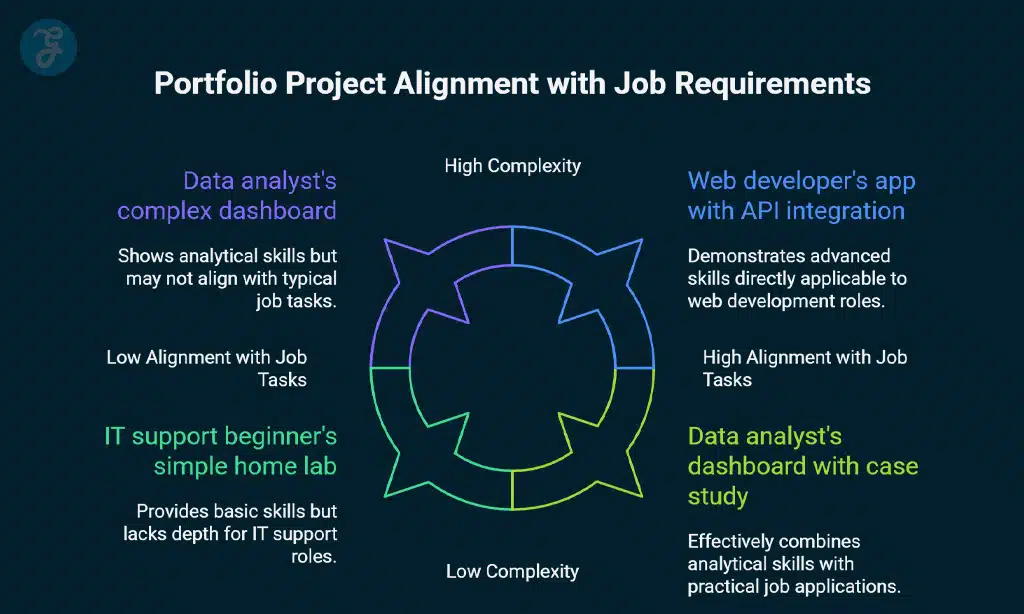
Build projects that reflect real job tasks, not random experiments. A web developer can show an app with a clear feature set and an API integration; a data analyst can show a dashboard plus a short written case study that explains decisions and recommendations; an IT support beginner can show a mini knowledge base of troubleshooting guides and a simple home lab setup.
A portfolio gets interviews when it answers one question:
“Can you do the job—or at least enough of it to be trained quickly?”
What makes a project “hireable?”
-
It solves a real or realistic problem
-
It has a clear goal and clear outcome
-
It’s documented (README/case study)
-
It shows your decision-making
Portfolio project ideas (use these as templates)
| Track | Beginner project | Slightly stronger project |
|---|---|---|
| Web Dev | To-do app with local storage | API-based app (search + filters + pagination) |
| Data | Dashboard from public dataset | SQL case study + business recommendations |
| IT | “Fix common Wi-Fi issues” guide set | Home lab + network diagram + troubleshooting logs |
| Cyber | Password/security checklist write-up | Basic threat model + log review notes |
| QA | Test cases for a demo app | Automated smoke test suite + bug reports |
| UX | Screen redesign in Figma | Full case study + usability test summary |
Pro tip: your project isn’t “done” until it has:
-
screenshots
-
a clear README
-
and a short “what I learned” section
Step 6: Use Certifications Strategically (As Signals, Not Substitutes)
Certifications can help you break into tech, especially in IT and cybersecurity, but they’re most effective when they reinforce what you can already demonstrate. Think of a certification as a credibility booster—useful for getting past filters and showing structured learning—but not a replacement for projects or hands-on practice.
If you’re pursuing IT support or security roles, certifications can be a helpful “baseline signal.” If you’re going for data or UX, certificates are useful when paired with strong case studies and a visible portfolio. The best strategy is often: build one solid project first (so you understand what you’re learning), then pursue a certification that matches the roles you’re applying to.
Good beginner-friendly options include:
-
Google Career Certificates (IT Support, Data Analytics, Cybersecurity, Project Management, UX Design)
-
CompTIA tracks for IT and security (A+, Network+, Security+)
Certification map by goal
| Your goal | Good starting cert | Best paired with |
|---|---|---|
| First IT job | IT support-focused cert | Home lab + troubleshooting documentation |
| Entry security path | Security fundamentals cert | Networking basics + lab notes + threat model |
| Data analyst job | Data analytics certificate | SQL case study + dashboard portfolio |
| UX design role | UX certificate | 2–3 case studies in Figma |
If you’re short on time: build a project first, then add a cert if it boosts your confidence or improves your resume signal.
Step 7: Start Applying Before You Feel “Ready”
A common mistake is waiting for confidence before taking action. Confidence usually comes after you start applying, talking to people, and getting feedback. Your first job search goal isn’t to land a perfect job immediately—it’s to start conversations, learn what employers want, and improve your proof of work.
The best entry routes into tech
-
Entry-level jobs (help desk, junior dev, junior analyst, QA tester)
-
Internships and apprenticeships
-
Freelance micro-projects (small websites, dashboards, UX redesigns)
-
Internal transfer (if you’re already employed somewhere)
A simple job search checklist
-
1-page resume tailored to your chosen track
-
Portfolio link (GitHub/website/Figma/case studies)
-
2–3 “proof” projects
-
LinkedIn profile with a clear headline
-
Weekly routine: apply + network + practice interviews
Outreach message you can copy (works well)
“Hi [Name], I’m transitioning into [role]. I built [project link]. Could you share 2 things you’d improve if you were hiring for entry-level?”
This gets feedback, builds relationships, and sometimes leads to referrals.
Step 8: Prepare For Interviews By Practicing Explanations (Not Memorizing Answers)
Entry-level interviews typically test how you think, how you communicate, and whether you can handle job basics.
For example:
- Developers are often asked to explain projects and demonstrate fundamental coding logic
- Data candidates are tested on SQL and how they interpret metrics
- IT candidates are evaluated through troubleshooting scenarios
- QA candidates are assessed on test thinking and bug reporting
- UX candidates are judged by their case study storytelling and user-centered decisions.
The most reliable prep method is to practice explaining your own work clearly: what the problem was, what you built, why you chose that approach, and how you would improve it next. Clear explanations create trust—especially when you’re early in your career.
Step 9: Use AI Tools To Learn Faster, But Don’t Outsource Understanding
AI tools can speed up learning, but they can also make you think you’re improving when you’re not. Surveys show adoption is growing, but many developers still hesitate to trust AI in higher-responsibility tasks.
A good beginner approach:
-
Use AI for explanations, debugging hints, and practice questions
-
Don’t copy blindly—rewrite in your own words
-
Document what you used AI for in your notes (not on your resume)
Your long-term advantage is understanding, not copying.
Common Mistakes That Slow Down Beginners (Avoid These)
Many beginners lose momentum not because tech is too hard, but because they follow unfocused habits that prevent real progress. Avoiding these common mistakes will help you learn faster, build stronger proof of skills, and reach job-ready confidence sooner.
-
Switching paths every week
-
Consuming tutorials without building
-
Building huge projects too early
-
Not documenting anything
-
Applying randomly instead of targeting roles
If you do just one thing differently: finish small projects and document them well.
Frequently Asked Questions About Starting a Career in Tech
Can I start a career in tech with no degree?
Yes. Many tech roles are skills-based, especially IT support, QA, web development, and data analytics. Structured learning + projects + proof of work matter a lot.
What’s the fastest way to get into tech?
For many people, IT support and QA testing are faster entry points because they rely more on practical skills and less on deep programming. You can grow from there.
How long does it take to become job-ready?
If you follow a focused plan and build real portfolio proof, many beginners can reach entry-level readiness in roughly 8–16 weeks (depending on time available and chosen path).
Which tech job is easiest to get first?
It depends on your local market, but common entry roles include help desk, QA tester, junior data analyst (with strong SQL + dashboards), and junior web dev (with solid projects).
Final Takeaway: Choose One Path, Build Proof, Repeat
If you want to know how to start a career in tech to feel simple instead of overwhelming, focus on one path, build proof, and move in small, finished steps. Choose a beginner-friendly track, learn the universal foundations, and follow a structured plan that forces you to ship projects and document what you’ve done.
Pair optional certifications with real hands-on work, start applying earlier than you feel comfortable, and practice explaining your projects like a professional. Tech rewards consistency more than intensity—so a steady routine of learning, building, and showing your work is what turns “beginner” into “job-ready.”