
With the rise in popularity of easy-to-use People Search Engines, much of our personal information has been widely available, making it vulnerable to criminal actors.
These web services need little to no effort to seek up someone’s information such as their name, identification, address, and other personal information.
Reverse phone lookups are one of the most common ways to learn more about someone by looking up their phone number. Here’s an article about reverse phone lookup that you might find useful.
When someone’s personal information falls into the wrong hands, it can be quite harmful. It can be used to injure you in a variety of ways, including:
Identity theft: If someone has access to your data, they can mimic you and steal your identity. They can simply take out large loans, mortgages, and credit card applications in your name. This could get you into legal difficulties with the authorities, and clearing your name could take a long time.
Stalking: Anyone may check up your social media accounts, as well as your home location and phone number, on the internet. Stalkers and other dangerous actors can use this information to track you down and attack you.
Furthermore, you may come across irrelevant or incorrect information about yourself on the internet, which may be used to discredit you. It will be tough for you to find work because many employers utilize these People Search engines for background checks.
NumLooker is one of the most popular people search engines. Check article to people finders with NumLooker with information about practically everyone publicly available. However, because some people are hesitant to share their personal information online, NumLooker makes it simple to remove your information from the public record.
Learn how to erase your information from NumLooker in the following post.
How to Delete Your NumLooker Profile
It’s simple to get rid of your information with NumLooker. It doesn’t involve any kind of sign-up or account setup, and you won’t have to pay anything to get your information removed. The removal request, however, may take up to 48 hours to be processed.
To remove your information from NumLooker, follow these simple steps:
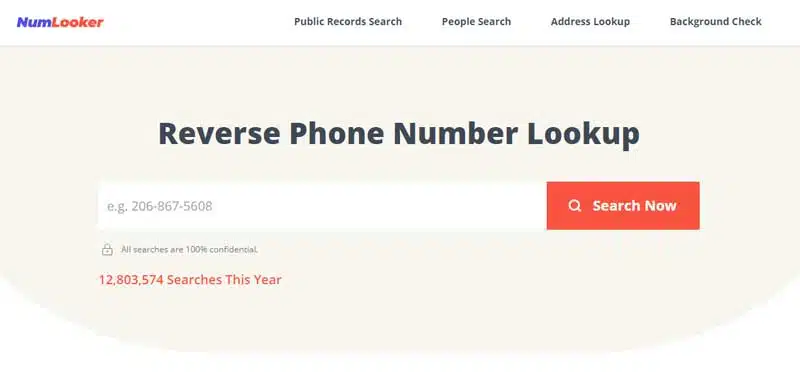
Step 1: Look for yourself.
To begin, use NumLooker to look for your profile. It’s quite easy; all you have to do is go to www.NumLooker.com and type your name into the search box on the front page. When you click the search icon, a list of profiles that meet your criteria should appear.
You may also use the reverse lookup tool to check up your phone number or the reverse address lookup tool to seek your home address.
Lookup an address in reverse
Step 2: Locate your Profile
NumLooker will search its massive database and present you with a list of all matching profiles after you submit your search request. You can discover your profile by scrolling and looking through the list from here.
You can narrow down the results by adding additional data such as your city name or selecting your home state from the drop-down option in the search bar, as there may be many people with the same name.
To open your profile, find it and click on ‘Check Details.’
Step 3: Request that your information be removed.
On the profile page, look for the ‘Remove my details’ button and click it to opt out of the NumLooker database.
Verification is the fourth step.
An email with a verification link will be sent to you. Simply click the link to authenticate your identity, and your request will be accepted, and NumLooker will begin the process of removing your profile from its search results.
Following that, you will receive a confirmation email confirming that your information has been removed from the NumLookers database. You can double-check this by browsing your profile on NumLooker again.
The effective processing of the removal request normally takes a day or two. To see the results, you may need to clear the cache on your device.
Opt-out on Someone Else’s Behalf
You can also opt-out on behalf of a relative with NumLooker. The procedure for doing so is nearly identical. You must also obtain valid written authorization from the individual whose profile you are requesting to be removed.
NumLooker’s Background
NumLooker is the most well-known search engine. By linking various publicly available records from around the world, it has amassed a massive database of accurate information about everyone.
All of the information on NumLooker is derived from publicly available sources obtained from the government, and it is fully legal and risk-free to use. Companies and individuals alike use it to do background checks, seek up contact information, and locate addresses. As a result, NumLooker seeks to bring individuals together and bring them closer together.
NumLooker may be accessed directly from your web browser and is designed in the style of a search engine, similar to Google. To look up somebody, all you need is their name. It generates a list of potential matches from which you may select the profile of the person you want.
NumLooker has created several tools to assist you with your search. The following are some of its most notable features:
People Look
This tool can be used to locate an individual’s profile using only their name. Because many people with the same name exist, you can further filter the list of results by providing additional information such as the person’s city or state. This is a fantastic tool for reconnecting with old pals.
Lookup a phone number in reverse
This is the process of using a phone number to look up information such as a person’s name, personal identity, and address. It’s looking for information on an unknown phone number.
Lookup an address
It, like a phone lookup service, uses the address to acquire information on the location’s renter. It allows you to verify whether or not a person claiming to live at a given address lives there.
Email Lookup
This function allows you to look up the name, address, and age of the person who owns a specific email address.
Conclusion
It is not a good idea to make your information public for anybody to see since unscrupulous actors could use it to cause you great harm. NumLooker, on the other hand, makes it simple to hide your profile and delete your information from the public record.