

Increase File Security: Lock Your Google Docs to Limit Edit Access


We’ve all been there—sharing a crucial document or spreadsheet with colleagues, only to find that someone has gone in and made changes without letting us know first. It can be downright frustrating, right?

Well, it seems the folks at Google Drive understand this struggle all too well. That’s why they’ve introduced a game-changing new feature: the ability to “Lock” your files to prevent those unwanted edits.

Now, instead of stressing over who might accidentally (or purposefully) tweak your work, you can simply lock the file. It’s a welcome update for anyone who’s tired of sifting through version histories or sending out those awkward “Please do not edit” messages. So, hats off to Google Drive for making our digital lives just a little bit easier.

Google Drive Now Allows “Lock” Documents

Good news for all you Google Workspace users out there! Google Drive has rolled out a fantastic new feature that allows you to lock your files. What’s the best part? Once a file is locked, it’s untouchable—regardless of how much access someone might normally have. That means you won’t have to worry about unauthorized edits messing up your work unless you explicitly give permission for changes.

 This new feature aims to simplify and streamline the process of restricting access to files in Google Drive. To make use of this feature, follow these easy steps:
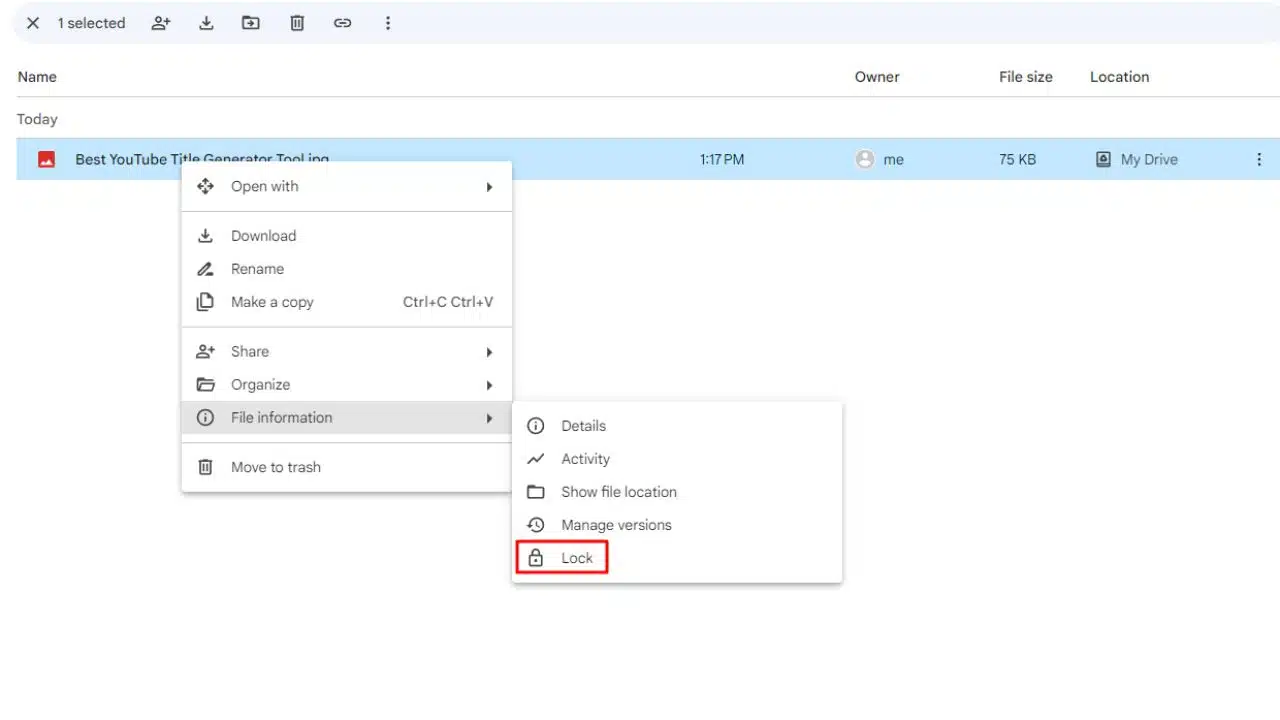
Google Drive File Locking Feature

  1. Open Google Drive and locate the file you want to restrict access to.
  2. Right-click on the file.
  3. Ensure that you have edit access to the selected file.
  4. From the pop-up menu that appears, choose the “Lock” option.

By selecting the “Lock” option, you can effectively enable read-only mode for that specific file. What makes this implementation different from previous methods is its flexibility. You can lock a file even after you’ve already shared it with a colleague, a feature that was not available before.

The rollout of this new Google Drive file lock feature has already begun for Workspace users in the Rapid Release domain. It’s expected to become available to all users within the next 15 days. If you fall under the Scheduled Release domain, you can expect this feature to go live for you starting from September 20, following a similar 15-day rollout period.

Now, the big question is: What do you think of this nifty Google Drive feature? Do you anticipate using it frequently? Feel free to share your thoughts in the comment section below.



Subscribe to Our Newsletter

Related Articles

Top Trending

Social Media Agency vs In-House Team
Social Media Agency vs In-House Team: Cost, Speed, Context, and Control
How Board Games Teach Counting Without Trying
September 28
On This Day September 28: History, Famous Birthdays, Deaths & Global Events
How to Teach Letters to Kids
8 Ways to Teach Letters to Kids Who Hate Sitting Still
Alphabet Magic vs 123 Magic Number Fun
Alphabet Magic vs 123 Magic Number Fun: Which Skill Does Each App Actually Target?

Technology & AI

Social Media Agency vs In-House Team
Social Media Agency vs In-House Team: Cost, Speed, Context, and Control
SEO Agency vs In-House SEO vs Freelancer
SEO Agency vs In-House SEO vs Freelancer: A Decision Framework for Small Teams
ImagineLab Voice Lab vs Murf AI
ImagineLab Voice Lab vs Murf AI: I Tried Multilingual Narration from the Same Script
Best Document Collaboration Tools
10 Best Online Document Collaboration Tools for Teams
Important Signs When Should Raise Prices on Your SaaS
10 Signs It's Time to Raise Prices on Your SaaS

GAMING

Intentional Screen Time
How to Spend Your Screen Time More Intentionally
Complete Guide on Game Programgeeks
Game Programgeeks: A Complete Guide on PC, Game Dev, and Tech
Online Color Game Philippines
Online Color Game Philippines: What Every Beginner Should Know Before Playing
Ways to Reduce Game Development Costs
12 Ways Studios Cut Game Development Costs
NFT game development cost
How Much Does NFT Game Development Cost? A Realistic Budget Breakdown

Business & Marketing

Email Marketing Agency vs DIY Platform
Email Marketing Agency vs DIY Platform: When Outside Help Adds Value
Critical Path Method
The Critical Path Method Explained in Plain English
Time to Value: How SaaS Teams Can Reach Results Faster
How to Onboard New Team Members With a Self-Serve Wiki
How to Document Team Processes for Better Teamwork

EdTech & E-Learning

How to Teach Letters to Kids
8 Ways to Teach Letters to Kids Who Hate Sitting Still
Alphabet Magic vs 123 Magic Number Fun
Alphabet Magic vs 123 Magic Number Fun: Which Skill Does Each App Actually Target?
Alphabet Magic vs ABC Kids: Which Offers Clearer Letter Practice
Alphabet Magic vs ABC Kids: Which Gives Clearer Uppercase and Lowercase Practice?
Alphabet Magic vs LetterSchool comparison review
Alphabet Magic vs LetterSchool: Letter-Tracing Accuracy on the Same Letters [A Hands-on Review]
Alphabet Magic Trace and Phonics vs Teach Your Monster to Read
Alphabet Magic Trace and Phonics vs Teach Your Monster to Read: Which Is Best?

Software & Apps

Best Document Collaboration Tools
10 Best Online Document Collaboration Tools for Teams
Important Signs When Should Raise Prices on Your SaaS
10 Signs It's Time to Raise Prices on Your SaaS
Best CRM Tools for Small Marketing Teams
10 CRM Tools for Small Marketing Teams Worth Using
SaaS partnership tools
10 Best Tools for Managing SaaS Partnerships and Integrations
White-Label SaaS Platform to Resell
8 Best White-Label SaaS Platforms to Resell




















