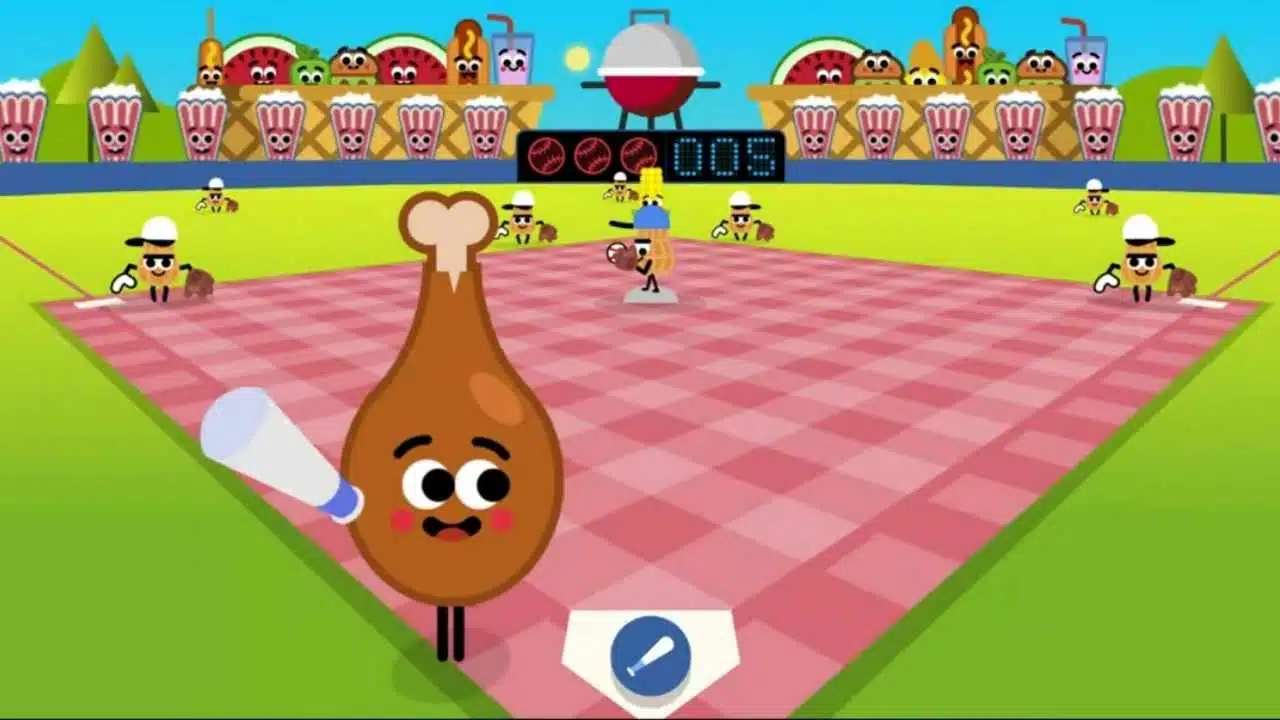
Have you tried to play google doodle games baseball but got stuck with the rules? Many players click away from this fun game because they don’t know how to hit that perfect home run.
You’re not alone if you’ve swung and missed more times than you can count.
Google Doodle Baseball first appeared in 2019 as a cute way to celebrate America’s love for this classic sport. The game uses food characters as players, making it both silly and fun for all ages.
This guide will walk you through every step of playing Google Doodle Baseball. From finding the game to mastering your swing timing, we’ve got all the tips you need. Ready to hit some home runs?
Key Takeaways
- Google Doodle Baseball first appeared in 2019 and features food characters as players.
- You can find the game by searching “Google Doodle Baseball” on Google.com.
- Timing is key to success – watch the pitcher closely and swing when the ball reaches the plate.
- The game includes fun animations like confetti and cheering when you hit a home run.
- No downloads are needed as the game runs directly in your web browser on most devices.
How do I access Google Doodle Baseball?
Google Doodle Baseball brings fun baseball action right to your computer or phone. You can start playing this simple yet addicting game in just a few clicks.
- Open your web browser and go to Google.com.
- Type “Google Doodle Baseball” in the search bar and press Enter.
- Click on the first search result that shows the game.
- The game will load automatically on your screen.
- You’ll see colorful food characters ready to play baseball.
- No downloads are needed, the game runs right in your browser.
- The controls are easy to learn, just click or tap to swing the bat.
- Google launched this baseball game in 2019 to celebrate America’s baseball culture.
- The game works on most devices including phones, tablets, and computers.
- You can play anytime you want, the game stays online after its initial release.
- Share your high scores with friends by taking screenshots.
- The game loads quickly even on slower internet connections.
Understanding the gameplay mechanics
Google Doodle Baseball brings classic baseball fun with simple controls. You’ll swing the bat with a click or tap, trying to hit balls thrown at different speeds and angles.
What are hits and pitches in the game?
Hits in Google Doodle Baseball happen when you swing your bat at the right time and connect with the ball. You can get singles, doubles, triples, or home runs based on how well you hit.
The game tracks your hits and gives you points for each one. Home runs are the most fun because they come with special animations and sounds! Pitches in the game vary in speed and style.
Some balls come straight at you, while others curve or drop. The pitcher tries to trick you with different throws. Your job is to watch the ball closely and swing when it reaches the plate.
This simple but fun system makes the baseball doodle game both easy to learn and hard to master.
How is the field of play designed?
The field in Google Doodle Baseball keeps things simple and fun. You’ll see a cartoon-style baseball diamond with bright colors and food-themed characters. The batter stands at home plate, ready to hit balls pitched from the mound.
Unlike real baseball fields with complex layouts, this digital field focuses on the basic path from home to first base. The design makes it easy for players of all ages to jump right in without learning complex rules.
Google created this field to match the game’s playful spirit. When you hit a home run, your character runs around bases while fun animations play. The field has clear markers to show if your hit was good or not.
This simple design helps make the game addicting with perfect pacing, just as Google intended when they launched it in 2019 to celebrate baseball culture.
Key features of Google Doodle Baseball
Google Doodle Baseball packs a punch with its bright, food-themed players that swing for the fences. The game mixes simple controls with funny sound effects that make each hit feel like a real crowd-pleaser.
What are the playable food characters?
Google Doodle Baseball brings fun food characters to life on the baseball field. These tasty players add humor and personality to this simple yet addicting game.
- Hot Dog slugger wears a mustard cap and has a big smile when hitting home runs
- Popcorn pitcher throws fast curves with kernels that pop during special pitches
- Ice Cream batter melts slightly in the sun but freezes opponents with powerful hits
- Pizza slice fielder spins like a frisbee to catch fly balls in the outfield
- Hamburger catcher squats behind home plate with sesame seed eyes watching each pitch
- French Fry coach waves from the sidelines when you score points
- Soda cup umpire bubbles with excitement during close calls
- Nachos fan in the stands who jumps up for home runs
- Peanut vendor who walks through the crowd between innings
- Cotton Candy rookie who gets sticky when sliding into bases
What fun animations and sound effects are included?
Google Doodle Baseball packs a ton of fun sounds and cute animations. Every hit comes with a crack of the bat and cheers from the crowd. You’ll smile at the food players doing victory dances after home runs.
The pitcher makes funny faces when you hit well, and the ball zooms with cartoon-like speed lines. Crowd noises rise and fall with the action, making you feel like you’re at a real game.
The simple graphics have bright colors that pop on your screen.
The game adds special touches that make each play exciting. Hit a home run and watch fireworks explode while trumpets play a victory tune. Strike out and hear a sad trombone sound.
These small details make the baseball doodle more than just a game. The food characters have their own unique movements, like the hot dog that spins when pitching or the ice cream cone that melts a little in the sun.
These playful elements keep players coming back for more fun.
How can I improve my score in Google Doodle Baseball?
You’ll hit more home runs in Google Doodle Baseball with a few simple tricks. Master your timing and watch for the pitcher’s tells to smash those balls out of the park.
How do I time my swings effectively?
Timing your swings in Google Doodle Baseball can make the difference between a strike and a home run. This simple yet challenging baseball simulator rewards players who master the art of perfect timing.
- Watch the pitcher’s arm motion closely to predict when the ball will reach you.
- Start your swing as the ball crosses the halfway point between the pitcher and home plate.
- Practice makes perfect, so don’t get upset if you miss the first few pitches.
- Look for patterns in how the pitches come at you during the game.
- Keep your finger or mouse ready to click at just the right moment.
- Try to hit the ball when it’s directly over the plate for best results.
- Pay attention to the speed of different pitches and adjust your timing.
- Count the seconds between pitches to get into a rhythm.
- Focus on the ball’s path rather than getting distracted by fun animations.
- Hit earlier for fast pitches and later for slower, tricky pitches.
- The sweet spot for timing is just as the ball reaches the front of home plate.
- Take a few practice swings before playing to warm up your clicking finger.
How can I recognize and handle tricky pitches?
Tricky pitches in Google Doodle Baseball can make hitting home runs a real challenge. You’ll need sharp eyes and quick reflexes to spot and hit these curveballs that try to fool you.
- Watch the pitcher’s wind-up closely for hints about the coming pitch.
- Fast pitches zoom straight at you, so swing early to make contact.
- Curved pitches move in an arc, so wait a bit longer before swinging.
- Some pitches look fast but slow down mid-air, so don’t rush your swing.
- The ball changes color slightly for different pitch types in many versions.
- Count the seconds between pitches to get into a rhythm for better timing.
- Practice makes perfect, so keep playing to learn each pitch pattern.
- The game gets harder as you hit more home runs, with trickier pitches coming your way.
- Food-themed pitchers in the game each have their own special pitch styles.
- Pay attention to sound cues that might signal a change in pitch speed.
- Your bat speed matters, so match it to the pitch type for best results.
- If you miss three times, you’re out, so pick your swings wisely.
What highlights should I look out for?
You’ll find special treats in Google Doodle Baseball that make the game extra fun. The game has cool surprises waiting for you that will make you smile while you play.
What are the unique food-themed baseball cards?
Google Doodle Baseball brings fun to the game with special food-themed baseball cards. These cards add humor and charm to your baseball gaming experience.
- Hot Dog Slugger Card shows a cartoon hot dog with a baseball bat, ready to hit a home run.
- Pizza Pitcher Card features a slice of pizza in a classic pitching pose, complete with pepperoni spots.
- Ice Cream Rookie Card displays a melting ice cream cone wearing a tiny baseball cap.
- Hamburger All-Star Card shows a juicy burger with lettuce and tomato wearing baseball cleats.
- French Fries Fielder Card has a box of fries with arms stretched out to catch fly balls.
- Soda Pop Champion Card features a fizzy drink can with a championship belt.
- Popcorn MVP Card shows a popcorn box jumping with excitement after winning Most Valuable Player.
- Nachos Legend Card displays a plate of cheesy nachos with a baseball glove.
- Cotton Candy Coach Card shows pink cotton candy wearing a coach’s cap and holding a clipboard.
- Peanut Hall of Famer Card features a peanut with a plaque marking its entry into the food baseball hall of fame.
What celebratory animations appear for home runs?
Home runs in Google Doodle Baseball trigger fun food-themed celebrations that light up your screen. Your character jumps with joy while colorful confetti rains down across the field.
The crowd goes wild with cheers and whistles as your food player circles the bases with a big smile. Each home run also adds special baseball cards to your collection, showing off the food character in different poses.
These lively animations make every successful hit more rewarding and keep players coming back for more excitement.
What are other popular Google Doodle games?
Google Doodle Baseball isn’t the only fun game on the block. Google has made many other cool games that keep players clicking for hours. The Pac-Man Doodle lets you munch dots and dodge ghosts just like the classic arcade game.
Another hit is the Halloween Ghost Game where you swipe to fight spooky ghosts. For music fans, there’s the Hip Hop Doodle that teaches you how to mix beats. The Coding Bunny game helps kids learn basic programming while having fun.
These games show how Google turns simple web doodles into addicting gameplay. Each one has the same magic mix of simple controls and perfect pacing that makes Google Doodle Baseball so popular.
You can find these games by typing their names in the Google search bar, just like with Baseball. Many celebrate special days or teach players something new while they play.
Takeaways
Google Doodle Baseball brings simple fun to your screen with just a few clicks. You’ll swing at pitches, hit home runs, and enjoy funny food characters that make the game special. The easy rules let anyone play, but you can still get better with practice and smart timing.
This little game shows how small details like sound effects and cute animations can make a big difference. Try it today for a quick break that might just turn into your new favorite online game!
FAQs
1. What are Google Doodle Games and how do I find the baseball one?
Google Doodle Games are fun, interactive games that Google creates to celebrate events or people. You can find the baseball game by searching “Google Doodle Baseball” or checking the Google Doodle archive on their website. These games appear on Google’s homepage during special occasions.
2. How do I play the Google Doodle Baseball game?
Just click to swing your bat when the ball comes toward you. The timing matters a lot, so watch carefully. Your goal is to hit as many balls as you can to score points and advance through the game.
3. Can I play Google Doodle Baseball games on my phone?
Yes! The baseball game works on phones, tablets, and computers. Simply open your browser, go to Google, and tap on the Doodle when it’s available.
4. Why can’t I find the Google Doodle Baseball game today?
Google Doodles rotate and aren’t always available on the homepage. If you can’t see it today, try looking in the Google Doodle archive where past games are stored for you to enjoy anytime.