

The guilt is real. Every parent knows the feeling: You walk into the living room, and your child is glued to a screen, controller in hand, eyes wide, completely zoned out. Your instinct says, “This is a waste of time.” Your worry says, “They should be studying.” But what if I told you that Gamification In Education is one of the clearest ways to turn kids’ screen time into something that builds real skills instead of default habits and the most intense learning session of their life?
In 2026, Gamification is no longer a buzzword; it is the backbone of the modern learning revolution. The days of “chocolate-covered broccoli”, where developers slapped a few badges on a boring math quiz, are over. Today, we are witnessing a shift toward Immersive Narrative Learning, where the game is the lesson, and the controller is a tool for building cognitive resilience.
But let’s be honest: not every “gamified” app is good. Some use game mechanics to teach. Others use game mechanics to keep kids clicking. This guide will dismantle the myths surrounding video games and education. We will look at the hard data, the brain science, and the practical tools you can use to turn your child’s screen time from a passive distraction into an active gymnasium for the mind.
Key Takeaways: At a Glance
- The 2026 Shift: We have moved from “Gamification 1.0” (Points/Badges) to “Gamification 2.0” (Story/Immersion). The new goal is Flow, not high scores.
- The Dopamine Advantage: Unlike the anxiety of a red pen on a test, games use dopamine to reframe failure as “feedback,” boosting resilience and grit.
- Narrative is King: Research shows that wrapping a lesson in a story (e.g., “Save the spaceship”) improves memory retention by 2:1 compared to rote memorization.
- Modding = Creating: The highest form of active screen time isn’t playing the game—it’s changing the game (modding and coding).
- The “Flow State” Standard: Good EdTech uses AI to keep your child in the “Zone of Proximal Development,” ensuring they are never bored and never overwhelmed.
What Is Gamification In Education?
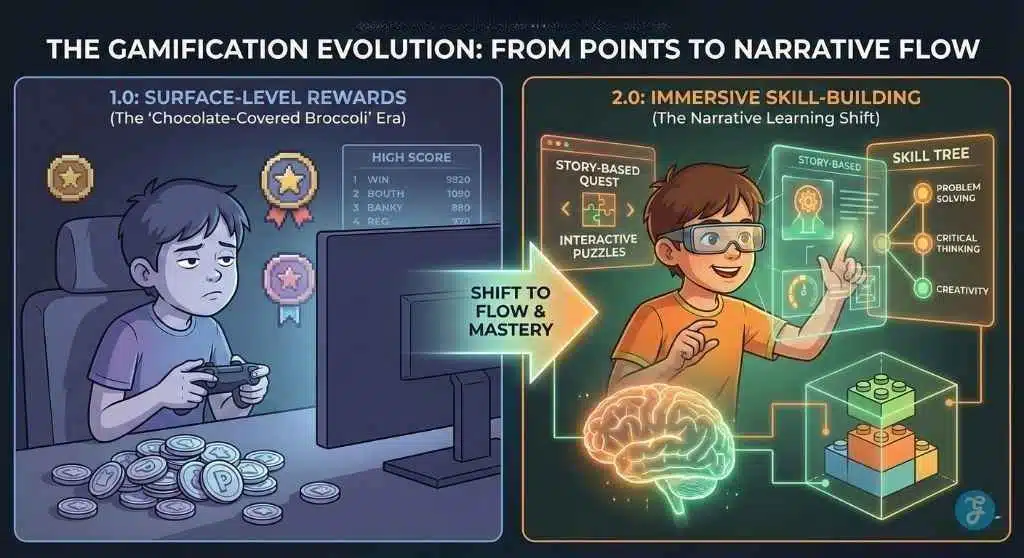
Gamification in education uses game elements, like missions, progress tracking, and instant feedback, to make learning practice more engaging and consistent. The best gamified learning improves skills because kids actively solve problems, receive helpful corrections, and can see mastery over time. The worst version is the “points-only” design that keeps kids clicking without building real understanding.
Common game elements include:
- Missions or quests (clear goals)
- Levels (progression)
- Feedback (instant correction and encouragement)
- Points or badges (signals of mastery)
- Unlocks (new challenges after progress)
Gamification Vs. Game-Based Learning Vs. Educational Games
These terms get mixed up constantly, so here’s the clean difference:
- Gamification: Adds game mechanics to non-game learning (a math practice app with levels and quests).
- Game-based learning: Learning happens inside a full game experience (a simulation or strategy game designed around skills).
- Educational games: A broad label for “games that teach,” ranging from excellent to fluff.
A useful shortcut: Gamification is a learning system with a game structure. Game-based learning is a game designed for learning.
The Core Building Blocks: Mechanics, Motivation, Outcomes
Gamification works best when these three align:
- Mechanics: what the game features are (missions, points, progress bars)
- Motivation: why the child keeps going (curiosity, mastery, autonomy, social connection)
- Outcomes: what improves (reading fluency, math accuracy, problem solving)
If mechanics drive motivation but outcomes don’t improve, you’re not looking at educational gamification—you’re looking at engagement design.
Why Gamified Learning Works [The Psychology]
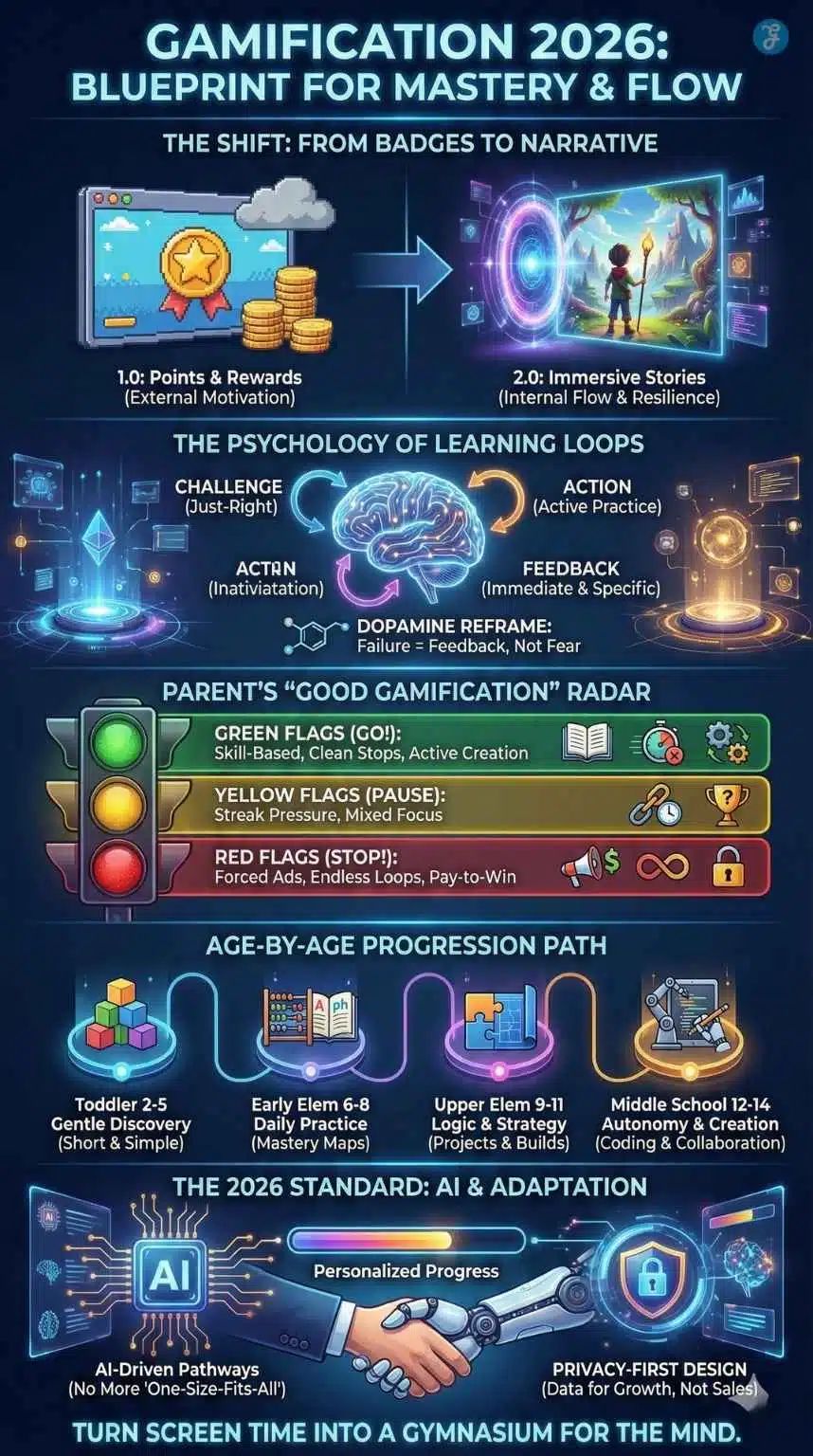
Kids are wired to respond to progress, feedback, and challenge. In real life, we call that “learning.” In games, we call that “leveling up.” Gamification simply uses that natural learning loop on purpose.
Motivation That Lasts [Not Just Bribes]
Rewards can help kids start. But lasting motivation usually comes from three deeper drivers:
- Autonomy: “I get to choose a path or mission.”
- Competence: “I can feel myself improving.”
- Relatedness: “I’m learning with someone or for someone.”
That’s why the best gamified learning feels empowering—not pressuring.
Feedback Loops And Mastery
Traditional learning often delays feedback. Kids do work, then wait. Gamified learning improves this by giving:
- Immediate correction,
- Hints that guide thinking,
- A second chance quickly.
This is huge for confidence. Kids are more likely to persist when they don’t feel stuck for long.
Flow, Focus, And The “Just-Right Challenge”
The sweet spot is where a task feels:
- Not too easy (boring),
- Not too hard (frustrating),
- Just right (absorbing).
Well-designed gamified systems adjust difficulty through levels, targeted practice, or adaptive pathways, keeping kids in that “I can do this if I try” zone.
The Best Game Mechanics For Learning And Why They Work
Not all game elements are equal. Some reliably support learning because they guide attention toward practice and mastery, not just rewards.
Mechanics That Usually Improve Learning
- Missions and clear goals: Kids know what “done” looks like, which reduces drifting.
- Instant, specific feedback: The learner understands what to fix, not just that they were wrong.
- Progress maps (mastery paths): Kids see improvement over time, which builds confidence.
- Just-right challenges: Difficulty ramps gradually, so kids stay engaged without frustration.
- Choice and autonomy: Picking a path increases buy-in and reduces resistance.
Mechanics That Need Careful Use
- Leaderboards: Can motivate some kids and discourage others. Personal-best goals are often safer.
- Streaks: Can build habits but also create anxiety and “I can’t stop” behavior.
- Random rewards: Can spike excitement but may shift focus away from the skill.
A simple rule: If the mechanic makes the skill practice clearer, it helps. If it makes the reward louder than the learning, it hurts.
What The Research Suggests And What It Doesn’t
Across many studies and reviews, a consistent pattern shows up:
- Gamification often increases engagement and time-on-task.
- It can improve learning outcomes when the game elements reinforce real practice and feedback.
- It can backfire when the design becomes shallow, overly competitive, or distracting.
In other words: Gamification is not automatically effective. It’s effective when it is tied to learning science, clear skill goals, and supportive design.
Where Gamification Can Backfire
These are the common failure modes:
- Points replace understanding (kids chase rewards without learning)
- Leaderboards shame slower learners
- Streaks create anxiety (“I can’t miss a day or I lose everything”)
- No stopping points (endless loops create conflict at home)
- Surface-level tasks (lots of tapping, little thinking)
The solution isn’t “no gamification.” The solution is better criteria.
The “Good Gamification” Checklist For Parents
Before you install, subscribe to, or recommend anything, use this checklist. It’s designed to be fast and realistic.
Green Flags
- Clear learning goal (you can name the skill)
- Active learning (solving, practicing, creating)
- Helpful feedback (not just “wrong,” but “try this”)
- Visible progress based on mastery (not just time spent)
- Easy stopping points (missions end cleanly)
- Safe design (minimal data requests, no manipulative upsells)
Yellow Flags
- Rewards feel slightly louder than learning
- Streaks matter too much
- Difficulty jumps randomly (kids get frustrated)
- Too many badges without meaning
Yellow doesn’t mean “no.” It means: use shorter sessions, supervise more, and watch outcomes.
Red Flags
- Heavy ads or “watch to unlock”
- Constant prompts to buy
- Open chat or uncontrolled social features for kids
- Endless autoplay loops
- Unclear learning goals (“brain training” without specifics)
Quick Table: Green / Yellow / Red In One Glance
| Category | Green | Yellow | Red |
| Rewards | reinforce mastery | too frequent | drive compulsion |
| Competition | personal-best or cooperative | mixed | public ranking pressure |
| Progress | skill-based | unclear | time-based grinding |
| Stopping | clear endings | some friction | endless loops |
| Safety | minimal data, calm | unclear | ads/upsells/chat |
Age-By-Age Gamification That Actually Helps
The “best” gamified learning changes by age. The younger the child, the more you should prioritize simplicity, calm design, and adult-guided routines.
Toddlers And Preschool [2–5]
At this age, gamification should be gentle. Think short missions, simple cause-and-effect learning, and clean visuals.
What works:
- Matching, shapes, early counting, letter-sound exposure
- Short, repeatable challenges with praise
- Parent-gated navigation and easy stopping
What to avoid:
- Ads, fast pacing, and overstimulating effects
- “Endless” gameplay
- Frustration-based unlocks
Early Elementary [6–8]
This is prime time for gamified skill practice—phonics, reading fluency, math basics—because children benefit from repetition when it feels rewarding.
What works:
- Short daily missions (10–20 minutes)
- Immediate feedback on mistakes
- Mastery maps that show progress
Add a simple habit: ask for one teach-back moment after the session.
Upper Elementary [9–11]
Kids can handle longer quests and deeper reasoning. They start enjoying strategy, planning, and problem solving.
What works:
- Multi-step puzzles and logic missions
- Projects that end with something to show (a story, a build, a creation)
- Personal-best challenges instead of “top of the class” pressure
Middle School [12–14]
Autonomy becomes the engine. Kids this age resist being controlled, but they respond well to meaningful goals.
What works:
- Choice-based learning paths (“pick your mission”)
- Collaborative quests and team challenges
- Coding projects and creation-driven learning
- Goal-setting plus reflection (“what improved this week?”)
Gamification Tools Parents Commonly Use [By Learning Goal]
Parents often ask, “What kind of gamified tools should I even look for?” A helpful way to choose is to start with the learning goal, then match the tool type to that goal. In 2026, the strongest gamified learning tools usually fall into these categories.
Reading And Literacy [Fluency, Vocabulary, Comprehension]
Reading-focused gamification works best when it builds consistency and confidence. Look for tools that:
- Practice phonics or decoding with clear feedback
- Build fluency through short daily missions
- Grow vocabulary using context, not random word lists
- Include comprehension checks that require thinking, not guessing
A strong reading tool makes progress visible over weeks. It should feel like “I’m getting better,” not “I’m collecting badges.”
Math Practice [Accuracy, Speed, Number Sense]
Math gamification shines because repetition is necessary, and kids will repeat more when it feels like progress. The best tools:
- Adapt difficulty so kids don’t get stuck too long
- Explain mistakes with hints or step guidance
- Focus on mastery rather than endless grinding
- Include clean stopping points after missions
Be cautious with tools that reward speed only. Accuracy and reasoning matter more than racing.
Language Learning [Listening, Speaking, And Daily Practice]
Language tools often gamify streaks and short daily lessons. That can be helpful when the content is solid, but streak pressure can also create stress.
Look for tools that:
- Encourage speaking or listening, not just tapping
- Include spaced review so learning sticks
- Make lessons short and repeatable
- Reward meaningful practice, not just “showing up”
A healthy language tool makes breaks feel normal. It shouldn’t punish your child for having an off day.
Coding And Computational Thinking
Coding is naturally gamified because it’s built on challenges, debugging, and “unlocking” new abilities. Great coding tools:
- Start with small wins and clear instructions
- Help kids debug with supportive hints
- Shift from puzzles into real creation (games, animations, simple apps)
- Reward persistence and problem-solving, not just completion
The best sign it’s working is output: your child can show you what they built and explain how it works.
Study Habits And Executive Function [Older Kids]
For tweens and teens, the “learning goal” may not be content—it may be organization, consistency, and follow-through. Gamified study tools often support:
- Checklists and routines (“daily missions”)
- Focus timers and distraction reduction
- Progress streaks tied to healthy habits (with flexibility)
- Goal setting and weekly reflection
This category works best when the system feels supportive, not judgmental. A teen doesn’t need another scoreboard. They need a structure that makes school feel manageable.
Social-Emotional Skills And Classroom Behavior [Use With Care]
Some systems gamify behavior or emotional regulation through points and rewards. This can work when it reinforces positive habits gently, but it can also backfire if kids feel publicly ranked or controlled.
If you use this category:
- Keep it private (personal-best goals)
- Focus on growth, not competition
- Avoid “punishment points” that create shame
For emotional skills, the best “game element” is often reflection and progress—not prizes.
A Simple Rule To Choose The Right Category
- If your child needs skill practice, choose reading, math, or language tools.
- If your child needs confidence and creativity, choose coding and creation tools.
- If your child needs consistency, use study-habit tools with a calm, flexible design.
Turning Screen Time Into Active Learning [At Home And In Class]
Gamification becomes powerful when it connects to real-life learning. You don’t need complicated systems. You need a repeatable loop.
The 3-Part Setup: Goal → Game Loop → Real-World Transfer
- Goal: Choose one clear skill (fractions, reading fluency, vocabulary).
- Game loop: Practice through missions with feedback and progress tracking.
- Transfer: Apply it off-screen or explain it (teach-back, mini project, real-life use).
Micro-Routines That Work
Here are two routines that fit busy families:
Routine A: “Two Wins And Stop”
- Complete two missions
- Stop immediately after the second mission
- Quick teach-back (“what got easier?”)
This reduces meltdowns because stopping happens at a natural success point.
Routine B: “Practice Then Create”
- 10–15 minutes practice
- 5–10 minutes creation (story, drawing, coding blocks)
- Share the output with a parent or teacher
Creation transforms learning from “consuming” into “producing,” which is where confidence grows fastest.
Motivation Without Meltdowns
A simple rule helps: if stopping causes repeated conflict, the tool may not have healthy stopping points. Shorten sessions, remove streak pressure, and prioritize apps that end missions cleanly.
Gamification In 2026: What’s Changing Right Now
Gamification isn’t “new,” but what’s changing is how it’s built and where it’s used.
Adaptive Gamification Is Becoming The Standard
Instead of giving every child the same experience, more learning tools are using adaptive pathways:
- Difficulty adjusts based on performance,
- Practice targets weak areas,
- Progress maps are personalized.
This makes gamification more than “fun.” It makes it a learning coach.
AI Feedback Is Becoming The Differentiator
The next wave isn’t more badges. It’s better feedback:
- Hints that explain why an answer is wrong,
- Guided steps for problem solving,
- Prompts that encourage reflection.
For parents and educators, this means you should evaluate feedback quality as carefully as you evaluate content.
Privacy-First Expectations Are Rising
Parents are increasingly cautious about ad-driven systems and unnecessary tracking—especially for children. The future of gamified learning will lean toward safer design: fewer ads, clearer data practices, and more parent-facing controls.
A Parent Safety Note: Purchases, Ads, And Data
Gamification can turn unhealthy when rewards are tied to spending, ads, or unnecessary data collection. If a learning tool pressures kids to buy boosts, watch ads to unlock progress, or share personal details that don’t match the learning goal, it’s no longer “screen time that counts.”
A safe default for kids: ad-light or ad-free, purchase-protected, and minimal permissions—especially for younger learners.
Common Mistakes Parents Make With Gamified Learning And Simple Fixes
Gamification can be a huge help—or a quiet source of conflict. Most problems come from predictable mistakes.
Mistake 1: Chasing Streaks Instead Of Skills
Streaks can motivate, but they can also create anxiety and “I can’t stop” behavior.
Fix: Reward mastery, not attendance. If an app punishes breaks, use it less or replace it.
Mistake 2: Picking Apps With Great Rewards And Weak Learning
A shiny reward system can hide shallow content.
Fix: Ask, “What skill improves?” If you can’t name it, skip the app.
Mistake 3: Too Much Competition (Or The Wrong Kind)
Some kids love competition. Others feel discouraged fast.
Fix: Prefer personal-best goals, team quests, or cooperative progress. If leaderboards exist, make them optional or limited.
Mistake 4: No “Off-Ramp” (Kids Don’t Know When To Stop)
If sessions end mid-quest, kids melt down.
Fix: Stop after a mission, not mid-mission. Use “two wins and stop” as your default.
Mistake 5: Not Connecting The Game To Real Life
Learning sticks when kids explain or apply it.
Fix: Add one teach-back question after sessions. Keep it light: “What improved today?”
Best Practices For Educators Using Gamification
Gamification works best when teachers use it to support learning—not to replace it.
Gamify The Process, Not Just The Score
Reward:
- Effort
- Revision
- Persistence
- Strategy
- Improvement
This helps students who aren’t naturally “fast” still feel successful.
Use Cooperative Modes To Reduce Anxiety
Team missions and classroom goals can increase participation without turning learning into a public ranking contest.
Measure What Matters
Track mastery and growth, not just time spent. If students are engaged but not improving, adjust difficulty, feedback, or skill focus.
FAQs
1) Is Gamification In Education Actually Good For Learning Or Just Motivation?
It can be both, but only when the game elements reinforce real practice and feedback. If kids are solving problems, getting corrected, and improving measurable skills, learning is happening. If they’re mostly collecting rewards with little thinking, motivation may rise while learning stays flat.
2) What’s The Difference Between Gamification And Game-Based Learning?
Gamification adds game elements to learning (missions, progress bars, rewards). Game-based learning is a full game designed around learning goals (simulations, strategy games). Gamification usually works best for daily skill practice; game-based learning can be great for deeper immersion.
3) How Do I Know If A “Learning Game” Is Truly Educational?
Ask three questions: What skill is it teaching? Does the child actively practice that skill? Is there helpful feedback and visible improvement? If you can’t answer those clearly, the “educational” label may be more marketing than substance.
4) Can Gamified Learning Harm Attention Span?
It can if the design relies on constant novelty, streak pressure, or endless loops. Healthy gamified learning includes calm pacing, clear stopping points, and real effort. If your child becomes more irritable after sessions or can’t transition off the device, shorten sessions and choose tools with better endings.
5) What’s A Healthy Schedule For Gamified Learning At Home?
For many kids, 10–30 minutes in a structured window works well—especially when it’s paired with offline life (movement, play, reading). A simple approach is “two missions and stop” on school days, then longer project-based sessions on weekends.
Final Thoughts: Make Learning Feel Like Progress, Not Pressure
The digital genie is out of the bottle. We cannot ban screens, nor should we want to. The technology available to our children is a superpower if they know how to use it.
Gamification in Education offers us a way to bridge the gap between “Fun” and “Work.” It allows us to meet our children where they are, in the digital world, and guide them toward something productive.
By choosing Active, Narrative, and Safe games, you are doing more than just keeping them quiet for an hour. You are teaching them that technology is not just for consuming content; it is for solving problems. You are teaching them that failure is temporary. You are teaching them that they are the main character in their own story of learning.
So, the next time you see your child furrowing their brow at a tablet, trying to solve a puzzle to unlock the next level, don’t worry. They aren’t zoning out. They are leveling up.






























