


Are you wondering why visitors leave your website so fast? Well, tracking scroll depth and user engagement can reveal big clues about their behavior. In this post, we’ll show you seven free tools to analyze how users interact with your site.
Stick around to boost your web analytics game!
Key Takeaways
- Google Analytics helps track scroll depth and user engagement with free tools, though the premium version, Google Analytics 360, costs $150,000 per year.
- Hotjar offers free heatmaps and session recordings to see where users click and scroll, with limits on daily sessions in the free plan.
- Microsoft Clarity provides free scroll depth tracking and session replays forever, plus heatmaps for better user experience insights.
- Clicky gives real-time scroll tracking for up to 3,000 daily page views on its free plan, with paid plans starting at $9.99 a month.
- Smartlook tracks user journeys with session recordings for up to 3,000 sessions monthly on its free plan, with paid options from $55 a month.
Google Analytics
Hey there, want to know how far folks scroll on your site? Google Analytics has got your back with solid tools to track scroll depth and see how users interact!
Track scroll depth and detailed user engagement metrics
Let’s talk about tracking scroll depth and user engagement metrics with Google Analytics, a top tool for website analytics. This free platform lets you see how far visitors scroll on your pages and dig into data like traffic sources, page views, clicks, and session durations.
It’s a goldmine for understanding user behavior on your site, helping you tweak your content for better results.
Now, setting it up takes a bit of elbow grease since you need manual event tracking for scroll depth. But once it’s rolling, you get tight integrations with other Google services like Google Search Console.
Keep in mind, the free version covers most needs, though Google Analytics 360 runs a steep $150,000 per year if you want the big guns for deeper insights. Stick with this, and you’ll grasp how to boost user engagement!
Hotjar

Hey there, wanna see how users really interact with your site? Hotjar paints a vivid picture with heatmaps and session recordings, showing you exactly where folks click and scroll.
Keep reading to dig deeper into this awesome tool!
Visualize user behavior with heatmaps and session recordings
Got a website and curious about how folks interact with it? Hotjar offers a cool way to see user behavior with heatmaps and session recordings. Heatmaps show you the hot spots where visitors click, scroll, or linger on your pages.
It’s like getting a sneak peek into their minds!
Session recordings, on the other hand, let you watch real-time replays of user journeys. You can spot where they get stuck or bounce off. With Hotjar’s free plan, you’re limited on daily sessions and surveys, but the real-time feedback and session replays are gold for boosting user engagement.
Sure, the quantitative analytics aren’t deep, and event tracking needs manual setup, but for visualizing customer behavior, this tool packs a punch.
Microsoft Clarity
Hey, wanna peek into how users really interact with your site? Microsoft Clarity offers awesome session replays and scroll depth tracking to show you the full picture, so dive right in and see what’s clicking!
Monitor scroll depth with in-depth session replays
Diving straight into the action, Microsoft Clarity offers a fantastic way to monitor scroll depth on your website, all for free forever. This tool lets you see exactly how far visitors scroll down your pages, helping you understand user engagement at a glance.
Plus, with in-depth session replays, you can watch real-time recordings of user interactions, almost like peeking over their shoulder. It’s a goldmine for spotting where your content shines or flops on landing pages.
On top of that, Clarity includes heatmaps to show hot spots of visitor behavior, and it even breaks down data with user segmentation. Want to improve your website optimization? Use these insights to tweak your digital marketing strategy and boost conversion rates.
It’s like having a roadmap to better user experience (UX), without spending a dime!
Clicky
Hey there, wanna know how your visitors are really interacting with your site? Clicky offers real-time scroll tracking and sharp engagement stats to help you see what’s clicking, literally!
Access real-time scroll tracking and engagement analytics
Let’s chat about getting real-time scroll tracking and user engagement analytics with Clicky, a handy tool for your website. This platform lets you see exactly how far visitors scroll down your pages, right as it happens.
Plus, with up to 3,000 daily page views on the free plan, it’s a sweet deal for small sites or blogs just starting out.
Dig into the pros, like bot detection to keep your data clean, heatmaps to spot hot zones on your site, and live traffic insights for user behavior tracking. On the flip side, the cons are real; there’s no session recordings, and the interface feels a bit old-school.
Still, for just $9.99 a month on the paid plan, you can boost your web analytics game and tweak your site for better user experience.
Smartlook
Hey there, wanna know how users really move through your site? Smartlook lets you peek at their journey with cool session recordings and heatmaps, showing exactly where they click and scroll.
Keep reading to dig deeper into this awesome tool!
Analyze user journeys with session recordings and heatmaps
Let’s chat about how Smartlook helps you track user journeys with session recordings and heatmaps. This tool lets you see exactly how folks move through your site, almost like watching over their shoulder.
You can spot where they click, scroll, and even pause. Pretty neat, right?
With Smartlook, you get a clear picture of user behavior through visual data. Their free plan covers up to 3,000 sessions per month, which is plenty to start digging into user engagement.
If you need more, paid plans kick off at $55 a month. So, grab this user-friendly gem to boost your website analytics and improve the customer journey!
Matomo
Hey, wanna dig into a tool that respects your data privacy while tracking scroll depth? Matomo’s got your back with solid analytics that keep user info safe, perfect for GDPR compliance.
Privacy-focused analytics for scroll depth tracking
Let’s discuss protecting your data while monitoring scroll depth. If privacy is your priority, Matomo is a reliable choice for web analytics. This open-source platform shields your data with strong security, ensuring user information remains protected.
It’s ideal for those concerned about browser cookies and data privacy.
Matomo also ensures GDPR compliance, keeping you aligned with legal requirements. You can explore visitor behavior and scroll depth without compromising personal information. Plus, with a free trial for cloud hosting and paid plans starting at just $26 a month, it suits most budgets.
Use this tool to increase user engagement while maintaining a focus on privacy.
Woopra
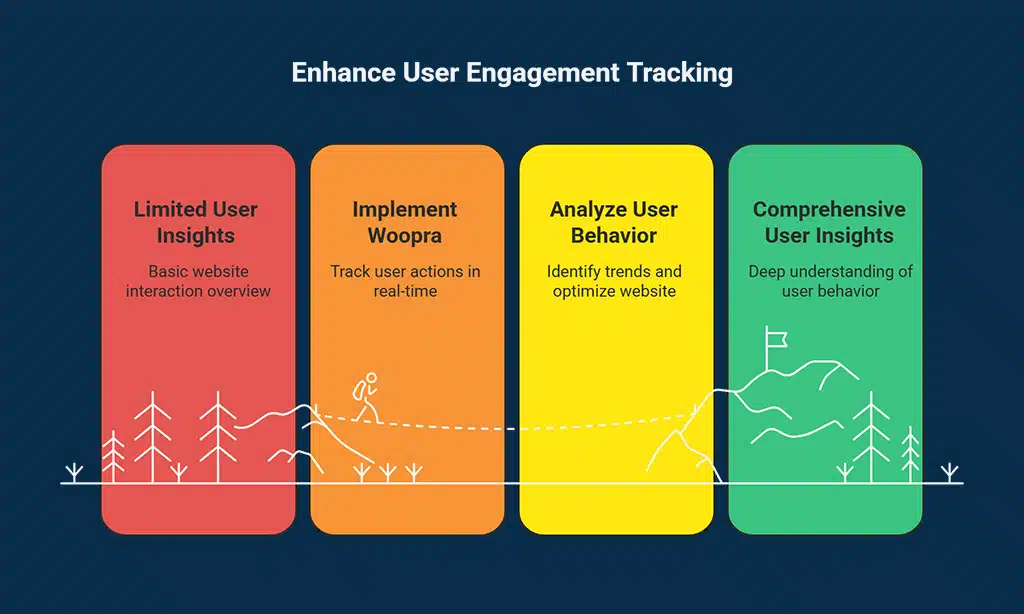
Hey there, want to dig into how users really interact with your site? Woopra offers real-time insights and tracks user engagement like a hawk, helping you see every click and scroll with crystal clear detail!
Comprehensive user engagement tracking with real-time insights
Let’s chat about tracking user engagement with real-time insights, folks. With a tool like Woopra, you get a clear view of how visitors interact on your site right as it happens.
Their free plan tracks up to 500,000 monthly user actions, and keeps data for 90 days. That’s a big window to spot trends in user behavior and tweak your website optimization game.
Dig into advanced segmentation with this tool, and see detailed user behavior reports. One downside, though, is no session recordings to watch exactly how folks move around. Plus, you’ll need to set up manual event tracking for deeper web analytics.
Still, for real-time insights on user engagement and conversion rates, this packs a solid punch for marketers.
How to Choose the Right Tool for Your Needs
Picking the perfect tool for tracking scroll depth and user engagement can feel like finding a needle in a haystack, but don’t sweat it, I’ve got your back. Start by figuring out your specific goals for website analysis, like boosting conversion rates or understanding visitor behavior.
Clear objectives help you cut through the clutter and focus on tools like Google Analytics or Hotjar that match your vibe. Also, think about ease of use, especially if your team isn’t full of tech wizards; a simple setup saves headaches.
Now, dig into the nitty-gritty by checking key features, such as real-time web analytics, heatmaps, or session recordings, to see user interactions up close. Look at data privacy rules too, particularly with self-hosted options like Matomo, to keep your info safe and meet GDPR compliance.
Don’t forget to peek at free plan limits on tracked users or historical data, and see if the tool can grow with your business. Oh, and a solid support crew or active community for troubleshooting? That’s gold, my friend.
Takeaways
Hey there, folks, let’s wrap this up with a bang! Picking the right tool from these seven free gems, like Google Analytics or Hotjar, can truly boost your website’s user engagement.
Think of scroll depth tracking as your secret map to hidden treasure, showing where visitors linger or bounce off. Got a favorite yet? Drop a comment, and let’s chat about how these tools jazz up your site’s performance!
FAQs on Free Tools to Analyze Website
1. Hey, what’s the big deal with scroll depth and user engagement on my site?
Well, scroll depth shows how far down a page folks are willing to go, giving you a peek into user behavior. It’s like a treasure map for spotting where your content grabs attention, or flops, and ties right into user engagement metrics. Using website analytics tools, you can tweak things for better conversion rates.
2. Can free tools really help with website optimization for scroll depth?
Absolutely, pal, free web analytics software like Google Analytics can track scroll depth and visitor behavior with ease. They’re a goldmine for insights on user interactions without costing a dime.
3. How do I use these tools to lower my bounce rate?
Start with tools like Open Web Analytics to dig into bounce rate and see where users ditch your site. Pair that with session recordings to watch real user behavior tracking, catching those pesky frustration score spikes. It’s like being a detective, piecing together clues to keep folks clicking through your web traffic.
4. Are there privacy concerns when using web tracking for user segmentation?
You bet, data privacy is a hot topic, especially with rules like GDPR compliance in play. Free tools often offer safe ways to handle web analytics, but you gotta double-check how they manage clickstream data and cross-device tracking to keep your audience’s trust intact.
5. What’s the role of A/B testing in boosting user experience on my site?
A/B tests, or split testing, let you pit two versions of a page against each other to see what wins for user experience (UX). Tools like Google Optimize help run these A/B testing experiments, guiding you to sharper content optimization. Think of it as a friendly duel to nail the best call to action for your target audience.
6. How can I mix scroll depth data into my digital marketing tools for better results?
Dive into scroll depth with free website analysis gadgets to spot key touchpoints where users linger or leave. Link this with funnel analysis and event tracking to shape marketing strategies that hit home on search engine results pages. It’s like tuning an engine; every tweak boosts conversion optimization and search engine rankings for your network.




























