Picking a new cell phone can make your head spin, right? Many seniors say smartphones feel confusing. Small buttons, tricky menus, and tiny text cause headaches for many people over sixty.
You want to call family or send texts with no fuss — but so many models leave you lost.
Good news: There are easy-to-use smartphones made for seniors like you, focused on simplicity and safety. For example, the Jitterbug Smart4 by Lively has large icons and clear sound built-in.
In this blog post, I’ll walk through the top 10 senior-friendly phones for 2025 — including Android devices and iPhones — rated by experts for ease of use and accessibility features like big displays, long battery life, voice control options such as Google Assistant or Facetime video calls on Apple’s iOS platform.
Keep reading to find which smartphone will work best for your needs!
Key Takeaways
- Big buttons, large screens, and clear sound make phones like Jitterbug Smart4 and Consumer Cellular IRIS Easy Flip top picks for seniors in 2025.
- Senior-friendly smartphones such as iPhone 16e ($699), Samsung Galaxy A25 5G ($350), and Alcatel Go Flip 4 ($89.99) fit many budgets—from cheap flip phones to high-end models like the iPhone 16 Plus ($1,099).
- Key safety features include emergency help buttons (Jitterbug Smart4, Jitterbug Flip2), crash detection (iPhone 16 series, Pixel 8a), and support for hearing aids with M4/T4 ratings.
- Most tested devices last a full day or longer on one charge; Samsung Galaxy A25 boasts up to 44 hours of talk time while others like Jitterbug Smart4 need daily charging.
- Voice assistants such as Google Assistant or Alexa offer easy calling and texting without typing; select phones work on popular networks like AT&T, T-Mobile, Verizon, but some (like Lively’s Jitterbugs) may require special plans.
What to Look for in a Senior-Friendly Smartphone

Finding the right mobile phone can feel like hunting for a needle in a haystack, with so many choices on shelves. Picking smart phones that fit your needs gives more comfort and freedom each day.
Ease of use
Big, bright icons pop right out at you on easy-to-use smartphones for seniors. Samsung’s Easy Mode puts large buttons and straightforward menus front and center, so users can spot what they need fast.
Lively Jitterbug Smart4 has a simple list menu—texting, calling, camera—right on the home screen. No hunting around or fighting with confusing settings.
Many senior-friendly phones use voice commands like Amazon Alexa or Google Assistant. Just say “Call Jill” or “Open Messages,” and it happens without lifting a finger. Flip phones such as the Consumer Cellular IRIS Easy Flip offer clear layouts with chunky keys that are easy to press.
These designs help seniors send texts, make calls, browse photos—even play mobile games—with less fuss and frustration every day.
Display size and clarity
Large screens matter a lot for seniors. Many smart devices today, like the Apple iPhone 16 Plus and Samsung Galaxy S25 Ultra, use super AMOLED displays. These screens make text big, bold, and easy to see.
Anti-reflective displays help stop glare from lights or windows. This keeps things clear even in bright rooms. Some Android phones also have large icons and simple menus.
Easy-to-read cell phones rely on more than size. High contrast helps people with weaker eyesight read better without squinting or guessing at letters. The Jitterbug Smart4 takes this up a notch with sharp images and touch-friendly buttons, so you won’t need tiny fingers to send a message! Tablets often copy these features too; think about using both if your hands shake while scrolling on a smaller phone display.
Battery life
Battery life matters for seniors who think about safety and ease. The Google Pixel 8a and Samsung Galaxy A25 5G last over a full day, even with calls, texts, or using WhatsApp. Some affordable smartphones keep power going strong for up to two days on one charge.
Longer battery life in senior-friendly phones means less worry about searching for the charger or missing an emergency call.
Phones like the IRIS Easy Flip and Jitterbug Smart4 hold power overnight so no race against time at bedtime. Many modern senior-friendly smartphones use smart tech to save energy when you forget to plug in before sleep, making them good picks if you want peace of mind that lasts all day—and night too—on just one charge.
Hearing aid compatibility
M4/T4-rated phones, like the Jitterbug Flip2 and IRIS Easy Flip, work well with most hearing aids. That means you get less buzzing and clear sound during calls. Many senior-friendly smartphones, such as the Apple iPhone 16 Plus and Samsung Galaxy A25 5G, also support hearing aid compatibility features.
Some models even let you tweak sound settings or use Bluetooth to stream straight into your hearing aids. Big brands want their phones easy for everyone—whether you wear behind-the-ear aids or in-the-canal types.
Checking for “hearing aid compatibility” on a phone’s specs helps keep conversations smooth, sharp and simple—no more shouting matches or missed words at family dinners!
Emergency assistance features
Medical alert buttons, like the one on the Jitterbug Smart4, help seniors get fast support. With one tap, users can contact emergency services or loved ones. Many senior-friendly phones let you press and hold a key to call for help.
Some models even use artificial intelligence (AI) to notice falls or accidents automatically.
Popular iPhone models give quick access to Emergency SOS by pressing the side button five times. Big, clear icons work well for shaky hands or low vision. The Consumer Cellular IRIS Easy Flip and RAZ Memory Cell Phone offer loud alarms and direct-dial for emergencies without fussing with menus.
Seniors need simple safety features that work in real moments—not just on paper—because seconds count when help is needed most.
Budget considerations
Prices for senior-friendly smartphones swing wide. Simple flip phones, such as the Alcatel Go Flip 4 or TCL Flip 2, can cost just $60. High-end options like the Apple iPhone 16 Plus or Samsung Galaxy S25 Ultra may shoot up to $1,200.
Many seniors find great value in affordable smartphones from brands like Consumer Cellular and Lively Jitterbug. These provide basic features without breaking the bank.
Most carriers—AT&T, Verizon Network, T-Mobile—offer plans that suit tighter budgets and still include voice commands or emergency assistance. Some phones have extras like MagSafe charging on newer iPhones but come with a steeper price tag.
Consider what matters most: is it hearing aid compatibility? Or maybe long battery life? Sometimes less really is more for senior-friendly design. Find your sweet spot between price and features before you pay top dollar for fancy camera tricks or AI tools you might never use!
Jitterbug Smart4 by Lively
The Jitterbug Smart4 by Lively boasts big icons, simple screens, and a loud speaker. With voice commands like Google Assistant and easy access to emergency help, it makes calling and texting feel as easy as pie.
Key Features
Every senior wants a phone that’s simple and smart. Jitterbug Smart4 by Lively checks many boxes for ease and safety.
- Big 6.5-inch touchscreen shows large icons, making every app easy to spot.
- Simple menu design gives quick access to calls, messages, camera, and urgent help.
- A 13 MP camera lets you snap crisp photos for memories or ID use, without fussing with settings.
- Voice typing speeds up texting for folks who find tiny keys tiring.
- Urgent Response button connects straight to medical help 24/7—just one tap if you feel unwell or unsafe.
- Hearing aid compatibility helps people who wear hearing aids hear calls much better, so nothing gets missed.
- Long battery life means fewer charges; you can talk all day and still have power left at bedtime.
- Lively Link app keeps loved ones in the loop about your health and safety—peace of mind for everyone.
- Built-in magnifier tool makes small print bigger, helping you read menus or pill bottles without glasses.
- Works well with Consumer Cellular, T-Mobile, AT&T—no need to switch carriers if you’re happy already.
Pros & Cons
Sometimes, picking a phone feels like finding your glasses—tricky, but satisfying once you see things clearly. Here’s the scoop on the Jitterbug Smart4 by Lively. You’ll spot exactly what works, and what doesn’t, at a glance.
| Pros | Cons |
|---|---|
|
|
Apple iPhone 16e
Apple iPhone 16e fits seniors well. The 6.1-inch display feels big and easy to see, with crisp text and icons that pop. USB-C lets you charge fast, using cables from other devices too—no more cable confusion in the drawer! Apple keeps this phone budget-friendly for an iPhone, so it’s easier on your wallet than most newer models.
Battery life lasts all day for calls, texts or checking photos from the grandkids. The camera is reliable—snap a quick family shot and it turns out clear every time, even if your hands aren’t rock steady.
Accessibility features such as large icons and voice commands help folks who prefer simple steps. It does not have mmWave 5G or high screen brightness like pricier phones; but most users don’t mind since calls sound great and apps work smoothly.
Touch ID makes unlocking easy with one tap—no passwords needed—and hearing aid compatibility brings comfort during chats with friends or doctors.
Samsung Galaxy A25 5G
Samsung Galaxy A25 5G packs a punch for seniors who want more speed, but without the headache. The bright 6.5-inch AMOLED screen makes reading texts or looking at photos simple on sore eyes.
Battery life is nothing to sneeze at—expect up to 44 hours of talk time, perfect for long chats with grandkids or checking in with friends every evening.
At $350, this affordable smartphone feels modern and easy-to-use. Icons are big, colors pop, and the menus make sense even if you aren’t tech-savvy. Hearing aid compatibility means clear calls even if your ears need help catching every word.
Samsung’s own virtual assistant comes built-in to answer questions or set reminders by voice command, making it one of the top choices for senior-friendly design in 2025’s lineup of smartphones for seniors.
Consumer Cellular IRIS Easy Flip
Big, bold buttons make the Consumer Cellular IRIS Easy Flip friendly for aging hands. The display shines bright and large enough to see without squinting. Audio is strong and clear, which helps those with hearing aids or mild hearing loss.
AARP members even get more savings through their partnership with Consumer Cellular.
Voice over 4G means calls sound sharp as a tack. Battery life stretches over several days, so there’s no need for daily charging. The IRIS Easy Flip includes emergency assistance features—just hold down the button if help is needed fast.
Simple navigation keeps things stress-free, while affordable plans keep costs from ballooning out of reach. This flip phone proves that smart design wins over fancy tricks every time.
Jitterbug Flip2 by Lively
Jitterbug Flip2 by Lively keeps things simple and helpful. The phone has large buttons, perfect for older hands, and big text that’s easy on the eyes. The loud speaker works wonders for those who are hard of hearing.
Its M4/T4 rating means it pairs well with most hearing aids. Alexa voice commands take care of calling or texting—just say what you want, skip the tiny keyboard.
The urgent response button sits front and center—it gives fast help in emergencies. There’s no internet or app store here, so spammy pop-ups stay far away. While this flip phone’s camera does not win prizes, its long battery life wins hearts during busy days out and about.
Seniors looking for ease will like this one: clear menus, simple calls, fewer headaches than a bucket of frogs at a disco!
Apple iPhone 16 Plus
Apple’s iPhone 16 Plus has a bright, large display. Seniors with tired eyes find it easy to read texts and see pictures. The phone sports a strong 48 MP camera, great for snapping sharp photos of grandkids or pets without fuss.
Its battery lasts all day, so you don’t have to worry about charging before dinner.
Simple menus and big icons make this Apple smartphone friendly for seniors. Voice commands help send messages or call loved ones hands-free. The device is hearing aid compatible and works well with Consumer Cellular plans.
At $1,099, it offers high-end performance packed in an easy-to-use design—just what senior-friendly phones should aim for in 2025.
Samsung Galaxy S25 Ultra
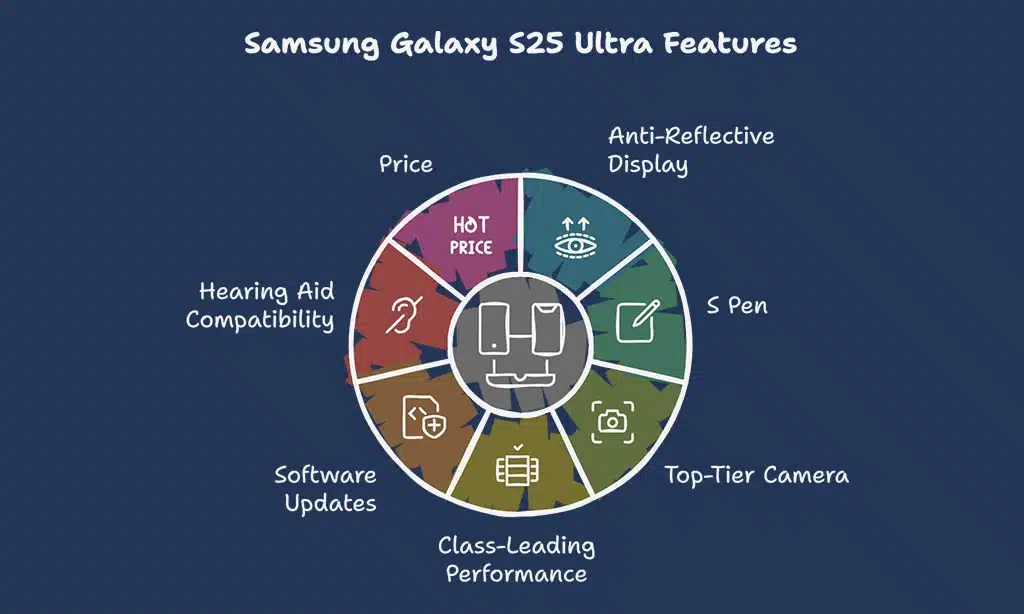
The Samsung Galaxy S25 Ultra shines with its huge, anti-reflective display. Seniors who want a clear screen for reading texts or checking family photos will like this feature. The built-in S Pen helps you write notes or draw quick sketches.
You get sharp pictures from the top-tier phone camera.
This smartphone runs fast and smooth, thanks to class-leading performance. It supports long software updates, so it stays safe over time. If you wear hearing aids, no stress: it offers strong hearing aid compatibility.
Some might wince at the $1,199 price tag—this model sits on the higher end of senior-friendly smartphones for 2025. While the S Pen now has fewer features than before, most seniors find what’s left useful enough for daily tasks in a pinch.
RAZ Memory Cell Phone
RAZ Memory Cell Phone helps people with dementia. Its screen only shows pictures of contacts and one red button for emergencies. There’s no menu, apps, or confusing settings to muddle through.
Each name and picture is clear and big, so users do not have to search their memory for numbers or small icons. Priced at $309, this cell phone focuses on safety features like emergency calling.
Family members can control the phone from far away using a simple web tool. This makes it easy for loved ones to add contacts or check the device anytime—no extra trips needed. RAZ offers hearing aid compatibility too, which supports seniors who need better sound quality during calls.
With long battery life and large buttons, this affordable smartphone blends peace of mind with everyday function—a real lifeline in a pocket-sized package.
Alcatel Go Flip 4
Alcatel Go Flip 4 offers the basics, plain and simple. Large buttons stand out on this flip phone. Seniors can call or text with ease. The bright screen helps old eyes see numbers and words.
At just $89.99, it fits into a tight budget for someone who wants affordable smartphones. You get long battery life for days of use between charges.
This phone works well with hearing aids, making conversation clear as day for people who need that boost in volume. Voice commands allow quick dialing or texting—just say the name or number to call a friend without pressing tiny keys.
Alcatel Go Flip 4 keeps things easy by giving seniors simplified menus and large icons right there on the display, no need to search through confusing folders like on some smartphones for seniors such as the Samsung Galaxy A25 5G or Jitterbug Smart4 by Lively.
Google Pixel 8a
The Google Pixel 8a packs a friendly punch for seniors. Its bright 6.1-inch AMOLED display makes reading and video calls easy on the eyes, like picking out apples at the grocery store instead of squinting at tiny grapes.
Need camera help? The 4K ultra-wide camera snaps crisp photos—no more blurry birthday cakes or fuzzy grandkids.
Long battery life means less time searching for outlets, more time catching up with friends. This phone gets seven years of software support from Google, so it stays safe and quick over the years—just set it once and enjoy peace of mind.
Built-in Google Assistant handles voice commands with ease; just say what you want, skip all the fussing with small text or icons. At $499, this affordable smartphone offers senior-friendly features without breaking your budget piggy bank.
How We Tested and Selected These Smartphones
A small group of five tech experts rolled up their sleeves for this task. They spent 200 hours testing and poking at 25 different easy-to-use smartphones. Each device faced real-life tests, not just labs or shiny showrooms.
Experts checked things like hearing aid compatibility, large buttons, big icons, voice commands using Google Assistant or Siri, and long battery life. Some gadgets from Apple and Samsung even took high-tech hits with crash detection and AI features to see how they’d help seniors in a pinch.
Seven senior-friendly phones made the final cut for review in 2025 after careful checks on accessibility features and price tags. Jitterbug Smart4 by Lively got extra attention for its simplified menus.
Pixel 8a stood out for affordable smartphones lovers wanting the latest from Google Play Store without fuss. The team also looked hard at devices from consumer cellular brands such as IRIS Easy Flip and RAZ Memory Cell Phone because flip phones keep things simple with large screens plus safety features many seniors value most—no jargon needed! Even Alcatel Go Flip 4 had to shine under bright lights before getting picked now that T-Mobile senior plans are so popular in America these days.
Takeaways
Shopping for easy-to-use smartphones does not have to feel like a wild goose chase. Big screens, simple menus, and features like crash detection make all the difference. Each phone here helps bring family, fun, and peace of mind right to your fingertips.
Whether you want an affordable iPhone or a friendly flip phone with large buttons, there is something on this list that can help keep life simple—and calls even simpler.
FAQs on Easy-to-Use Smartphones for Seniors in 2025
1. What makes smartphones for seniors easy to use in 2025?
Senior-friendly phones come with large icons, big buttons, and simplified menus. Many offer voice commands using Google Assistant or Apple Intelligence. Some models even have hearing aid compatibility.
2. Are there affordable smartphones for older adults?
Yes, budget-friendly phones like the Iris Easy Flip and TCL Flip 2 are popular choices. These dumb phones focus on simple calling and texting, not confusing apps.
3. Which safety features matter most for seniors?
Crash detection stands out as a big one now, along with emergency call buttons on flip phones like Jitterbug Flip2. Lively Jitterbug Smart4 also lets you zoom text and has loud speakers—handy when your ears aren’t what they used to be.
4. Do all senior-friendly smartphones work with hearing aids?
Not every device does, but top picks such as iPhone SE from Apple or Samsung Galaxy S25 Ultra often support hearing-aid use and are tested by places like pcmag.com.
5. Can I get a smartphone plan just for seniors through carriers?
Yes, T-Mobile senior plans plus options from AT&T or Consumer Cellular give discounts to older adults who want reliable service without breaking the bank.