Have you ever sat through an online training module, aggressively clicking the “Next” button just to get it over with? Many organizations struggle to keep learners interested in online courses. Employees click through slides without absorbing information, completion rates drop, and training budgets go to waste. The problem runs deeper than just boring content. Most companies lack a clear strategy for E-learning Content Design that actually captures attention and sticks with learners.
Industry data shows standard corporate courses often suffer from dismal completion rates of 5% to 15%. However, a 2026 Zick Learn report highlights that employees actually want to learn and upskill, provided you make the format fit their busy days. This means your audience is ready to engage, but they need you to deliver the material in a fresh, compelling way.
Grab a cup of coffee, and let’s go through it together so you can master engaging e-learning content design.
Understanding E-Learning Content Design and Development
E-learning design and development work together, but they serve different purposes in creating online courses. Design focuses on planning what learners will experience, while development builds the actual course that delivers those experiences. I have seen countless projects fail because teams blur these two distinct roles.
What is e-learning design?
E-learning design shapes how people learn online by creating interactive content that works on computers, tablets, and phones. Designers build courses with clear learning objectives, multimedia resources, and interactive elements that keep learners focused.
They think about what students need to know, how to teach it, and what activities help them practice. Good course organization makes it easy to find information so learners never get lost.
A 2025 Harvard Business Review study found the average employee’s attention span has dropped to just 47 seconds before switching tasks. This makes short modules essential. Breaking big topics into bite-sized pieces fits busy schedules perfectly.
Instructional design is central to this work, blending psychology, technology, and content expertise into one package.
The best e-learning doesn’t just deliver information; it creates moments where learners genuinely want to engage.
Key differences between design and development
Now that you grasp what e-learning design actually is, let’s separate the two sides of the coin. Design and development sound like twins, but they play different roles in building your course.
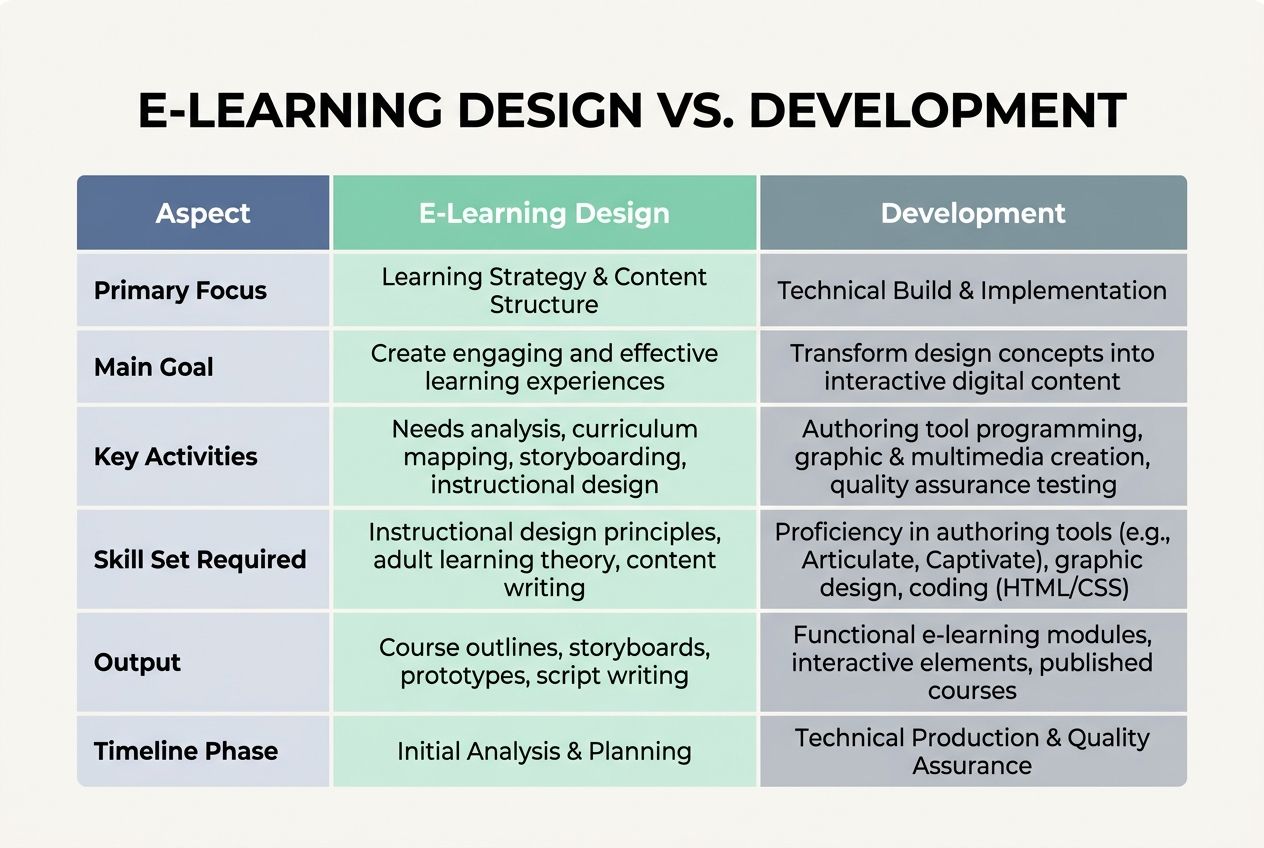
| Aspect | E-Learning Design | Development |
|---|---|---|
| Primary Focus | Plans the learning experience and structure | Builds and codes the actual platform |
| Main Goal | Creates the blueprint for course content | Transforms designs into working software |
| Key Activities | Outlines learning objectives, storyboards, and instructional flow | Writes code, integrates tools, and deploys systems |
| Skill Set Required | Instructional design, pedagogy, and content strategy | Programming, software engineering, and technical expertise |
| Output | Course outlines, learning maps, and design documents | Functioning website, app, or learning management system |
| Timeline Phase | Happens before development starts | Follows design completion |
Think of design as the architect sketching your house using popular authoring tools like Articulate Storyline or Adobe Captivate. Development is the construction crew bringing those sketches to life by integrating the final files into a Learning Management System.
Both matter, and both teams must talk constantly to ensure your final product performs well technically while delivering a great learning experience.
Principles of Engaging E-Learning Content
Great e-learning content rests on five core principles that work together like a well-oiled machine. These principles transform boring training into something learners actually want to complete. Let’s look at each one.
Anticipatory set
An anticipatory set grabs your learners’ attention right from the start. Think of it as the hook that makes people want to keep watching.
If you browse L&D forums like the r/instructionaldesign subreddit, experienced pros frequently share a massive warning. Starting your course with a dry, bulleted list of “learning objectives” is the absolute fastest way to lose your audience.
Instead, your anticipatory set works best when it connects directly to a real workplace challenge. You open with something relevant to their lives, a real problem they face, or a scenario that matters to them.
Instructional input
Instructional input forms the backbone of your online training programs. This is where you deliver the core information that learners need to absorb.
You can present facts, concepts, and skills through several different multimedia resources:
- Videos: Show real-world processes in action.
- Interactive Graphics: Let learners explore diagrams at their own pace.
- Text and Audio: Provide accessible options for reading or listening.
Storytelling transforms dry instructional input into something memorable and relatable. To speed up this process, many creators now use AI video generators like Colossyan or Synthesia. These tools let you create professional, localized video content in a fraction of the time it takes to film live actors.
Guided practice
Guided practice gives learners a chance to try new skills with support. Learners work through problems or tasks while you provide feedback. This step sits between instructional input and independent learning.
The data support this hands-on approach. A 2026 report from Continu showed that microlearning formats focusing on single skills boost knowledge retention by 25% to 60% compared to traditional, passive lectures.
Your role during guided practice is to watch, listen, and correct mistakes gently. Let them struggle a little, but jump in before frustration takes over.
Closure and evaluation
Closure and evaluation wrap up your learning experience and measure what students actually learned. You need to assess whether learners reached the learning objectives you set at the start.
Instead of relying on boring multiple-choice tests, I always suggest using game-based assessment tools like Kahoot! or simple drag-and-drop scenario builders.
Assessments should feel like a natural continuation of the learning journey, not a punishing final exam.
These interactive learning moments keep students engaged right through the end, so they leave feeling accomplished rather than confused. Your assessment results also guide improvements for the next round, making your e-learning content stronger over time.
Independent learning
After learners complete guided practice and receive feedback, they need space to apply what they learned on their own. Independent learning gives students the chance to test their skills without a safety net. Learners tackle real challenges, solve problems, and build confidence in their abilities.
A study in the Journal of Applied Psychology found that learners who used self-paced microlearning retained 23% more information than those in group learning sessions of the same length.
Digital learning platforms track progress, showing which employees master the training and impact goals and which ones need extra support.
Steps to Create Engaging E-Learning Content
Creating engaging e-learning content requires a clear roadmap that moves from planning to execution. You will walk through practical steps that transform your training goals into courses that actually capture attention.
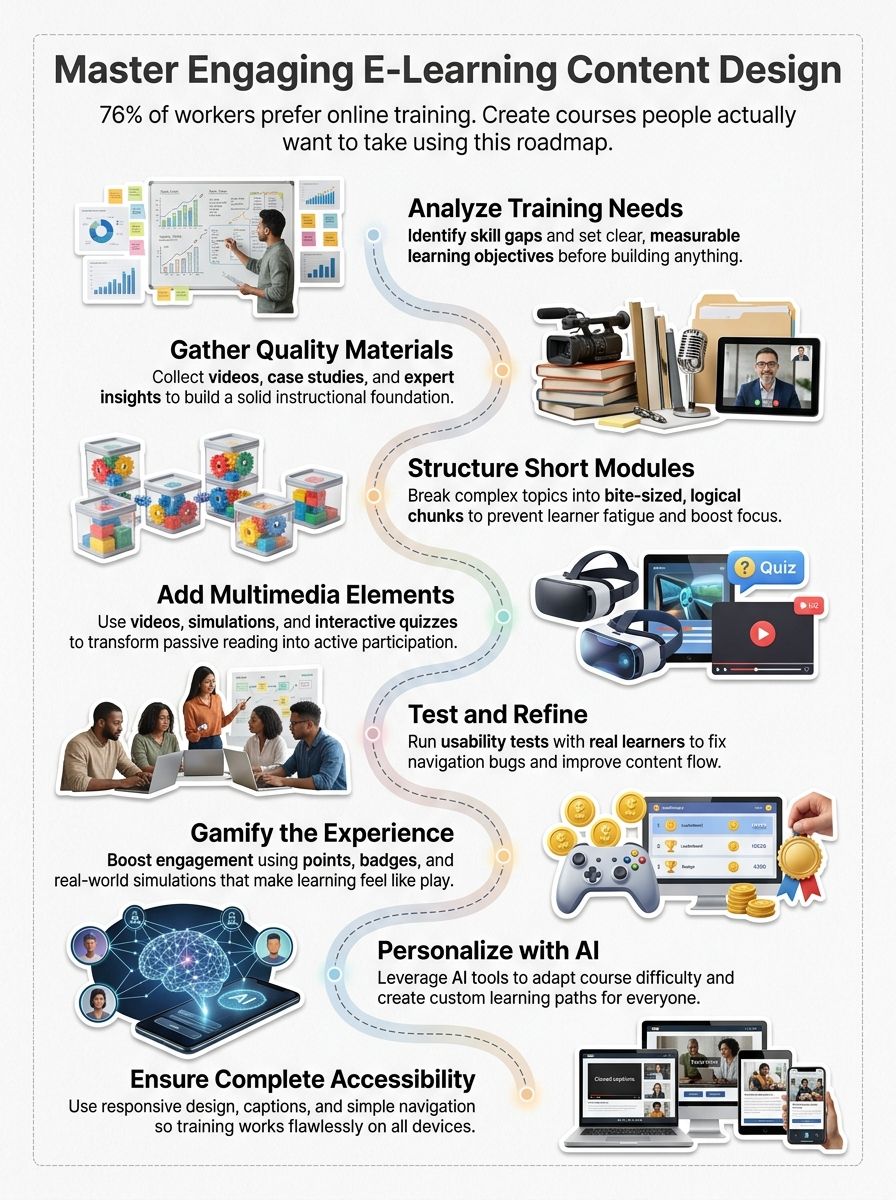
Analyze training needs and goals
Your training program starts with a clear picture of what your learners need. You must dig into your organization to spot skill gaps, performance problems, and business challenges.
I highly recommend using Cathy Moore’s Action Mapping framework for this phase. It forces you to focus strictly on the business goal and the specific actions employees must take to reach it.
Ask yourself these critical questions before building anything:
- What specific business problem are we trying to solve?
- What behaviors need to change to solve it?
- What information do employees need to change those behaviors?
Set specific, measurable targets for what people should accomplish by the end of the course. This clarity helps you pick the right multimedia resources and decide whether simulations or interactive content works best.
Research and gather materials
Start by collecting materials from multiple sources. You might pull from industry reports, competitor courses, subject matter experts, and existing training documentation.
A common pitfall I see is letting Subject Matter Experts (SMEs) write the actual course script. SMEs are brilliant, but they often suffer from the “curse of knowledge” and provide way too much technical detail.
Treat your SMEs as raw data sources, and let your instructional designers craft the final message. Organize all your gathered content into a logical system to make course organization much easier later on.
Develop and structure the content
Organizing your course content means breaking it into small, digestible pieces that learners can handle without feeling overwhelmed. Short modules work better than long, dense lessons because they fit into busy schedules and keep attention high.
To ensure your structure works perfectly, follow these steps:
- Group similar topics together to create a logical flow.
- Break down complex concepts into three-minute micro-lessons.
- Ensure your final output is exported in a standard format like SCORM 1.2 or xAPI.
- Upload the file to your Learning Management System to verify tracking works correctly.
This standardized export ensures your course communicates perfectly with your tracking software, so you never lose a learner’s progress data.
Incorporate multimedia and interactive elements
Multimedia resources transform flat, boring content into experiences that stick in your brain. Videos show processes in action, images break up text walls, and audio lets learners absorb information while commuting.
According to Gametize data, knowledge retention increases by a massive 30% when an oral or text-based presentation is paired with strong visuals and infographics.
Interactive content keeps people awake and engaged. Drag-and-drop activities, clickable hotspots, and branching scenarios make learning feel like a game instead of a chore.
Test and refine the content
Testing your e-learning content separates mediocre courses from exceptional ones. You will catch problems before learners struggle through them. Use a dedicated review tool like Articulate Review 360 so your team can leave specific comments directly on individual slides.
- Gather feedback from a small group of real learners who match your target audience.
- Run usability tests to spot navigation problems across different devices.
- Check that all multimedia resources load properly.
- Measure completion rates to see if learners drop off at certain points.
- Track quiz scores to identify confusing content sections.
- Verify that interactive content works smoothly on mobile phones.
- Adjust your content based on patterns you see in the data.
Now that your content passes rigorous testing, advanced techniques will amplify your training impact.
Enhancing Engagement Through Advanced Techniques
You can push engagement to new heights by using game mechanics, adult learning science, and smart AI tools that adapt to each learner. These modern methods transform flat courses into experiences that stick with people long after they finish.
Gamification and game-based learning
Gamification transforms e-learning from a passive experience into an active adventure. Learners earn points, badges, and leaderboard rankings as they progress through course material.
A 2026 University of Pennsylvania study observing 100,000 learners found that gamified e-learning completion rates rose from a baseline of 14% to an impressive 52%.
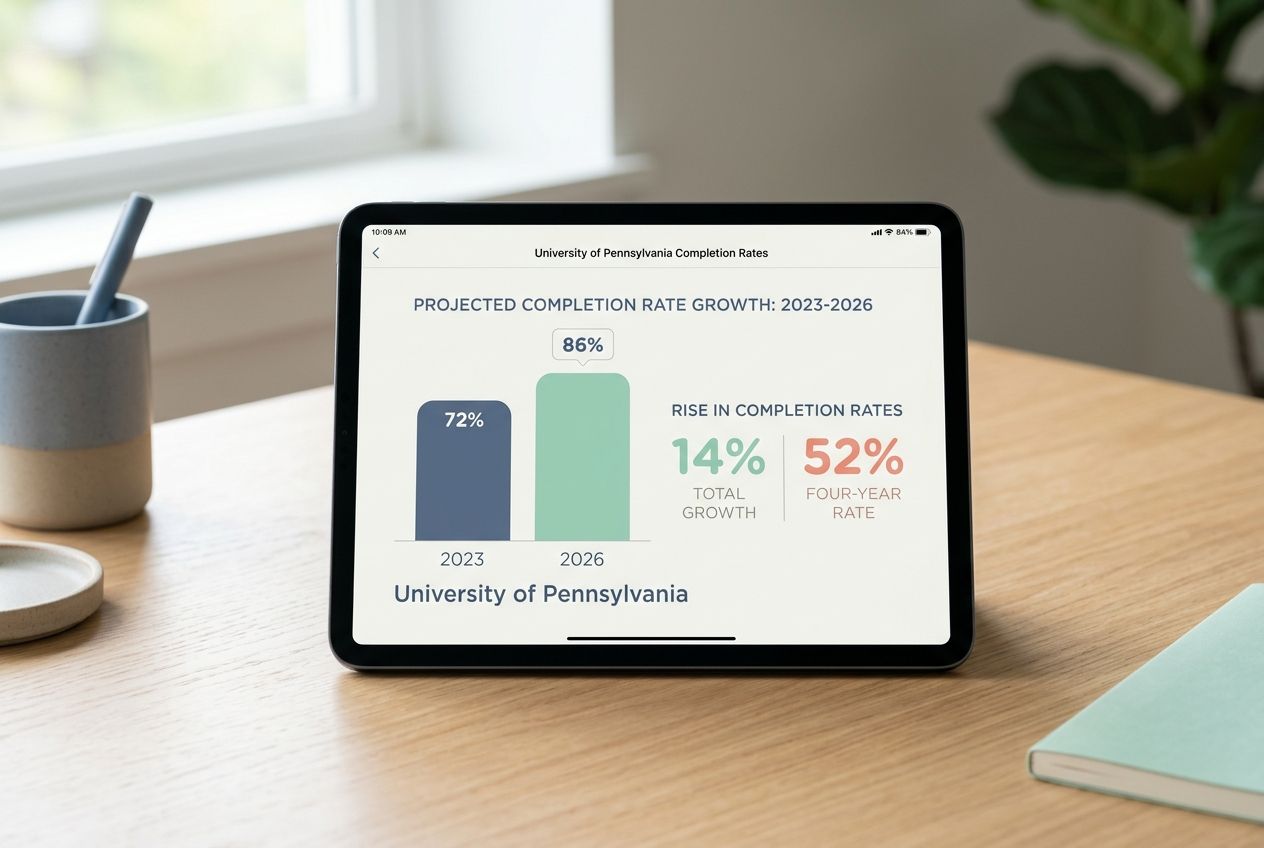
Gamification taps into our natural desire for competition and achievement, making interactive learning feel less like work and more like play.
Multimedia resources stand out in game-based learning environments. Animated characters guide learners through scenarios, while sound effects and visuals reinforce key concepts.
Applying adult learning theories
Adults learn differently from children, and your e-learning content should reflect this reality.
When building courses, lean heavily on Malcolm Knowles’ Principles of Andragogy. His core principle states that adults need to know the clear “why” behind a lesson before they care about the “how.”
Adult learners bring real-world experience to the table, so they want practical knowledge they can use right away. Your digital learning courses should connect new information to what learners already know, using short modules that respect their busy schedules.
Using AI-powered tools for personalized learning
AI-powered tools transform how learners experience online training. These systems analyze each person’s performance, learning speed, and preferences to create custom learning paths.
In 2026, leading enterprise platforms deploy personal AI agents that actively monitor a user’s progress. Platforms like Docebo and CYPHER Learning use this technology to deliver immediate value:
- Skill Gap Identification: AI detects when a learner struggles with a specific concept.
- Content Curation: The system automatically suggests micro-lessons to fix the gap.
- Adaptive Pacing: Fast learners skip ahead, while others get extra practice time.
This personalized approach boosts engagement because people feel the content speaks directly to them. The result is that learners absorb information faster and retain it longer than with one-size-fits-all training.
Best Practices for How To Design Engaging E-Learning Content
You make your courses stick when you focus on what learners actually need, not what sounds fancy. Smart creators build courses that work smoothly on phones, tablets, and computers, so students can learn anywhere they want.
Focus on accessibility and inclusivity
Accessibility and inclusivity form the foundation of effective online training. Your course organization should accommodate learners with different abilities, backgrounds, and learning styles.
If you are designing for US-based audiences, your content must comply with ADA (Americans with Disabilities Act) guidelines and Section 508 standards. This means you must ensure your modules work flawlessly with popular screen-reading software like JAWS or NVDA.
Add captions to all videos so deaf and hard-of-hearing employees can follow along. Use clear fonts, sufficient color contrast, and readable text sizes that do not strain the eyes.
Your learners should move through your course like they are walking down a straight hallway, not wandering through a maze. Clear menus, logical buttons, and straightforward pathways help people find what they need fast.
To guarantee a smooth experience, I always advise my teams to follow a very specific guideline:
Follow the “Three-Click Rule”: A learner should be able to locate any critical piece of course material within three clicks from the main dashboard.
Simple navigation cuts down frustration and keeps learners focused on the actual relevant content instead of hunting for the next module.
Ensure compatibility across platforms
Your learners use phones, tablets, laptops, and desktops. They switch between devices throughout their day, so your online training content must work on all of them.
According to recent industry data from Disprz, mobile-friendly design allows learners to finish employee training during commutes or short breaks, pushing completion rates up to 80% or 90%.
Test your course on multiple devices and browsers like Chrome, Safari, and Edge before launch to catch layout problems early. Platform compatibility transforms casual learners into committed participants who return for more.
Wrapping Up
Mastering e-learning content design comes down to understanding your learners, building interactive experiences, and testing everything along the way. You have learned how to analyze training needs, structure content into short modules, and weave storytelling and simulations throughout your courses.
These practical strategies work because they respect how adults actually learn, combining multimedia resources with clear learning objectives to create real impact. Start small with one course, gather feedback from your team, and watch how engagement scores climb when you put these methods into action.
Frequently Asked Questions (FAQs) on E-learning Content Design
1. How do I make e-learning content more engaging for students?
Start with a real-life story or scenario that your learners can instantly relate to, then weave in visuals and quick interactive moments. According to a 2023 TalentLMS study, courses with interactive elements like short quizzes and videos get 45% higher engagement than text-heavy slides.
2. What are some easy ways to keep online lessons interesting?
Switch up your format every 5-7 minutes with something interactive like a poll, quick video, or thought-provoking question. This matters because research shows that attention starts to drift after about six minutes of just watching and listening.
3. Why is it important to use different types of media in digital learning?
People learn differently, so mixing videos, audio, text, and hands-on tasks means you’re reaching everyone instead of just a few. A 2024 study in the Journal of Educational Technology found that courses using three or more media types boosted retention by 60% compared to sticking with just one format. When you vary your approach, the content sticks better for more people.
4. How can I check if my e-learning content actually works?
Keep an eye on your completion rates and quiz scores to spot where students are getting stuck or losing interest. Simple feedback surveys after each section can also tell you what’s landing well and what needs tweaking.