Do you struggle to find the best Content Management System to run your online store? About three out of four American online shops use a CMS to boost sales. This guide will list top online store platforms like an online store builder and WooCommerce, and show how they simplify payment integration and boost user experience.
Read on.
Key Takeaways
- About 75% of American online shops use a CMS. Shopify tops the list with a machine‐learning shop builder, unified media vault, out-of-the-box stock control, and plans from $29 to $299 per month (Plus at $2,300). You can try the first three plans free.
- WooCommerce is a free WordPress plugin that adds store pages and carts in a few clicks. Hosting starts at $2.99 per month. You get 58,000 plugins, PayPal/Stripe/Square support, and full data control.
- BigCommerce delivers cloud-hosted scaling, a drag-and-drop builder, clean SEO URLs, and multichannel sales. Plans range from $29 to $299 per month with a 15-day free trial.
- Wix eCommerce, Squarespace, and Volusion serve beginners with drag-and-drop editors, hosting, SEO tools, and payment integrations. Prices run from $16 to $159 per month.
- Magento (Adobe Commerce), Contentful, Shift4Shop, OpenCart, PrestaShop, and HubSpot CMS power large or specialized stores. They offer B2B portals, headless APIs, multi-store support, and custom pricing on request.
What makes Shopify the easiest CMS to use?
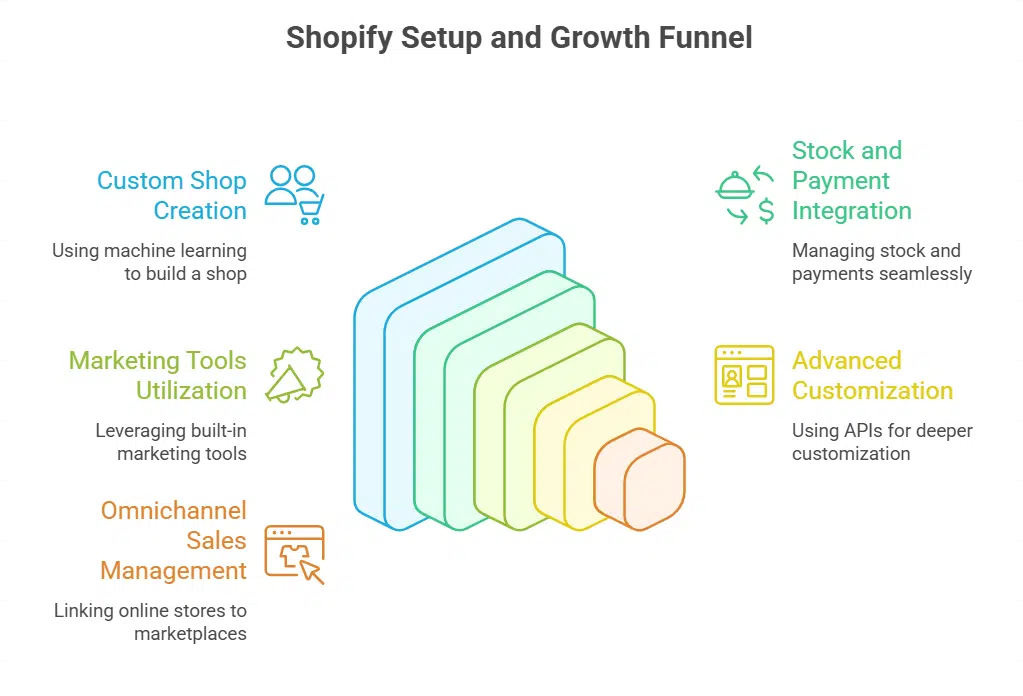
Shopify uses an easy user interface, with a media vault that stores images, docs, and videos in one spot. A machine learning builder spins up a custom shop in minutes, using dozens of ready designs.
Its stock control and payment processing work right out of the box. Plans start at $29 a month for the Basic tier, run $79 for Grow, and go to $299 for Advanced, with Plus from $2,300; you can try the first three plans free for a short time.
Merchants tap an Application Programming Interface for deeper tweaks, while built-in marketing tools handle email, ads, and social posts.
Brands from tiny startups to massive shops find the system a breeze. The platform runs automated SEO chores, crafts product blurbs, and edits photos with a smart editor. Omnichannel sales link online stores to marketplaces and social feeds in one dashboard.
This setup cuts steps, speeds launches, and keeps owners smiling.
Why is WooCommerce ideal for WordPress users?
WooCommerce is a free plugin that turns WordPress into a functional Ecommerce CMS. It adds store pages and shopping carts in a few clicks. This extension fits the core software without extra fees.
Hosting plans start at $2.99 a month on many hosts. Merchants can choose from PayPal, Stripe, or Square payment gateways in minutes. Site owners also pick from thousands of themes and add 58,000 plugins for extra features.
Small tweaks with HTML and CSS unlock custom layouts. The open source code helps bloggers sell goods right on their content hubs.
Integrations with WordPress tools like the block editor boost design options. Developers tap into a scripting language and database system to build custom features. Store managers install modules for taxes, shipping rules, and digital downloads.
Mobile-responsive themes adapt to phones and tablets. Site expansion stays smooth as traffic grows. Owners steer clear of vendor lock in and retain full control of data. They shift from shared servers to virtual private or cloud hosting whenever they need more power.
How does BigCommerce offer a scalable e-commerce solution?
BigCommerce uses cloud hosting that scales server capacity as digital commerce demand grows. Its open SaaS design offers both small business and enterprise solutions with a drag-and-drop website builder.
Clean SEO URLs and redirect tools improve search rankings fast. Site layouts adapt to any screen for smooth mobile online shopping.
The platform links with marketplaces and social media for multichannel retail reach. Pricing tiers start at $29 a month and rise to $299 a month, with a 15-day free trial. Large sellers can request enterprise plans for extra support and custom functions.
BigCommerce sends regular software patches for security and performance.
What customization options does Magento provide?
Magento offers deep customization options for Ecommerce platforms, with built-in BB BusinesstoBusiness and BC BusinesstoConsumer tools. It supports Multistore setups and multi-currency pricing, plus B2B buying portals and advanced inventory management.
The platform drives Omnichannel sales and gives rich Content management, including blog integration.
Enterprise names such as Christian Louboutin, Nespresso, Vizio run large shops on it for its Security and top-tier Performance. Adobe Commerce Pro and its Managed Services cost figures arrive on request.
Setup calls for tech chops, yet it pays off with control and scale.
Why is Wix eCommerce good for beginners?
Wix’s website builder uses draganddrop blocks. You drop images, text, and menus on a blank canvas. Each layout uses HTML5 and CSS3 under the hood. Stores appear in minutes without a line of code.
Industry-specific layouts suit bakeries, studios, and boutiques. The design templates feel professional. A userfriendly dashboard guides beginners with tooltips and prompts.
Wix bundles inventory management. It also provides payment processing and shipping tools. The setup wizard links your store to PayPal or Stripe. You track stock from a single screen.
Basic SEO tools help you get found on Google. Email campaigns reach customers with coupons and updates. Plans start at $17 per month. They go up to $36 for business sites. These plans cater to small business solutions of all sizes.
Business Elite at $159 adds VIP support and a 14-day guarantee.
How do Squarespace design templates enhance online stores?
Squarespace offers minimalist design templates that boost any ecommerce store’s visual design. Small shops and creators pick a layout that fits art or products in their online store like a glove, whether they sell clothing, coffee beans, or digital prints.
These website templates include hosting services and built-in checkout tools, so you skip tech headaches. Setup feels like a paint by numbers board, not a code maze. You get industry-specific skins for fashion, food, and fitness, all tuned for a clean user experience.
You tweak colors and fonts inside a live editor, no code needed. Paid plans start at $16/month for Basic, jump to $23/month for Core, climb to $39/month for Plus, and hit $99/month for Advanced.
A free trial lets you test features first. Gated membership features let you sell exclusive videos or guides behind a password. Squarespace also loads in basic SEO tools like auto-generated sitemaps for faster indexing.
Customization stays fun, and you see changes instantly in a live preview.
What makes OpenCart an affordable open-source option?
OpenCart is a free open-source Ecommerce platform. It runs on PHP and MySQL. It needs Selfhosting. It offers core e-commerce features at no software cost. Managed hosting plans start at $14.95 per month.
Plans top at $69.95. Extra fees arise from hosting, domain, themes, and digital wallets. The platform supports multilingual and multi-currency stores. It packs built-in SEO tools. The Marketplace has numerous page designs and Extensions.
This budgetfriendly option suits small online stores.
Merchants tweak stores with third-party modules and themes. They adjust layouts in the Theme Editor. Integration with cPanel simplifies setup. Shop owners add payment processors at checkout.
Customization stays within a tight budget. An active developer community offers add-ons. Free and paid modules meet diverse needs. Store fronts scale without huge upfront costs.
How customizable and feature-rich is PrestaShop?
PrestaShop runs on free code. It works on PHP, MySQL, and Apache. Sites need hosting from $3.79 per month. Users control product management in simple screens. Theme options let users tweak layouts fast.
Admins adjust menus, banners, and colors. Developers install add-on modules with Composer or Git. Payment add-ons support Stripe or PayPal.
Small to medium stores suit this CMS best. It handles multiple languages. Multiple currencies work smoothly. Scaling reaches limits on big catalogs. Performance dips past thousands of items.
Community support uses forums, docs. You find guides and code samples online. Such help lets you customize fast.
Why is Volusion suited for small to medium businesses?
Volusion caters to small and medium ecommerce businesses with a simple site builder. Owners can drag and drop features and skip code, building an online store in minutes. The platform feels like a trusty sidekick, guiding you through stock, orders, and customer management.
Integration with PayPal and Stripe covers all payment processing needs. A library of templates keeps the look sharp, even without a designer.
Mobile optimization grabs shoppers on phones, boosting sales. The dashboard adds CRM tools for customer management and email lists. Non-technical users adjust site colors, fonts, and product pages with ease.
Fresh pricing starts at $29 per month, perfect for budgetfriendly stores. No hidden fees keep cash flow steady, and support teams stand ready to help.
What changed with Shift4Shop after rebranding from 3dcart?

Shift4Shop emerged from 3dcart with a new name and a fresh interface. It serves ecommerce sellers who need a simple online store builder. The site builder now features a clean dashboard and an improved user interface.
It offers search engine optimization SEO tools to boost rankings. The platform suits beginners and seasoned pros.
It ties in Shift4’s payment gateway for credit cards and digital wallets. No extra payment processing plugins fall on your to-do list. Your business sees seamless scalability from a corner shop to a national chain.
New themes and drag-and-drop design controls expand customization options. Digital marketing features let teams send targeted emails and run coupon campaigns. Many users rank it with top ecommerce CMS platforms in America.
How does HubSpot CMS integrate marketing tools?
HubSpot CMS blends CRM data, marketing tools and content on a single platform. The CRM-powered CMS syncs contact records with site visits, form fills, email clicks and chat transcripts, ready for Inbound Marketing and Sales Automation tasks.
Users play with a drag-and-drop Website Builder that cuts coding time, and they launch a SEO-friendly blog maker from the same dashboard. Marketers flip a switch in Marketing Automation and Analytics to track campaign performance in real time.
Corporate giants like enterprise-insights.dji.com and ht4biz.hindustantimes.com rely on this unified stack to boost lead capture and drive repeat purchases.
Cloudbased Solutions let teams spin up new pages or online shops without IT delays. HubSpot pairs Ecommerce modules with page design and CRM data. Shop owners chat with buyers, group customers and send targeted offers, just like a barista remembering your usual brew.
The free plan opens a basic toolkit at no charge. Starter costs twenty dollars each month and adds forms plus email tools. Growth teams pay five hundred dollars per month for Professional features.
Enterprise users invest fifteen hundred each month for custom reports, advanced web apps and secure APIs. Small shops can scale from ten pages to thousands in one hosted hub.
What enterprise features does Adobe Commerce offer?
Adobe Commerce shines in big ecommerce shops that need work behind the scenes. It lets you run multistore, multilingual, and multi-currency sites from one dashboard. Teams add blogs or marketing pages right inside the platform for smooth content integration.
Brands use its SEO tools to boost site traffic, and mobile-friendly themes keep buyers happy on phones. Secure checkout flows guard each sale and keep data safe. Inventory moves across catalogs so warehouses talk to sales in real time.
Magic happens with B2B buying portals that let companies place bulk orders fast. Omnichannel sales tie web, store, and social channels into one loop of orders. Giant retailers pick this system for its scale and sturdy framework.
Scalability comes from a server base that grows with your orders. Pricing shows on request to match each company budget and needs.
When should you choose Contentful as a headless CMS?
Global brands like Oakley and Corsair use Contentful as a headless CMS. Teams use APIfirst design and decoupled architecture to split front-end and content. Editors sculpt pages with custom content modeling.
Managers track progress with workflow management. Developers push assets over web APIs for omnichannel delivery.
Small groups may face a steep technical setup. Engineers build front-end code to fetch data. Everyone works at once via realtime collaboration. Structured content management stores pieces for multichannel experiences.
Brands that crave flexible content delivery see big wins.
Key Features to Consider in a CMS
Don’t settle for half measures in security or interface integration. See how top platforms like Contentful and Drupal handle SEO suites and cloud servers at scale.
How important is ease of use and customization?
Firms love a userfriendly interface. It offers an intuitive dashboard and a solid help center for questions. No more hunting through menus like a needle in a haystack. These setups cut setup time for WP, Wix store, and Shopify plan.
Quick onboarding helps performance optimization and boosts content control.
Customization matters for brand voices and page layouts. Drag-and-drop design tools let new users craft pages without code. Advanced setups may call on HTML or CSS or a developer’s skills.
Modular solutions such as Craft or October let teams mix themes, plugins, and modules. Multisite and multilingual support extend reach for global markets.
What SEO and marketing capabilities should a CMS have?
Platforms need built-in SEO tools. They should auto generate robots.txt files, sitemap.xml maps, and rel canonical tags to block duplicate content. Clean URL paths also boost user experience.
Shopify, BigCommerce, and WordPress shine with advanced meta tag controls, alt text tools, and custom URL settings. Wix and Squarespace offer basic SEO settings, with auto sitemaps and header controls.
Systems must tie into marketing automation and CRM suites, like HubSpot CMS linking email campaigns and lead scoring. It lets teams schedule posts, track traffic in Google Analytics, and fine tune keywords for organic growth.
Developers can speed up on page optimization with keyword management widgets and rich snippet support.
How well does the CMS integrate with third-party tools?
Seamless connectivity links email, CRM, inventory tools and payment gateways. Shopify, BigCommerce and HubSpot CMS shine in this area. WordPress relies on a plugin ecosystem with over 58,000 add-ons.
API access lets you hook custom tools right into your store. BigCommerce adds multichannel selling through marketplaces and social apps. Headless options like Contentful or Strapi use pure APIs for integration.
You can automate stock alerts, customer messages and order flows. Marketplaces for third-party apps speed up setup. A robust middleware layer eases complex workflows. These integration paths boost scalability as your store grows.
Smart connectivity drives functionality across every channel.
What security and scalability features are essential?
SSL certificates and secure checkout protect user data. Regular updates and patch management block common threats. Enterprises need compliance audits and advanced permission controls.
Cloud hosting and modular infrastructure let stores scale with demand, with at least 40GB storage and 10TB monthly bandwidth. Adobe Commerce and this open-source CMS offer centralized management with workflow automation for large teams.
Caching, image optimization, and efficient code boost performance and support multilingual catalogs.
Takeaways
Finding a great site manager can feel like hunting for gold in a haystack. This post shows the top picks from cloud-hosted site builders to enterprise-grade e-store solutions, with clear guides on Payment Integration and Shopping Cart Software.
You get easy SEO Optimization tips, slick designs, and wide Customization Options. You can match tools like Website Builders and Digital Commerce Software to your plan. Pick one, spin up your store, and watch sales soar.
FAQs on CMS Platforms for E-commerce Stores in America
1. What are the top 12 CMS platforms for e-commerce stores in America?
You get a mix of store builders, open source engines, and hosted tools that power small shops and big brands. These CMS platforms let you add products, track orders, and scale up as you grow.
2. How do I pick one of the top 12 CMS platforms for my e-commerce store?
First, set your budget and skill level. Next, look at design options, app markets, and support channels. Then match your plan to a platform that feels right, so you can launch in hours, not weeks.
3. Can I switch between the top 12 CMS platforms later?
Yes, you can move products, customer lists, and orders with import tools. Think of it like moving into a new home—you pack data, set up themes, tweak links, and you’re ready to sell again.
4. Will the top 12 CMS platforms for e-commerce stores in America handle big traffic?
Most tools scale with your store. They offer caching, content networks, and analytics. These features keep your site fast, even at peak shopping times.