OpenAI has rolled out a major update to ChatGPT Voice, changing how people interact with the AI through spoken conversation. Instead of opening a separate full-screen interface, ChatGPT Voice now works directly inside your ongoing chat window, giving users a smoother, more intuitive experience. This update blends voice, text, and visuals into one unified conversation space, making it easier to follow along and get more value out of each interaction.
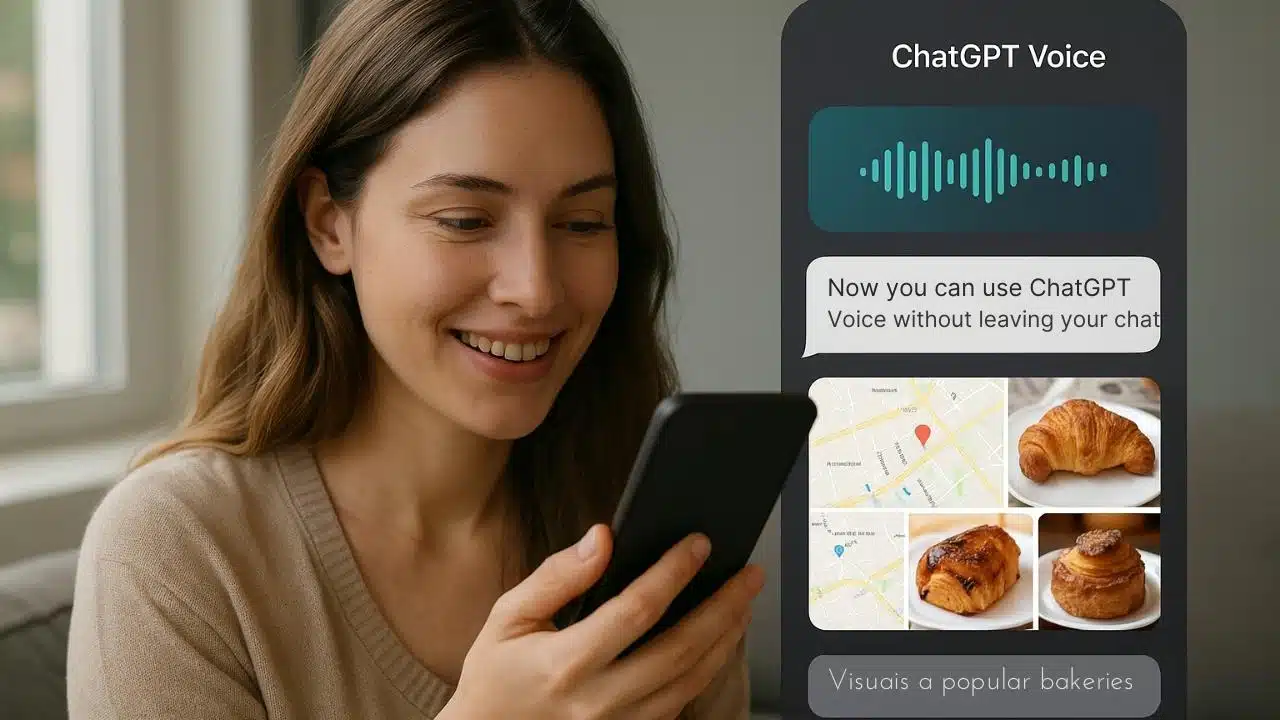
With this redesign, starting a voice chat feels as simple as sending a message. You can tap or click the waveform icon next to the text bar, and ChatGPT immediately begins a voice session within your current chat. Everything—your spoken input, the AI’s voice responses, and any visual elements like images, diagrams, maps, or examples—appears inline, right where you’re already working. This eliminates the friction of switching between a voice interface and the main chat window, allowing the entire conversation to stay in one place.
As soon as voice mode begins, ChatGPT automatically displays a real-time transcript of both sides of the conversation. This makes the interaction transparent and easier to reference, especially if the conversation includes instructions, names, complex topics, or directions. When ChatGPT mentions a place, an object, or an idea that benefits from visuals, it can now show those images instantly and seamlessly. For example, in OpenAI’s demonstration, ChatGPT offered bakery suggestions and displayed a map of locations along with photos of pastries from Tartine without ever leaving the main chat. This is designed to help users feel more connected to what the AI is saying, especially when the conversation involves creative tasks, learning, problem-solving, or exploring new information.
The update also pushes ChatGPT’s multimodal abilities further. Since users can already upload images, videos, or screenshots and ask questions about them, it makes sense that voice responses should also carry visual support when needed. The new inline voice mode aligns with this idea, combining listening, speaking, reading, and seeing into one conversation. This type of natural integration reflects a shift in how people are beginning to use AI—moving from traditional text-based commands to richer, more conversational and sensory interactions.
For users who enjoyed the original orb-style voice interface, OpenAI hasn’t removed it. Instead, it can be turned back on by opening ChatGPT Settings, going to the Voice Mode section, and toggling on Separate Mode. This gives users full control over whether they want the immersive voice screen or the new embedded conversational experience. The flexibility ensures that people who use ChatGPT for tasks requiring deep focus, storytelling, role-play, or hands-free interaction can still use the original layout, while others can enjoy the convenience of staying inside the standard chat.
You can now use ChatGPT Voice right inside chat—no separate mode needed.
You can talk, watch answers appear, review earlier messages, and see visuals like images or maps in real time.
Rolling out to all users on mobile and web. Just update your app. pic.twitter.com/emXjNpn45w
— OpenAI (@OpenAI) November 25, 2025
Naturally, this shift mirrors a broader trend in AI design. Google, for instance, has been experimenting with more expressive features in its Gemini Live system, such as overlays that highlight objects during video conversations. While OpenAI’s implementation is not reactive in that same live-video sense, it moves in a related direction by making the voice interaction more informative, visually supportive, and context-aware. Instead of simply hearing an answer, users can now see related images, examples, and explanations unfold as they talk—making the experience more engaging and helpful.
This update is also intended to make everyday use more fluid. Voice interactions now feel less like switching modes and more like continuing the same conversation in a different format. The combination of transcripts and inline visuals helps reduce confusion, especially when discussing complicated topics. It also supports accessibility—users who may have difficulty following spoken responses, remembering instructions, or understanding complex explanations benefit greatly from the built-in transcript and illustrations.
Overall, integrating ChatGPT Voice directly into the chat window represents a meaningful improvement in how people communicate with AI. It strengthens the connection between spoken conversation and visual learning, while maintaining the flexibility to switch back to the older interface. For anyone who uses ChatGPT for multitasking, explanations, brainstorming, research, or visual exploration, this updated voice mode creates a smoother and more intuitive experience.