


Are you a web developer hitting roadblocks with browser compatibility or maybe struggling to keep your website secure? It’s like trying to solve a puzzle with missing pieces, right?
Guess what, you’re not alone in facing these real-life challenges faced by web developers. Did you know that picking the right tech stack can make or break a project? That’s just one hurdle among many.
In this blog, we’ll tackle 10 big issues, from website performance to UI/UX design headaches. We’ve got simple fixes, like using cross-browser testing tools and optimizing images for speed.
Stick around, let’s crack these problems together! Keep reading!
Key Takeaways
- Web developers face 10 major challenges like browser compatibility and security issues.
- Tools like LambdaTest and BrowserStack help fix cross-browser problems fast.
- Using SSL certificates boosts website security against cyber threats.
- Google Core Web Vitals metrics, like Largest Contentful Paint (LCP), improve site speed.
- WCAG guidelines ensure websites are accessible for users with disabilities.
Platform and Browser Compatibility

Facing issues with platform and browser compatibility can feel like walking a tightrope, can’t it? As web developers, we often hit snags because different platforms, browsers, and operating systems work in their own quirky ways.
Your site might shine on one browser but flop on another. It’s a real headache to make sure every user gets a smooth ride, no matter their setup. This challenge in web development pops up when a page looks perfect on Chrome but breaks on legacy browsers like older versions of Internet Explorer.
So, how do we tackle this beast called cross-browser compatibility? Start by using cross-platform frameworks to build a solid base for your web app. Test your pages on various setups with handy tools like LambdaTest, BrowserStack, TestingBot, and TestGrid.
These platforms help spot glitches before users do. Also, plan ahead by mapping out the browsers and systems your audience uses most. A little foresight goes a long way in smoothing out those bumpy touchpoints for a better user experience.
Security Implementation Challenges
Hey there, let’s talk about a major challenge in web development: keeping websites secure. Security implementation issues can stump even experienced developers. Think of your site as a house; you wouldn’t leave the door wide open, right? Yet, cyber threats like cross-site scripting can slip in if you’re not vigilant.
Safeguarding user data is essential, and that’s where tools like SSL certificates make a difference. These secure sockets layer features encrypt information, making it hard for hackers to pry.
Include multi-factor authentication, and you’ve added another layer of protection to that door.
Now, imagine this problem: neglecting regular updates or relying on unreliable hosting. That’s like asking for issues to show up! Secure server storage prevents data breaches before they happen.
Also, client-side input validation reviews what users enter, stopping harmful content. Don’t overlook output encoding; it transforms data so attackers can’t manipulate it. Combine TLS with SSL, and you significantly strengthen website security.
Follow these practices, keep up with emerging threats, and you’ll stay one step ahead.
Performance Optimization Issues
Man, keeping a website fast can feel like trying to outrun a cheetah. Many web developers struggle with website performance due to messy code, weak server capabilities, heavy traffic, and tricky third-party dependencies.
A slow site frustrates users, and nobody wants that. Think about waiting for a page to load; it’s like watching paint dry. To tackle this, start by cleaning up poor code quality.
Optimize images to shrink file sizes, cut down on HTTP requests, and use caching to store data for quicker access. Also, pick powerful servers that can handle the load without breaking a sweat.
Now, let’s chat about some handy helpers for this job. Tools like Google Core Web Vitals give you the scoop on how your site performs with metrics like Largest Contentful Paint (LCP), First Input Delay (FID), and Cumulative Layout Shift (CLS).
These show where your web app lags, so you can fix it fast. Toss in a Content Delivery Network (CDN) to speed up content delivery by serving data from closer locations. Trust me, shaving off even a second of load time boosts user engagement.
Keep tweaking, and your site will run smoother than a well-oiled machine.
Selecting the Right Tech Stack
Picking the right tech stack can feel like choosing the perfect recipe for a big dinner. You want tools that mix well, taste great, and don’t flop under pressure. In web development, this means finding a set of technologies that match your project needs, like PHP, Ruby on Rails, or Node.js for server-side scripting.
Misalignment here can mess up functionality and leave clients frustrated, so getting it spot on matters a lot.
Think of it as building a sturdy house; you need a solid base to grow. Go for scalable tools that can handle more traffic as your website expands. Defining clear objectives upfront helps dodge future headaches.
So, chat with your team, map out the project requirements, and pick a tech stack, maybe something like the React framework for the front end, that fits like a glove for awesome web performance.
Adhering to Web Standards
Sticking to web standards is like following a reliable guide on a road trip; it keeps your website on the right track for everyone. These rules, set by groups like the W3C, help ensure your site functions well on any device or browser.
They enhance accessibility, so individuals with disabilities can access your site smoothly. Plus, they increase speed, strengthen security, and guarantee cross-browser compatibility.
Imagine building a house without a plan; ignoring standards can result in a shaky structure. So, start using W3C validation tools to review your code, and keep your site strong for all users.
Now, staying updated with web standards is a bit like keeping pace with a fast-moving stream. Trends change rapidly in web development, and lagging behind can impact your site’s performance.
Sign up for newsletters or follow industry experts to stay informed on updates. Think of it as preparing your equipment before a major task. By following these guidelines, you improve website security and enhance user experience (UX).
Whether it’s adjusting for Google Core Web Vitals or optimizing Largest Contentful Paint (LCP), staying aware helps your site stand out across the internet.
UI and UX Design Complexities
Hey there, let’s chat about the tricky side of UI and UX design in web development. Crafting a user interface (UI) and user experience (UX) that clicks with everyone can feel like solving a puzzle.
Poor design hits hard; it drops satisfaction and keeps folks from sticking around on a site. Think about a cluttered page, like eBay’s old layout, where too much info overwhelms users.
It’s a mess to navigate, right? That’s why nailing user-centric design matters so much.
Now, here’s how to tackle these UI/UX design hurdles. Start with solid user research to know what people want. Simplify your designs, test usability often, and always ask for feedback.
For instance, break down content into clear categories to avoid confusion. Use tools like Google Analytics to track how users interact with your site. Keep tweaking based on what you learn, and watch how engagement grows.
Website Maintenance and Updates
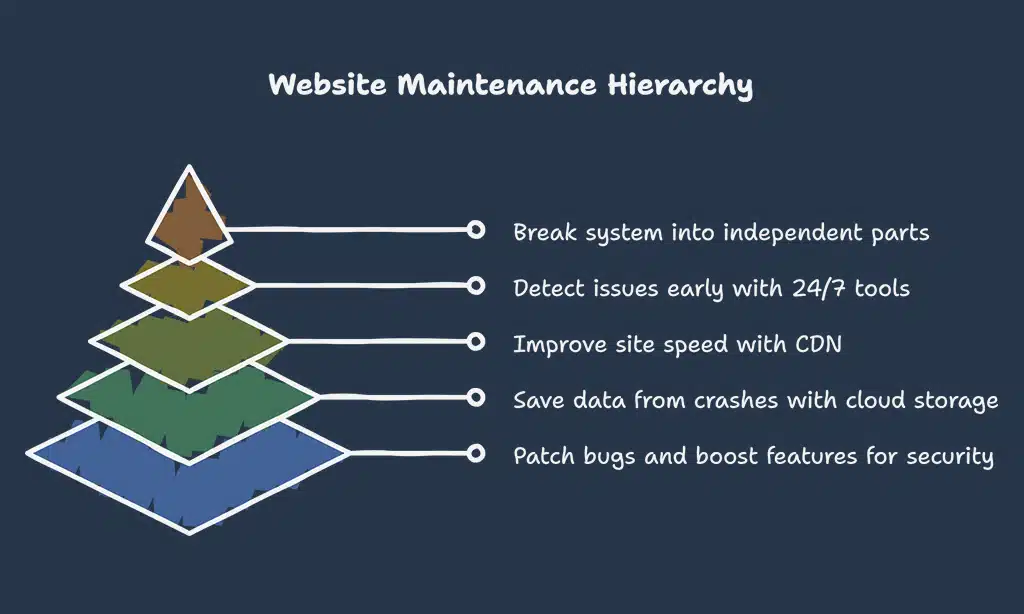
Keeping a website running smoothly takes real effort. Let’s chat about the hurdles in website maintenance and updates, and how to tackle them head-on.
- First off, regular updates are a must for functionality and website security. You’ve got to patch up bugs and boost features to keep things safe. Think of it as locking your front door every night. Use tools like SSL certificates to secure data with Secure Sockets Layer (SSL) protection. Set a schedule for these updates, maybe weekly, to stay on top of threats.
- Next, backups save your bacon when disaster strikes. A crashed site can mean lost data or downtime, and nobody wants that headache. Make it a habit to back up your site daily or after big changes. Store these on cloud platforms for easy access. It’s like having a spare tire in your trunk, just in case.
- Then, performance optimization keeps users happy. A slow site drives folks away faster than a rainy picnic. Focus on metrics like Largest Contentful Paint (LCP) and First Input Delay (FID) from Google Core Web Vitals. Use a Content Delivery Network (CDN) for quicker load times. Test often to spot sluggish spots and fix them pronto.
- Also, constant monitoring is key to avoiding surprises. Problems creep up when you least expect, like a leaky pipe at midnight. Go for 24/7 monitoring tools to catch issues before they grow. This cuts downtime and keeps your web development project humming along nicely.
- Lastly, reducing dependencies with a microservices architecture helps a ton. Instead of one big, clunky system, break things into smaller, independent parts. If one piece fails, the rest keep going. It’s like having separate engines on a plane; one can stall, but you still land safely. This setup makes updates smoother and less risky for your web application development.
Scaling Websites and Databases
Moving from the task of keeping websites fresh with maintenance and updates, let’s tackle a bigger beast, scaling websites and databases. As your site grows, more folks visit it every day.
That spike in traffic can slow things down if you’re not ready. It’s like hosting a small party that suddenly turns into a huge bash. You need a bigger space and more snacks to keep everyone happy.
In web terms, handling increased traffic without slowdowns is a must.
Think of your website as a busy shop on a crowded street. More customers mean you gotta expand fast. Start by using scalable setups that grow with demand. Boost your bandwidth to keep data flowing smooth.
Fine-tune your databases so they don’t choke under pressure. Also, tap into content delivery networks, or CDNs, to speed up access for users everywhere. With tools like cloud computing and microservices architecture, you can spread the load and keep things running slick, no matter how many visitors pop in.
Managing Third-Party Integrations
Hey there, let’s chat about a real headache for web developers: managing third-party integrations. You see, adding tools like APIs or webhooks can supercharge a website’s features, making it more dynamic on the world wide web.
But, oh boy, it often feels like juggling flaming torches. Compatibility issues pop up fast with these third-party libraries, and they can mess with your project’s flow. Think of it as inviting a wild guest to a calm dinner party; things can get messy quick.
Now, here’s the good news, folks. Picking well-documented tools is a solid fix for these integration hiccups. Streamline your strategy by testing APIs early, and always have a backup plan.
This approach keeps your web development smooth, dodging those nasty compatibility snags. Imagine it as mapping out a road trip; know your stops, and you won’t get lost. Stick with trusted application programming interfaces, and watch your site grow stronger with every connection.
Dealing with Imposter Syndrome
Facing imposter syndrome hurts, doesn’t it? Many web developers struggle with stress and anxiety, feeling like they fall short. Even after mastering challenging projects in web development, that persistent uncertainty sneaks in, suggesting you’re not genuine.
It’s a subtle darkness, overshadowing your well-deserved achievements.
Don’t let it prevail, though. Acknowledge every minor success in your software development path, like resolving a complex bug or enhancing user experience (UX). Take brief pauses, engage in personal interests, spend time with friends, and focus on rest along with physical activity.
These actions help push self-doubt away, strengthening confidence in your web development abilities day by day.
Overcoming Developer Burnout
Hey there, let’s talk about a real struggle in web development: burnout. It’s that heavy feeling when stress and anxiety pile up, making you doubt your skills. Many developers face this, often feeling like they’re not good enough.
But guess what? You’re not alone, and there are ways to push through this fog.
Start by celebrating your wins, no matter how small they seem. Take short breaks during your coding sessions to refresh your mind. Keep up with hobbies outside of web development to balance your life.
Connect with friends or fellow coders for support, and make sure you get enough sleep and exercise. These steps can lift that weight off your shoulders and keep you going. Now, let’s move on to tackling accessibility compliance challenges next.
Accessibility Compliance Challenges
Facing accessibility compliance in web development can feel like climbing a steep hill, folks. Many websites still miss the mark for users with disabilities, and that’s a real problem.
Following WCAG guidelines is the key to making the web inclusive for everyone. Think about keyboard navigation; it lets users move through a site without a mouse. Then there’s alt text for images, which helps screen readers describe visuals to the visually impaired.
These steps matter a lot.
Don’t forget color contrast either, since it helps those with vision issues see content clearly. Using plain language also makes a huge difference, breaking down barriers for users with cognitive challenges.
Picture yourself stuck on a site you can’t use; frustrating, right? As developers, fixing these web design gaps with user-centric design isn’t just nice, it’s a must. Let’s keep pushing for a web that welcomes all, step by step.
Structuring and Organizing Codebase
Moving from making websites accessible to all, let’s tackle another big hurdle in web development. Structuring and organizing your codebase can feel like trying to tidy up a messy room, but it’s super important for smooth sailing.
A sloppy setup leads to bugs popping up everywhere, and fixing them becomes a real headache. Poor planning, as we know, creates maintenance nightmares down the road. So, getting this right from the start saves a ton of stress.
Think of your codebase like a well-organized toolbox. If every file and function has its spot, you won’t waste time hunting for stuff. Use clean coding practices to keep things neat, and make sure developers chat often to stay on the same page.
Tools like Git help track changes, while frameworks such as React or Angular guide you in laying out your project. Trust me, a clear structure in web development stops chaos before it starts.
Consistent communication among team members also keeps everyone aligned on project requirements.
Setting and Managing Realistic Goals
Hey there, let’s chat about a key part of web development. Setting and managing realistic goals can make or break your project life cycle.
- Poor time management often leads to missed deadlines, and that’s a real headache for any developer. If you’re not careful, you might find yourself scrambling at the last minute, stressing over unfinished tasks. The fix is simple: prioritize your work, break it down into small, doable chunks, and keep your focus sharp. This approach keeps your website development on track and stress at bay.
- Grab some handy project management tools to stay organized. For instance, a platform like MarkUp.io can help you map out every step of your project requirements. It’s like having a trusty roadmap, showing you exactly where to go next in app development or web-based tasks. You’ll save time and dodge those pesky delays.
- Set clear, achievable targets for every phase of your work. Don’t aim to build a massive site overnight; that’s a recipe for frustration. Instead, plan small wins, like finishing the user interface (UI) design by Friday. This keeps your momentum going and builds confidence in handling clients and servers.
- Always keep an eye on realistic priorities during website performance tasks. You can’t do everything at once, so pick what matters most, like fixing bugs before adding new features. Think of it as putting out a fire before planting a garden; it just makes sense for steady progress.
- Break tasks into smaller goals to avoid feeling overwhelmed in web development challenges. Say you’re tackling UI/UX design; start with sketching user personas before coding. This step-by-step method is like eating a pizza slice by slice, making the whole process easier to digest.
- Chat with your team to align on expectations using agile methodology. Open dialogue, much like a friendly huddle before a game, keeps everyone on the same page. It’s vital for collaboration, especially when managing third-party integrations or cloud-based systems.
- Review your progress often to adjust goals as needed for project management. If something’s off track, like a delay in testing Google Core Web Vitals, tweak your plan fast. Staying flexible is your secret weapon, helping you roll with the punches in this field.
Collaboration and Communication in Teams
Teaming up with others in web development can feel like juggling hot potatoes, but it’s vital for success. You’ve got to keep the conversation flowing with your crew, no matter the project size.
Consistent communication among developers helps dodge misunderstandings and keeps everyone on the same page. Think of it as passing a baton in a relay race; one fumble, and the whole race slows down.
Using platforms like Turing for finding vetted talent can also smooth out the process of building a solid squad.
Poor chats can lead to messy code or missed deadlines, and nobody wants that headache. So, set up regular check-ins, whether through quick video calls or tools like Slack for instant updates.
Make sure to share ideas openly, even if they seem a bit wild at first. A good laugh over a crazy suggestion can spark the best fixes. Now, let’s shift gears to keeping up with rapidly changing technologies in the next section.
Keeping Up with Rapidly Changing Technologies
Staying on top of emerging technologies in web development can feel like chasing a speeding train. Don’t worry, though, I’ve got your back with some simple tips. The tech landscape shifts quickly, and tools like the React framework and Angular framework emerge or update frequently.
To stay current, subscribe to newsletters from industry leaders. They’re a treasure trove for the latest trends and insights.
Another wise step is using AI solutions to simplify your work. Imagine automating tedious tasks so you can concentrate on mastering new areas like cloud computing or microservices architecture.
It’s like having a reliable partner. Also, follow influencers or experts in the field for fast updates on web development challenges and solutions. Maintain these practices, and you’ll adapt to change like a pro.
Testing and Debugging Across Environments
Moving from the fast pace of keeping up with new tech, let’s talk about a hands-on hurdle in web development. Testing and debugging across environments is a real test of patience for many developers.
- Testing across various setups is a big deal in web development challenges. You’ve got different browsers, devices, and systems, all acting differently. A site might look perfect on one browser but break on another. Cross-browser compatibility is key here. Tools like LambdaTest and BrowserStack help a lot. They let you see how your site behaves on tons of platforms without needing a room full of gadgets. Run regular testing with these to catch issues early.
- Debugging in diverse environments can feel like finding a needle in a haystack. One bug might only show up on a specific phone model. That’s frustrating, right? Using TestingBot and TestGrid can save your sanity. These tools mimic real user conditions, so you spot glitches before your users do. Set up 24/7 monitoring to stay ahead of sneaky problems.
- Performance metrics often trip up developers during testing phases. Things like Largest Contentful Paint (LCP), First Input Delay (FID), and Cumulative Layout Shift (CLS) matter for user experience. If these Core Web Vitals are off, your site feels slow or jumpy. Test them in every environment to keep users happy. A quick check with the right tools shows where to fix things fast.
- Simulators are your best pals when physical devices aren’t around. They let you test on virtual setups that act like the real thing. This cuts down on costs and time. But, don’t rely on them alone. Pair simulator results with real-world checks using platforms like LambdaTest for solid outcomes.
- Fixing bugs across environments needs a steady plan. Random guesses won’t cut it when users are waiting. Prioritize issues based on how many people they affect. Use bug fixes systematically, tracking each step. This way, you tackle website performance problems without losing your cool.
- Keeping an eye on everything 24/7 is a game-changer for developers. Constant monitoring spots issues before they blow up into big headaches. It’s like having a guard dog for your site. Pair this with tools like TestGrid to handle errors on the fly. Your users will thank you for the smooth ride.
Takeaways
Hey there, web developers! We’ve tackled a wild ride through the top challenges you face daily, from browser quirks to security headaches. Phew, it’s like juggling flaming swords sometimes, right? Let’s keep pushing with sharp tools like React framework and smart testing tricks.
Stick together, and we’ll conquer every coding hurdle!
FAQs
1. What are some big web development challenges developers face today?
Hey, web development isn’t a walk in the park, my friend. You’ve got hurdles like browser compatibility, or as I call it, the “why does this look funky on that browser” puzzle. Then there’s website performance, platform compatibility, and wrestling with legacy browsers, all while juggling Google Core Web Vitals like Largest Contentful Paint (LCP) and First Input Delay (FID).
2. How do you tackle cross-browser compatibility issues?
Listen up, fixing cross-browser compatibility is like taming a wild beast. Use tools and frameworks like React framework or Angular framework to build interoperable, platform-agnostic code that plays nice across different setups.
3. Why is website performance such a headache, and how can I fix it?
Oh boy, website performance can drag you down with slow load times and cranky users. Think about metrics like Cumulative Layout Shift (CLS) from Core Web Vitals, then optimize with a Content Delivery Network (CDN), image optimization, and a solid web host to speed things up. It’s like giving your site a turbo boost, so user experience (UX) doesn’t take a hit.
4. What’s the deal with UI/UX design struggles in web development?
Man, nailing UI/UX design is like painting a masterpiece while blindfolded. You’ve got to focus on user-centric design, craft user personas, and polish that user interface (UI) to keep folks happy. Dive into A/B testing to see what clicks with your crowd, and watch that user experience soar.
5. How can third-party integrations mess up my project, and what’s the fix?
Third-party integrations can be a real thorn in your side, often clashing with your tech stack or slowing things down. Lean on microservices architecture instead of a clunky monolithic architecture, and test thoroughly with QA teams or dedicated developers to keep things smooth.
6. What’s a smart way to handle website security in web development solutions?
Hey, don’t sleep on website security, alright? Use SSL certificates for HTTP over SSL, add multi-factor authentication, and tap into cloud computing or distributed systems to guard your site like a fortress against sneaky threats.






























