Photography has changed. In 2026, a great image isn’t just captured; it is crafted. Whether you are a seasoned influencer, a small business owner, or just someone who wants their camera roll to look professional, finding the Best Photo Editing Apps for Mobile is the single most important step in your creative workflow. The days of over-saturated, “filtered” looks are gone. We have entered the era of “Imperfect by Design”—where authenticity meets AI precision.
The current landscape of mobile editing is divided into two clear camps: the “AI Workflow” tools that magically erase distractions and expand backgrounds, and the “Aesthetic” engines designed to give your photos a timeless, film-like soul. With thousands of options on the App Store and Google Play, finding the right tool can feel overwhelming. That is why we have tested, ranked, and reviewed the top contenders, defining the standard for 2026.
This guide goes beyond simple descriptions. We break down the pricing, the hidden features, and exactly which app belongs in your pocket based on your specific creative goals.
Key Takeaways
-
Authenticity is trending: The “2026 look” is less about perfect smoothing and more about “clean reality”—grain, texture, and natural colors are in.
-
AI is for cleanup, not just fake art: The best use of AI this year is removing distractions and expanding backgrounds, not generating fake images.
-
Video is part of the photo workflow: Apps like Tezza and VSCO now treat video color grading with the same importance as photos.
-
E-commerce has its own toolkit: If you are selling, Photoroom beats general editors every time.
The New Standard: What to Look for in 2026
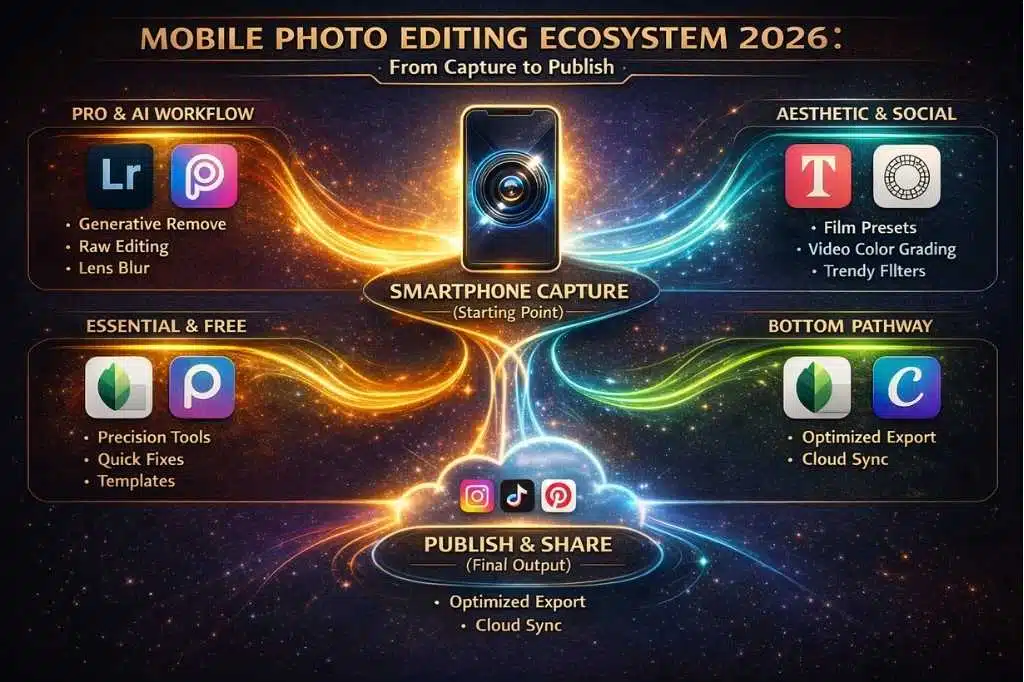
Before downloading a dozen apps, it is critical to understand how the technology has shifted. In 2026, a top-tier mobile editor isn’t defined by how many filters it has, but by how effectively it integrates AI (Artificial Intelligence) and Workflow Efficiency into your creative process.
We evaluated the apps on this list based on four non-negotiable criteria that define modern content creation:
-
Generative AI Integration: The best apps no longer just correct pixels; they understand them. We prioritized apps that offer “Generative Remove” (magically erasing objects) and “Generative Expand” (extending image borders) without forcing you to open a desktop computer.
-
The “Video-Photo” Hybrid: Social algorithms in 2026 favor video, but your aesthetic needs to stay consistent. The top apps now allow you to apply the same color grading presets to your 4K video Reels as you do to your static photos, ensuring a cohesive feed.
-
Non-Destructive Workflow: “Destructive” editing—where you can’t undo a change after saving—is a thing of the past. The apps selected here (like Snapseed and Lightroom) prioritize “stacks” or layers, allowing you to tweak a specific edit you made ten steps ago without starting over.
-
Cloud Ecosystem: For the modern creator, mobility is key. We looked for apps that offer cloud syncing, letting you snap a photo on your phone, start the edit on your tablet, and finalize the export on your laptop.
Understanding these criteria will help you decide if you need a “One-Click Wonder” for quick posts or a “Pocket Studio” for professional work.
Quick Comparison: The Top 8 at a Glance
If you need a quick answer, here is how the top players stack up against each other this year.
| App Name | Best For | Price Model | Key 2026 Feature |
| 1. Adobe Lightroom | Pro Color Grading | Free / Subscription | Generative Remove & Lens Blur |
| 2. Tezza | Trendy Aesthetics | Subscription | “Camcorder” Mode & Studio Video |
| 3. Snapseed | Precision Editing | Free | Non-destructive Stacks |
| 4. Picsart | Creative AI | Freemium | “Imperfect” AI Generation |
| 5. Canva | Social Design | Freemium | Magic Grab & Brand Hub |
| 6. VSCO | Film Purists | Freemium | Realistic Kodak/Fuji Stocks |
| 7. Photoroom | Product Sales | Freemium | Instant AI Backgrounds |
| 8. Facetune | Retouching | Subscription | AI Relight & makeup |
Deep Dive: The 8 Best Apps of 2026
We tested dozens of top-rated tools against real-world creator workflows to determine which ones truly justify the space on your phone. Whether you need studio-level precision, AI magic, or instant aesthetic vibes, here is the definitive breakdown of the editors defining mobile photography this year.
1. Adobe Lightroom Mobile
The Undisputed King of Professional Mobile Photography
If you speak to any professional photographer about their mobile workflow, the conversation begins and ends with Lightroom. In 2026, Adobe successfully bridged the gap between desktop power and mobile convenience. It is no longer just a “lite” version of the desktop software; it is a powerhouse in its own right.
- Why It Wins in 2026:The standout feature this year is the seamless integration of Generative Remove. Unlike standard “healing” tools that just smudge pixels, Lightroom uses Adobe’s Firefly AI to understand what is behind the object you are removing, filling the space with contextually accurate textures.
-
Key Features:
-
Lens Blur: Uses depth-mapping AI to add a realistic bokeh (background blur) to any photo, even if it wasn’t taken in Portrait Mode.
-
Cloud Sync: Edit a photo on your iPad, tweak it on your iPhone, and export it from your MacBook without missing a beat.
-
Masking: Select “Subject,” “Sky,” or “Background” automatically to apply edits to specific areas only.
-
The Verdict: It has a steeper learning curve than others, but for pure image quality and color control, it is unbeatable.
2. Tezza
The “It-Girl” App for Lifestyle Creators
Tezza has evolved from a simple preset pack into a full-blown creative ecosystem. It is the secret weapon behind the most cohesive, aesthetic feeds on Instagram and TikTok. While other apps focus on technical perfection, Tezza focuses on the vibe.
- Why It Wins in 2026:The introduction of “Camcorder” mode and the Tezza Studio for video has made it a dual-threat. Creators in 2026 are prioritizing video as much as photos, and Tezza allows you to apply the same vintage, gritty, or warm aesthetic to your Reels that you use on your static posts.
-
Key Features:
-
Editorial Presets: The “Luxe,” “Cocoa,” and “Film” presets are industry standards for a reason.
-
Stop Motion: A built-in tool to create trending stop-motion videos without needing complex timeline editing.
-
Frames: High-quality film borders (Super 8, Polaroid) that look authentic, not cheesy.
-
The Verdict: If your goal is to grow a social media following with a consistent “aesthetic,” Tezza is the best investment you can make.
3. Snapseed
The Best Free Photo Editor (Still)
Owned by Google, Snapseed remains a marvel of software engineering. It is completely free, contains zero ads, and offers a level of precision that usually costs $10/month. While it doesn’t get flashy AI updates as often as the others, its core engine is rock solid.
- Why It Wins in 2026:In an era of subscription fatigue, Snapseed stands alone. Its “Stacks” feature allows you to view your edit history and adjust any previous step without undoing the work you did after it—a non-destructive workflow that is rare in mobile apps.
-
Key Features:
-
Selective Tool: Place a control point on a specific color (like a blue shirt) and adjust the brightness/saturation of only that area.
-
Double Exposure: Blend two images together with professional blending modes (Lighten, Darken, Overlay).
-
Expand: Smartly expands the edges of your photo to fix a crooked horizon without cropping out details.
-
The Verdict: Every mobile photographer should have Snapseed installed. It’s the perfect utility tool for quick, precise fixes.
4. Picsart AI Photo Editor
The Creative “Prompt Playground”
Picsart has leaned harder into Generative AI than any other app on this list. It is less of a photo corrector and more of a photo creator. If you want to turn a photo of your dog into an astronaut or change your living room into a jungle, this is the app.
- Why It Wins in 2026:The trend for 2026 is “Imperfect by Design,” and Picsart’s new AI Remix tools allow users to blend their photos with AI prompts to create mixed-media art that feels handmade yet futuristic.
-
Key Features:
-
AI Replace: Circle an object (e.g., a coffee cup) and type “vintage flower vase” to swap it instantly.
-
AI Avatar: Generates stylized digital portraits of you in various artistic styles.
-
Sticker Maker: Automatically cuts out subjects and turns them into stickers you can use in other designs.
-
The Verdict: Perfect for Gen Z creators, meme makers, and anyone who views photography as a starting point for digital art.
5. Canva
The Social Media Powerhouse
Canva is technically a graphic design app, but its photo editing capabilities have become so advanced that it deserves a top spot here. For creators who treat their photos as part of a larger content strategy (thumbnails, carousels, stories), Canva is indispensable.
- Why It Wins in 2026:Magic Grab and Magic Expand have changed the workflow. You can now take a photo, “grab” the subject to move them to the left, and use “Magic Expand” to fill the empty space, turning a vertical photo into a horizontal YouTube thumbnail in seconds.
-
Key Features:
-
Brand Hub: Save your fonts, logos, and color palettes to apply them to any photo edit instantly.
-
Background Remover: One of the most accurate one-tap removers in the industry.
-
Mockups: Place your edited photo onto a laptop screen or t-shirt with one click.
-
The Verdict: If you are running a business or a personal brand, Canva is likely where your photo editing workflow will end, even if it starts in Lightroom.
6. VSCO
For the Film Purist
Before Instagram had good filters, there was VSCO. In 2026, VSCO has doubled down on what made it famous: high-fidelity film emulation. While other apps chase AI trends, VSCO chases the physics of real film stocks like Kodak Portra and Fuji Pro.
- Why It Wins in 2026:Authenticity is the currency of 2026. VSCO’s filters don’t just overlay a color; they manipulate the color curves to mathematically mimic how real film reacts to light. Their new Video Color Grading allows you to apply these sophisticated looks to 4K video.
-
Key Features:
-
Film X: A library of over 200 classic film stocks.
-
Recipes: Save your favorite combination of edits (e.g., C1 preset + +1.0 exposure + +2.0 grain) to apply to future photos.
-
Community: VSCO retains a dedicated community of photographers who care about art, not just likes.
-
The Verdict: For the photographer who wants their mobile photos to look like they were shot on a $2,000 analog camera.
7. Photoroom
The E-Commerce Essential
If you sell on Depop, Poshmark, eBay, or Shopify, Photoroom is not optional; it is essential. It is built entirely around the workflow of taking a product photo and making it look like a studio shot.
- Why It Wins in 2026:Instant Shadows. In previous years, removing a background left a product looking like it was floating in space. Photoroom’s 2026 AI analyzes the lighting on the object and generates a realistic 3D shadow on the new background, grounding the item perfectly.
-
Key Features:
-
Batch Mode: Edit 50 photos of different shoes at once, removing all backgrounds and centering them.
-
AI Backgrounds: Place your product on a “marble countertop” or “beach sand” using text prompts.
-
Smart Resize: Automatically reformats the image for Instagram Story, Etsy listing, and Facebook Banner simultaneously.
-
The Verdict: The highest ROI app on this list. It literally makes you money by improving your product listings.
8. Facetune
The Personal Branding Suite
Facetune has a reputation for heavy-handed editing, but the 2026 version is surprisingly subtle. It has pivoted from “fake perfection” to “polished reality.” It is the best tool for when the lighting isn’t quite right on your face.
- Why It Wins in 2026:AI Relight. This feature allows you to change the direction of the light source after the photo is taken. If the sun is behind you and your face is dark, you can virtually move the “sun” to the front.
-
Key Features:
-
Heal & Smooth: Still the best in class for removing temporary blemishes while keeping skin texture.
-
Makeup: Digitally add subtle blush or fill in eyebrows if the camera washed them out.
-
Video Retouch: Apply smooth skin effects to video in real-time.
-
The Verdict: Use it with a light touch. It’s an essential tool for vloggers and selfie-centric creators.
The “AI Trap” – When NOT to Use Generative Features
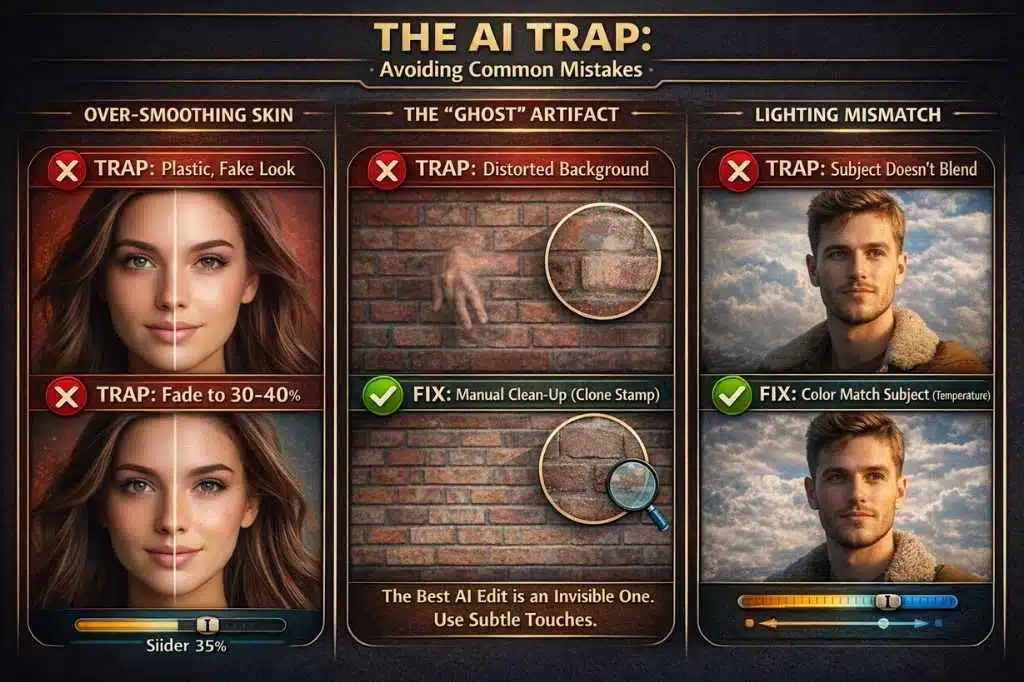
With apps like Picsart and Lightroom offering “Magic” buttons, the temptation to fix everything is high. However, the most successful creators in 2026 know that imperfection creates connection.
Avoid these three common “AI Traps” to keep your work looking professional:
1. Over-Smoothing Skin: AI “Face Enhance” tools often remove the natural texture of skin (pores, fine lines). This triggers the “Uncanny Valley” effect, making the subject look plastic and fake.
The Fix: If you use Facetune or an AI filter, always use the “Fade” slider to reduce the effect to 30-40%. You want to look like you on your best day, not like a generated avatar.
2. The “Ghost” Hand: Generative Remove is incredible, but it struggles with complex patterns (like plaid shirts or brick walls). If you erase a person from a crowd, check the background closely. Does the brick wall warp? Did it leave a floating hand?
The Fix: Don’t rely on one tap. Zoom in to 200% and manually clean up the “smudges” left behind by the AI using the Clone Stamp tool in Snapseed.
3. Lighting Mismatches: If you use AI to swap a sky (e.g., turning a gray day into a sunset), ensure the lighting on your subject matches. A golden sunset background with a subject lit by cold, blue daylight screams “fake.”
The Fix: If you swap the background, use the “Temperature” or “Warmth” tool to tint your subject to match the new light source.
Buying Guide: How to Choose the Right App in 2026
With so many overlapping features, how do you choose? Here is a decision framework based on your “Creator Archetype.”
1. The “Workflow” vs. “Aesthetic” Creator
- The Workflow Creator: You care about the technical quality. You want to fix exposure, remove a trash can from the background, and sharpen the details.
- Choice: Adobe Lightroom or Snapseed.
- The Aesthetic Creator: You care about the “mood.” You want a warm, vintage feel that makes your grid look cohesive.
- Choice: Tezza or VSCO.
2. The “AI” Factor
Do you want to fix reality or invent it?
-
If you just want to remove a photobomber, Lightroom’s Generative Remove is sufficient.
-
If you want to place yourself on the moon or add objects that weren’t there, you need the generative engines of Picsart.
3. Subscription Fatigue
Be realistic about your budget.
-
Zero Budget: Snapseed is the only truly free pro editor. Canva has a generous free tier.
-
High Value: Lightroom ($9.99/mo) includes 1TB of storage, effectively backing up your life’s work.
-
ROI Driven: Photoroom costs money but saves hours of manual work if you sell products.
The “Golden Export” – Stop Social Media from Ruining Your Quality
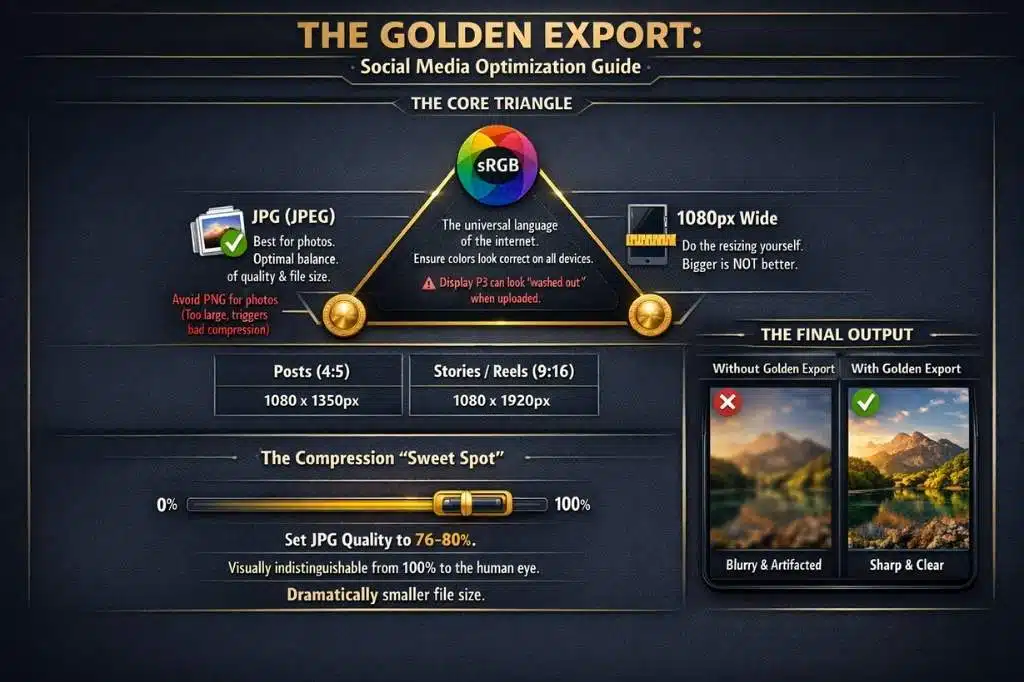
You can spend hours color grading in Lightroom, but if you export with the wrong settings, Instagram and TikTok will compress your image into a blurry mess. In 2026, social platforms are ruthless with high-resolution files.
Here is the “Golden Export” formula to ensure your photos stay crisp when uploaded:
-
Format: Always export as JPG (or HEIF if you are strictly in the Apple ecosystem), not PNG for photos. PNGs are too large and trigger aggressive compression algorithms.
-
Color Space: Set this to sRGB. While modern phones shoot in “Display P3” (which has more vibrant colors), most web browsers and social apps still default to sRGB. If you upload a P3 photo, the colors will look “washed out” or dull on other people’s screens.
-
Resolution (The Secret Sauce): Bigger is not always better.
-
For Instagram Posts: Resize to 1080px wide by 1350px tall (4:5 ratio). If you upload a 4000px image, Instagram’s server will crush it down to 1080px poorly. Do the resizing yourself in Lightroom or Snapseed for better sharpness control.
-
For Stories/Reels: Export at 1080px by 1920px.
-
-
Sharpening: Apply “Screen Sharpening” (Low or Standard) upon export. This counters the softening effect of compression.
Pro Tip: If your editing app allows it (like Lightroom), set your Quality Slider to 76-80%, not 100%. The visual difference is undetectable to the human eye, but the file size drops massively, keeping you under the compression radar of social algorithms.
Frequently Asked Questions (FAQs)
What is the best completely free photo editing app in 2026?
Snapseed remains the undisputed king of free editors. It offers professional tools like curves, healing, and selective edits without any paywalls, watermarks, or ads.
Which app do most Instagram influencers use?
Most top lifestyle influencers use a combination of Lightroom (for lighting fixes) and Tezza (for that signature vintage color filter). Tezza has largely replaced VSCO for the “trendy” influencer look.
Is Adobe Lightroom Mobile free?
Lightroom is “Freemium.” You can use the powerful editing tools (lighting, color, cropping) for free forever. However, “Masking” (editing just the sky/subject) and “Generative AI” features require a Premium subscription.
Can I edit RAW photos on my phone?
Yes! Lightroom and Snapseed both support RAW editing. This allows you to pull back detail from bright skies or dark shadows that would be impossible to save in a standard JPEG.
What is the difference between Facetune and Photoshop Express?
Facetune is specialized for human faces (skin, eyes, reshaping features). Photoshop Express is a general editor for the whole image (exposure, collage, noise reduction). Use Facetune for the selfie, and Photoshop for the scene.
Final Thought: The Tool Doesn’t Make the Artist
In 2026, the technology in your pocket rivals the darkrooms of the 20th century. However, the Best Photo Editing Apps for Mobile are just that—tools. The most powerful feature in any of these apps is your own eye. Don’t let the AI do all the work. Use these apps to enhance your vision, remove the obstacles between you and your audience, and tell your story with clarity.
Download one “Technical” app (like Lightroom) and one “Creative” app (like Tezza), and you will have a complete studio in your pocket.