Many beginners feel stuck when they try to learn JavaScript for web development. They watch tutorials, but code errors stop them. They want to build interactive websites and dynamic content, but they lack clear guides.
This can kill motivation fast.
JavaScript now runs on both the front end and back end, thanks to nodejs. We list the Best Free Resources To Learn JavaScript Faster. You get online courses, a free book, and hands-on coding lessons.
You learn javascript functions, javascript arrays, and html forms. Read on.
Key Takeaways
- freeCodeCamp offers a full JavaScript course with 134 video lessons, self-paced interactive challenges, real projects, and free certificates as you learn functions and arrays.
- Codecademy’s 15-hour JavaScript Track guides 2.3 million learners through 11 lessons, 12 projects, and 9 quizzes, and holds a 4.48-star rating from 31,468 reviews.
- MDN Web Docs provides up-to-date tutorials, API guides (DOM, promises, JSON), a glossary, and real code samples for vanilla JS, ES6, and web development tricks.
- Eloquent JavaScript by Marijn Haverbeke is a free online book with smooth text, interactive exercises, and chapters on HTTP, forms, Node.js, and libraries like Angular.js.
- JavaScript30 delivers 30 plain-JS video lessons, each building a small project (drum kit, photo gallery, task list) with no frameworks, so you master functions, arrays, and event listeners.
FreeCodeCamp
You can start web development on freeCodeCamp. The site offers 134 video lessons in a full JavaScript course. It serves beginners and advanced learners. It teaches the programming language from scratch.
You tackle self-paced interactive challenges and projects. You practice while loops and get requests. You explore JavaScript functions, arrays, and advanced JavaScript concepts. You test code in a browser and a built-in html editor.
You try plain JavaScript and a JavaScript library. You learn to make dynamic web content and interactive websites.
Each practice project builds your portfolio for real scenarios. You earn certificates as you finish more lessons. You collect them for each completed module. Testimonies praise the platform’s clear, comprehensive course structure.
You learn algorithms and data structures alongside responsive web design. You write code in a user-friendly code editor and watch short video clips. You gain confidence to create web applications and game development demos.
You prepare for frontend developer or mobile app development roles.
Codecademy’s Introduction to JavaScript Track
Codecademy’s Introduction to JavaScript Track lasts about 15 hours. Learners follow 11 lessons, tackle 12 projects, and answer 9 quizzes. This interactive javascript tutorial uses an editor in the browser.
That tool shows errors and rewards correct code on the spot. Lessons cover loops, functions, and data structures. Beginners grasp javascript syntax for web development and interactive websites.
The program lifts skill ratings to roughly 6.8 out of 100. Enrolled learners total more than 2.3 million. User feedback gives a 4.48 star score from 31,468 ratings.
Projects like Kelvin Weather, Dog Years, and Magic Eight Ball keep studies fun. Each task builds on javascript arrays and API calls. Quiz rounds test loops, functions, and control flow.
Plus members earn certificates for resumes and LinkedIn. Alumni join teams at Google, Meta, Apple, EA, Amazon, IBM, Microsoft, Reddit, Spotify, Uber, YouTube, and Instagram. That record motivates new coders to master this programming language.
The course also shows work with DevTools console and GitHub. These tools ready students for mobile app development and fullstack academy prep.
Mozilla Developer Network (MDN) Web Docs
MDN Web Docs offers clear, up-to-date tutorials to help you learn JavaScript, covering functions, arrays, and ES6. It lays out API guides for the Document Object Model, promises, and JSON.
Learners find structured lessons in multiple languages, from beginner tips to advanced hacks. The site packs a glossary and real code samples, so you grasp each term and tweak. The community calls it the go-to spot for free documentation in web development.
Readers build skills at their own pace, with each chapter feeding new tricks. You can bookmark a note on arrow functions or async calls, then loop back on demand. Web developers call it the best spot to explore this programming language, or to brush up on interactive websites tricks.
A big mix of tutorials covers vanilla JS, Angular.js, vuejs.org pointers, even jquery.com tips. The clear, concise style feels light, like a chat over coffee, yet it hits all the right details.
Eloquent JavaScript (Online Book)
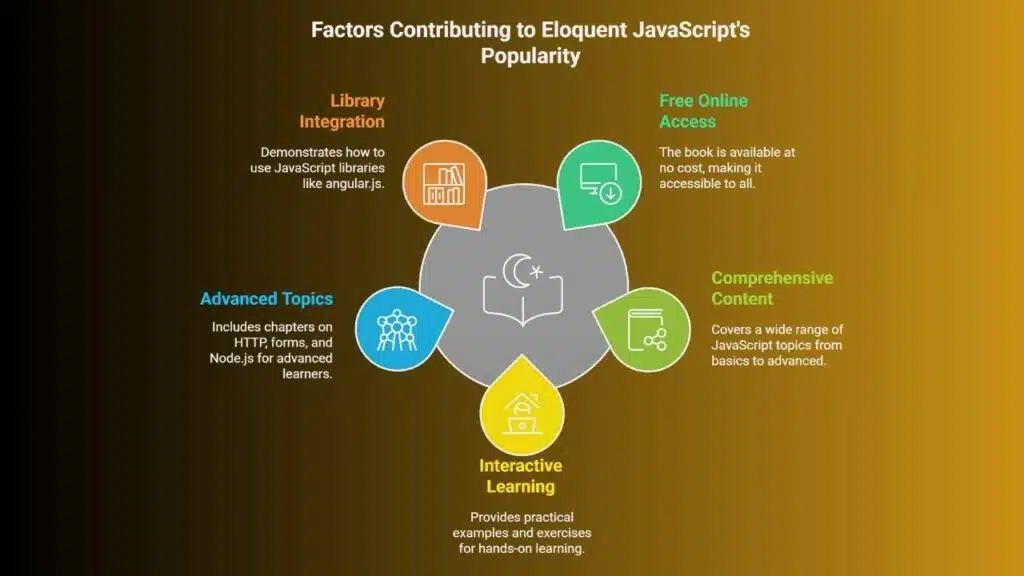
Eloquent JavaScript by Marijn Haverbeke sits online as a free digital book. You get fast access to JavaScript syntax, loops, and arrays. It builds strong roots in this programming language.
The text reads smoothly, like a live interactive JavaScript tutorial. It suits intermediate coders who want to learn JavaScript faster. Readers call it one of the most recommended free textbooks for self-study.
The resource packs practical examples with exercises, so code truly leaps off the page. It fits guided classes or solo study.
Later chapters tackle HTTP, forms, and Node.js with crisp demos. You can build interactive websites and mobile app development samples. The book shows how to use JavaScript libraries like angular.js in real code.
It helps you grasp advanced JavaScript concepts and web application framework basics. Software developers worldwide point to this title for depth and value. Free online access makes this guide a top pick for web development and game development dreams.
JavaScript30 (Project-Based Course)
JavaScript30 offers thirty video lessons in plain JavaScript. Each lesson builds a small project. A drum kit, a photo gallery and a task list appear. You learn how to use javascript functions, javascript arrays and event listeners in code editor and browser inspector.
The course runs without frameworks like Angular.js or extra javascript libraries. New coders learn javascript as they watch each clip. A student named Dan said, “I kicked off my game development in two hours.” It feels like a puzzle that you solve piece by piece.
Students build real-world apps and interactive websites. It acts as an interactive javascript tutorial with live demos. Projects span simple sliders to mobile app development demos in the browser.
A plain tutorial would skip this. You craft a portfolio that speaks to employers. Completion of all thirty tasks adds practical proof of skill in the javascript programming language.
The site stays free and online for self-motivated learners. Job hunters show off their work in any remote repository. You boost your web development toolkit with advanced javascript concepts and boilerplate tips.
Takeaways
These five picks make JavaScript a friendlier programming language. Each learning platform offers an interactive javascript tutorial that covers functions and arrays. The documentation portal and an online guide help you master advanced javascript concepts.
Hands-on projects speed up web development and game development. You hold the key. Go pick your favorite and start coding lessons now.
FAQs
1. What free tools can help me learn JavaScript fast?
You can dive into an interactive JavaScript tutorial online, grab the free Eloquent JavaScript book, watch coding lessons by Programming with Mosh, or pore over MDN, a web development hub for this programming language.
2. How can I practice JavaScript functions and arrays?
Think of functions as little chefs that cook your data, and arrays as spice racks that hold all your ingredients, then try quick game development exercises, free code labs, or snippets in an interactive JavaScript tutorial.
3. Can I build interactive websites with free resources?
Yes, you can. Mix HTML, CSS, and JavaScript libraries like Angular.js, add simple animations, then test on your own web sites until you get a feel for creating interactive websites.
4. Do these free sites cover advanced JavaScript concepts?
Most do, they walk you through promises, callbacks, modules, and more. You’ll learn advanced JavaScript concepts, the core of the JavaScript language, and see how it stacks up among other programming languages.
5. Can I use these resources for mobile app development and game development?
Absolutely. You start with core web development skills, then branch into game development or mobile app development. You’ll build fun demos for the web, you’ll even spin up projects on the internet, and soon you’ll have live web sites of your own.