Finding the best cloud storage for small business in 2026 isn’t just about a place to “dump files.” It’s about ensuring your team can collaborate in real-time, keeping sensitive client data under lock and key, and avoiding the “storage tax” that hits when you scale from 10GB to 10TB.
Whether you are a solo consultant needing 100GB or a growing agency managing 5TB of video assets, this guide breaks down the best-in-class providers for every SMB scenario.
Quick Take (Best Picks by Use Case)
Best Overall for SMB Collaboration: Google Drive (Workspace)
For teams that live in Docs, Sheets, and Slides. Its pooled storage model makes it easy to manage across a growing workforce.
Best for Microsoft 365 Teams: OneDrive for Business
The natural choice for companies using Excel and Word desktop apps. Deep Windows integration makes it feel like a local drive.
Best for Privacy / Zero-Knowledge Security: Proton Drive
Based in Switzerland, Proton offers end-to-end encryption by default, ensuring even the provider can’t peek at your files.
Best for 10TB-Scale Storage: IDrive
IDrive bridges the gap between backup and storage, offering massive 10TB+ tiers at a fraction of the cost of “unlimited” business plans.
Best for Object Storage / Archives (Cheapest per TB): Wasabi
If you have “cold” data or huge archives, Wasabi’s flat-rate, no-egress-fee model is the gold standard for cost predictability.
2026 SMB Cloud Storage for Small Businesses
| Provider | Storage Range | Pricing Model | Max File Size | Best For | Key Drawback |
| Google Drive | 30GB – 5TB+ | Per-user (Pooled) | 5 TB | Collaboration | Privacy concerns |
| OneDrive | 1TB – Unlimited | Per-user | 250 GB | MS 365 Users | Complex admin |
| Dropbox | 2TB – 5TB+ | Per-user (Pooled) | 2 TB | Speed / Sync | High cost |
| Box | 100GB – Unlim. | Per-user | 50 GB | Governance | Steep learning curve |
| Zoho WorkDrive | 1TB – 100TB | Team-based | 50 GB | Value / SMBs | Limited 3rd party |
| Sync.com | 1TB – Unlim. | Per-user | Unlimited | Privacy | Slower sync |
| IDrive | 10GB – 100TB | Capacity-based | No Limit | Large Archives | Dated interface |
| Wasabi | 1TB – PB scale | Usage (Flat) | 5 TB | Cheap Archiving | No native editor |
How We Chose These Cloud Storage Tools
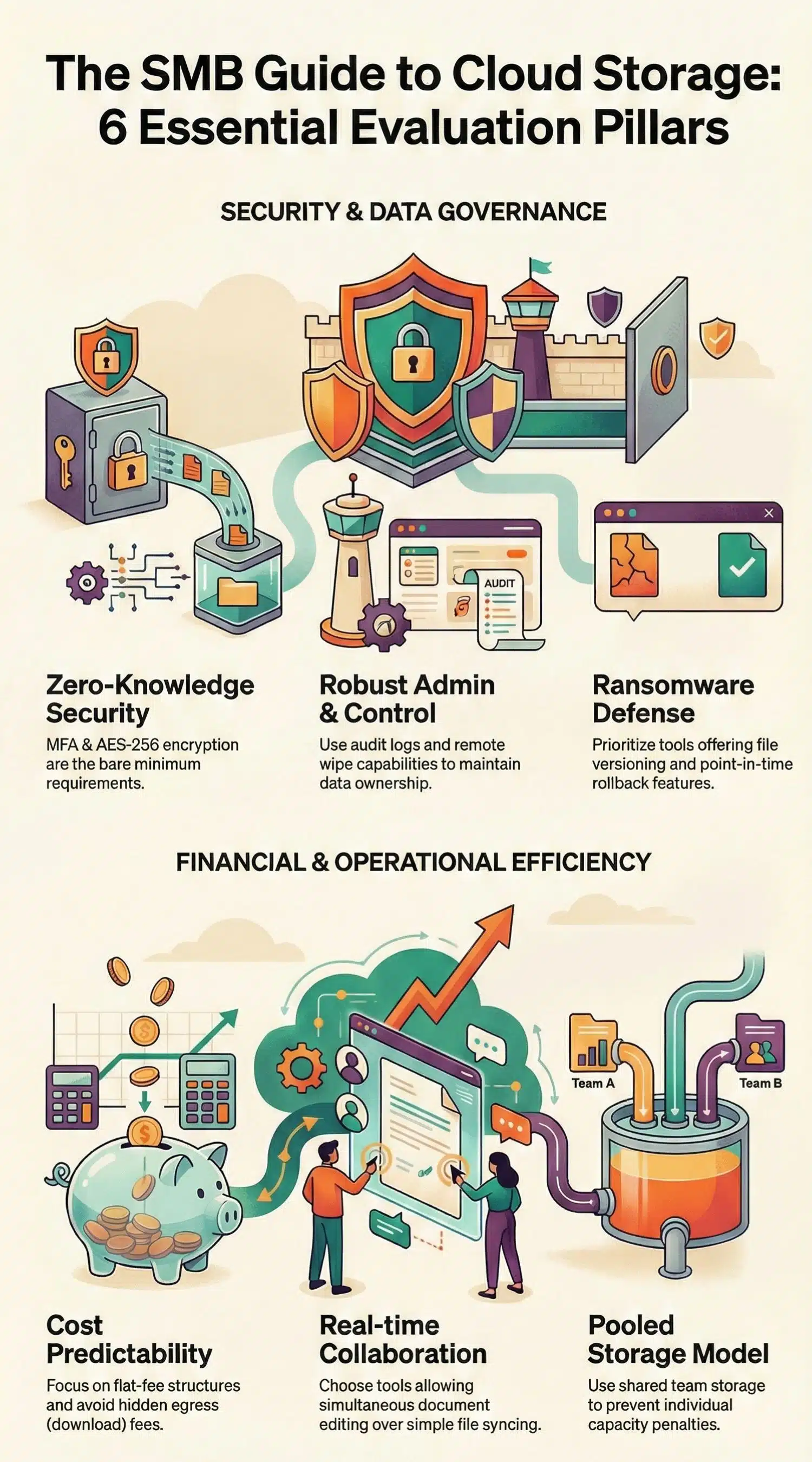
Selecting storage for a small business is different than picking a personal plan. We evaluated these providers based on six critical SMB pillars:
Storage Model Clarity
We prioritized providers that make it clear how you pay. Pooled storage (like Google Workspace) is often better for teams because one user’s 2GB doesn’t penalize another’s 50GB. We flagged “unlimited” plans that often have hidden “fair use” caps.
Security Basics
In 2026, Multi-Factor Authentication (MFA) and AES-256 encryption are the bare minimum. We looked for providers offering Zero-Knowledge encryption, where only you hold the keys.
Admin & Governance
A business needs to own its data. We looked for robust admin consoles that allow you to set roles, view audit logs (who downloaded what?), and remotely wipe devices if a laptop is stolen.
Collaboration
There is a difference between “Store + Share” and “Real-time Collaboration.” We distinguished tools that allow multiple people to type in a document simultaneously versus those that simply sync file versions.
Backup & Recovery
Ransomware is a major threat to SMBs. We prioritized tools with versioning (saving older versions of files) and “point-in-time” rollback capabilities.
Cost Predictability
Object storage (like Wasabi or Backblaze) is cheap, but “egress fees” (charging you to download your own data) can kill a small budget. We focused on providers with transparent, flat-fee structures.
12 Best Cloud Storage Solutions for Small Businesses
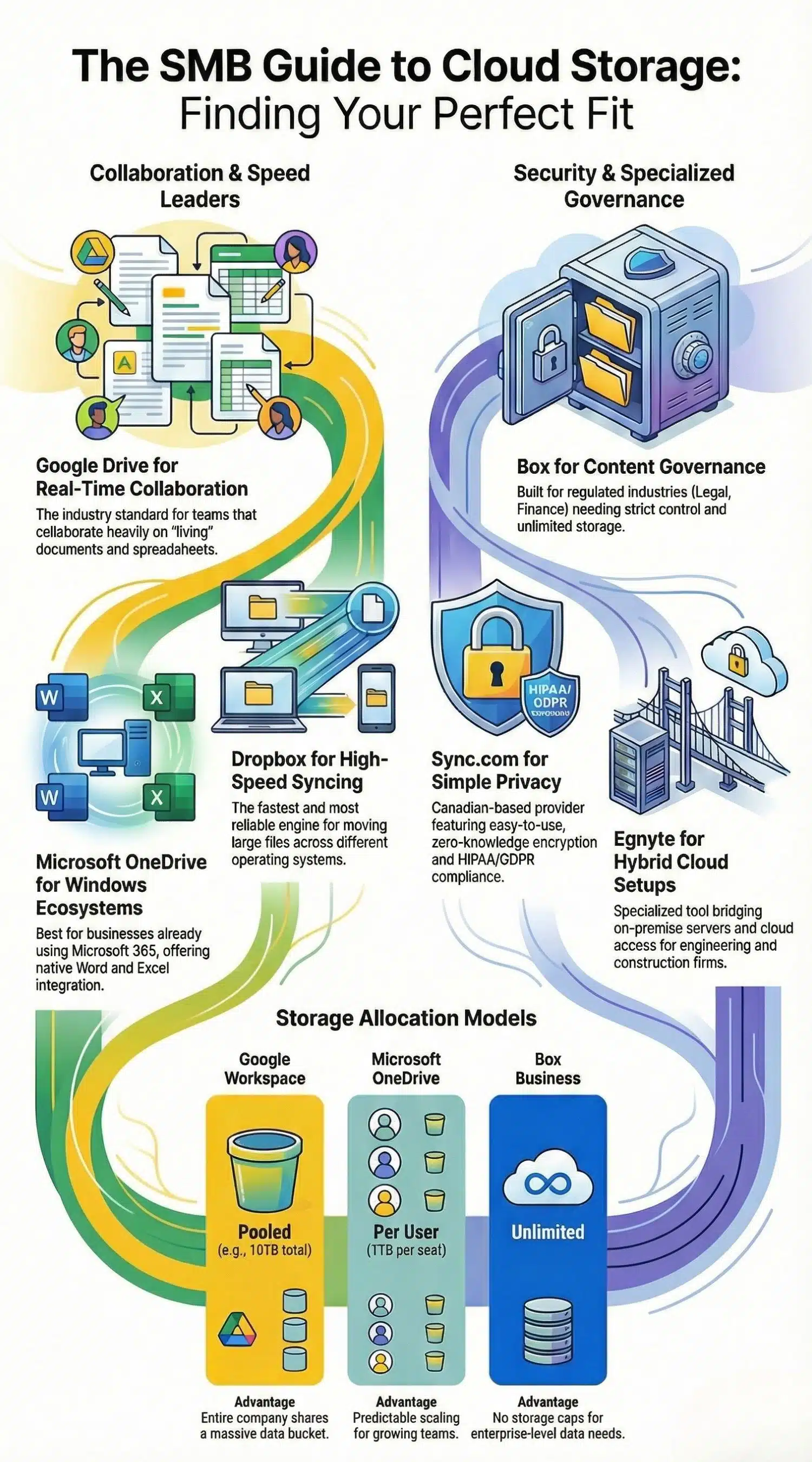
1. Google Drive via Google Workspace — Best for Real-Time Collaboration
The industry standard for “living” documents. Google Drive is part of the Workspace suite, meaning your storage is tied to your email and office tools.
- Storage & Scaling: Uses a pooled model. For example, a 5-user Business Standard plan provides 10TB total for the whole company to share.
- Top Features: AI-powered search, deep integration with 1,000+ apps, and Google Vids.
- Pros: Best-in-class real-time editing; very familiar interface.
- Cons: Privacy-conscious businesses may dislike Google’s data indexing; requires an internet connection for full functionality.
- Who should choose it: Teams that collaborate heavily on documents and spreadsheets.
- Who should skip it: Companies handling highly sensitive, “top secret” architectural or legal data.
- Pricing: Per-user, monthly or annual.
2. Microsoft OneDrive for Business — Best for Microsoft Ecosystem
If your company runs on Windows and the Office desktop suite, OneDrive is essentially the “S” drive that follows you everywhere.
- Storage & Scaling: Most plans start at 1TB per user.
- Top Features: Known Folder Move (PC backup), integration with Microsoft Teams, and Files On-Demand.
- Pros: Native integration with Word/Excel; “Personal Vault” for extra security.
- Cons: Syncing issues can occur with very long file paths or specialized characters.
- Who should choose it: Businesses already paying for Microsoft 365.
- Who should skip it: Mac-only creative shops.
- Pricing: Per-user, included in M365 Business plans.
3. Dropbox Business — Best for High-Speed Sync
Dropbox earned its reputation on a “it just works” sync engine. It remains the fastest way to move large files across different operating systems.
- Storage & Scaling: Business plans start at 5TB for the team.
- Top Features: Dropbox Transfer (send up to 250GB), Paper for brainstorming, and Smart Sync.
- Pros: Reliable sync; excellent third-party integrations (Adobe, Slack).
- Cons: Expensive compared to Google/Microsoft; the desktop app has become “bloated” with extra features.
- Who should choose it: Agencies and freelancers moving large creative assets.
- Who should skip it: Budget-constrained micro-businesses.
- Pricing: Per-user, tiered based on features.
4. Box Business — Best for Content Governance
Box isn’t just a folder; it’s a content management system. It’s built for businesses that need strict control over how data is shared externally.
- Storage & Scaling: Most Business plans offer unlimited storage.
- Top Features: Box Sign (e-signatures), Box Shield (malware protection), and 1,500+ integrations.
- Pros: Enterprise-level security; unlimited storage options.
- Cons: Lower-tier plans have small file upload limits (e.g., 5GB).
- Who should choose it: Regulated industries (Legal, Finance, Healthcare).
- Who should skip it: Small teams looking for a simple “folder in the sky.”
- Pricing: Per-user, minimum 3 users.
5. Egnyte — Best for Hybrid Cloud Governance
Egnyte is a specialized tool that bridges the gap between on-premise servers and the cloud, making it a favorite for construction and engineering firms.
- Storage & Scaling: Starts at 1TB with scaling based on user count.
- Top Features: Smart Cache (local access for fast speeds), content governance, and file-level auditing.
- Pros: Excellent for hybrid setups; top-tier security.
- Cons: Pricey and complex to configure.
- Who should choose it: SMBs with large local files that also need cloud accessibility.
- Who should skip it: Simple 10-person remote teams.
- Pricing: Per-user, higher entry point.
6. Zoho WorkDrive — Best Value for SMB Teams
Zoho offers a highly polished, affordable alternative to the “Big Two” (Google/Microsoft) with a surprising amount of power.
- Storage & Scaling: Plans range from 1TB to 100TB for the team.
- Top Features: Integrated office suite (Writer, Sheet, Show), data masking, and custom branding.
- Pros: Extremely affordable; built-in team folders are very intuitive.
- Cons: The mobile app is not as robust as Dropbox or Google.
- Who should choose it: Small businesses wanting to save 50%+ on their monthly cloud bill.
- Who should skip it: Teams deeply entrenched in the Microsoft ecosystem.
- Pricing: Per-user, billed monthly/annually.
7. Sync.com Teams — Best for Simple Privacy
Sync.com is a Canadian-based provider that focuses on one thing: zero-knowledge encryption that is actually easy to use.
- Storage & Scaling: Business plans often feature “unlimited” or 1TB-per-user models.
- Top Features: HIPAA/GDPR compliance out of the box, secure sharing links with passwords.
- Pros: 100% private; no third-party tracking.
- Cons: Slower upload speeds due to the heavy encryption process.
- Who should choose it: Healthcare or legal professionals.
- Who should skip it: Teams that need to edit documents simultaneously.
- Pricing: Per-user.
8. Tresorit Business — Best for High-End Security
Tresorit is like the “Fort Knox” of cloud storage. It’s a premium Swiss service for companies where a data leak is not an option.
- Storage & Scaling: Starts at 1TB+ per user.
- Top Features: Zero-knowledge end-to-end encryption, digital rights management (DRM), and email encryption.
- Pros: Unmatched security; elegant user interface.
- Cons: Among the most expensive options; limited integrations.
- Who should choose it: High-security firms and researchers.
- Who should skip it: Casual users.
- Pricing: Per-user, premium tier.
9. pCloud Business — Best for Media Management
pCloud is unique for its “pCloud Drive,” which creates a virtual drive on your computer that doesn’t take up local hard drive space.
- Storage & Scaling: Business plans offer 1TB per user (min 3 users).
- Top Features: Built-in video and audio players, file request links, and “Crypto” folder for E2EE.
- Pros: Excellent for media previews; “lifetime” personal plans available for founders.
- Cons: End-to-end encryption is an extra paid add-on for some plans.
- Who should choose it: Videographers and photographers.
- Who should skip it: Firms needing deep document collaboration.
- Pricing: Per-user.
10. Proton Drive — Best Privacy Ecosystem
Proton has evolved from an encrypted email service into a full office suite. It is the best “privacy first” alternative to Google Workspace.
- Storage & Scaling: Business plans range from 500GB to multi-TB tiers.
- Top Features: Encrypted calendar, mail, and VPN integrated into one dashboard.
- Pros: Swiss-based; very high trust rating; open-source code.
- Cons: Newer product; fewer “bells and whistles” than Google.
- Who should choose it: Privacy advocates and tech-savvy SMBs.
- Who should skip it: Teams needing legacy app integrations.
- Pricing: Per-user/Tiered.
11. IDrive Business — Best Hybrid Backup/Storage
IDrive isn’t just for syncing; it’s for backing up every device in your office—including servers, NAS drives, and PCs.
- Storage & Scaling: Offers massive fixed tiers (5TB, 10TB, 50TB+).
- Top Features: IDrive Express (physical drive shipping for fast backups), server backup, and disk imaging.
- Pros: Incredible price-to-storage ratio; covers unlimited devices.
- Cons: The sync feature is less fluid than Dropbox.
- Who should choose it: Small businesses with 10TB+ of data across many computers.
- Who should skip it: Remote teams who only need to share documents.
- Pricing: Fixed capacity, annual billing.
12. Wasabi Hot Cloud Storage — Best for Archiving
Wasabi is “object storage,” meaning it’s designed to be used with other software (like Veeam or Arq) rather than a desktop folder.
- Storage & Scaling: Pay only for what you use (per TB).
- Top Features: No egress fees; no API request charges; S3 compatibility.
- Pros: Cheaper than almost any other provider for 5TB+ of data.
- Cons: No “user-friendly” web interface for document editing.
- Who should choose it: Businesses needing long-term, low-cost archives of large data sets.
- Who should skip it: Users wanting a “Drive” to work out of daily.
- Pricing: Usage-based ($6.99/TB/month approx).
Choose by Storage Size (10GB → 10TB)
The “best” tool often depends on where you sit on the data spectrum.
10GB–100GB (Solo + Micro Business)
At this range, you are likely looking for convenience. Google Drive’s free/low-cost tiers or pCloud are ideal. You don’t need complex admin controls; you just need your files to sync between your laptop and phone.
100GB–1TB (Small Teams, Light Media)
This is the “sweet spot” for 5-10 person agencies. Microsoft 365 (OneDrive) is often the best financial choice here because the storage is “free” with your Office apps. If privacy is the priority, Proton Drive offers great value at this tier.
1TB–5TB (Most SMBs)
Once you hit 2TB+, you need to think about pooled storage. Dropbox Business or Zoho WorkDrive shine here. They allow you to distribute that 5TB across the team without worrying if one person hits their individual 1TB cap.
5TB–10TB (Media, Design, Backups)
At this scale, you are likely dealing with high-res images, video, or years of project archives. IDrive is the winner for cost at this range, providing a dedicated 10TB bucket for a fraction of what “unlimited” per-user plans cost.
10TB+ (Object Storage or Specialized Backup)
If you have 10TB of raw footage or database backups, don’t use a sync tool—it will slow down your computer. Use Wasabi or Backblaze B2. These are “bottomless” storage buckets that stay out of your way until you need them.
Cloud Storage vs Cloud Backup: Don’t Buy the Wrong Thing
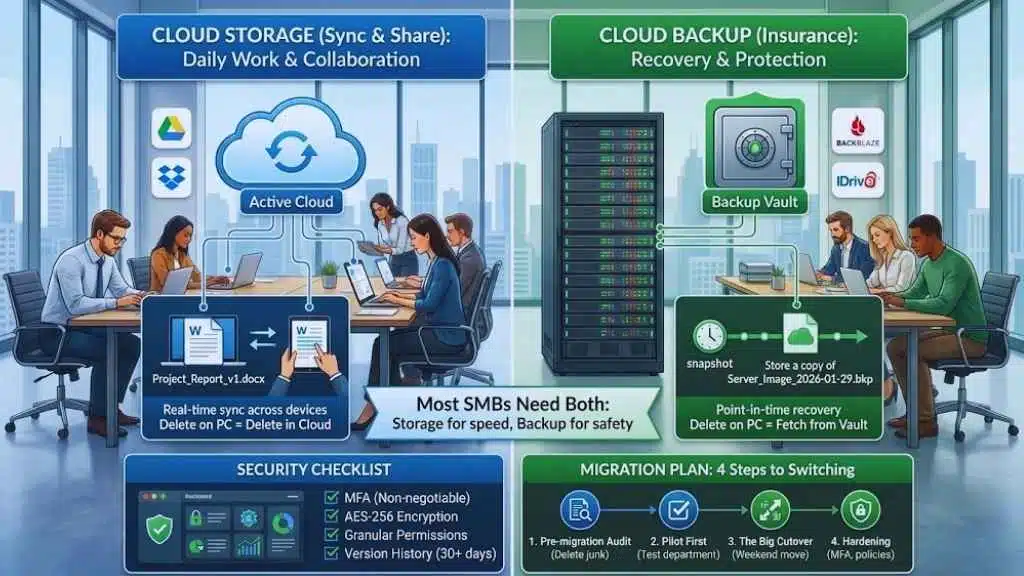
Many small business owners use these terms interchangeably, but they serve different masters:
- Cloud Storage (Sync & Share): Designed for daily work. You change a file; it changes everywhere. (e.g., Google Drive, Dropbox).
- Cloud Backup: Designed for recovery. It takes a “snapshot” of your entire computer or server and hides it away so you can restore everything if your hardware dies or you get hit by ransomware. (e.g., IDrive, Backblaze).
Simple Rule of Thumb:
If you delete a file on your computer and it disappears from the cloud, that’s Storage.
If you delete a file on your computer and you can still go “fetch” it from a hidden vault, that’s Backup.
Most SMBs need both. You use Storage for collaboration and Backup for insurance.
Security Checklist for Small Businesses
When picking your provider, ensure you can check these boxes:
Must-haves
- MFA (Multi-Factor Authentication): Non-negotiable in 2026.
- AES-256 Encryption: Standard for data “at rest” on their servers.
- Granular Permissions: Can you share a folder as “View Only” so a contractor can’t delete your work?
- Version History: At least 30 days of “undo” history for every file.
Nice-to-haves
- SSO (Single Sign-On): Allows employees to log in using their main company password (Okta, etc.).
- DLP (Data Loss Prevention): Automatically alerts you if someone tries to share a file containing credit card numbers.
- Remote Wipe: The ability to delete company files from an employee’s personal phone if they leave the company.
Migration Plan: 4 Steps to Switching
Moving 2TB of data isn’t as simple as drag-and-drop. Follow this roadmap:
- Pre-migration Audit: Delete the junk. Don’t pay to migrate 500GB of “Final_v2_OLD_DONT_USE” files. Map out who needs access to which folders.
- Pilot First: Move one department (like Marketing) first. Let them break things for a week and see where the “sync lag” occurs.
- The Big Cutover: Schedule the move for a weekend. Use a tool like Move-it or the provider’s native migration tool to ensure file permissions stay intact.
- Hardening: Once the data is moved, immediately turn on MFA for everyone and set up your “External Sharing” policies (e.g., links must expire after 30 days).
Final Thoughts: Securing Your Business Future
In 2026, cloud storage is no longer a luxury; it is the digital floorplan of your small business. Choosing between 10GB of high-security files or 10TB of raw media assets requires a shift in mindset from “how much space do I get?” to “how effectively can my team work?”
For most SMBs, the decision rests on your existing ecosystem. If you are already paying for Microsoft 365 or Google Workspace, maximizing those platforms is the most cost-effective move. However, don’t let “free” storage lure you into a security vacuum. If you handle sensitive legal, medical, or financial data, the peace of mind offered by zero-knowledge providers like Sync.com or Proton Drive far outweighs a few dollars in monthly savings.
As you scale toward that 10TB milestone, keep your eye on cost predictability. Avoid the “egress trap” by utilizing object storage like Wasabi for your archives, while keeping your active projects in a high-speed sync environment like Dropbox. By layering your storage—using the right tool for the right data tier—you ensure that your business remains agile, secure, and prepared for whatever growth comes next. Start small, audit often, and never compromise on your backup strategy.