
Productivity Extensions for Online Learners
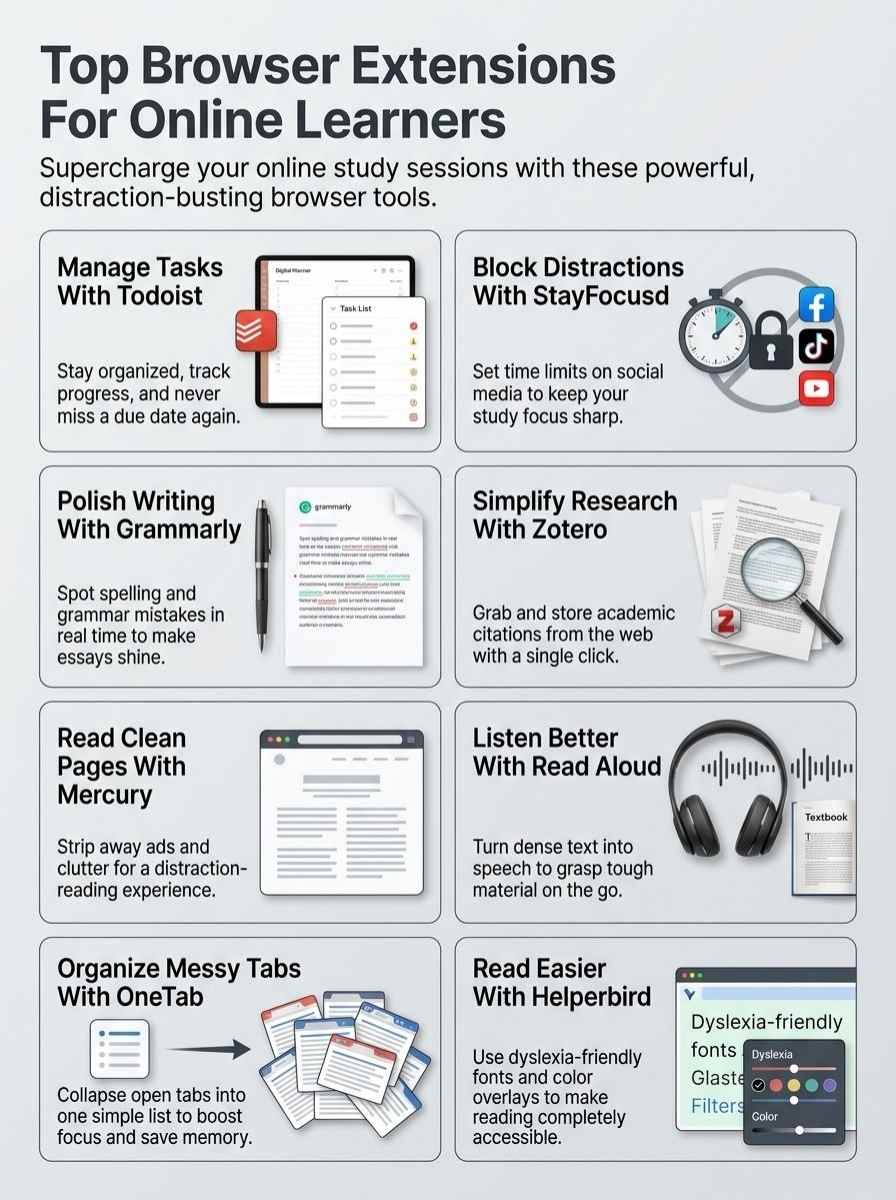
Ever feel like online classes pull you in a million directions, like a dog chasing squirrels? Grab tools like task lists on Google Chrome to cut the chaos, boost your focus, and make learning feel like a smooth ride.
Todoist: Stay organized and manage tasks seamlessly
Students love Todoist for keeping chaos at bay during online learning sessions. This productivity app acts like a trusty sidekick, helping you juggle tasks without breaking a sweat.
Add it from the Chrome Web Store, and watch it transform your Google Chrome browser into a task-mastering machine. You create lists, set deadlines, and track progress with ease. Imagine tackling assignments like a pro, no more forgotten due dates or scattered notes.
Online learners, especially in higher education, find it boosts focus and cuts distractions.
Todoist changed how I handle my study load; it’s like having a personal organizer in my pocket, says Julie Campos, a certification student using Google Workspace tools.
K-12 kids benefit too, as Todoist builds better habits by blocking mental clutter. Pair it with extensions like StayFocusd for ultimate concentration. Teachers use it alongside Screencastify for seamless video creation in flipped classrooms.
Flashcard tools like Zorbi complement it, turning study time into a breeze. With at least 10 free browser extensions available, Todoist stands out for managing tasks in academia. Productivity apps like this make online learning feel less overwhelming, more like a smooth ride.
StayFocusd: Block distractions for better focus
StayFocusd acts like a trusty guard dog for your online study sessions. It blocks distracting sites that pull you away from learning. You set time limits on apps like social media, so focus stays sharp.
K-12 kids use it to build solid habits, dodging the rabbit holes of endless scrolling. This Chrome extension boosts Google Chrome’s power, helping students learn without the chaos.
Imagine taming a wild browser into a calm study buddy, that’s what it does.
Folks add StayFocusd for free, joining at least 10 other extensions that enhance online learning. It fits right into focus management, a key purpose for tools like this. Tested and recommended for remote students, it pairs well with mindfulness breaks to recharge your brain.
Customize your browser with it, block out noise like ads or YouTube temptations. Picture a student powering through homework, no more sneaky distractions creeping in.
Writing and Grammar Support Extensions
Ever feel like your writing needs a quick polish before you hit submit? Grammarly spots grammar slips and spelling mistakes right away, while LanguageTool offers sharp proofreading across various languages, making your work shine without the hassle.
Grammarly: Improve your writing with real-time grammar and spelling checks
Grammarly steps in as your trusty sidekick for writing tasks. It spots spelling slip-ups and grammar goofs in real time, right across emails, social media posts, and even Google Docs.
Students love how this Chrome extension polishes their work, making essays and notes shine without extra effort. Picture typing away on a tricky assignment, and bam, it fixes errors on the spot, like a helpful coach whispering tips in your ear.
As part of edtech tools, Grammarly boosts writing skills for online learners, fitting seamlessly with browser customization needs.
Grammarly has transformed how I handle assignments; it’s like having a proofreader in my pocket, says a satisfied student user.
This free extension joins at least 10 others that enhance student learning, from focus management with StayFocusd to flashcard creation via Zorbi. K-12 kids use it to build better habits, blocking distractions while improving prose.
Teachers pair it with Screencastify for video feedback, turning ordinary browsers into powerhouses for education. Artificial intelligence drives its smart checks, helping with everything from research papers to quick notes in apps like D2L Brightspace.
LanguageTool: Advanced proofreading for multiple languages
LanguageTool steps in as your trusty sidekick for proofreading across tons of languages. It catches tricky grammar slips, style blunders, and even punctuation hiccups in real time.
Imagine drafting an essay in Spanish or French, and this tool flags issues before you hit send. Chrome extensions like LanguageTool boost Google Chrome’s power, especially for students tackling online courses.
They serve purposes like writing improvement, and multiple ones get tested for online learners. You get advanced checks that go beyond basics, making your work shine without the hassle.
Picture a K-12 student juggling assignments in English and another tongue; LanguageTool helps build better habits by sharpening focus on clear text. It pairs well with tools like Google Dictionary or Reverso for quick lookups.
At least 10 free browser extensions exist to enhance student learning, and this one fits right in. Learners use it for emails, posts, or reports, turning rough drafts into polished pieces.
Language learning feels easier when you fix errors on the fly, like a quiet coach whispering tips in your ear.
Research and Citation Management Extensions
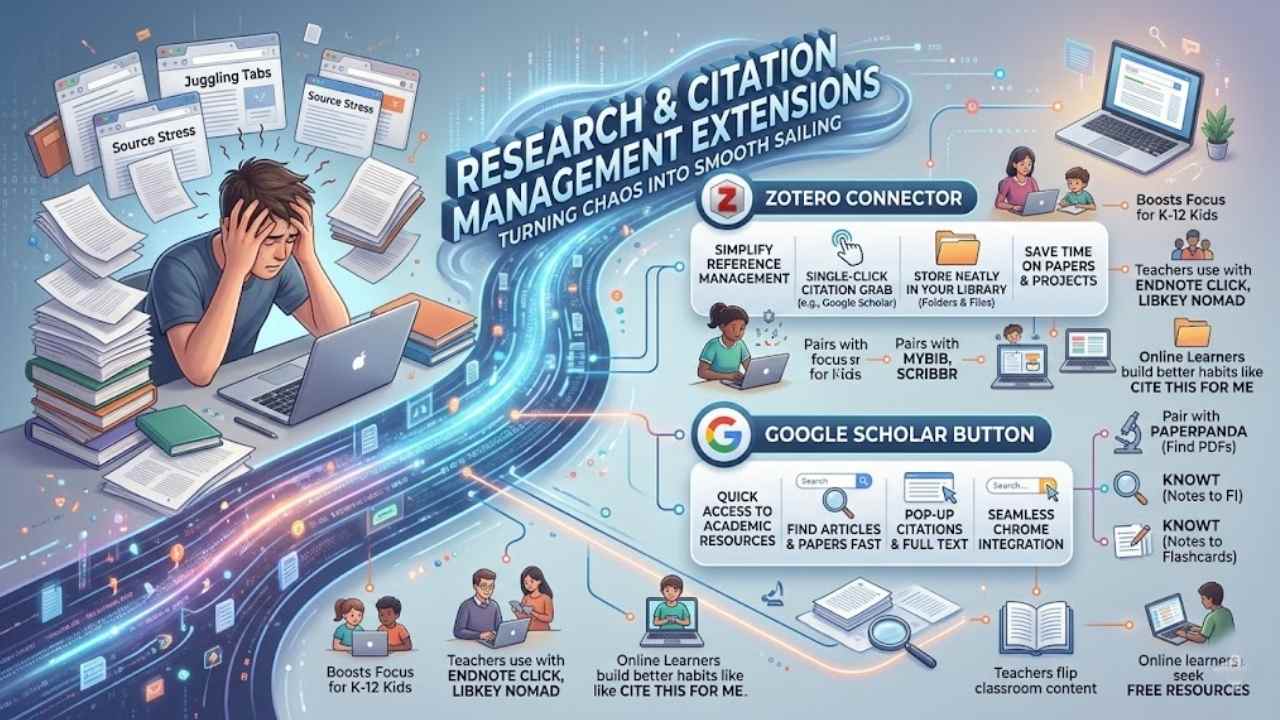
Imagine juggling stacks of research papers like a circus act, but these tools turn chaos into smooth sailing. Grab add-ons like MyBib or Scribbr Citation Generator, and watch your citations flow without the headache.
Zotero Connector: Simplify academic reference management
Zotero Connector turns chaotic research into a smooth ride for online learners. You click once to grab citations from sites like Google Scholar, and it stores them neatly in your library.
Students love how it simplifies academic reference management, saving time on papers and projects. Imagine you’re deep in a study session, and Zotero grabs that key article without missing a beat.
It pairs well with tools like MyBib or Scribbr Citation Generator for even faster workflows.
This free Chrome extension boosts focus for K-12 kids too, by cutting down on messy bookmark chaos. Teachers use it alongside Endnote Click or Libkey Nomad to organize resources effortlessly.
Online learners find it a game-changer for building better habits, much like Cite This For Me helps with quick cites. Hey, if you’ve ever juggled tabs full of sources, Zotero steps in like a trusty sidekick, keeping everything in check.
Google Scholar Button: Quick access to academic resources
Google Scholar Button gives you fast entry to scholarly articles and papers right from your browser. Students love how it pulls up academic sources in seconds, no more digging through endless search results.
Imagine you’re knee-deep in a research paper, and bam, this extension pops up citations and full texts like a helpful sidekick. It works seamlessly on Chrome, boosting your hunt for reliable info without the hassle.
Pair it with tools like PaperPanda for grabbing those hard-to-find PDFs, or Knowt for turning notes into flashcards on the fly. This setup turns chaotic study sessions into smooth rides, especially for online learners chasing free resources.
Teachers even use it to flip classroom content, making lessons pop with fresh data. With at least 10 free extensions like this tested for students, you stay ahead in your learning game.
Reading and Comprehension Support Extensions
Imagine opening a cluttered webpage, feeling overwhelmed, but then a tool like Mercury Reader strips away the noise, turning it into a clean slate for easy reading. Or envision struggling with dense text, when Read Aloud steps in, voicing the words aloud, making comprehension feel like a friendly chat over coffee.
Mercury Reader: Clean up web pages for distraction-free reading
Mercury Reader strips away ads and clutter from web pages, letting you read clean text for focused reading. Students love this tool because it turns messy articles into simple, easy-to-scan formats.
Imagine stumbling on a research page loaded with pop-ups; Mercury Reader clicks in and zaps them gone, like a digital broom sweeping distractions aside. It pairs well with StayFocusd to block time-wasting sites, boosting your online learning habits.
K-12 kids use it to build better focus, just as multiple Chrome extensions get tested and recommended for students.
This free extension enhances Google Chrome for academic tasks, making articles pop with adjustable fonts and themes. Dark Reader complements it by easing eye strain during long study sessions, while Auto Highlight marks key phrases for quick reviews.
You create flashcards fast with tools like Zorbi, but Mercury Reader sets the stage for distraction-free comprehension first. Save to Pocket grabs those cleaned-up pages for later, turning your browser into a smart study hub.
Postlight Reader vibes echo this simplicity, helping you absorb info without the noise.
Read Aloud: Text-to-speech for better comprehension
Read Aloud turns text into speech. This tool helps you grasp tough material, like dense articles or study notes. Students love it for listening on the go. Pair it with Speechify for even smoother audio playback.
Voice In adds quick dictation features too. SpeakIt! joins the mix by reading selected web text aloud. These extensions fit right into Chrome, boosting your online learning game.
K-12 kids use such tools to cut distractions and sharpen focus. They build strong habits for remote classes. At least 10 free options exist, tested for student success. Tools like these handle comprehension tasks well.
They support reading support in various ways. Grab Read Aloud to hear content clearly and keep up with lessons.
Tab and Bookmark Management Extensions
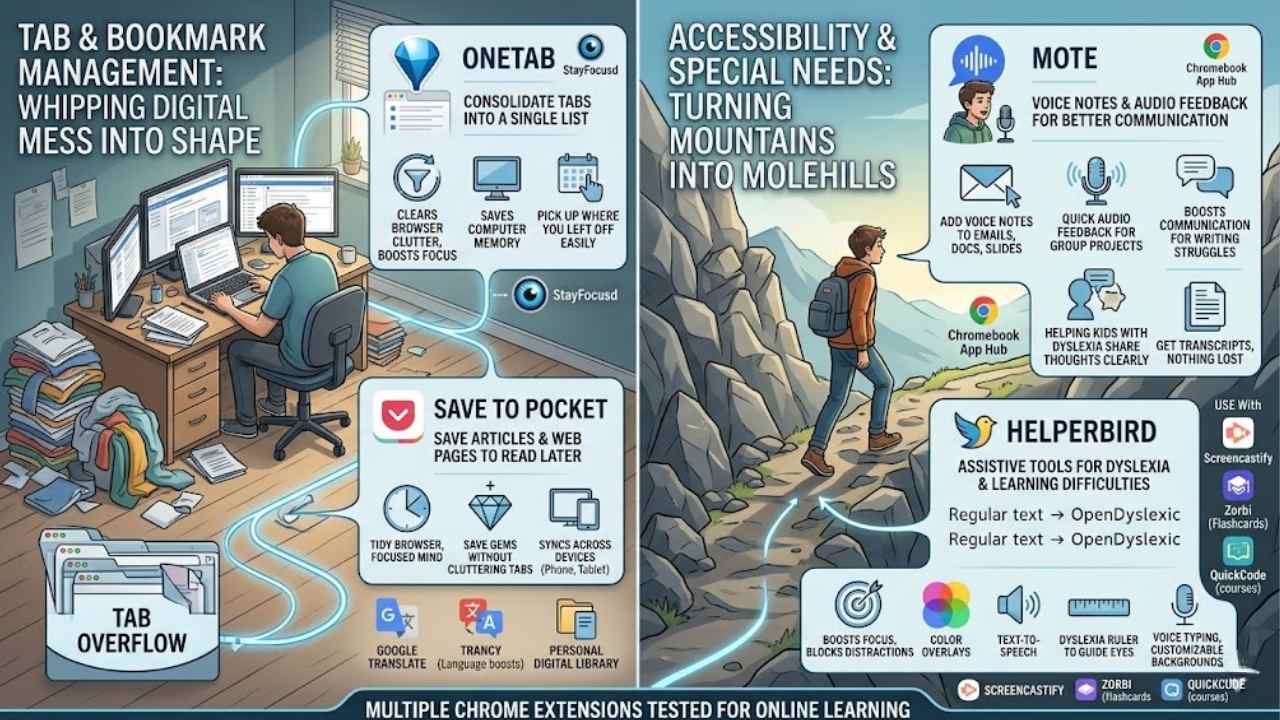
Tired of tabs piling up like dirty laundry during a long study session? These handy browser add-ons whip your digital mess into shape, letting you focus on learning without the clutter.
OneTab: Consolidate tabs into a single list for better organization
OneTab changes the game for online learners juggling tons of tabs. This free Chrome extension collapses all your open tabs into one simple list with just a click. Students often drown in browser clutter during study sessions, but OneTab clears the mess, boosts focus, and saves computer memory.
Imagine: you’re researching a topic, tabs multiply like rabbits, and suddenly your screen slows to a crawl. OneTab steps in like a trusty sidekick, organizing everything so you can pick up right where you left off.
It fits perfectly with other tools like StayFocusd, which blocks distractions, helping K-12 kids build better habits online.
Chrome extensions like OneTab boost Google Chrome‘s power for students in smart ways. You get quick access to saved lists, making it easy to share research or revisit articles later.
Think about combining it with Save to Pocket for even smoother bookmark management. Learners use these tools to handle writing improvement, flashcard creation with Zorbi, or course discovery via QuickCode.
Teachers love extensions like Screencastify for video creation, flipping classroom content without hassle. At least 10 free options exist, tested for online learning, including noiseplayer for focus or kami for annotations.
OneTab keeps your workflow tidy, letting ideas flow freely during busy sessions.
Save to Pocket: Save articles and web pages to read later
Save to Pocket lets you stash articles and web pages for later, like tucking away a snack for when hunger strikes. Students love this Chrome extension because it keeps your browser tidy and your mind focused.
Imagine scrolling through research on Medcerts or EdPuzzle, you spot a gem, click the button, and boom, it saves without cluttering tabs. This tool fits right into tab management, much like OneTab consolidates open pages into lists.
Plus, it’s one of those free browser extensions that boosts online learning habits for K-12 kids, helping them block distractions and build focus.
Pocket syncs across devices, so you grab saved reads on your phone during a quick break. Think of it as your personal library, ready whenever inspiration hits. Pair it with tools like Google Translate for foreign articles or Trancy for language boosts, and you amp up comprehension fast.
Browser extensions like this serve purposes from flashcard creation with Zorbi to course discovery via QuickCode, making study sessions smoother. Teachers even use similar ones for video creation with Screencastify, flipping classroom content effortlessly.
Accessibility and Special Needs Extensions
Online learning can feel like a tough climb if you face reading challenges or need extra support, but the right tools turn that mountain into a molehill. Imagine popping in an extension for voice feedback or font tweaks for dyslexia, and suddenly your study sessions flow smoother, pulling you in for more tips ahead.
Mote: Voice notes and audio feedback for better communication
Mote lets you add voice notes to emails, docs, and slides with ease. Students love it for quick audio feedback during group projects. Teachers use it to explain ideas without typing long messages.
This Chrome extension fits right into Google Workspace tools. It boosts communication for those who struggle with writing.
Imagine recording a fast tip on homework instead of pecking at keys. Mote helps kids with dyslexia share thoughts clearly. You get transcripts too, so nothing gets lost. Pair it with Chromebook App Hub for more school-friendly finds.
It turns tough talks into simple sounds, like chatting face-to-face online.
Helperbird: Assistive tools for dyslexia and learning difficulties
Helperbird steps in as a lifesaver for folks battling dyslexia or other learning hurdles. This Chrome extension packs tools that tweak text fonts, like switching to OpenDyslexic for Chrome, to make reading less of a scramble.
Students find it boosts focus, much like StayFocusd blocks distractions for K-12 kids building solid online habits. Picture a kid, buried in homework, suddenly sailing through paragraphs without the usual fog.
It offers color overlays, text-to-speech, and even a dyslexia ruler to guide eyes smoothly. Multiple Chrome extensions, tested and recommended for online learners, serve purposes from focus management to writing improvement.
Grab Helperbird if words on screens twist into knots for you. It delivers voice typing and customizable backgrounds, easing strain during long study sessions. Think of it as a trusty sidekick, turning chaotic web pages into clear paths.
At least 10 free browser extensions exist to enhance student learning, and this one shines for special needs. Teachers flip classroom content with similar aids, creating instructional videos effortlessly.
Chrome extensions boost Google Chrome’s power specifically for students, helping with flashcard creation like Zorbi or course discovery via QuickCode.
Final Thoughts
You’ve seen how extensions like Todoist and StayFocusd keep tasks in check, while Grammarly and Zotero make writing and research a breeze. These tools fit right into your daily routine, quick to install and free for most browsers.
They boost focus and cut distractions, turning scattered study sessions into sharp, productive wins. Check out extras like Equatio for math help or Rikaikun for instant translations in the Chrome Web Store.
Once, I added OneTab during a tough semester, and it saved my sanity by taming my tab chaos. Grab a few today, and watch your online learning soar like a rocket.
Frequently Asked Questions (FAQs) About Browser Extensions for Online Learners
1. What’s the deal with Equatio for online learners?
Equatio lets you type math equations fast, like a wizard turning scribbles into neat formulas. It works great in Google Docs, saving you time on homework. Plus, it’s a lifesaver for students who hate hunting for symbols.
2. Can Rikaikun make language learning easier?
Absolutely, Rikaikun pops up translations when you hover over Japanese words, like a friendly ghost whispering secrets. It beats flipping through dictionaries, keeping your study flow smooth.
3. How does Mouse Tooltip Translator help with foreign texts?
Mouse Tooltip Translator gives instant word meanings as you mouse over them, turning confusing pages into clear paths. Imagine it as your personal tour guide through language barriers, especially in online courses. Learners love it for quick comprehension without breaking stride.
4. Is StayFocusd a good pick to beat distractions?
StayFocusd limits time on distracting sites, acting like a strict but fair coach keeping you on track. Pair it with AdBlock Plus to zap ads, and you’ve got a powerhouse duo for focused learning.
5. What about Language Reactor for video watching?
Language Reactor adds subtitles and dictionaries to videos, making language immersion feel like a fun adventure. It’s perfect for Netflix-style learning, with tools like Toucan by Babbel to sprinkle in new words naturally.
6. How can OneTab help manage my tabs?
OneTab collapses all your open tabs into a single list, like folding a messy room into a tidy drawer, freeing up memory. Use it with The Great Suspender to pause inactive tabs, and you’ll surf smoother during long study sessions.