

Do you ever feel swamped by endless tasks, ideas, and reminders that clutter your mind? Many folks juggle work notes on scraps of paper, digital docs, or even sticky notes, only to lose track amid the chaos.
It’s like herding cats in a storm, right? This mess hurts focus and productivity, especially when you need quick access to info for projects or meetings.
Did you know that apps like Microsoft OneNote stand out as the best free note-taking app, with cross-platform compatibility that works on iOS, Android, and macOS? Tools such as Notion and Evernote add AI features, web clipper options, and task management to boost your workflow.
This post breaks down top picks, from Apple Notes for iPad users with Apple Pencil support to Obsidian for building a second brain through markdown and mind maps.
Stick around to find your perfect match.
What Makes a Great Note-Taking App?
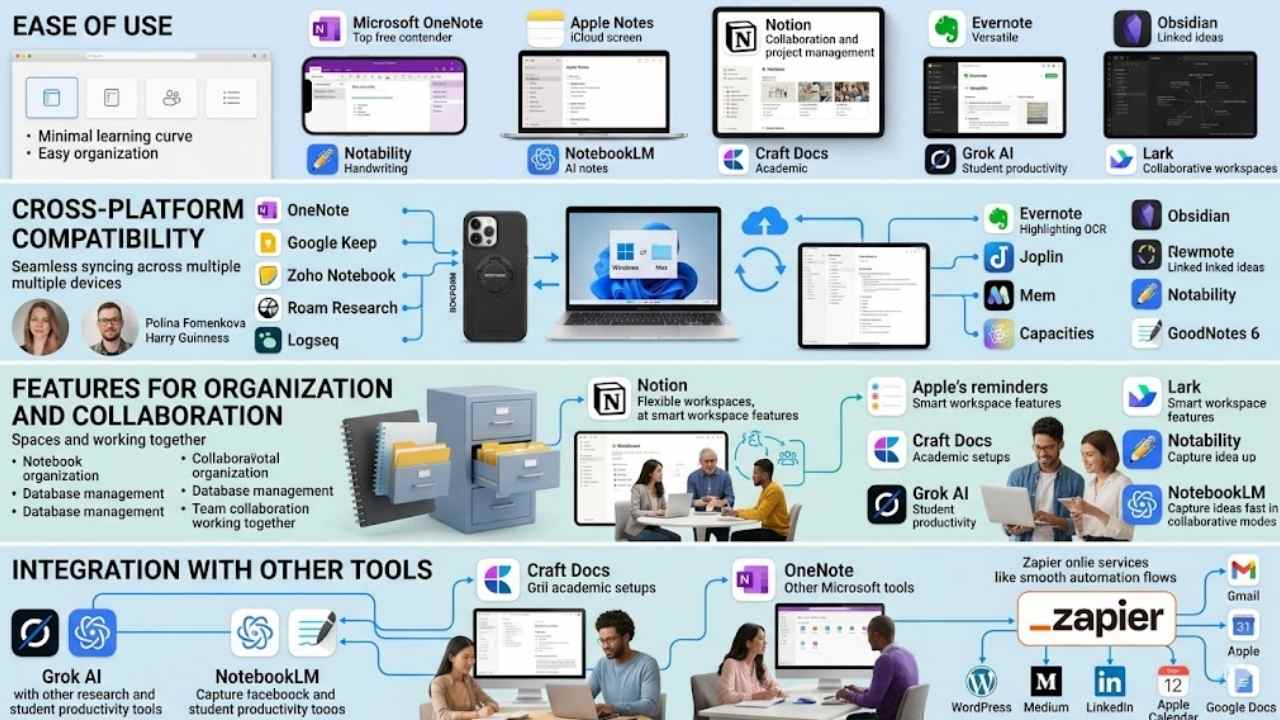
You know that feeling when your brain overflows with ideas, like a leaky faucet you can’t shut off? A killer app grabs those thoughts fast, works on your iPhone or laptop without a hitch, teams up for group brainstorms, and links right into Zapier for smooth automation flows.
Ease of use
Great note-taking apps shine with simple interfaces that let you jump right in. Think about Microsoft OneNote, the best free note-taking app and a top contender generally. It offers offline access and easy note organization without a steep learning curve.
Apps like Apple Notes keep things straightforward for quick digital notes on iCloud. Notion stands out for collaboration, blending project management with team features in a flexible workspace.
Evernote brings versatility, integrating with tools like Zapier for automation. Obsidian suits power users who want a second brain setup, linking ideas like a web. Multiple lists rank 7, 12, or even 25 note-taking apps, showing options for every style.
Notability ranks high for college students in 2025, with handwriting support that feels natural. NotebookLM helps students with AI-powered note-taking apps, while Craft Docs fits academic users perfectly.
Grok AI boosts student productivity through smart information management. Lark provides collaborative notes in a smart workspace, much like Notion’s database management. Apps serve purposes from team collaboration to personal agendas, like linking with Apple Calendar or Google Docs.
Pick based on your notetaking style and organizational preferences, folks. Ease matters because it turns chaos into clarity, like finding a needle in a haystack without the hassle.
Choosing the right note-taking app requires considering personal notetaking styles and individual organizational preferences. – From key insights on note-taking tools.
Cross-platform compatibility
Cross-platform compatibility lets you switch devices without missing a beat. Imagine jotting down ideas on your phone during a commute, then picking up right where you left off on your laptop at home.
Apps like Microsoft OneNote shine here, working seamlessly across Windows, Mac, iOS, and Android, thanks to Office 365 integration. Google Keep offers quick sync for Android fans, while Zoho Notebook handles notes on multiple platforms with ease.
Notion stands out for team collaboration, linking up notebooks and spaces on any device, much like Roam Research or Logseq for power users building a second brain. Even Joplin provides open-source freedom across systems, avoiding the lock-in that plagues Apple Notes, which ties you to Apple’s ecosystem.
Folks often overlook this feature, but it saves headaches in our busy lives. Take Evernote; it syncs notes with OCR scanning on web, mobile, and desktop, perfect for user experience on the go.
Obsidian links knowledge graphs across platforms, rivaling Mem or Capacities for those craving flexibility. Students love Notability or GoodNotes 6 for iPad handwriting, yet they pair well with broader tools like NotebookLM or Craft Docs for cross-device access in 2025.
Lark boosts collaborative notes in smart workspaces, and apps from Ulysses to MindNode integrate with software like WordPress or Medium for sharing on LinkedIn. Polina Fomenkova and Harry Guinness praise such versatility, noting how it fits personal styles, from handwriting support to database management in a world of multiple lists ranking 7, 12, or 25 apps.
UpNote, MarginNote, Nebo, Noteshelf, Noteful, and even Rokform cases enhance this, tying into Apple’s Reminders for some, but true compatibility opens doors for everyone.
Features for organization and collaboration
Great note-taking apps shine with tools that sort your ideas and let teams work together. Think of notebooks & spaces as your digital filing cabinet, where you group notes like family photos in albums.
Apps like Notion offer flexible workspaces for database management and team projects, making collaboration a breeze. Lark stands out with smart workspace features that support group notes, perfect for shared brainstorming sessions.
Note-taking apps handle multiple tasks, from second brain setups to team collaboration capabilities. Experts list up to 25 apps in rankings, showing options for every style.
You pick based on your habits, like using Apple’s reminders for quick organization. Craft Docs suits academic users with clean layouts for study groups. Grok AI boosts student productivity through smart features.
Notability ranks high for college students in 2025, with strong tools for shared handwritten notes. NotebookLM helps students capture ideas fast in collaborative modes. These features turn chaos into order, like a well-oiled machine humming along.
Integration with other tools
Envision this: Grok AI teams up with productivity boosters for students, or NotebookLM pairs with research tools to make studying a breeze. Craft Docs blends with academic setups, offering a nod to personal styles and organizational prefs.
Experts rank these in lists of 7, 12, or even 25 apps, showing how integration turns simple notes into powerhouses for work or school. Microsoft OneNote stands out as the best free option, meshing well with other Microsoft tools for that contender edge in top picks.
Best Free Note-Taking App: Microsoft OneNote
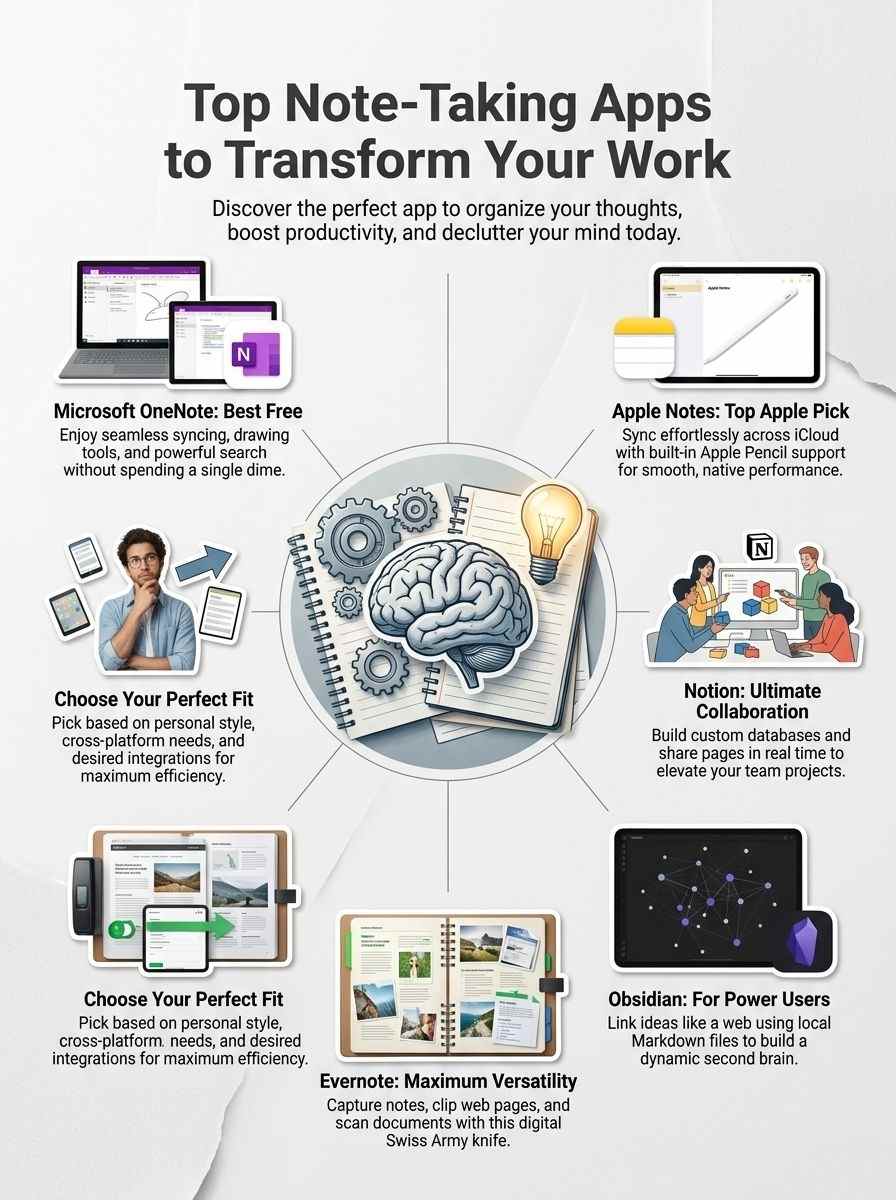
If you’re hunting for a top-notch free note-taking app that packs a punch without costing a dime, Microsoft OneNote stands out with its seamless syncing across devices, handy drawing tools for quick sketches, and powerful search functions that let you find notes in a flash, making it a game-changer for busy folks juggling work and life.
Keep reading to explore its key features and see if it fits your style.
Key Features of Microsoft OneNote
Microsoft OneNote stands out as a top free note-taking app, often ranked as a serious contender for the very best in lists of 7, 12, and even 25 different applications. You get powerful tools that fit various styles, from simple jots to complex organization, much like a trusty sidekick in your daily grind.
- OneNote offers seamless cross-platform compatibility, so you can access your notes on Windows, Mac, iOS, Android, and web browsers without missing a beat, perfect for folks who switch devices like they change socks.
- Explore its organization features, like notebooks, sections, and pages that let you build a custom structure, acting as your personal filing cabinet that grows with your ideas, and it ties in well with apps like Notion for database vibes or Lark for team chats.
- Collaboration shines here, you and your team can edit notes in real time, share ideas effortlessly, which mirrors the smart workspace perks seen in tools like Lark, making group projects feel less like herding cats.
- Integration with Microsoft tools, such as Outlook and Teams, pulls in emails or meeting notes automatically, saving you time and linking up like a well-oiled machine, especially handy for students eyeing options like NotebookLM or Craft Docs.
- Handwriting support lets you scribble with a stylus on tablets, converting doodles to text, a nod to apps like Notability that’s great for college students in 2025 who mix digital and analog styles.
- Search functionality scans everything, even images and handwritten notes, so finding that one key point from months ago happens in a snap, boosting productivity akin to how Grok AI helps students stay on top.
- Free access with no hidden costs makes it the go-to for budget-savvy users, yet it packs premium features that rival paid apps, proving you don’t need to shell out cash for a solid second brain setup.
- Customization options abound, tag notes, add colors, or insert audio recordings, adapting it to your preferences, just as important facts stress considering personal styles when picking from versatile choices like Evernote or Obsidian.
Pros & Cons of Microsoft OneNote
OneNote stands out as a top pick for free note-taking, and folks often call it a strong player in the whole app game.
| Pros | Cons |
|---|---|
| – It tops the charts as the best free option, plus a real contender for the top crown in note-taking apps.
– You get ease of use right out of the gate, with cross-platform support that works on all your devices. – Features shine for organization and teamwork, like collaborative notes that feel like a group brainstorm session. – Integration flows smooth with other tools, turning it into a smart workspace for notes and more. – Lists rank it high among 7, 12, or even 25 apps, showing its solid spot in the crowd. – Think of it as your second brain, handling handwriting support and versatile tasks with ease. – Students love options like this, similar to how Notability fits college users in 2025, or NotebookLM boosts study time. – Academic folks grab Craft Docs for classes, but OneNote matches that vibe for personal styles. – Tools like Grok AI amp up productivity, and OneNote joins that league for team collaboration. – Lark offers smart features, yet OneNote keeps pace with flexible database management, just like Notion. – Pick based on your own habits, as apps serve handwriting, organization, and group work needs. |
– Free access comes with limits on storage if you pile up tons of notes.
– Some users find the interface a tad cluttered, like a desk with too many sticky notes. – Advanced features lock behind a paywall for premium perks, which might frustrate power users. – Sync issues pop up now and then, especially on spotty internet, breaking your flow. – It lacks deep database tools compared to rivals, so complex projects feel a bit boxed in. – Customization options stay basic, not as wild as what some apps dish out for unique setups. – Heavy users report slowdowns with big notebooks, like a car bogged down in mud. – Search functions work well but miss the mark on super-specific queries sometimes. – Collaboration shines, yet it demands a Microsoft account, which adds an extra step for new folks. – Offline mode helps, but edits don’t always sync perfectly when you reconnect. – For Apple fans, it plays nice but doesn’t blend as seamless as native apps do. |
Best for Apple Users: Apple Notes
If you own an iPhone, iPad, or Mac, Apple Notes fits like a glove, syncing your ideas across devices with iCloud for effortless access, no matter where you roam. Stick around to discover its standout features that make jotting down thoughts a breeze.
Key Features of Apple Notes
Apple Notes fits right into your daily routine if you love Apple devices. This app keeps things simple yet powerful for jotting down ideas on the go.
- Syncs across all Apple gadgets like iPhone, iPad, and Mac, so your notes follow you everywhere without a hitch, much like a loyal sidekick in your pocket.
- Offers handwriting support with Apple Pencil, perfect for college students sketching diagrams or jotting lecture points, and it rivals apps like Notability, which ranks high for 2025 student use.
- Builds a second brain setup through folders and tags, helping you organize thoughts based on personal styles, just as fact 10 suggests considering individual preferences for the best fit.
- Enables team collaboration by sharing notes easily, turning solo scribbles into group brainstorms, and it aligns with versatile purposes like those in fact 9 for apps in general.
- Integrates with tools such as Siri for voice notes or iCloud for backups, boosting productivity in ways that echo recommendations for student aids like NotebookLM or Grok AI.
- Scans documents and adds photos directly, creating a smart workspace vibe similar to Lark’s collaborative features, but suited for Apple fans who crave seamless flow.
- Searches handwritten text or typed words quickly, saving time like finding a needle in a haystack, and it supports database-style organization akin to Notion’s flexible setup.
- Locks sensitive notes with passwords or Face ID, giving peace of mind for private jottings, especially useful in academic settings where Craft Docs also shines for users.
- Formats text with checklists, tables, and headings, making notes pop like a well-organized toolbox, and this versatility matches the multiple purposes in comprehensive app lists of 7, 12, or even 25 options.
Pros & Cons of Apple Notes
You know, Apple Notes fits right into your daily grind if you’re deep in the Apple world, offering seamless vibes for quick jots and big ideas.
| Pros | Cons |
|---|---|
| It syncs smoothly across iPhone, iPad, and Mac, keeping your thoughts in one spot without extra hassle. | Limited to Apple devices only, so Android friends miss out on the fun. |
| Handwriting support shines with Apple Pencil, perfect for sketching notes like in Notability for college students in 2025. | Fewer advanced features for team collaboration compared to Lark’s smart workspace tools. |
| Free and built-in, it rivals Microsoft OneNote as a top contender without costing a dime. | Organization feels basic next to Notion’s flexible database management for power users. |
| Integration with other Apple tools boosts productivity, much like how Grok AI aids student workflows. | No deep customization options, unlike Obsidian’s setup for personal note-taking styles. |
| Second brain functionality helps with quick searches and tags, ideal for academic users similar to Craft Docs. | Lacks robust export features, making switches to apps like Evernote a bit tricky. |
| Collaboration is simple for sharing notes, echoing NotebookLM’s value for students on group projects. | Updates depend on iOS changes, which might not suit everyone’s organizational preferences. |
Best for Collaboration: Notion
Team up like pros with Notion, the all-in-one workspace where you build databases, share pages in real time, and turn ideas into action with your crew—keep scrolling to see what makes it shine and where it falls short.
Key Features of Notion
Notion shines as a flexible workspace that adapts to your needs. People love it for blending notes with database management, making teamwork a breeze.
- Notion lets you build custom databases right inside your notes, so you turn simple lists into powerful trackers for projects or ideas, like organizing a team’s tasks without extra software.
- You get real-time collaboration features that allow multiple users to edit pages together, fostering that second brain functionality where everyone contributes to shared knowledge bases.
- The app supports handwriting input through integrations, which helps if you prefer jotting thoughts by hand on tablets before syncing them into organized sections.
- Notion acts as an all-in-one hub for team collaboration capabilities, where you create wikis, calendars, and docs in one spot, cutting down on app-switching chaos.
- It integrates smoothly with other tools, pulling in data from calendars or task managers to keep your workflow humming along without hiccups.
- Users praise its versatility for personal notetaking styles, letting you drag and drop elements like images or embeds to match how your brain organizes info.
- Notion offers smart workspace features, similar to what Lark provides, but with endless customization that feels like building your own digital playground.
- You can set up pages as databases for managing anything from student notes to business plans, echoing how it’s recommended alongside tools like Grok AI for productivity.
- The interface encourages individual organizational preferences, so you tweak templates to fit your style, whether you’re a minimalist or a detail freak.
- Notion handles multiple purposes, from basic note-taking to advanced setups that rival dedicated apps like Craft Docs for academic users.
Pros & Cons of Notion
You might love Notion for its team features, but let’s break down what shines and what falls short.
| Pros | Cons |
|---|---|
| Offers flexible workspace for notes and database management, like a Swiss Army knife in your pocket. | Can feel overwhelming with so many options, especially if you prefer simple setups. |
| Boosts team collaboration capabilities, perfect for group projects or shared ideas. | Lacks strong handwriting support, which might bug users who jot down quick sketches. |
| Acts as a second brain for organization, fitting various personal note-taking styles. | Free version limits some advanced tools, pushing you toward paid plans for full access. |
| Integrates well with other apps, making it a top pick for folks who juggle multiple tasks. | Search functions sometimes lag, frustrating when you need fast info retrieval. |
| Supports database features that turn notes into powerful lists or trackers. | Offline access isn’t always smooth, a hassle during spotty internet moments. |
Best for Power Users: Obsidian
Power users, imagine linking your ideas like a spider’s web, with Obsidian’s graph views and custom plugins turning plain markdown files into a dynamic knowledge vault that grows with your brain—curious how this free tool crushes complex projects?
Key Features of Obsidian
Obsidian stands out as a powerhouse for those who crave deep customization in their note-taking. It turns your notes into a connected web, much like building your own second brain, perfect for power users who juggle complex ideas.
- Obsidian uses local Markdown files, so you own your data and work offline without cloud worries; this setup lets you link notes like a personal wiki, creating a graph view that shows connections, ideal for that second brain functionality mentioned in top app lists.
- Plugins extend its power, from calendar integrations to advanced search tools; imagine adding features on the fly, similar to how Notion handles databases, but customized for users who prefer individual organizational preferences over team setups.
- The app supports cross-platform use on Windows, Mac, Linux, iOS, and Android, ensuring you access notes anywhere; this beats apps like Apple Notes, which stick to Apple devices, and aligns with the versatility seen in comprehensive lists ranking up to 25 note-taking apps.
- Obsidian offers a free core version with optional paid sync, making it accessible like Microsoft OneNote; power users love how it integrates with tools such as Grok AI for productivity boosts, turning simple notes into smart, connected knowledge bases.
- Its canvas feature lets you visually map ideas, like drawing a mind map; this helps in organization, much as Lark provides collaborative notes, but Obsidian focuses on solo depth for those looking for more than basic handwriting support.
- Community themes and custom CSS allow full personalization, so your workspace feels just right; think of it as crafting your ideal setup, echoing how Craft Docs suits academic users with its clean, flexible interface.
- Obsidian handles databases and tables through plugins, rivaling Notion’s workspace solutions; this makes it great for managing projects, as seen in recommendations for student tools like NotebookLM, where organization meets individual styles.
- The app encourages linking and backlinking for easy navigation; users build vast note networks, supporting multiple purposes like team collaboration if needed, though it shines for personal use in lists of top apps for 2025, including Notability for college students.
Pros & Cons of Obsidian
Power users love Obsidian for its local file storage, which keeps your notes safe on your device. You build a knowledge graph that links ideas like a spider web, making complex thoughts easy to navigate. Plugins add endless custom features, from calendars to task managers, and it works offline without a hitch. This app shines in lists of top note-taking tools, including rankings of 7, 12, and even 25 apps, perfect for those who crave a second brain setup. Folks with unique organizational preferences find it fits like a glove, handling handwriting support and database management in one go.
On the flip side, new users often face a steep learning curve, as Markdown editing takes time to master. Collaboration falls short without extra setups, unlike apps built for teams. It lacks some polished interfaces that simpler options provide, and syncing across devices requires manual effort or third-party services. Keep your notetaking style in mind, as this tool demands commitment to unlock its full potential for productivity.
Best for Versatility: Evernote
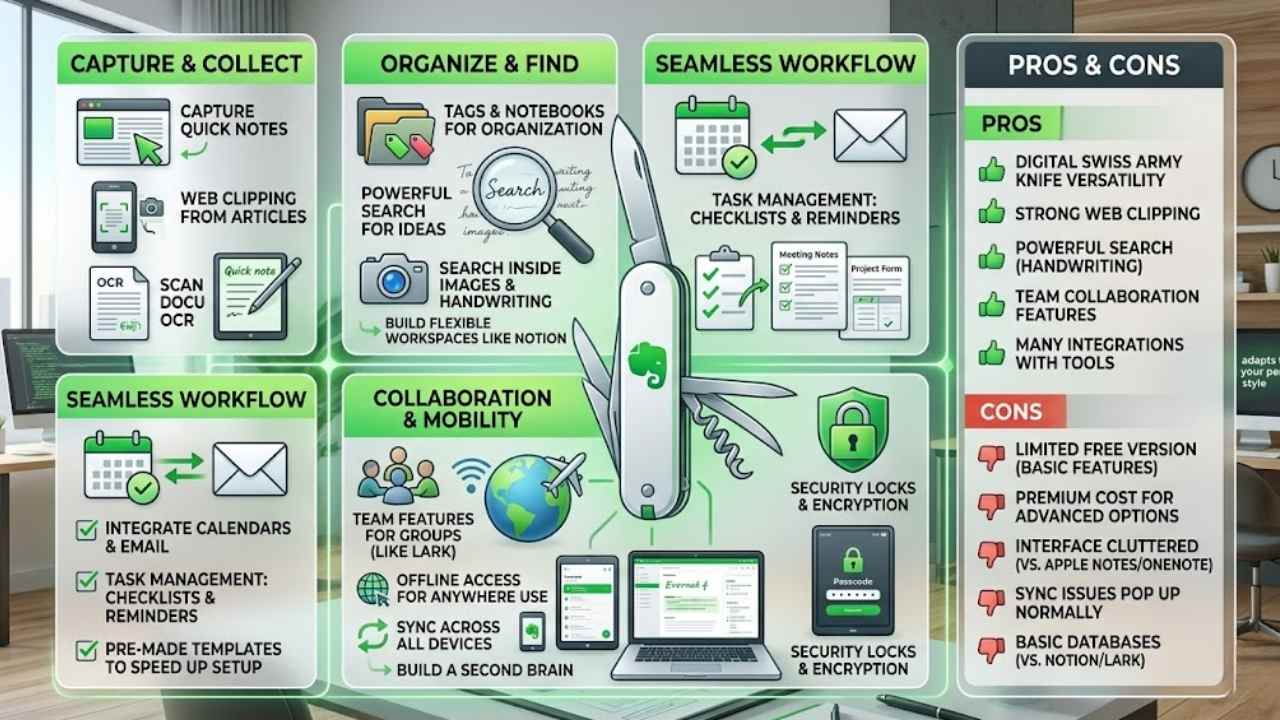
Evernote acts like a digital Swiss Army knife, letting you capture notes, clip web pages, scan documents, and organize everything with tags and notebooks that sync across phones, computers, and tablets.
You can search handwritten text or inside images, a real lifesaver when you lose track of ideas. It integrates with calendars and email apps, so your workflow stays smooth.
Key Features of Evernote
Evernote stands out as a versatile note-taking app that adapts to your personal style. People love it for handling everything from quick jots to big projects, like building a second brain for ideas.
- Evernote offers strong handwriting support, so you can scribble notes on your device just like on paper, perfect for folks who mix digital and analog worlds.
- Users build databases with ease in Evernote, turning it into a flexible workspace for organizing thoughts, much like Notion does for notes and data management.
- Collaboration shines here, with team features that let groups share and edit notes in real time, echoing Lark’s smart workspace for joint work.
- Integration happens smoothly with other tools, pulling in emails or web clips to boost productivity, as if creating a central hub for all your info.
- Search functions work like magic, finding text even in scanned docs or images, saving you time when digging through piles of notes.
- Templates speed up your setup, offering pre-made formats for meetings or projects, suited to individual organizational preferences as fact 10 suggests.
- Offline access keeps you going without Wi-Fi, so jot down ideas on a plane or hike, then sync later for seamless use.
- Web clipping grabs articles or pages right into your notebooks, acting as a digital scrapbook that grows with your interests.
- Task management integrates checklists and reminders, helping power users juggle deadlines without switching apps.
- Security locks down your notes with passcodes or encryption, giving peace of mind for sensitive stuff like student work or business plans.
Pros & Cons of Evernote
You love versatility in a note-taking app, right? Evernote shines here with strong web clipping and powerful search tools that make finding old notes a breeze. It handles handwriting support well, turning your scribbles into searchable text, like a second brain for your ideas. Team collaboration features let you share notebooks easily, boosting productivity for groups. Plus, it integrates with many other tools, fitting various personal note-taking styles and organizational preferences.
On the flip side, the free version limits you to basic features, pushing for a premium upgrade that costs money. Some users find the interface cluttered, especially compared to simpler apps like Apple Notes or Microsoft OneNote. Sync issues pop up now and then, frustrating folks who need reliable cross-platform access. If you crave advanced database management like in Notion or Lark, Evernote might feel a tad basic for power users.
Final Thoughts
We’ve covered top note-taking apps like Microsoft OneNote for free power, Apple Notes for seamless Apple integration, Notion for team collaboration, Obsidian for advanced linking, and Evernote for versatile capture.
These tools make organizing thoughts simple and fast, fitting right into your daily grind without steep learning curves. Pick one that matches your style, and watch your productivity soar, turning chaos into clear wins at work or school.
Check out lists of 25 note apps or try Notability for students to dig deeper. I once switched to Obsidian and felt like I’d unlocked a secret brain upgrade, no joke. Go grab an app today, transform your workflow, and own your day like a boss.
Frequently Asked Questions (FAQs) About Note-Taking Apps
1. What makes these note-taking apps stand out in changing your work habits?
Well, imagine juggling thoughts like a circus performer, these apps, such as Evernote and Notion, grab those ideas fast and organize them neatly. They boost productivity by syncing across devices, so you never drop the ball. Hey, it’s like having a personal assistant in your pocket, keeping chaos at bay.
2. How do top note-taking apps help with team collaboration?
Apps like Microsoft OneNote shine here; they let teams share notes in real time. Picture brainstorming sessions where everyone adds ideas without missing a beat.
3. Are there free note-taking apps that can transform my workflow?
Yes, Google Keep offers simple, no-cost tools to capture quick notes and set reminders. It turns scattered thoughts into structured plans, making your day flow smoother. Plus, its colorful labels add a fun twist, like decorating your digital desk.
4. Can these apps integrate with other tools to improve daily work?
Absolutely, tools like Roam Research connect with calendars and email seamlessly. This setup predicts your needs, almost like reading your mind, and cuts down on wasted time.






















