
If you have used ChatGPT for writing, you already know the feeling. Sometimes it is fast and helpful, and sometimes it feels generic, repetitive, or too confident about facts. That is why many writers search for ChatGPT Alternatives For Writing that are built for real workflows, not just quick replies.
Some tools focus on grammar and clarity, others focus on marketing copy that converts, and a few are built for long-form storytelling. The best option depends on what you write, how often you write, and how strict your quality checks are. Price matters too, but time saved and fewer revisions often matter more.
This guide compares 10 popular tools that many people prefer over ChatGPT for specific writing jobs. You will also learn what “better” really means, and how to pick the right assistant without wasting money. By the end, you will have clear options and a simple way to test them.
| What This Guide Covers | What You Get |
| Who each tool is best for | Clear use cases for each assistant |
| Key strengths and limits | What they do well and where they fail |
| Pricing snapshots | Quick cost reference before you try |
| Selection tips | A simple way to choose fast |
What “Better Than ChatGPT” Really Means For Writing?
“Better” is not one thing. ChatGPT is a general assistant, so it can feel strong at many tasks but not perfect at any single workflow. A writing-focused tool usually wins because it is designed around editing, tone control, templates, and publishing needs. For example, a grammar-first tool can catch issues faster than a chatbot. A marketing tool can keep brand voice consistent across a whole team. A fiction tool can help you brainstorm plot turns without breaking character logic. These are very different goals, so the best pick changes by scenario.
You should also think about trust and control. Some tools offer tighter style rules, better rewriting controls, and more predictable outputs. Others provide built-in checks like plagiarism scanning, tone goals, or structured workflows that guide you step by step.
Finally, “better” can mean fewer edits. If a tool consistently gives you usable first drafts, you save hours. If it makes you rewrite everything anyway, the tool is not really helping.
| What “Better” Can Mean | Simple Example |
| More accurate writing support | Better grammar suggestions and clarity edits |
| Stronger brand voice control | Same tone across ads, emails, and blogs |
| Faster content production | Templates and workflows for repeat tasks |
| Better long-form help | Story structure, scene expansion, and pacing |
Quick Comparison Of The 10 Tools
This table is a fast scan. Each tool is explained in detail below, with a table and practical guidance.
| Tool | Best For | Biggest Advantage | Starting Price (Typical) |
| Grammarly | Editing, clarity, polish | Strong rewrite and tone support | About $12/month |
| Jasper | Marketing teams | On-brand content workflows | About $69/seat monthly |
| Copy.ai | Sales and marketing teams | Workflow-style content production | About $29/month (team chat plan) |
| Writesonic | SEO and content systems | SEO + content automation platform | About $49/month |
| Anyword | Conversion-focused copy | Performance and prediction angles | About $49/month |
| Wordtune | Rewriting and tone | Simple “human” rewrites | About $6.99/month annually |
| QuillBot | Paraphrasing and rewriting | Strong paraphrase modes + tools | About $8.33/month annually |
| Rytr | Budget writing help | Low-cost short-form writing | Pricing varies publicly |
| Sudowrite | Fiction and creative writing | Story expansion and brainstorming | About $10/month |
| Claude | Long context writing and analysis | Great structure and reasoning | About $20/month (or $17 annual) |
1) Grammarly
Grammarly is not just a spell checker anymore. It is best when you already have a draft and want it to read cleaner, sharper, and more confident. It often beats ChatGPT for editing because it focuses on the last mile, which is where most writing time is lost. It is especially useful for professional writing where tone matters, like client emails, website copy, proposals, and articles. Grammarly’s suggestions are usually quick to apply, and you can keep your original voice while polishing the flow. The tool also highlights clarity and tone issues in a way that feels practical. Grammarly also shares usage claims like being trusted by over 40 million people and 50,000 organizations, which hints at broad adoption in real workplaces.
| Grammarly Snapshot | Details |
| Best for | Editing, clarity, grammar, tone |
| Strongest feature | Fast rewrite suggestions without losing meaning |
| Good fit if | You revise and publish often |
| Watch out for | It can suggest “safe” phrasing if you accept everything |
| Typical starting price | About $12/month |
Why It Can Beat ChatGPT?
Grammarly is built for correction and refinement, not just generation. It tends to produce fewer “chatty” lines and more direct professional language. It also works inside many writing environments, so you do not have to copy and paste as much.
Where It Shines Most?
Use Grammarly when the content is already written and you need polish fast. It is ideal for tightening paragraphs, reducing repetition, and improving readability. It also helps when you want consistent tone across a whole piece.
Limits To Know
Grammarly is not meant to replace deep research or build complex outlines from scratch. You still need to verify facts and shape the argument. Think of it as your editor, not your strategist.
2) Jasper
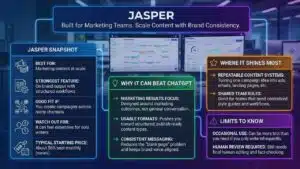
Jasper is built for marketing teams that publish a lot and need consistency. It focuses on workflows, brand control, and scaling content without losing the “company voice.” This is where it can feel stronger than ChatGPT, especially for teams. It is also useful when you need content across formats, like ads, landing pages, product descriptions, and blog drafts. Jasper is designed to reduce back-and-forth. You set the style and goals, and it keeps the output aligned. Pricing commonly starts around $69 per month per seat for monthly billing, and lower with annual billing options shown on its pricing page.
| Jasper Snapshot | Details |
| Best for | Marketing content at scale |
| Strongest feature | On-brand output with structured workflows |
| Good fit if | You create campaigns across many channels |
| Watch out for | It can feel expensive for solo writers |
| Typical starting price | About $69/seat monthly |
Why It Can Beat ChatGPT?
Jasper is designed around marketing results, not general conversation. It pushes you toward usable formats and consistent messaging. That can reduce the “blank page” problem when you need content fast.
Where It Shines Most?
Use it for repeatable content systems. For example, turning one campaign idea into ads, emails, and landing page sections. It is also good for teams that need shared rules.
Limits To Know
If you only need occasional writing help, Jasper can be more tool than you need. It still requires human review for accuracy, and you should keep a final edit step.
3) Copy.ai
Copy.ai leans into go-to-market writing, meaning sales and marketing content that supports growth. It is often preferred over ChatGPT when you need structured workflows, team collaboration, and repeatable outputs that match business tasks. One thing that stands out is the pricing structure aimed at teams. Its “Chat” plan shows 5 seats, unlimited chat words, and access to multiple model providers, with a listed $29 per month billed monthly and $24 per month billed annually. Copy.ai also presents large adoption claims like being trusted by 17 million users.
| Copy.ai Snapshot | Details |
| Best for | Sales and marketing teams |
| Strongest feature | Workflow-based output for repeat processes |
| Good fit if | You write outbound, campaigns, or enablement assets |
| Watch out for | Some features are built more for teams than solo writers |
| Typical starting price | About $29/month (team chat plan) |
Why It Can Beat ChatGPT?
Instead of asking you to prompt everything from scratch, it guides repeatable tasks. That makes it easier to standardize content quality across a team. It can feel more “production-ready” than a general chatbot.
Where It Shines Most?
Use it for prospecting, email sequences, pitch angles, and campaign support content. It is helpful when you want consistent formats without rewriting from zero every time.
Limits To Know
If your work is mostly long-form editorial writing, it may feel less tailored than editing-first tools. You still need a human voice pass before publishing.
4) Writesonic
Writesonic positions itself as more than a writer. It focuses on SEO and content automation, which can make it feel “better” than ChatGPT for teams that care about ranking and repeatable publishing systems. On its pricing page, the Lite plan shows $49 per month for monthly billing and $39 per month billed annually, with higher tiers for larger teams and deeper features. Writesonic also markets results like cutting tool costs and improving traffic for users, though you should treat these as directional claims and still test performance yourself.
| Writesonic Snapshot | Details |
| Best for | SEO-focused content workflows |
| Strongest feature | Content + SEO process in one platform |
| Good fit if | You publish often and want a system |
| Watch out for | Higher tiers get expensive fast |
| Typical starting price | About $49/month |
Why It Can Beat ChatGPT?
ChatGPT can write an article, but it does not run a content system by itself. Writesonic is built around repeatable publishing and SEO workflows. That often saves time for teams.
Where It Shines Most?
Use it when you need regular blog production, topic coverage, and optimization workflows. It can be useful for content teams that manage many pages and need structure.
Limits To Know
SEO tools do not remove the need for original thinking. You still need real expertise, unique angles, and fact-checking. If you publish thin content, no tool will fix that long term.
5) Anyword
Anyword is designed for marketers who care about conversion performance. It stands out because it frames writing as something you can test and improve, not just generate. That mindset is where it can outperform ChatGPT for paid ads, landing pages, and messaging. Its pricing page shows a Starter plan at $49 per month, with higher tiers like Data-Driven at $99 per month, plus annual billing options shown lower on the page. If your goal is clicks, sign-ups, or purchases, Anyword’s approach can feel more practical than open-ended chat prompts.
| Anyword Snapshot | Details |
| Best for | Conversion copy and performance messaging |
| Strongest feature | Data-driven framing for marketing copy |
| Good fit if | You run ads or optimize landing pages |
| Watch out for | Less useful for fiction or casual writing |
| Typical starting price | About $49/month |
Why It Can Beat ChatGPT?
ChatGPT can brainstorm copy, but it does not naturally push you toward testing and performance thinking. Anyword encourages tighter messaging and clearer value statements.
Where It Shines Most?
Use it for headline variations, ad angles, product positioning, and landing page sections. It is also helpful when you need many variations quickly.
Limits To Know
It will not replace a real growth strategy. You still need good offers, correct audience targeting, and honest claims. Treat it as a copy assistant, not a marketing plan.
6) Wordtune
Wordtune is a rewriting tool first. If you want your writing to sound more natural, more direct, or more confident, it is one of the easiest tools to use. This is why many people pick it over ChatGPT for rewriting, because it focuses on quick improvement instead of long conversational answers. Its plans page lists an Unlimited plan with annual billing around $6.99 per month, and an Advanced plan around $4.89 per month billed annually. Wordtune also highlights productivity-style claims like reducing editing time for some users, but your results will depend on your writing and workflow.
| Wordtune Snapshot | Details |
| Best for | Rewriting and tone improvement |
| Strongest feature | Fast rewrites that keep meaning intact |
| Good fit if | You want your drafts to sound more human |
| Watch out for | Not built for deep research or long-form planning |
| Typical starting price | About $6.99/month annually |
Why It Can Beat ChatGPT?
Wordtune is simpler and faster for rewriting. You do not need complex prompts. You highlight a line, choose a rewrite, and move on.
Where It Shines Most?
Use it for awkward sentences, repetitive phrasing, and tone fixes. It is especially helpful for non-native writers and busy professionals.
Limits To Know
It will not build a full content strategy. It works best as a layer on top of your writing, not as the whole writing process.
7) QuillBot
QuillBot is popular for paraphrasing, rewriting, and quick transformations. Many students and bloggers like it because it offers multiple modes and extra tools in one place. It can beat ChatGPT when your main goal is to rework text while keeping the meaning. Its Premium page lists pricing like $8.33 per month billed annually. It also includes tools like paraphrasing, grammar checking, plagiarism checking, and an AI detector and humanizer features according to the plan details shown. QuillBot can be useful when you want fast rewriting without having to “talk” to the tool.
| QuillBot Snapshot | Details |
| Best for | Paraphrasing and rewriting workflows |
| Strongest feature | Many paraphrase modes with extra writing tools |
| Good fit if | You rewrite often and want speed |
| Watch out for | It can still produce generic phrasing if overused |
| Typical starting price | About $8.33/month annually |
Why It Can Beat ChatGPT?
It is focused. You paste text, choose a mode, and get a rewrite with less prompt effort. That makes it faster for editing-heavy tasks.
Where It Shines Most?
Use it for simplifying sentences, improving clarity, and creating alternative versions of the same paragraph. It is also helpful for summarizing and quick restructuring.
Limits To Know
Paraphrasing is not the same as original writing. If you are publishing, you still need unique ideas, correct facts, and a final human voice edit.
8) Rytr
Rytr is often chosen for one reason: cost. It is built to help people generate short-form content fast, like captions, product descriptions, quick emails, and simple blog sections. If you want a lightweight writing assistant, Rytr can feel easier than ChatGPT because it is more template-driven. Rytr’s pricing page is visible publicly, but plan details may load dynamically depending on region and device. Many public breakdowns describe it as budget-friendly compared to most competitors, which is the main reason it stays popular. Rytr is a practical pick if you do not want to pay premium prices and you still want a tool that pushes you into useful formats.
| Rytr Snapshot | Details |
| Best for | Budget-friendly short-form writing |
| Strongest feature | Quick templates for common writing tasks |
| Good fit if | You need basic content fast and cheap |
| Watch out for | Less strong for long-form depth and unique voice |
| Typical starting price | Varies by plan and billing |
Why It Can Beat ChatGPT?
When your needs are simple, templates beat open chat. Rytr helps you start faster, especially if you do not want to write long prompts.
Where It Shines Most?
Use it for quick drafts, variations, and basic marketing content. It works well for routine tasks where perfection is not required.
Limits To Know
It can feel shallow for complex topics. If your content requires strong expertise and deep structure, you may outgrow it quickly.
9) Sudowrite
Sudowrite is built for creative writers. It is not trying to be a general chatbot, and that is exactly why it can beat ChatGPT for fiction. It focuses on storytelling support, like brainstorming, expanding scenes, and breaking through writer’s block. Its pricing page shows a Hobby & Student plan at $10 per month with credits, a Professional plan at $22 per month, and a Max plan at $44 per month, with credits listed per plan. If you write novels, screenplays, or short stories, Sudowrite can feel like a true creative partner instead of a generic assistant.
| Sudowrite Snapshot | Details |
| Best for | Fiction, storytelling, creative drafting |
| Strongest feature | Scene expansion and brainstorming support |
| Good fit if | You write long creative work regularly |
| Watch out for | Not designed for SEO or business copy |
| Typical starting price | About $10/month |
Why It Can Beat ChatGPT?
Sudowrite is tuned for story work. It helps you explore options without forcing everything into a neat, generic tone. That makes it better for creative flow.
Where It Shines Most?
Use it when you are stuck on what happens next, when dialogue feels flat, or when a scene needs more detail. It can also help you explore alternate plot directions.
Limits To Know
Creative tools can still drift from your intent. You should treat outputs as suggestions, not final text. You are still the author and the final editor.
10) Claude
Claude is a strong option when you want longer context, clearer structure, and thoughtful reasoning while writing. Many writers use it for outlining, reorganizing long drafts, and improving flow without making everything sound the same. In those moments, it can feel like one of the best ChatGPT Alternatives For Writing. On its pricing page, Claude Pro is listed at $20 if billed monthly, or $17 per month with an annual subscription discount, with a Max tier starting from $100 per person billed monthly. Claude is often a good fit for longer documents because it is designed to handle complex work with projects and extended thinking features, depending on plan and usage limits.
| Claude Snapshot | Details |
| Best for | Long drafts, structure, rewriting with context |
| Strongest feature | Strong reasoning and organization for complex writing |
| Good fit if | You write long-form or need deep rewrites |
| Watch out for | Still needs fact checks and human editing |
| Typical starting price | About $20/month (or $17 annual) |
Why It Can Beat ChatGPT?
Claude often feels more consistent in long-form structure. It can help you keep arguments organized and reduce scattered writing, especially in big drafts.
Where It Shines Most?
Use it to outline a long article, tighten sections, or rewrite a piece while keeping your original intent. It is also helpful when you want fewer filler phrases.
Limits To Know
No assistant is a perfect source of truth. You still need to verify names, dates, and claims. Treat it as a writing partner, not a fact database.
How To Choose The Right Tool For Your Needs?

Choosing is easier when you start with your real workflow. If you mostly revise and polish, an editing-first tool will save you more time than a marketing platform. If you publish daily content, a workflow tool will matter more than a clever chat answer. Start by asking what frustrates you most about ChatGPT. Is it tone? Repetition? Brand voice? Lack of structure? Weak SEO workflow? Your answer points to the right category of tool. You should also think about where you write. If you live inside documents and email, a tool that integrates well may be “better” even if the model quality is similar.
For teams, consistency matters. Tools that let you define brand voice and shared rules tend to reduce editing cycles. For solo writers, cost and speed usually matter more. If you are unsure, test two tools for the same task using the same draft and compare how much editing you still need.
| Writing Goal | Best Tool Type | Good Options From This List |
| Polish and clarity | Editor and rewrite assistant | Grammarly, Wordtune |
| Marketing campaigns | Brand and workflow platform | Jasper, Copy.ai, Anyword |
| SEO production | SEO + content system | Writesonic |
| Paraphrasing | Paraphrase-focused toolkit | QuillBot |
| Budget writing | Lightweight templates | Rytr |
| Fiction writing | Creative writing partner | Sudowrite |
| Long-form structure | Long-context assistant | Claude |
Tips To Make AI Writing Sound More Human
Even the best tool can produce bland writing if you feed it vague prompts. The easiest fix is to give the tool a clear voice target. Describe your audience, your tone, and your goal in plain language, then reuse that as your “voice brief.” This alone can make output feel less robotic. Next, avoid asking for full articles in one shot. Generate an outline first, then draft section by section. This reduces repetition and keeps the writing focused. It also makes it easier to add real examples and your own experience.
After drafting, do a human editing pass. Read out loud. Cut filler lines. Replace generic phrases with specific details. Add short transitions so the piece flows naturally. Finally, always verify facts. AI tools can sound confident while being wrong. A quick check protects your credibility and reduces corrections later.
| Human-Sounding Workflow | What To Do |
| Step 1: Voice brief | Define tone, audience, and goal clearly |
| Step 2: Outline first | Build structure before writing paragraphs |
| Step 3: Draft in sections | Generate one section at a time |
| Step 4: Human edit pass | Cut filler, add specificity, improve flow |
| Step 5: Verify facts | Confirm names, dates, pricing, and claims |
Ethics, Accuracy, And Originality
If you publish content, accuracy is not optional. AI writing assistants can help you draft faster, but they do not remove your responsibility. Always check factual claims, especially for health, legal, finance, and news-related topics. Originality matters too. If you rely too heavily on paraphrasing, your writing can become a remix of common phrasing. That often reads flat and can hurt trust. Use AI for structure, clarity, and brainstorming, then add unique examples, opinions, and insights.
Also consider privacy. Do not paste sensitive client data or private documents into tools unless your policy allows it and the platform offers the right protections. For teams, use admin controls and clear guidelines. Used responsibly, AI can improve writing quality and speed. Used carelessly, it can publish mistakes at scale.
| Responsible Use Checklist | What It Protects |
| Fact-check key claims | Credibility and trust |
| Add unique insights | Originality and value |
| Avoid sensitive data | Privacy and compliance |
| Use AI as a draft layer | Better final quality |
| Keep a human final review | Fewer errors and better tone |
Final Thoughts
If you want cleaner drafts, stronger tone, and fewer edits, a specialized tool can outperform a general chatbot. That is why ChatGPT Alternatives For Writing keep growing in popularity. The best choice depends on whether you need editing, marketing workflows, SEO systems, rewriting help, or creative support.
If you only write sometimes, start small with a rewriting or editing tool. If you publish regularly, consider a platform that supports repeat workflows and team consistency. If you write fiction, choose a tool designed for storytelling, not business copy.