If you are comparing email platforms, “send” is not the goal. Inbox placement is the goal. This guide breaks down the best email marketing tools with a strong track record of deliverability features, plus the practical steps that help you stay out of spam and promotions tabs.You will also see what mailbox providers now expect from bulk senders, and what to look for before you migrate a list or scale volume.
What High Deliverability Means in 2026?
High deliverability is not just “sent” or “delivered.” It is whether your email lands in the inbox where people actually see it. Many teams get tricked by a high delivery rate, then wonder why opens and sales stay flat. Inbox placement depends on trust signals like sender reputation, authentication, complaint rate, and consistent engagement. In a widely cited industry benchmark report, average inbox placement was 83.5%, with 6.7% landing in spam and 9.8% missing. That gap is the difference between a profitable campaign and a quiet one. The good news is that most deliverability problems come from fixable habits, not bad luck. The tool you pick matters, but your sending discipline matters more.
| Deliverability Term | Simple Meaning | Why It Matters |
| Delivery rate | Server accepted the email | Can look good even when inbox is weak |
| Inbox placement | Email lands in inbox | Closest to real performance |
| Sender reputation | Trust score for your domain and IP | Drives filtering decisions |
| Complaint rate | People marking you as spam | One of the fastest reputation killers |
| Authentication | SPF, DKIM, DMARC alignment | Proves the email is truly from you |
Inbox Placement vs Delivery Rate
Delivery means the receiving mail server did not reject your message. It does not promise the inbox. Inbox placement is the result mailbox providers choose after scoring your email. Providers look at your recent sending pattern and how recipients react. If people ignore you or complain, the inbox becomes harder to earn. If people open, click, reply, or move your email out of spam, your trust improves over time. This is why a smaller, engaged segment often performs better than blasting the full list. For most brands, the inbox is built through consistency, not one big campaign.
Authentication Basics: SPF, DKIM, DMARC
Authentication is the foundation for modern email sending. SPF tells receivers which servers are allowed to send for your domain. DKIM adds a signature so receivers can verify the message was not altered. DMARC ties these checks together and tells receivers what to do if something fails. When you authenticate, you reduce spoofing risk and improve trust signals. When you skip it, inbox placement becomes unpredictable, especially at higher volume. Most email marketing platforms support these records, but the difference is how clearly they guide setup and troubleshooting. Treat authentication like setting up your payment gateway. You do it once, then it protects you every day.
Compliance Signals: Unsubscribe and Complaint Rate
Unsubscribes are not the enemy. Complaints are. When people cannot leave easily, they hit spam. Modern inbox filters also reward senders who offer clean opt-out and keep complaints low. One-click unsubscribe matters because it prevents frustration. A preference center can help even more by letting subscribers reduce frequency instead of quitting. Complaint rate also tends to rise when teams over-email, target poorly, or reuse old lists. If you want better deliverability, lower the reasons someone would feel surprised by your email. That starts at signup and continues through every campaign.
How We Picked These Best Email Marketing Tools?
This list focuses on tools that support real-world deliverability, not just pretty templates. We looked for platforms that make authentication easy, handle bounces and complaints properly, and give you controls to send smarter. A strong tool helps you segment so you email the right people, not everyone. It also helps you automate list hygiene, like stopping emails to subscribers who never engage. Reporting matters too, because you cannot fix what you do not measure. We also considered different use cases, since ecommerce, creators, and B2B funnels behave differently. Finally, we kept it unbiased by highlighting trade-offs, not only strengths. The goal is a shortlist you can trust.
| Selection Factor | What We Looked For | Why It Helps Deliverability |
| Authentication support | SPF, DKIM, DMARC setup guidance | Builds trust with mailbox providers |
| List hygiene tools | Suppression, bounce handling, engagement tagging | Reduces sending to risky contacts |
| Segmentation depth | Behavior, purchase, lifecycle, tags | Improves relevance and engagement |
| Sending controls | Scheduling, throttling, frequency control | Avoids sudden spikes and over-sending |
| Reporting | Bounces, unsubscribes, complaints, engagement | Makes problems visible early |
Deliverability Controls That Matter
Good platforms do the basics well. They automatically suppress hard bounces, prevent repeat sending to invalid addresses, and respect unsubscribes across the account. They also make it hard to do the wrong thing by mistake, like re-mailing suppressed contacts. Some platforms offer better guidance for domain setup, which saves time for small teams. Others provide stronger compliance tools like preference centers and double opt-in options. These features do not look exciting, but they protect your sender reputation. If you plan to scale, prioritize control over convenience.
Automation and Segmentation That Reduce Spam Risk
Most spam complaints come from irrelevance. Automation helps you send based on behavior, not guesses. Segmentation helps you avoid over-emailing people who rarely engage. A simple example is a welcome series that teaches new subscribers what to expect. Another example is a re-engagement flow that asks inactive subscribers if they still want emails. If they do not respond, you stop emailing them instead of dragging down your reputation. These patterns work in almost every industry. The best tools make them easy to build and maintain.
Reporting and Testing That Keep You Out of Trouble
Deliverability issues often appear before revenue drops. You might see rising bounces, fewer opens, or a sudden jump in unsubscribes. A good platform shows these trends clearly. Some tools also support inbox previews or integration paths for deliverability testing workflows. Even without fancy testing, basic reporting helps you react faster. If a campaign drives complaints, you can pause, tighten targeting, and protect your domain. That is how strong senders stay strong.
Best Email Marketing Tools: Quick Comparison
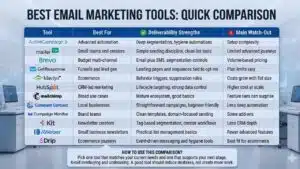
If you want a fast answer, start here. This table helps you match the tool to your business model. The “deliverability strengths” column focuses on what actually changes inbox results in practice. The “watch-outs” column keeps the comparison honest. Use this snapshot to shortlist two or three tools, then read the detailed sections. Most teams do best when they pick a tool that fits their workflow, not the most complicated platform available. A simple tool used well often beats a powerful tool used poorly. Keep your choice grounded in your list size, your content style, and your team’s bandwidth.
| Tool | Best For | Deliverability Strengths | Main Watch-Out |
| ActiveCampaign | Advanced automation | Deep segmentation, hygiene automations | Setup complexity |
| MailerLite | Small teams and creators | Simple sending discipline, clean list tools | Limited advanced journeys |
| Sender | Small and growing businesses | Custom event automation, segmentation, authentication support | No built-in CRM |
| GetResponse | Funnels and lead gen | Landing pages and sequences tied to opt-ins | Plan limits vary |
| Klaviyo | Ecommerce | Behavior triggers, suppression rules | Costs grow with list size |
| HubSpot | CRM-led marketing | Lifecycle targeting, strong data control | Higher cost at scale |
| Mailchimp | Broad use cases | Mature ecosystem, good basics | Feature tiers can surprise |
| Constant Contact | Local businesses | Straightforward campaigns, beginner-friendly | Less deep automation |
| Campaign Monitor | Brand teams | Clean templates, domain-focused sending | Some add-ons |
| Kit | Newsletter creators | Tag-based segmentation, creator workflows | Less CRM depth |
| AWeber | Small business newsletters | Practical list management basics | Fewer advanced features |
| Drip | Ecommerce journeys | Event-driven messaging and hygiene tools | Best fit for ecommerce |
How to Use This Comparison?
Pick one tool that matches your current needs and one that supports your next stage. If you are a newsletter creator, you may not need ecommerce triggers. If you run an ecommerce store, you will want event-based automation and strong suppression. If you are B2B, CRM alignment and lead stages matter more than flashy templates. Use this to avoid overbuying and underusing. A good tool should reduce mistakes, not create more work.
1. ActiveCampaign
ActiveCampaign fits teams that want automation to do the heavy lifting. It shines when you need behavior-based sending, like nurturing leads based on page visits, form fills, or pipeline stage. Deliverability benefits when emails stay relevant and consistent, and this platform makes relevance easier through segmentation and tagging. You can build “sunset” rules that stop sending to inactive contacts, which protects your reputation over time. It also works well for multi-step onboarding and re-engagement sequences that reduce complaints. The trade-off is complexity, because you need a clear plan to get value. If your team enjoys building journeys and testing segments, it can be a strong long-term pick.
| ActiveCampaign Summary | Details |
| Best for | Automation-heavy teams and B2B funnels |
| Deliverability helpers | Segmentation, hygiene automations, suppression handling |
| Strengths | Behavioral targeting, lifecycle journeys |
| Limitations | Learning curve for new users |
| Pricing model | Typically scales by contacts and features |
Where It Fits Best?
Use it when your list is growing and you want fewer broadcasts and more targeted flows. It is also useful when sales and marketing need shared context.
2. MailerLite
MailerLite is a practical tool for newsletters and small businesses that want a clean workflow. Its strength is simplicity, which helps teams send consistently without overcomplicating things. Consistency matters because sudden volume swings can trigger filtering. MailerLite also supports segmentation and basic automations, which help you avoid repeatedly emailing inactive subscribers. It works well for creators who publish regularly and want landing pages and forms in the same place. If your list is under control and your content is steady, it can perform very well. The main limitation is that power users may want deeper automation later. Still, many teams prefer a tool they actually use over one they barely understand.
| MailerLite Summary | Details |
| Best for | Creators, newsletters, small businesses |
| Deliverability helpers | List tools, segmentation, steady sending workflows |
| Strengths | Easy setup, clean editor, practical automations |
| Limitations | Less advanced journeys than enterprise tools |
| Pricing model | Typically scales by subscribers and features |
Where It Fits Best?
Use it when you want a strong newsletter engine without a heavy learning curve. It is also a good option for early-stage email programs.
3. Sender
Sender is a feature-rich email marketing platform built for small and growing businesses that want strong deliverability without enterprise-level pricing. It covers bulk emailing, newsletters, and transactional emails from one dashboard, which keeps your sending consistent across use cases. Deliverability benefits when the platform makes good habits easy, and Sender supports authentication setup, segmentation, and suppression handling out of the box. It also offers automation with custom events, so you can trigger messages based on real subscriber behavior. That kind of relevance helps reduce complaints and keeps engagement steady. The tool is known for being user-friendly, which matters because misconfiguration is a common cause of poor inbox placement. The main trade-off is that advanced users may want deeper CRM features, since Sender does not include a built-in CRM.
| Sender Summary | Details |
| Best for | Small and growing businesses, ecommerce, content creators |
| Deliverability helpers | Authentication setup, segmentation, suppression handling |
| Strengths | Easy-to-use platform, custom event automation, strong pricing value |
| Limitations | Sender branding on free plan, no built-in CRM |
| Pricing model | Typically scales by subscribers and email volume |
Where It Fits Best?
Use it when you want a feature-rich newsletter and bulk email tool that stays affordable as your list grows. It also fits teams that need transactional emails and behavior-based automation in one platform.
4. Brevo
Brevo is a good match for teams that want email plus SMS without running multiple platforms. Multi-channel tools can improve deliverability when email is not the only channel carrying the full burden. For example, you can keep email frequency reasonable and use SMS for urgent reminders. Brevo supports automation and segmentation so you can tailor messages and reduce irrelevant sends. It also fits teams who want transactional and marketing messaging under one roof, as long as you manage sending practices carefully. Brevo’s pricing often revolves around email volume, which can be helpful if your list is large but you send selectively. The watch-out is cost variability when volume spikes. Plan your cadence so your budget and reputation stay stable.
| Brevo Summary | Details |
| Best for | Budget-friendly multi-channel marketing |
| Deliverability helpers | Segmentation, automation, frequency control options |
| Strengths | Email plus SMS, flexible sending approach |
| Limitations | Volume-based costs can climb during heavy promos |
| Pricing model | Often tied to email sends and plan level |
Where It Fits Best?
Use it when you want email, SMS, and automation basics in one platform. It suits small and mid-size teams with mixed campaigns.
5. GetResponse
GetResponse works well for lead generation and funnel-based marketing. Its strength is combining email with landing pages and sequences, which can improve list quality when done right. Better list quality often means fewer complaints and fewer bounces, which directly supports deliverability. You can guide subscribers from signup to value quickly through a welcome flow, then segment them based on behavior. It also suits teams running webinars or campaigns tied to lead magnets. The key is to keep promises consistent, meaning the email content matches what the subscriber signed up for. If you collect emails through many sources, GetResponse helps you organize them into cleaner journeys. The limitation is that features can vary by plan, so you need to choose tiers carefully.
| GetResponse Summary | Details |
| Best for | Funnels, lead magnets, webinar-led marketing |
| Deliverability helpers | Signup quality support, automation sequences, segmentation |
| Strengths | Landing pages plus email journeys |
| Limitations | Feature depth can vary by plan |
| Pricing model | Typically scales by list size and features |
Where It Fits Best?
Use it when acquisition and email work together, like content upgrades, webinars, and campaign funnels. It is also useful for teams that want lead capture in the same tool.
6. Klaviyo
Klaviyo is built for ecommerce, where timing and relevance drive engagement. Deliverability often improves when emails map to real customer behavior, such as browsing, cart activity, and purchases. Klaviyo supports that style through event-triggered flows and deep segmentation. You can suppress recent purchasers from repetitive promo blasts, which reduces fatigue and complaints. You can also build frequency rules so subscribers do not get hit with too many messages in a short window. The platform is strong for lifecycle campaigns like welcome, cart recovery, post-purchase, and win-back. The trade-off is cost, because ecommerce data and list growth can scale fast. If ecommerce revenue is a core goal, the value can justify the spend.
| Klaviyo Summary | Details |
| Best for | Ecommerce brands and retail marketing |
| Deliverability helpers | Event-driven flows, suppression rules, segmentation depth |
| Strengths | Strong personalization tied to shopping behavior |
| Limitations | Can get expensive as profiles and activity grow |
| Pricing model | Often scales by profiles and sending volume |
Where It Fits Best?
Use it for stores that want automated revenue flows, not just newsletters. It fits brands that segment by purchase history and engagement.
7. HubSpot Email Marketing
HubSpot is a strong option when your CRM is the center of your marketing. Deliverability improves when you stop emailing people who should not be emailed, and CRM rules make that easier. You can segment by lifecycle stage, lead status, and sales activity, which reduces irrelevant sending. That usually lowers complaints and unsubscribes over time. HubSpot also works well when multiple teams touch the same contact data, because it keeps marketing and sales aligned. For example, you can pause marketing emails during sensitive sales conversations or support cases. The main drawback is cost as you scale into more hubs and features. If you need tight CRM-driven targeting, it can be worth it.
| HubSpot Summary | Details |
| Best for | CRM-first B2B teams and sales alignment |
| Deliverability helpers | Lifecycle segmentation, suppression rules, preference handling |
| Strengths | Unified CRM and marketing workflows |
| Limitations | Pricing can rise with advanced needs |
| Pricing model | Typically scales by hubs, seats, and feature tiers |
Where It Fits Best?
Use it when lead stages, pipeline movement, and sales coordination matter. It also fits companies that want one source of truth for contacts.
8. Mailchimp
Mailchimp is one of the most widely used platforms because it covers many common needs with minimal setup. It offers templates, automation options, and integrations that help teams launch quickly. Deliverability success here depends on whether your list is permission-based and whether you authenticate properly. The tool supports segmentation and tagging, which can help reduce over-sending when used well. It also fits teams that value design and ease of use, especially for promotional newsletters. The risk is that feature limits vary by plan, and teams sometimes outgrow their initial tier. Still, for many small businesses, it remains a solid choice when used responsibly. Keep targeting tight and avoid reusing old, inactive lists.
| Mailchimp Summary | Details |
| Best for | Broad use cases and quick setup |
| Deliverability helpers | Segmentation, automation basics, reporting trends |
| Strengths | Integrations, templates, user-friendly editor |
| Limitations | Some features gated by plan tiers |
| Pricing model | Typically scales by contacts and features |
Where It Fits Best?
Use it when you want a mainstream tool with lots of integrations and you do not need very complex journeys. It can work well for newsletters and promotions.
9. Constant Contact
Constant Contact is popular with local businesses, community organizations, and teams that want simple sending. It supports the basics that protect deliverability, like list management, unsubscribes, and bounce handling. The platform is often easier for beginners than automation-heavy tools, which reduces setup mistakes. That matters because many deliverability issues come from misconfiguration and poor list habits. It can be a good fit for event announcements, weekly updates, and seasonal campaigns. The limitation is that advanced automation and deep segmentation may feel limited compared to more complex platforms. For many small senders, that is not a problem. If you stay consistent and keep your list clean, it can deliver strong results.
| Constant Contact Summary | Details |
| Best for | Local businesses and simple newsletters |
| Deliverability helpers | Beginner-friendly list tools, reporting, compliance basics |
| Strengths | Ease of use, straightforward campaign building |
| Limitations | Less advanced automation depth |
| Pricing model | Typically scales by contacts and plan tiers |
Where It Fits Best?
Use it when your email program is straightforward and you value simplicity. It is especially useful for teams without a dedicated email specialist.
10. Campaign Monitor
Campaign Monitor is known for clean design and brand-focused sending. For deliverability, design matters because overly complex layouts and spam-like formatting can hurt engagement and increase complaints. This platform fits teams that care about consistent branding and polished newsletters. It also supports list organization and segmentation, which helps you send more targeted messages. Campaign Monitor works well for agencies managing multiple clients, because brand separation encourages cleaner sending practices. The trade-off is that some advanced features may be add-ons depending on plan level. If your email program is design-led and consistent, it can be a strong fit. Make sure you still prioritize authentication and list hygiene, because design alone does not earn the inbox.
| Campaign Monitor Summary | Details |
| Best for | Brand-led teams and agencies |
| Deliverability helpers | Segmentation, list management, steady campaign workflows |
| Strengths | Strong templates and brand consistency |
| Limitations | Some features may vary by plan |
| Pricing model | Typically scales by contacts and sending needs |
Where It Fits Best?
Use it when visual presentation is a priority and you send consistent newsletters. It also fits teams managing multiple brands or clients.
11. Kit
Kit is built for creators who run newsletters, courses, and audience-based businesses. Deliverability improves when subscribers expect your emails and regularly engage, and creator newsletters often benefit from that relationship. Kit supports tag-based segmentation so you can keep topics relevant and avoid blasting everyone. It also fits creators who prefer plain, personal-style emails that look less promotional. You can automate welcome sequences, course launches, and simple funnels without heavy complexity. The key is to set expectations at signup, like frequency and content type. That reduces surprises and keeps complaints low. If you want a creator-first platform that stays simple, Kit is a strong contender.
| Kit Summary | Details |
| Best for | Creators and newsletter businesses |
| Deliverability helpers | Tag-based segmentation, simple automations, audience focus |
| Strengths | Clean workflows for creators and launches |
| Limitations | Less CRM depth than some platforms |
| Pricing model | Typically scales by subscribers and plan level |
Where It Fits Best?
Use it for newsletters, creator funnels, and audience-building. It fits teams that value speed and simplicity over complex CRM logic.
12. AWeber
AWeber is a long-standing option for small businesses that want reliable newsletter sending and simple automations. It focuses on fundamentals like list management, subscriber handling, and basic sequences. Those basics are often enough to keep deliverability stable when your list is permission-based and engaged. AWeber also suits teams that want to launch quickly without building complex workflows. It can work for weekly newsletters, simple product updates, and evergreen sequences. The limitation is that advanced segmentation and complex journeys may feel lighter than newer automation-first tools. Still, for many small senders, “simple and steady” is exactly what deliverability needs. If you want a straightforward platform with solid fundamentals, it is worth considering.
| AWeber Summary | Details |
| Best for | Small business newsletters and simple sequences |
| Deliverability helpers | List management basics, suppression handling, steady sending |
| Strengths | Easy-to-run campaigns and sequences |
| Limitations | Fewer advanced automation features |
| Pricing model | Typically scales by subscribers and plan tier |
Where It Fits Best?
Use it when you need dependable newsletters and basic follow-ups. It suits teams that prioritize simplicity and consistency.
13. Drip
Drip is a focused platform for ecommerce automation and customer journeys. It supports behavior-driven messaging that helps deliverability because emails feel timely and relevant. For example, cart recovery and post-purchase flows usually get stronger engagement than generic blasts. Drip also fits brands that want to segment by customer lifetime value, purchase recency, and on-site behavior. You can build suppression rules to avoid sending promos to people who just bought, which reduces fatigue. The trade-off is that it is less ideal for pure newsletter publishers with no ecommerce focus. If you are running a store and want journeys that feel personal, Drip is a strong option. When used well, it supports engagement signals that help keep your inbox placement healthy.
| Drip Summary | Details |
| Best for | Ecommerce lifecycle automation |
| Deliverability helpers | Event-driven flows, suppression rules, segmentation |
| Strengths | Strong customer journeys and revenue flows |
| Limitations | Less relevant for basic newsletters |
| Pricing model | Typically scales by subscribers and ecommerce needs |
Where It Fits Best?
Use it for ecommerce brands that prioritize automated revenue flows. It fits teams that use customer behavior to drive message timing.
How to Choose the Right Tool?
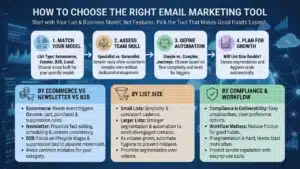
Choosing the best email marketing tools starts with your list and your business model, not the fanciest feature list. First, be honest about how you collect emails and how engaged your subscribers are. If your list is cold or old, even the best platform will struggle until you clean it. Next, match the tool to your sending style. Ecommerce brands need behavior triggers and suppression rules, while creators need fast publishing and clean segmentation. B2B teams often need CRM alignment and lead stage control. Also consider your team’s time, because complex tools need active management. A platform that helps you stay consistent and keep hygiene strong will usually win over time. If you need a one-sentence rule, pick the tool that makes good habits easiest.
| Decision Factor | What to Ask Yourself | What It Suggests |
| List type | Ecommerce, creator, B2B, local business | Pick a tool built for that model |
| Team skill | Do you have an email specialist | Simpler tool may outperform complex one |
| Automation need | Simple newsletters or journeys | Choose based on flow complexity |
| Growth plan | Will list size double soon | Ensure segmentation and hygiene scale |
By List Size
Small lists benefit from simplicity and consistent cadence. Larger lists need stronger segmentation and automation so you can avoid sending to disengaged contacts. As volume grows, small mistakes multiply quickly. Plan for a tool that can handle suppression and list hygiene without manual work. If your list is large but engagement is uneven, prioritize segmentation first. Sending fewer emails to the right people can outperform sending more emails to everyone.
By Ecommerce vs Newsletter vs B2B
Ecommerce needs event-based triggers like browse, cart, and purchase. Newsletters need fast editing, scheduling, and content consistency. B2B needs lifecycle stages and suppression rules tied to pipeline movement. Each model creates different deliverability risks. Ecommerce can over-email during promo seasons. Creators can burn trust if they switch from value emails to constant selling. B2B can damage reputation by emailing outdated lead lists. Choose a tool that helps you avoid the most common mistake in your category.
By Compliance and Team Workflow
Compliance is part of deliverability now, not a legal side note. If unsubscribes are hard, complaints rise. If signup sources are messy, bounces rise. Your tool should support preference options, clear unsubscribe handling, and clean suppression. Workflow matters too. If your team cannot easily segment and schedule, they will blast more often. A tool that reduces friction for good habits can protect your sender reputation for years.
Deliverability Checklist You Can Use With Any Platform
Most deliverability problems come from three places: weak authentication, weak list quality, and aggressive sending. Start by authenticating your domain properly so mailbox providers can trust you. Next, tighten your list sources so subscribers know exactly what they are signing up for. Then, keep a consistent cadence instead of sudden spikes. Use segmentation so you email engaged subscribers first, especially when you change domains, templates, or frequency. Keep an eye on warning signs like rising bounces, rising unsubscribes, and falling engagement. If something drops suddenly, pause and diagnose before you push more volume. The best email marketing tools can support these steps, but they cannot replace them.
| Checklist Step | What to Do | Outcome You Want |
| Authenticate | Set SPF, DKIM, DMARC correctly | More trust, fewer spam placements |
| Warm up changes | Scale volume gradually | Avoid triggering filters |
| Clean your list | Remove invalid and unengaged contacts | Lower bounces and complaints |
| Segment first | Send to engaged subscribers before full list | Stronger engagement signals |
| Keep cadence stable | Avoid sudden spikes | More predictable inbox results |
A Simple 30-Day Warm-Up Plan
Week one should focus on your most engaged subscribers. Send useful content, not a hard sell, and keep volume steady. Week two can expand to moderately engaged contacts, while you keep a close eye on unsubscribes and bounces. Week three is a good time to add automations like welcome and post-signup education. Week four can introduce broader campaigns, but only if early weeks stayed clean. If you see warning signs, slow down instead of pushing harder. Warm-up is not just for new domains. It also matters after big changes, like switching tools or increasing frequency.
Content and Cadence Rules That Protect Reputation
Write subject lines that match the email content. Avoid bait-style phrasing that attracts clicks but creates distrust. Keep your “from” name consistent so subscribers recognize you. Use a predictable sending schedule so your audience expects your emails. Balance promotions with helpful content so engagement stays real. Use a preference option when possible so people can choose weekly instead of daily. Deliverability improves when recipients feel in control.
Troubleshooting When Emails Start Landing in Spam
Start with the basics first. Check authentication and make sure you are sending from the right domain. Review your most recent list imports and remove questionable sources. Pause broad sending and switch to engaged segments only. Reduce frequency for a short period so complaint pressure drops. Update your welcome email to set expectations clearly for new subscribers. If a specific campaign caused the issue, review the subject line, offer, and targeting. Fix the cause, then scale again slowly.
Final Thoughts
If you want better inbox results, focus on fundamentals before you chase features. The best email marketing tools make authentication, segmentation, and hygiene easier, but they still depend on your discipline. Choose a platform that fits your business model and your team’s skill level. Then commit to a consistent cadence, clean list practices, and smarter targeting. Use engaged segments first, especially after changes like switching tools or increasing frequency. Keep unsubscribes easy and treat complaints as a serious warning sign. When you follow these habits, you give mailbox providers a clear reason to trust your domain. Over time, that trust is what turns email into reliable growth.