Remote teams in 2026 face a unique set of hurdles: digital exhaustion, fragmented communication, and the “visibility gap” that occurs when you can’t simply walk over to a colleague’s desk. Without a central source of truth, handoffs fail, time zones become enemies, and critical project context disappears into the black hole of Slack threads.
This guide provides an expert-vetted breakdown of the top project management tools for remote teams and designed to bridge these gaps. We’ve included a rapid-comparison table, “best-for” scenario picks, and a deep dive into 15 platforms that excel in async-first environments.
Trust Signal: Our team evaluated 40+ platforms based on remote-specific criteria like time-zone visualization, mobile parity, and async notification management. Pricing and features verified.
Quick Answer: The Best Tools by Remote Team Scenario
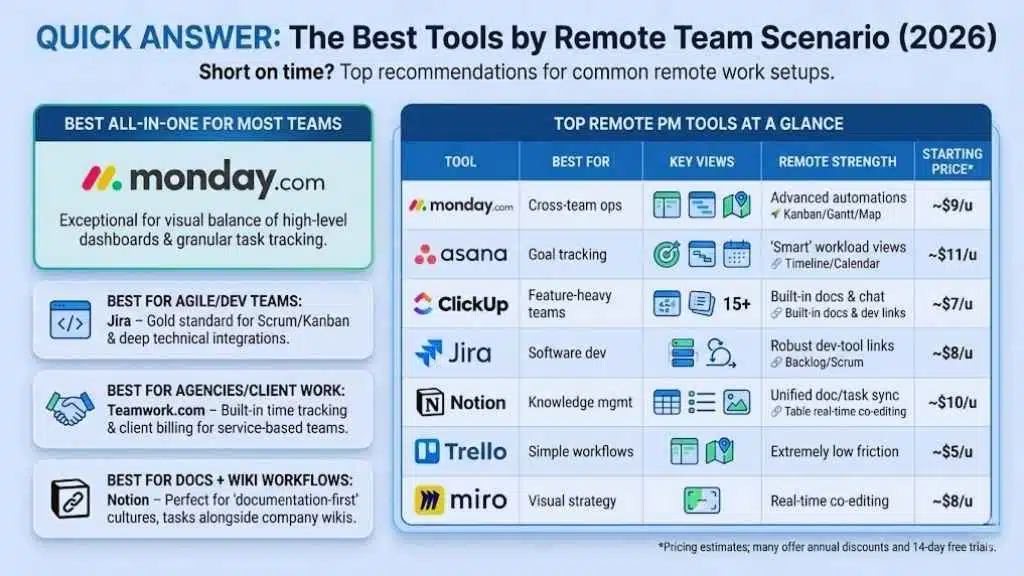
Short on time? Here are our top recommendations for the most common remote work setups in 2026:
- Best all-in-one for most teams: monday.com — Exceptional for its visual balance of high-level dashboards and granular task tracking.
- Best for Agile/dev teams: Jira — The gold standard for Scrum and Kanban workflows with deep technical integrations.
- Best for agencies/client work: Teamwork.com — Built-in time tracking and client billing make it the go-to for service-based teams.
- Best for docs + wiki workflows: Notion — Perfect for “documentation-first” cultures where project tasks live alongside meeting notes and company wikis.
- Best for spreadsheet-style planning: Smartsheet — Powerful for teams transitioning from Excel who need enterprise-grade automation.
- Best for whiteboarding + workshops: Miro — Essential for the “discovery” phase of projects and visual brainstorming across continents.
Top Remote PM Tools at a Glance
| Tool | Best For | Key Views | Remote Strength | Starting Price* |
| monday.com | Cross-team ops | Kanban, Gantt, Map | Advanced automations | Free plan / Paid from ~$9/u |
| Asana | Goal tracking | Timeline, Calendar | “Smart” workload views | Free plan / Paid from ~$11/u |
| ClickUp | Feature-heavy teams | 15+ views | Built-in docs & chat | Free plan / Paid from ~$7/u |
| Jira | Software dev | Backlog, Scrum | Robust dev-tool links | Free plan / Paid from ~$8/u |
| Notion | Knowledge mgmt | Table, List, Gallery | Unified doc/task sync | Free plan / Paid from ~$10/u |
| Trello | Simple workflows | Kanban, Map | Extremely low friction | Free plan / Paid from ~$5/u |
| Miro | Visual strategy | Infinite canvas | Real-time co-editing | Free plan / Paid from ~$8/u |
Pricing estimates; many offer annual discounts and 14-day free trials.
How We Picked These Tools (Remote Team Criteria)
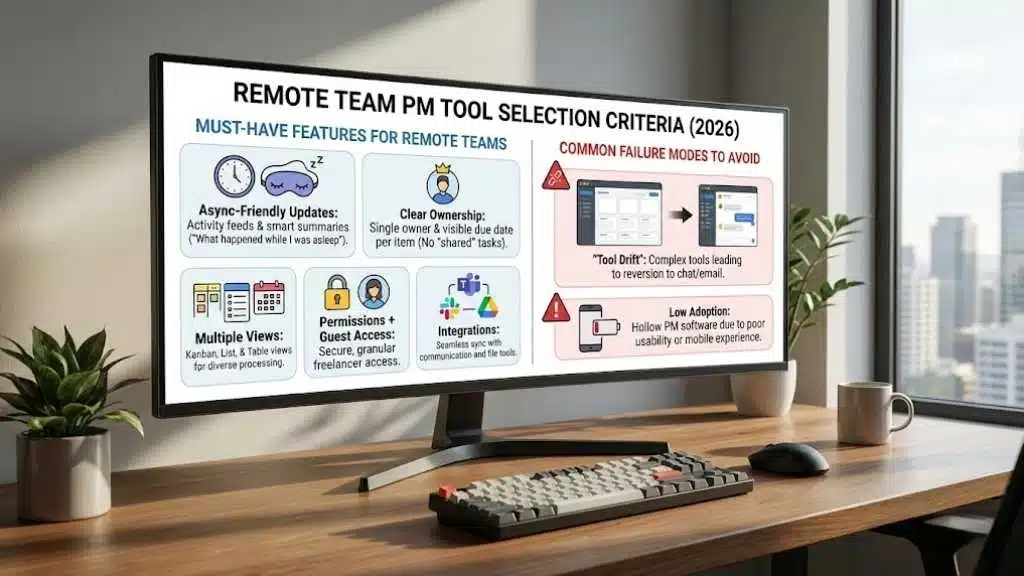
Choosing a PM tool for a local office is about organization; choosing one for a remote team is about culture and survival. We used the following criteria to filter our 2026 winners.
Must-Have Features for Remote Teams
- Async-Friendly Updates: The ability to see “what happened while I was asleep” via activity feeds and smart summaries.
- Clear Ownership: No “shared” tasks. Every item must have a single owner and a visible due date to prevent handoff friction.
- Multiple Views: Remote workers process information differently. A tool must offer Kanban for the visual learner and List/Table for the detail-oriented.
- Permissions + Guest Access: Remote teams often rely on freelancers. Secure, granular guest access is non-negotiable.
- Integrations: If it doesn’t talk to Slack, Teams, or Google Drive, it creates a manual data-entry burden that remote teams can’t afford.
Common Failure Modes to Avoid
We avoided tools that encourage “Tool Drift.” This happens when a tool is so complex that users revert to email or chat to actually “get work done,” leaving the PM software as a hollow shell of outdated data. We prioritize tools with high adoption rates and intuitive mobile apps.
15 Best Project Management Tools for Remote Teams
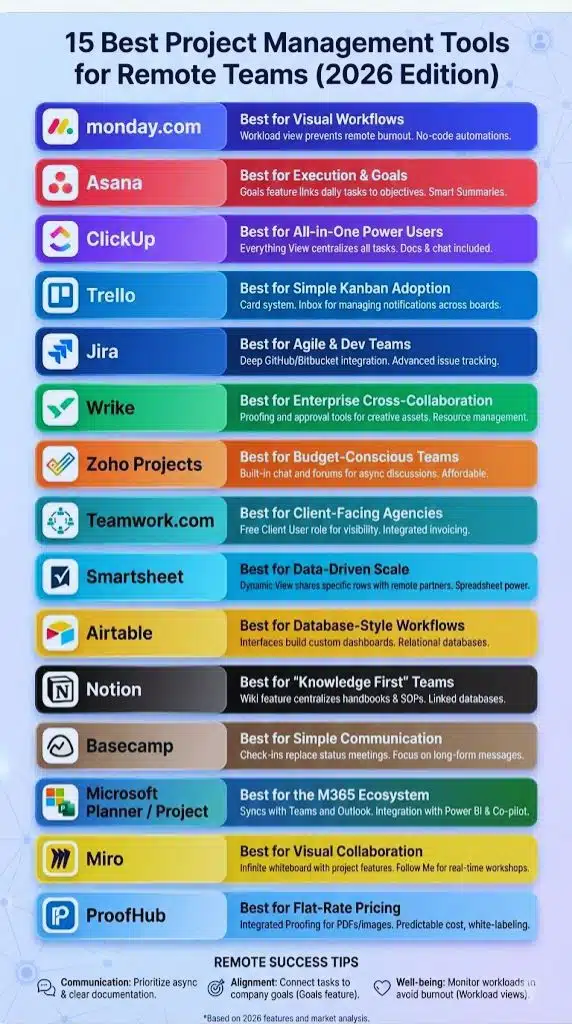
1. monday.com — Best for Visual Workflows
monday.com has evolved into a full “Work OS.” It is the most adaptable tool on this list, allowing teams to build custom apps within their boards.
- Remote Highlight: Its “Workload” view is a lifesaver for remote managers to ensure no one is burning out across time zones.
- Top Features: No-code automations, customizable dashboards, native time tracking.
- Pros: Highly visual; excellent mobile app.
- Cons: Higher price point; can feel overwhelming for very simple tasks.
2. Asana — Best for Execution & Goals
Asana focuses on the “who is doing what by when.” Its 2026 updates have doubled down on AI-driven “Smart Summaries” for long comment threads.
- Remote Highlight: “Goals” feature links daily tasks to high-level company objectives, keeping remote workers aligned with the “Why.”
- Top Features: Timeline view (Gantt), project portfolios, multi-homing tasks.
- Pros: Very intuitive; great for cross-functional dependencies.
- Cons: Limited offline mode; no built-in native time tracking.
3. ClickUp — Best for All-in-One Power Users
ClickUp’s mantra is “one app to replace them all.” It combines tasks, docs, chat, and goals in one interface.
- Remote Highlight: The “Everything View” allows managers to see every task across every department in one list.
- Top Features: Mind maps, whiteboard view, custom statuses.
- Pros: Features-to-price ratio is unbeatable; highly customizable.
- Cons: Significant learning curve; occasional performance lag.
4. Trello — Best for Simple Kanban Adoption
Known for its “card” system, Trello remains the easiest tool to roll out to a team that hates traditional PM software.
- Remote Highlight: Recent “Inbox” improvements allow users to manage notifications across multiple boards without losing focus.
- Top Features: Butler (automation), Power-ups (integrations), Map view.
- Pros: Setup takes minutes; free tier is very generous.
- Cons: Not suited for complex dependencies or large-scale resource planning.
5. Jira — Best for Agile & Dev Teams
Jira is the powerhouse for software development. It excels at managing backlogs and shipping releases.
- Remote Highlight: Deep integration with GitHub/Bitbucket means remote devs never have to manually update task statuses.
- Top Features: Burndown charts, sprint planning, advanced issue tracking.
- Pros: Unmatched for technical workflows; highly scalable.
- Cons: UI can feel “clunky” and corporate to non-technical users.
6. Wrike — Best for Enterprise Cross-Collaboration
Wrike is built for large organizations that need to balance creative work with strict corporate governance.
- Remote Highlight: Proofing and approval tools allow remote designers and stakeholders to leave feedback directly on assets.
- Top Features: Dynamic request forms, resource management, custom item types.
- Pros: Robust security; excellent for high-volume creative teams.
- Cons: Steep learning curve; setup requires a dedicated admin.
7. Zoho Projects — Best for Budget-Conscious Teams
As part of the Zoho ecosystem, this tool offers a massive feature set at a fraction of the cost of its competitors.
- Remote Highlight: Built-in chat and forums facilitate async discussions that might otherwise get lost in Slack.
- Top Features: Milestones, task dependencies, issue tracking.
- Pros: Very affordable; integrates perfectly with other Zoho apps.
- Cons: The UI feels slightly dated compared to monday or Asana.
8. Teamwork.com — Best for Client-Facing Agencies
Teamwork is unique because it treats “clients” as first-class citizens in the project management process.
- Remote Highlight: The “Client User” role is free, allowing you to give remote clients visibility without extra seat costs.
- Top Features: Integrated invoicing, time tracking, project templates.
- Pros: Excellent for billable hours; built-in profitability reports.
- Cons: Not as flexible for internal-only “product” teams.
9. Smartsheet — Best for Data-Driven Scale
If your team lives in Excel but needs more power, Smartsheet is the answer. It’s a spreadsheet on steroids.
- Remote Highlight: “Dynamic View” allows you to share only specific rows or columns with remote vendors or contractors.
- Top Features: Automated update requests, cell-level history, Critical Path.
- Pros: Familiar grid interface; massive automation capabilities.
- Cons: Visual customization is limited; can be intimidating to non-spreadsheet fans.
10. Airtable — Best for Database-Style Workflows
Airtable is part-database, part-spreadsheet, and part-app builder. It’s ideal for managing complex inventories or content calendars.
- Remote Highlight: “Interfaces” allow you to build custom dashboards for remote teammates that show only what they need to see.
- Top Features: Relational databases, form views, robust API.
- Pros: Incredibly flexible; beautiful UI.
- Cons: Can become a “black box” if not structured correctly at the start.
11. Notion — Best for “Knowledge First” Teams
Notion is a workspace where tasks are just one type of “block.” It is the ultimate tool for teams that value documentation.
- Remote Highlight: The “Wiki” feature ensures that remote workers can always find the “Handbooks” or “Standard Operating Procedures” (SOPs).
- Top Features: Linked databases, synced blocks, AI writing assistant.
- Pros: Centralizes all company knowledge; highly aesthetic.
- Cons: Task management features (like notifications) aren’t as robust as dedicated PM tools.
12. Basecamp — Best for Simple Communication
Basecamp takes a stand against the “chat-heavy” culture of remote work, focusing instead on long-form messages.
- Remote Highlight: “Check-ins” automatically ask the team “What did you work on today?” to replace status meetings.
- Top Features: Message boards, Campfire (chat), Hill Charts.
- Pros: Flat-rate pricing; very calm, low-stress user experience.
- Cons: Lacks traditional project views like Gantt or Kanban boards.
13. Microsoft Planner / Project — Best for the M365 Ecosystem
For teams already deep in the Microsoft world, Planner (simple) and Project (advanced) offer seamless integration.
- Remote Highlight: Tasks sync directly with Microsoft Teams and Outlook, keeping everything in one window.
- Top Features: Integration with Power BI, Co-pilot AI, Resource leveling.
- Pros: “Free” if you already pay for M365; enterprise-grade security.
- Cons: Can feel restrictive and less “fun” than modern SaaS tools.
14. Miro — Best for Visual Collaboration
Miro is an infinite whiteboard that has recently added robust project management features like “Miro Assist” (AI) and task cards.
- Remote Highlight: The “Follow Me” feature allows a facilitator to guide remote participants through a visual workshop in real-time.
- Top Features: Sticky notes, wireframes, integration with Jira/Asana.
- Pros: Best-in-class for brainstorming; very engaging for remote meetings.
- Cons: Not a standalone task manager; usually needs a “delivery” tool companion.
15. ProofHub — Best for Flat-Rate Pricing
ProofHub offers all the standard PM features (Kanban, Gantt, Time Tracking) but avoids the “per-user” pricing trap.
- Remote Highlight: Integrated “Proofing” allows remote teams to mark up PDFs and images directly in the tool, reducing feedback loops.
- Top Features: White-labeling, custom roles, internal chat.
- Pros: Predictable cost; simple, consolidated interface.
- Cons: Integrations aren’t as deep as the “Big 3” (monday, Asana, ClickUp).
How to Choose the Right Tool
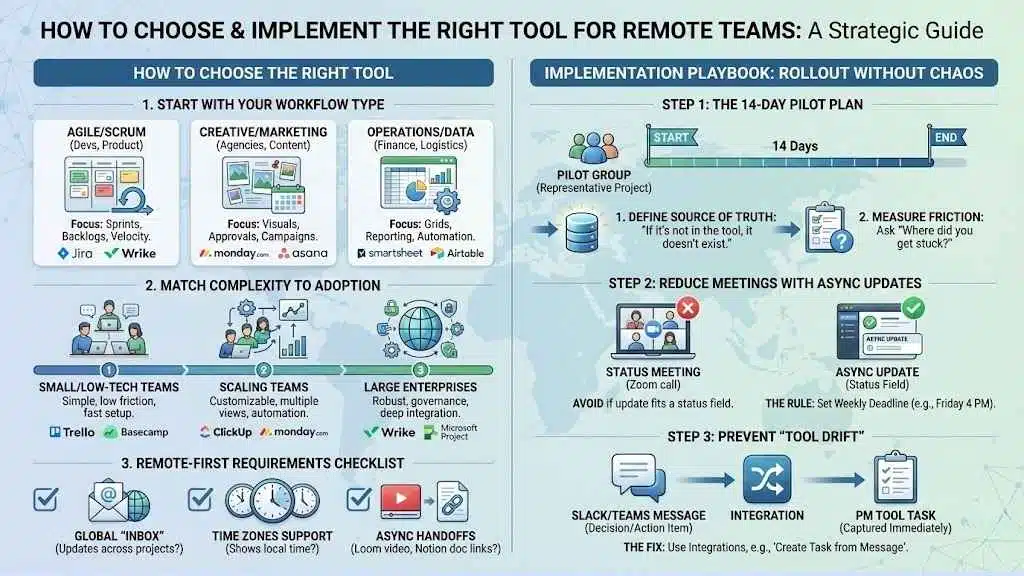
Start with Your Workflow Type
Before looking at features, identify your dominant work style:
- Agile/Scrum: (Devs, Product) -> Look at Jira or Wrike.
- Creative/Marketing: (Agencies, Content) -> Look at monday.com or Asana.
- Operations/Data: (Finance, Logistics) -> Look at Smartsheet or Airtable.
Match Complexity to Adoption
The “best” tool is the one your team actually uses.
- Small/Low-Tech Teams: Choose Trello or Basecamp.
- Scaling Teams: Choose ClickUp or monday.com.
- Large Enterprises: Choose Wrike or Microsoft Project.
Remote-First Requirements Checklist
- Does it have a global “Inbox”? (Crucial for seeing updates across projects).
- Can it handle time zones? (Does it show “local time” for assignees?).
- Does it support async handoffs? (Can I record a Loom video or link a Notion doc easily?).
Implementation Playbook: Rollout Without Chaos
Introducing a new tool to a remote team can backfire if not handled delicately. Follow this 3-step plan:
1. The 14-Day Pilot Plan
Don’t move the whole company at once. Pick one representative project and a small “pilot group.”
- Define the Source of Truth: Declare that “if it’s not in the tool, it doesn’t exist.”
- Measure Friction: Ask the pilot group: “Where did you get stuck?”
2. Reduce Meetings with Async Updates
The primary goal of a PM tool is to kill the status meeting.
- The Rule: If an update can be written in a status field, it doesn’t need a Zoom call.
- The Cadence: Set a weekly deadline (e.g., Friday by 4 PM) for all task statuses to be updated.
3. Prevent “Tool Drift”
“Tool Drift” happens when decisions are made in Slack/Teams but never recorded in the PM tool.
- The Fix: Use integrations. Use the “Create Task from Message” feature in Slack to ensure every conversation that turns into an action item is captured immediately.
Final Thoughts
Choosing the right project management tool in 2026 isn’t just about tracking tasks—it’s about building a digital headquarters that replaces the physical office. For remote teams, the tool you select becomes the lens through which everyone sees their work, their colleagues, and the company’s goals. Whether you opt for the visual flexibility of monday.com, the structured power of Jira, or the documentation-first approach of Notion, the goal remains the same: clarity over chaos.
Remember that no software can fix a broken culture. A tool is only as effective as the communication norms you build around it. To succeed, you must commit to moving away from “management by interruption” (constant pings) and toward management by objective. By centralizing your workflows, you empower your team to work autonomously, respect deep-work hours, and stay aligned across any time zone.
Start with a pilot, lean into automation to reduce “work about work,” and watch your remote team’s productivity—and morale—climb. The right tool won’t just manage your projects; it will give your team the freedom to do their best work from anywhere in the world.