In today’s digital age, having a website is essential for individuals, entrepreneurs, and businesses alike. Whether you want to showcase your portfolio, start a blog, or create an online store, knowing the steps to build a simple website from scratch can empower you to establish an online presence with ease.
A well-designed website boosts credibility, enhances brand visibility, and provides a platform to connect with your audience effectively.
This guide walks you through the process, from planning your website to launching it successfully. By following these 10 steps to build a simple website from scratch, you will gain the knowledge and confidence to create a professional and user-friendly site without prior technical expertise.
Step 1: Define Your Website’s Purpose and Goals
Before you dive into designing and coding, it’s crucial to clarify the purpose of your website. A clear objective helps streamline the entire website-building process, from content creation to design and marketing. Identifying your goals ensures that your site aligns with your target audience’s needs and provides real value.
Key Questions to Consider:
| Question | Why It Matters |
| What is the main objective of your website? | Helps you decide the right features and functionalities. |
| Who is your target audience? | Defines your design, tone, and content strategy. |
| What type of content will you offer? | Ensures engaging and relevant user experience. |
A well-defined purpose ensures your website remains focused and user-centric, ultimately enhancing user experience and engagement.
Step 2: Choose a Domain Name and Hosting Provider

Your domain name represents your brand online, so choosing the right one is vital. It serves as your digital identity and plays a significant role in branding, SEO, and user recall. A good domain name is short, easy to spell, and directly related to your niche.
Tips for Choosing a Domain Name:
| Tip | Why It’s Important |
| Keep it short and memorable | Easy for users to remember and type. |
| Avoid numbers and hyphens | Reduces confusion and improves readability. |
| Use relevant keywords | Helps with SEO and brand recognition. |
Selecting a Hosting Provider:
A web hosting provider stores your website files and makes them accessible online. Popular hosting options include:
| Hosting Provider | Features | Pricing |
| Bluehost | Free domain, 24/7 support, WordPress integration | Starts at $2.95/month |
| SiteGround | Fast speed, strong security, daily backups | Starts at $3.99/month |
| Hostinger | Affordable, beginner-friendly, free SSL | Starts at $1.99/month |
Choosing the right hosting provider ensures website reliability, security, and speed.
Step 3: Plan Your Website Structure and Content
A well-structured website enhances usability and SEO by providing a logical flow that guides visitors seamlessly through the content. Proper planning involves organizing pages intuitively, using clear navigation menus, and ensuring easy access to essential information.
A well-planned structure also improves search engine rankings, as it allows search engines to crawl and index content more efficiently. Ultimately, a thoughtfully designed website enhances user experience, reduces bounce rates, and increases engagement.
Essential Pages Every Website Should Have:
| Page | Purpose |
| Home Page | The first impression of your website. Communicates your value proposition. |
| About Page | Shares details about you or your business. Builds trust with visitors. |
| Services/Products Page | Lists offerings with descriptions, pricing, and benefits. |
| Contact Page | Provides an easy way for visitors to reach you via email, phone, or form. |
| Blog (Optional) | Shares insights, updates, and informative content to engage users. |
A clear structure enhances navigation and improves user retention.
Step 4: Select the Right Website Building Platform
You can build a website using different platforms depending on your technical skills and needs. A website builder simplifies the process, offering pre-designed templates and drag-and-drop functionality, making it ideal for beginners.
Coding, on the other hand, provides complete customization, allowing developers to create unique features and optimize performance. The choice between a website builder and custom coding depends on factors like budget, time constraints, and the complexity of the website you want to build.
Popular Website Builders:
| Platform | Best For | Pros |
| WordPress.org | Blogs, businesses, e-commerce | Flexible, SEO-friendly, vast plugin library |
| Wix | Small businesses, personal sites | Drag-and-drop builder, beginner-friendly |
| Shopify | E-commerce websites | Integrated payment options, inventory management |
Each platform has its strengths, so choose one that aligns with your website goals.
Step 5: Design the Website Layout and User Experience
Your website’s design should be visually appealing, intuitive, and easy to navigate. A well-structured layout guides users seamlessly, making information accessible and engaging. First impressions matter—visitors typically form an opinion about your website within seconds.
A clean design with clear navigation, high-quality visuals, and mobile responsiveness can significantly enhance user experience, encouraging visitors to stay longer and interact with your content.
Design Best Practices:
| Factor | Recommendation |
| Simplicity | Use a clean, minimalistic layout for clarity. |
| Responsiveness | Ensure it adapts to mobile, tablet, and desktop screens. |
| Readability | Use high-contrast text and readable fonts. |
A well-designed website keeps visitors engaged and encourages them to explore more content.
Step 6: Develop the Website’s Core Structure
Building a website requires establishing a solid foundation that ensures functionality, performance, and ease of navigation. The core structure of your website consists of essential elements such as layouts, menus, content sections, and interactive features.
Choosing the right method to develop your website—whether through a website builder or coding from scratch—depends on your skill level, customization needs, and long-term scalability.
Using a Website Builder:
- Choose a template that suits your industry and aligns with your brand identity.
- Customize colors, fonts, and layout to create a unique and visually appealing design.
- Add and arrange sections like images, text, and videos strategically to enhance user engagement and readability.
- Utilize drag-and-drop functionality to make quick modifications and improvements without coding.
- Integrate essential plugins or widgets for additional functionality, such as contact forms, live chat, or social media feeds.
- Optimize the design for mobile responsiveness to ensure seamless viewing on all devices.
Coding from Scratch (For Advanced Users):
| Language | Purpose |
| HTML | Structure of the webpage. |
| CSS | Styling and layout. |
| JavaScript | Adds interactivity. |
If you’re new to coding, website builders can simplify the process.
Step 7: Optimize for SEO and Performance
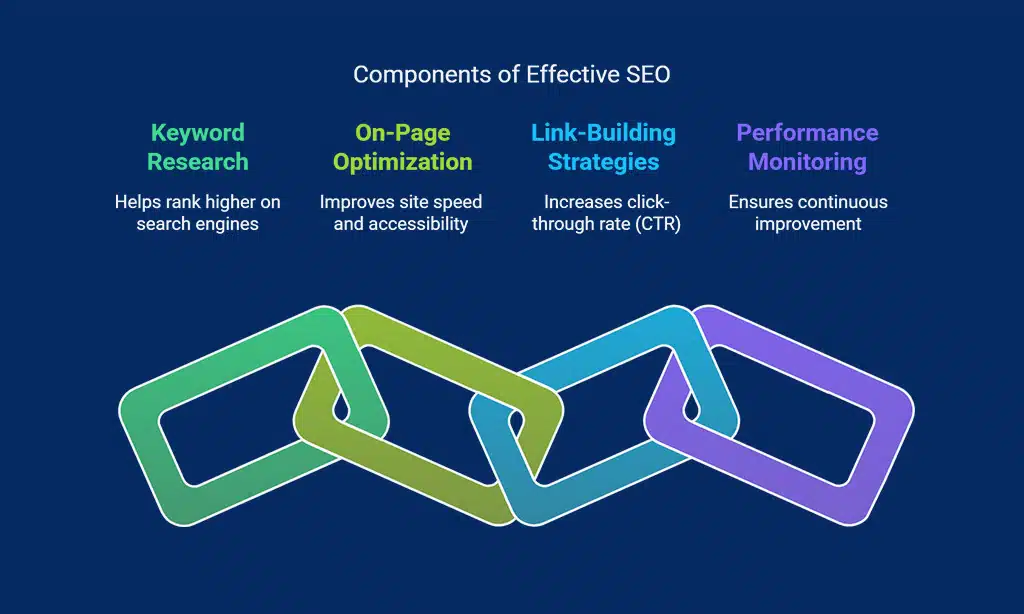
SEO ensures your website ranks well on search engines by making it easier for users to discover your content. A well-optimized site attracts more visitors, enhances engagement, and improves visibility, ultimately leading to higher conversions. Effective SEO involves keyword research, on-page optimization, link-building strategies, and continuous performance monitoring to stay ahead of competitors in search rankings.
Key SEO Practices:
| Practice | Benefit |
| Use relevant keywords | Helps rank higher on search engines. |
| Optimize images | Improves site speed and accessibility. |
| Write compelling meta descriptions | Increases click-through rate (CTR). |
SEO optimization helps your site rank higher on Google, attracting more visitors.
Step 8: Add Essential Features and Plugins
Enhance functionality with essential plugins and integrations that improve performance, security, and user experience. Plugins help automate tasks, optimize website speed, and ensure smooth operation. Integrations with tools like Google Analytics, CRM systems, and social media platforms can further enhance the site’s capabilities, providing better insights and engagement opportunities for visitors.
Must-Have Plugins:
| Feature | Recommended Plugin |
| SEO | Yoast SEO, Rank Math |
| Security | Wordfence, Sucuri |
| Performance | WP Rocket, W3 Total Cache |
These tools help improve your site’s security, speed, and analytics tracking.
Step 9: Test Your Website Before Launch
Before launching your website, thorough testing is essential to ensure functionality, performance, and a seamless user experience. This step helps identify and fix any technical glitches, broken links, design inconsistencies, or performance issues that may affect usability. A well-tested website ensures a professional and error-free browsing experience, reducing bounce rates and enhancing engagement.
Key Areas to Test:
| Test Category | Description |
| Functionality | Check all interactive elements, such as buttons, forms, and links, to ensure they work properly. |
| Compatibility | Test your website on multiple browsers (Chrome, Firefox, Safari, Edge) and devices (desktop, tablet, mobile). |
| Performance | Assess page load speed and optimize images, scripts, and caching for a faster experience. |
| Security | Run security scans to detect vulnerabilities and install SSL certificates for encrypted connections. |
| User Experience | Gather feedback from test users to identify navigation or design issues that may impact usability. |
Checklist for Testing:
| Test | Why It’s Important |
| Check for broken links | Ensures all links work properly and direct users to the right pages. |
| Ensure mobile responsiveness | Provides a seamless experience across all screen sizes and devices. |
| Test page load speed | Enhances user experience and SEO ranking by minimizing load time. |
| Verify contact forms and email submissions | Ensures that user inquiries and communications function properly. |
| Test payment gateways (if applicable) | Confirms that transactions process smoothly and securely. |
| Cross-browser testing | Ensures a consistent experience on different web browsers. |
| Check for spelling and grammar errors | Enhances professionalism and credibility. |
Thorough testing before launch guarantees that your website is functional, user-friendly, and optimized for search engines, providing a smooth and enjoyable experience for visitors.
| Test | Why It’s Important |
| Check for broken links | Ensures all links work properly. |
| Ensure mobile responsiveness | Provides a seamless experience across devices. |
| Test page load speed | Enhances user experience and SEO ranking. |
Proper testing ensures a seamless user experience before making your website live.
Step 10: Launch and Maintain Your Website
A successful launch is just the beginning. Regular maintenance is essential to ensure your website remains secure, updated, and optimized for performance. This includes updating software, monitoring analytics, fixing broken links, and keeping content fresh.
Regular security checks help protect against cyber threats, while performance optimization ensures fast loading times and a smooth user experience. By maintaining your website consistently, you enhance user engagement, improve SEO rankings, and provide a seamless browsing experience for visitors.
Ongoing Website Maintenance Tips:
| Task | Benefit |
| Update content | Keeps information fresh and engaging. |
| Monitor analytics | Helps track user behavior and optimize accordingly. |
| Run security scans | Prevents hacking threats and data loss. |
Maintaining your website ensures long-term success and relevance.
Final Thoughts
Building a website from scratch may seem overwhelming at first, but by following these 10 steps, you can create a functional, engaging, and professional online presence. Whether you choose a website builder or prefer coding from scratch, the key is to plan strategically, optimize for performance and SEO, and maintain your site regularly.
A well-maintained website not only attracts visitors but also keeps them coming back, ultimately helping you achieve your digital goals. Stay updated with the latest web design trends, implement security measures, and continuously enhance user experience to ensure your website remains relevant in the ever-evolving online world.