Finding the right tools for creating online courses can make the difference between a frustrating launch and a highly profitable educational business. Whether you are transitioning from freelance content writing and copy editing to selling your own masterclasses or modernizing an SME with digital training products, the landscape of e-learning has shifted dramatically by 2026.
Today’s creators need more than just a place to host videos; they require comprehensive ecosystems that handle interactive video editing, community building, secure checkouts, and built-in SEO to align with Google’s E-E-A-T guidelines. The software you choose dictates not only your students’ learning experience but also how efficiently you can scale your operations.
How We Evaluated the Best Tools for Creating Online Courses
To curate this list, we looked beyond basic hosting platforms. We divided our selection into complete Learning Management Systems (LMS), specialized video/audio editors, and interactive asset builders. Here are the core metrics used to evaluate the top software for course creators this year.
| Criteria | Evaluation Metric | Why It Matters |
| Content Delivery | Video hosting quality & interactive elements | Students expect high-fidelity, buffer-free video and engaging quizzes, not just text on a screen. |
| Monetization & Marketing | Built-in checkouts, upsells, and affiliate centers | Reduces the need to pay for third-party cart software to process transactions. |
| Customization & API | White-labeling and webhook/API access | Crucial for backend developers wanting to connect their course to custom micro-services or external databases. |
| Student Engagement | Native community spaces and gamification | High completion rates rely on peer-to-peer interaction and progress tracking. |
| Asset Creation | Timeline editing, screen recording, and UI design | You need reliable software to actually build the lesson materials before hosting them. |
The 12 Best Tools for Creating Online Courses
From all-in-one business platforms to highly specialized video editors, these 12 tools represent the ultimate tech stack for modern course creators.
1. Kajabi
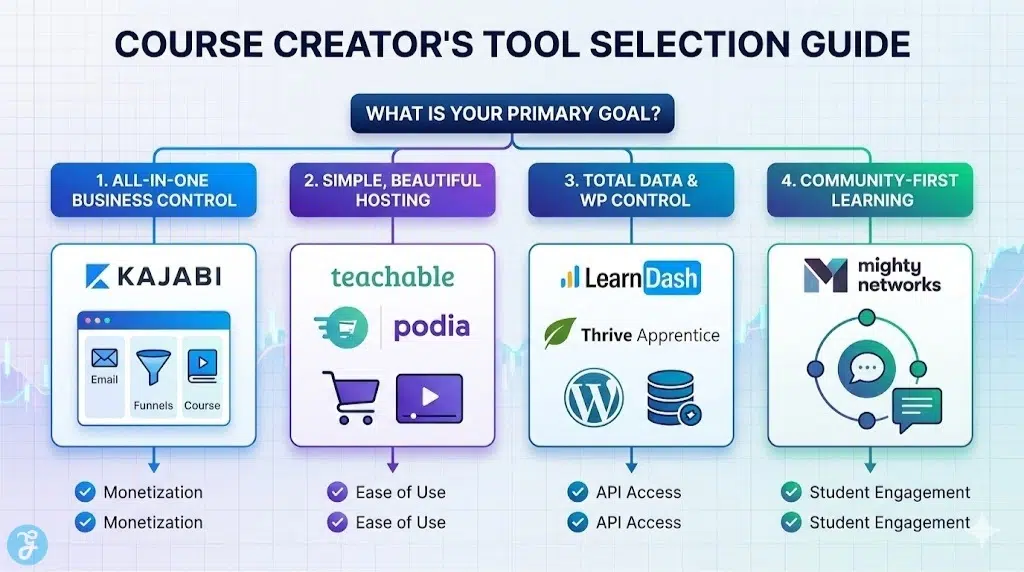
Kajabi remains the heavyweight champion of the all-in-one course platform market. It is designed to replace your website builder, email marketing software, sales funnel builder, and course host entirely. In 2026, Kajabi’s built-in AI assistant helps outline curriculums and draft marketing copy in seconds. It is the absolute best choice for creators who want to manage their entire digital business under a single dashboard without duct-taping different software together.
-
Best features: Seamless integration of courses, email marketing, and high-converting checkout pages.
-
Pros: Eliminates the need for multiple software subscriptions; excellent mobile app for students.
-
Things to consider: It comes with a premium price tag, which can be steep for beginners who haven’t validated their course idea yet.
2. Teachable
Teachable focuses heavily on doing one thing exceptionally well: delivering a beautiful, intuitive learning experience. It is much easier to set up than Kajabi and offers a highly generous free plan for creators just starting out. Teachable handles all the complicated tax compliance (like EU VAT) automatically, which is a massive headache-saver. Its coaching product feature also allows you to seamlessly mix pre-recorded courses with one-on-one live calendar bookings.
-
Best features: Automatic tax handling and integrated coaching/consultation booking.
-
Pros: Very user-friendly interface and excellent payout infrastructure for managing affiliate partners.
-
Things to consider: The page builder for sales pages is somewhat rigid compared to dedicated landing page software.
3. Thinkific
Thinkific is Teachable’s biggest rival, and it wins out when it comes to raw course-building flexibility. Thinkific allows you to build highly complex curriculums with prerequisite lessons, randomized question banks for exams, and detailed student progress reporting. If you are building corporate training materials or highly technical courses where verifying student knowledge is critical, Thinkific is the superior choice.
-
Best features: Advanced student assessments, randomized quizzes, and excellent bulk-enrollment tools.
-
Pros: Zero transaction fees on paid plans and a highly customizable course player environment.
-
Things to consider: It lacks built-in email marketing automation, meaning you will need to integrate a tool like Mailchimp or ConvertKit.
4. LearnDash
If you want total ownership of your data and prefer building on WordPress, LearnDash is the undisputed king of LMS plugins. Unlike hosted platforms, LearnDash turns your existing WordPress site into a fully functional school. It offers unparalleled flexibility for backend developers, allowing you to hook into its REST API and build custom micro-service integrations. It also features robust “Focus Mode” to eliminate distractions while students are learning.
-
Best features: Deep WordPress integration, Focus Mode, and complete data ownership.
-
Pros: No recurring monthly platform fees (just an annual plugin license); highly customizable.
-
Things to consider: Requires you to manage your own web hosting, video hosting (like Vimeo), and site security.
5. Podia
Podia is the platform for creators who sell a little bit of everything. If your business model includes selling a cohort-based course, a downloadable copy-editing template, a paid newsletter, and a private community, Podia handles all of it beautifully. It features a modern, clean storefront aesthetic that is incredibly easy to set up. It is widely loved for its transparent pricing and famously helpful customer support team.
-
Best features: Unified storefront for courses, digital downloads, webinars, and communities.
-
Pros: Incredibly simple learning curve and absolutely zero transaction fees on paid plans.
-
Things to consider: The course builder lacks advanced grading and complex interactive quiz features.
6. Mighty Networks
The e-learning industry is shifting heavily toward community-led courses, and Mighty Networks leads this charge. Instead of a course with a bolt-on forum, Mighty Networks is a powerful social network that allows you to embed courses directly into the community feed. Members can create profiles, direct message each other, and attend live events natively. It is the perfect tool for fostering deep engagement and recurring membership revenue.
-
Best features: Unmatched community-building tools and native live streaming capabilities.
-
Pros: Transforms static courses into highly engaging, interactive member experiences.
-
Things to consider: The backend interface can feel a bit cluttered due to the sheer volume of community features.
7. Descript
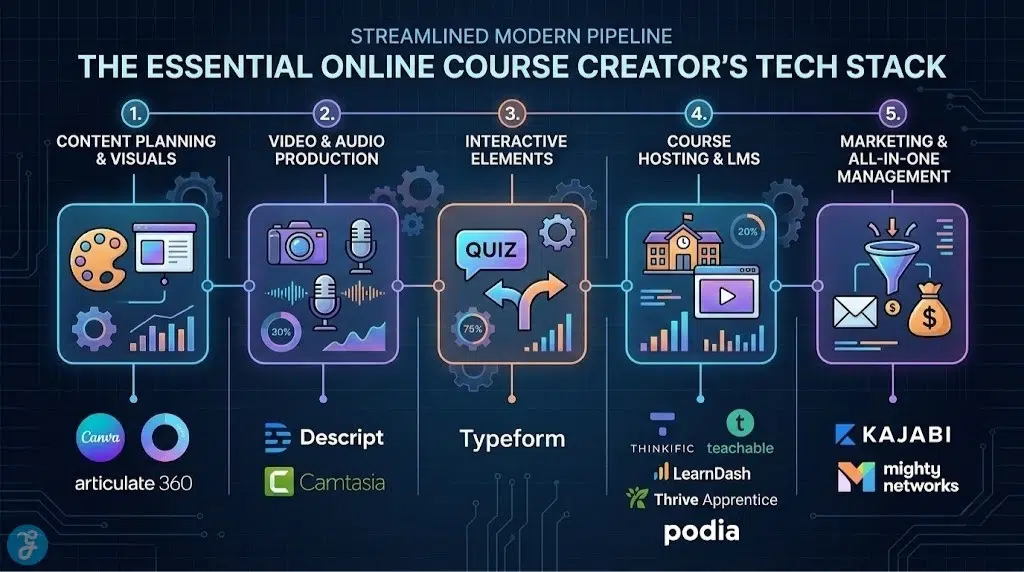
Moving away from hosting platforms, you need tools to actually create the content. Descript has revolutionized video and audio editing for course creators. It transcribes your video, allowing you to edit the video footage simply by deleting text in a document (like editing a Word doc). Its “Overdub” feature even lets you type text to generate an AI voice clone to fix flubbed words without having to re-record.
-
Best features: Text-based video editing and AI-powered studio sound enhancement.
-
Pros: Drastically reduces video editing time and removes the need to learn complex timeline software.
-
Things to consider: It relies heavily on cloud processing, so a strong internet connection is required for transcription.
8. Camtasia
While Descript is great for talking-head videos, Camtasia remains the industry standard for screen recording and technical tutorials. If you are teaching software, coding, or any on-screen process, Camtasia allows you to record your screen, add cursor highlights, zoom in on specific UI elements, and drop in lower-thirds with incredible ease. It is robust, reliable, and built specifically for instructional design.
-
Best features: Advanced screen recording, cursor smoothing, and interactive video quizzes.
-
Pros: The most precise tool available for software tutorials and on-screen demonstrations.
-
Things to consider: It is a heavy, desktop-based software with a relatively high upfront purchase cost.
9. Articulate Storyline 360
For enterprise-level training or highly interactive courses, Articulate Storyline 360 is the most powerful authoring tool available. It allows you to build courses that function almost like software applications, complete with drag-and-drop interactions, complex variable triggers, and customized learning paths based on student choices. It exports in SCORM or xAPI formats, allowing the courses to be hosted on almost any enterprise LMS.
-
Best features: Limitless interactivity programming and industry-standard SCORM exporting.
-
Pros: The absolute peak of instructional design capabilities for professional e-learning developers.
-
Things to consider: It has a very steep learning curve and a high enterprise-level price tag.
10. Canva
No course is complete without visual assets. Canva is indispensable for creating modern, clean, and professional slide decks, course workbooks, and marketing graphics. With its massive library of templates, you can easily maintain a consistent color palette across all your course materials. The built-in presentation recording feature even allows you to record your voice over your slides directly within the browser.
-
Best features: Thousands of educational templates and easy PDF workbook generation.
-
Pros: Makes professional graphic design accessible to non-designers; cloud-based collaboration.
-
Things to consider: For highly complex vector editing, you will still need Adobe Illustrator.
11. Thrive Apprentice
Thrive Apprentice is a fierce competitor to LearnDash in the WordPress ecosystem. It shines brightly when combined with the rest of the Thrive Suite, allowing you to use a visual drag-and-drop builder to design exactly how your course modules look. It integrates deeply with WordPress SEO plugins, ensuring your course landing pages are optimized to rank well on Google, adhering to strong content structure and readability metrics.
-
Best features: Visual drag-and-drop course design and deep integration with WordPress marketing tools.
-
Pros: Excellent for building highly optimized, conversion-focused course sales funnels on WordPress.
-
Things to consider: The sheer number of options in the Thrive Suite can be overwhelming for beginners.
12. Typeform
Engaging your students before and during the course is vital. Typeform is the best tool for creating beautiful, conversational surveys and assessments. You can use it to gather student feedback, create onboarding questionnaires to segment your students into different email sequences, or build interactive mid-course knowledge checks. Its sleek UI makes filling out forms feel like a premium experience rather than a chore.
-
Best features: Conversational, one-question-at-a-time interface and advanced logic jumping.
-
Pros: Significantly higher completion rates than standard web forms; integrates easily via webhooks.
-
Things to consider: The free tier is heavily restricted regarding the number of responses you can collect.
Quick Overview
The following table summarizes these essential tools to help you build your ideal course creation stack.
Comparison Table
| Tool Name | Primary Function | Best For | Pricing Model |
| Kajabi | All-in-One Platform | Managing your entire business | Premium Monthly |
| Teachable | Course Hosting | Easy setup & tax handling | Freemium / Monthly |
| Thinkific | Course Hosting | Advanced curriculum & quizzes | Freemium / Monthly |
| LearnDash | WordPress LMS | Developers & data ownership | Annual License |
| Podia | Digital Storefront | Selling varied digital products | Freemium / Monthly |
| Mighty Networks | Community LMS | Cohort and community-led courses | Monthly |
| Descript | Video Editing | Fast, text-based editing | Freemium / Monthly |
| Camtasia | Screen Recording | Software tutorials & screencasts | One-time License |
| Articulate 360 | SCORM Authoring | Enterprise interactive learning | Annual License |
| Canva | Asset Design | Slide decks & workbooks | Freemium / Monthly |
| Thrive Apprentice | WordPress LMS | Conversion-focused design | Annual License |
| Typeform | Assessments | Conversational student surveys | Freemium / Monthly |
Quick Picks
If you need a fast recommendation to start building today:
-
Best for All-in-One Convenience: Kajabi
-
Best for WordPress Control: LearnDash
-
Best for Video Editing: Descript
-
Best for Community Engagement: Mighty Networks
Final Thoughts On Course Creation Software
Choosing the right combination of tools for creating online courses will ultimately save you hundreds of hours in production and administrative work. We recommend starting by selecting your core hosting platform (like Teachable or WordPress with LearnDash) and then supplementing it with powerful creation software (like Descript and Canva). By investing in a tech stack that handles the heavy lifting, you can focus entirely on what matters most: delivering high-quality, transformative educational content to your students.