

Typing a quick sentence and getting a cinematic video used to be a pipe dream. Now, it is just Tuesday. If you want to create videos without buying expensive camera gear or hiring a production crew, you need a reliable AI text to video generator. The technology moved fast. We left the era of glitchy, weird-looking outputs behind.
Today’s tools give you hyper-realistic movement, synchronized audio, and incredible lighting. Whether you are a solo creator, a marketer, or a filmmaker, finding the right platform saves you hours of work. But the market is flooded. Every day, a new software claims to be the absolute best. We cut through the noise. We looked at video realism, prompt accuracy, and pricing to find the tools that actually deliver. Here is our breakdown of the 15 best options available right now to help you build your visual content.
How We Evaluated These Video Generators?
Finding the perfect AI text to video generator means looking past the marketing hype and focusing entirely on raw performance. We tested how well each platform understands complex prompts, checking if the AI actually includes every single detail you typed into the box. We paid close attention to physical realism, looking specifically at how the models handle tricky elements like fluid dynamics, walking animations, and object permanence.
We also evaluated the user interface, because a tool that takes three hours to figure out is simply not worth your time. Commercial safety was another massive factor, as businesses need clear licensing rules to avoid copyright strikes when running ads. Finally, we looked at rendering speeds and audio integration to see which platforms offer a truly finished product right out of the gate.
| Feature Analyzed | What We Looked For | Why It Matters |
| Visual Realism | Natural lighting, accurate human anatomy, and proper physics. | Unrealistic videos break viewer immersion instantly. |
| Prompt Adherence | Does the AI actually include every detail you typed? | You shouldn’t have to roll the dice to get what you asked for. |
| Audio Integration | Native sound effects, background noise, and lip-syncing. | Silent videos require extra editing time in other software. |
| Commercial Safety | Clear licensing rules and safe training data. | Businesses need to know they won’t get sued for using the video. |
1. Google Veo
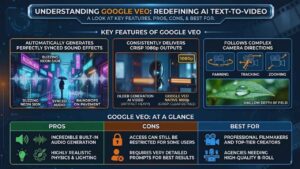
Google Veo completely redefines what you expect from an AI text to video generator. When you type in a prompt for a rainy cyberpunk street, Veo does not just give you the visuals; it generates the exact sound of raindrops hitting the pavement and neon signs buzzing in the background. The physics engine is incredibly robust, meaning water splashes naturally and smoke drifts exactly how it should in real life. It natively outputs in crisp 1080p resolution, avoiding the blurry, artifact-heavy look that plagued older generation tools.
Professional filmmakers use Veo for storyboarding and creating high-quality B-roll because it understands complex cinematic language. You can ask for a macro lens shot with a shallow depth of field, and the AI knows exactly how to blur the background. It integrates smoothly into professional workflows, making it the top choice for creators who refuse to compromise on lighting, sound, and visual fidelity.
Key Features of Google Veo
- Automatically generates perfectly synced sound effects based on your prompt.
- Consistently delivers crisp 1080p outputs without severe artifacting.
- Follows complex camera directions like panning, tracking, and zooming.
| Pros | Cons | Best For |
| Incredible built-in audio generation. | Access can still be restricted for some users. | Professional filmmakers and top-tier creators. |
| Highly realistic physics and lighting. | Requires very detailed prompts for best results. | Agencies needing high-quality B-roll. |
2. OpenAI Sora
OpenAI Sora remains a powerhouse for deep world-building and narrative storytelling. It understands the physical world better than almost any other model, knowing exactly how objects should interact with each other without melting together. You can generate extended video clips up to a full minute on premium tiers, which is massive for creators looking to tell a complete story without relying on quick cuts. Sora maintains strict character consistency across different angles.
If your subject is wearing a specific green jacket in the first second, they will still be wearing it fifty seconds later, even if the camera circles them entirely. The model also handles occlusion perfectly, meaning if a car drives behind a building, it reappears on the other side naturally instead of vanishing. It is the ultimate sandbox for high-end commercial production and detailed creative concepts.
Key Features of OpenAI Sora
- Can generate extended video clips without losing structural integrity.
- Handles multiple characters and busy backgrounds easily.
- Shows a deep understanding of gravity, fluid dynamics, and object permanence.
| Pros | Cons | Best For |
| Best-in-class physics and object permanence. | Rendering times can be quite long. | Storytellers needing complex scenes. |
| Unmatched character consistency. | High subscription cost for heavy users. | High-end commercial production. |
3. Runway Gen-3
Runway is the tool you want when you need absolute control over every pixel on the screen. Unlike simple prompt boxes, Runway acts like a full-scale visual effects suite. You use features like the Motion Brush to literally paint over a specific part of an image and dictate exactly which way it should move. If you want the water in a static image to flow left while the clouds move right, Runway handles it effortlessly.
It gives video editors the precise camera controls they need, allowing for exact adjustments to panning speed, zoom intensity, and tilt. It also features built-in lip-syncing, so you can upload an audio file and have your generated character speak the lines naturally. It is built entirely for professional editors and VFX artists who treat AI as an instrument rather than a slot machine.
Key Features of Runway Gen-3
- Paint specific areas to control exactly where and how motion happens.
- Dictate the speed and direction of camera movements.
- Easily match generated audio to character faces within the platform.
| Pros | Cons | Best For |
| Extreme granular control over motion. | UI can feel overwhelming for beginners. | VFX artists and professional editors. |
| Excellent integration with other editing tools. | Credit system burns fast on high-res renders. | Creators who want exact control over movement. |
4. Kling AI
Developed by Kuaishou, Kling AI took the internet by storm specifically because of its hyper-realistic human movements. If you need a video of someone eating a complex meal, drinking water, or performing a delicate physical task, Kling handles it beautifully where other models fail. It captures the subtle micro-expressions on a human face that make footage look genuine rather than synthetic.
You can seamlessly extend your videos within the platform, chaining multiple short clips together to build a longer, cohesive narrative up to two or three minutes. The platform is incredibly fast and highly optimized for mobile viewing formats. It is currently the top choice for social media creators who need realistic lifestyle footage or want to create viral clips featuring human subjects interacting naturally with their environment.
Key Features of Kling AI
- Generates realistic faces, hands, and bodily movements.
- Easily add time to a generated clip without weird transitions.
- Maintains the look of a subject even as the camera moves around them.
| Pros | Cons | Best For |
| Unbelievable realism with human subjects. | Interface translation can sometimes be clunky. | Social media creators making viral content. |
| Great at handling complex physical actions. | Server wait times during peak hours. | Anyone needing realistic human interaction shots. |
5. Luma Dream Machine
Luma Dream Machine dominates the market when it comes to pure speed and accessibility. When you have a sudden creative idea and just want to see how it looks visually, Luma spits out a high-quality render in under two minutes. It is incredibly accessible with one of the most generous free tiers available, allowing beginners to experiment heavily without pulling out a credit card.
It handles standard cinematic prompts beautifully and is particularly strong at creating seamless looping videos. This makes it perfect for generating Spotify canvas backgrounds, website hero videos, or repeating social media memes. While it might not have the heavy-duty editing features of Runway, its rapid processing power makes it the absolute best playground for brainstorming and fast prototyping.
Key Features of Luma Dream Machine
- Generates clips significantly faster than competitors.
- Allows users to experiment heavily without paying upfront.
- Great at creating looping videos for backgrounds or social media.
| Pros | Cons | Best For |
| Very fast rendering speeds. | Struggles with highly complex, multi-subject prompts. | Beginners and casual users. |
| Cost-effective for casual use. | Shorter maximum clip lengths. | Meme creators and rapid prototyping. |
6. HeyGen
HeyGen takes a completely different path from the cinematic world builders by focusing exclusively on talking-head videos. You simply write a script in their AI text to video generator prompt box, and the platform gives you a photorealistic human avatar reading those exact words. The lip-syncing is flawless, matching the syllables perfectly. You can upload a short video of yourself to create a custom digital twin, cloning both your appearance and your exact voice tone.
It also features a massive translation engine, allowing you to instantly convert your English video into over 170 different languages while maintaining your natural speaking rhythm. This eliminates the need for expensive studio rentals, teleprompters, and camera gear, making it the ultimate scaling tool for marketers, educators, and global sales teams.
Key Features of HeyGen
- Hundreds of stock avatars or the ability to create a custom digital twin.
- Clone your voice and translate it instantly into over 170 languages.
- The avatar’s mouth moves naturally with the generated audio.
| Pros | Cons | Best For |
| Eliminates the need for a camera and studio. | Not designed for cinematic or landscape videos. | Marketers creating ads at scale. |
| Massive time saver for international content. | Custom avatars can look slightly stiff sometimes. | Corporate trainers and educators. |
7. Adobe Firefly Video
Adobe Firefly solves the single biggest headache for major brands and advertising agencies: the fear of copyright infringement. Adobe trained this video generation model entirely on licensed Adobe Stock and public domain content. That means you can use the output for commercial projects without waiting for a lawsuit from angry artists. It integrates directly into the software you likely already use, working seamlessly inside Premiere Pro and After Effects.
You can highlight a section of your video timeline and use generative fill to add or remove elements naturally. The model understands traditional video editing terminology flawlessly, so if you ask for a specific color grade or lighting setup, it matches your existing brand assets perfectly without any guesswork.
Key Features of Adobe Firefly Video
- Trained exclusively on safe data, protecting you from copyright claims.
- Works directly inside your existing Adobe workflow.
- Easily matches the visual style of your existing brand assets.
| Pros | Cons | Best For |
| Zero copyright risks for commercial use. | Strict safety filters block many creative prompts. | Enterprise marketing teams. |
| Fits perfectly into the Adobe ecosystem. | Sometimes less photorealistic than Sora or Veo. | Ad agencies and brand managers. |
8. Hailuo AI (MiniMax)
Hailuo AI is a fast, highly capable tool that excels at prompt adherence and stylized motion. It is built from the ground up to create short, snappy clips that work perfectly as hooks on platforms like TikTok, Instagram Reels, and YouTube Shorts. It handles text-to-motion incredibly well, meaning if you ask for rapid, dynamic movement, the AI delivers without the image breaking apart. It also dominates in non-realistic art styles.
If you want an anime sequence, a 3D Pixar-style render, or a watercolor painting coming to life, Hailuo handles it beautifully. It requires absolutely zero technical background to use, offering a stripped-down, straightforward web interface that gets you from a typed sentence to a finished six-second clip in under a minute.
Key Features of Hailuo AI
- Excels at both realistic and heavily stylized artistic prompts.
- Consistently delivers 6-second clips in under a minute.
- Stripped-down, easy-to-use web interface.
| Pros | Cons | Best For |
| Extremely easy to pick up and use. | Lacks advanced camera controls. | Social media managers. |
| Great at non-realistic art styles. | Watermarks on the free version. | Content creators needing quick, stylish clips. |
9. Synthesia
Synthesia is the enterprise standard for AI avatars, focusing heavily on secure corporate communications. Like HeyGen, it generates talking-head videos from text scripts, but it comes with rigorous data privacy and SOC 2 compliance standards. The avatars look incredibly polished and professional, making it the primary choice for human resources departments building onboarding modules or internal company updates.
You can build custom corporate avatars that represent your actual employees. It offers hundreds of pre-built video layouts, allowing you to quickly drop in your script, add bullet points to the screen, and generate a finished presentation. It ensures your brand maintains a clean, unified, and highly professional look across all global communications with minimal effort.
Key Features of Synthesia
- Built with strict data privacy and security standards in mind.
- Hundreds of pre-built video layouts for corporate use.
- Avatars include natural nods, blinks, and hand movements.
| Pros | Cons | Best For |
| Extremely professional, polished output. | Monthly limits on video minutes generated. | HR departments and internal comms. |
| Easy to update videos just by typing new text. | Avatars are strictly for business, lacking casual styles. | Sales teams doing outreach. |
10. Invideo AI
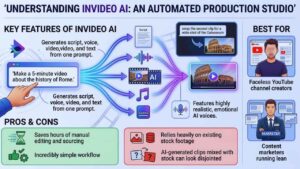
Invideo AI does all the heavy lifting for you, acting as an automated production studio. Instead of generating a single isolated clip, you type a broad prompt like “Make a 5-minute video about the history of Rome.” Invideo instantly writes an engaging script, generates an emotional AI voiceover, pulls relevant high-quality stock media, generates custom AI clips for the gaps, adds background music, and burns in the subtitles.
It gives you a fully finished video ready to upload in minutes. If you do not like a specific shot, you simply type “swap the second clip for a wide shot of the Colosseum” in the text box, and the editor fixes it immediately. It is the ultimate shortcut for running automated faceless YouTube channels.
Key Features of Invideo AI
- Generates script, voice, video, and text from one prompt.
- Allows you to swap out clips or rewrite the script easily using text commands.
- Features highly realistic, emotional AI voices for narration.
| Pros | Cons | Best For |
| Saves hours of manual editing and sourcing. | Relies heavily on existing stock footage. | Faceless YouTube channel creators. |
| Incredibly simple workflow. | AI-generated clips mixed with stock can look disjointed. | Content marketers running lean. |
11. Wan
Wan is the standout open-weight model in the current landscape, created by the team at Alibaba. It offers top-tier visual generation quality that genuinely rivals the big paid platforms, but it provides developers with the architecture to build upon. Because the weights are open, tech-savvy creators can run the model locally on their own powerful machines.
This allows you to completely bypass expensive monthly subscription fees and restrictive API costs. It excels at rendering complex, high-fidelity environments and integrates beautifully into advanced visual workflows like ComfyUI. If you have the technical skills to set it up, Wan gives you ultimate freedom, complete privacy, and massive rendering capabilities without relying on a corporate cloud server.
Key Features of Wan
- Allows for deep customization by developers and local execution.
- Produces sharp, detailed environmental shots and high-res outputs.
- Can be run locally without paying expensive API or subscription costs.
| Pros | Cons | Best For |
| Highly customizable and adaptable. | Requires technical knowledge to set up properly. | Developers building custom video tools. |
| Top-tier quality without the recurring subscription fee. | Hardware intensive to run locally. | Tech-savvy independent creators. |
12. Seedance
Created by Bytedance, the parent company of TikTok, Seedance knows exactly what makes a piece of short-form content go viral. It completely understands the visual language, pacing, and energy needed for modern social platforms. It defaults immediately to vertical 9:16 aspect ratios, ensuring you do not lose quality when cropping a widescreen video for your phone.
It generates fast-paced, highly dynamic camera movements like rapid zooms and energetic tracking shots. If you are trying to create a high-converting ad hook or a visually striking background for an Instagram Reel, Seedance produces results that grab the viewer’s attention in the crucial first three seconds.
Key Features of Seedance
- Tuned specifically for the algorithms of TikTok, Reels, and Shorts.
- Creates dynamic, fast-paced camera movements easily.
- Defaults to 9:16 aspect ratios without losing quality or framing.
| Pros | Cons | Best For |
| Perfect understanding of modern social media pacing. | Not ideal for slow, cinematic storytelling. | TikTok creators and Instagram influencers. |
| Very fast generation times for vertical video. | Less effective at long-form generation. | Social media ad agencies. |
13. LTX Studio
LTX Studio is built from the ground up for directors and storytellers. Instead of just giving the AI a single prompt for one moving picture, you feed LTX a full script or story concept. The AI then acts as your pre-production team, generating an entire shot-by-shot storyboard. It creates consistent character models and locks their seed numbers, so your main hero looks exactly the same in a wide establishing shot as they do in a tight close-up.
It automatically plans out the camera angles, lighting setups, and pacing for an entire sequence. It is a true pre-production powerhouse, allowing independent filmmakers to fully visualize an entire short film or commercial before they ever step onto a real set.
Key Features of LTX Studio
- Generates a full sequence of shots based on a narrative script.
- Keeps actors looking identical from shot to shot across different scenes.
- Automatically suggests wide shots, close-ups, and dramatic cutaways.
| Pros | Cons | Best For |
| Incredible for planning out full video projects. | Takes time to learn the sequencing workflow. | Indie filmmakers and directors. |
| Solves the character consistency problem perfectly. | Render times are longer due to multiple shots. | Pre-production creative teams. |
14. Kapwing AI
Kapwing merges the magic of AI generation with the practical necessity of a traditional timeline editor. You use their AI text to video generator prompt box to create a clip, and that clip drops directly onto a fully functional web-based timeline. From there, you do not have to export the file to Premiere or Final Cut. You can trim the edges, add dynamic text animations, drop in sound effects, apply your company brand kit, and export the final product all from the same browser tab.
It bridges the gap between raw AI generation and polished video editing. It is highly practical for solo creators who want to streamline their workflow and avoid bouncing between five different software applications just to finish one project.
Key Features of Kapwing AI
- Generate clips directly inside a traditional non-linear video editor.
- Handles generation, editing, subtitling, and exporting in the browser.
- Allows teams to log in and work on the same video project simultaneously.
| Pros | Cons | Best For |
| Eliminates the need for external editing software. | The AI generation model is slightly older than Veo/Sora. | Solo creators who want a streamlined workflow. |
| Great text and subtitling tools built-in. | Can lag in the browser on older computers. | Teams collaborating on video content. |
15. Pictory
Pictory targets writers, bloggers, and SEO content marketers who need to turn written words into engaging visual assets. You simply paste the URL of a 2,000-word blog post directly into Pictory. The AI scans the article, extracts the most important sentences to create a summary script, and automatically builds a highlight video.
It searches its massive integrated stock library to find footage that perfectly matches your topic, generates an AI voiceover to read the script, and burns in highly accurate, social-media-friendly subtitles. It is the absolute easiest way to repurpose your existing written content into long-form YouTube videos or short social media clips with minimal manual effort.
Key Features of Pictory
- Automatically condenses long articles into short, punchy video scripts.
- Uses AI to find stock footage that perfectly matches the spoken words.
- Creates highly accurate captions designed for social media viewing on mute.
| Pros | Cons | Best For |
| The best tool for repurposing blog posts into video. | Heavily reliant on stock footage libraries over raw generation. | Bloggers and SEO content teams. |
| Incredibly fast workflow for text-heavy creators. | Lacks the custom generative power of tools like Runway. | Marketers turning articles into YouTube videos. |
Final Thoughts
Video creation no longer requires a massive budget, a huge crew, or a degree in film production. Finding the right AI text to video generator just depends entirely on what you need to build today. If you want Hollywood-level realism and incredible sound design, Google Veo and Sora are unmatched. If you want to build a content empire without ever showing your real face on camera, tools like Invideo AI and HeyGen will save you hundreds of hours.
The technology space moves fast, and the tools get better every single week. Pick a platform that fits your workflow, start testing your prompts, and watch how quickly you can scale your visual content. Stop waiting for the perfect moment and start creating today.




























