Moving all your files and apps to the cloud can feel like trying to pack your whole house into a single suitcase. You might worry about losing something important or breaking a valuable item along the way. If you feel stuck on where to start, that is completely normal.
A recent DuploCloud report predicts that over 94% of organizations will use cloud infrastructure by the end of 2026. This shift isn’t just for the tech giants; it is happening for small teams who want smoother workdays, too.
In this guide, I will walk you through simple, proven steps to move your business safely. We will turn those confusing technical terms into a clear plan that makes switching tools feel manageable. Ready migrating to the cloud and make your work life easier? Let’s get started.
Why Migrate to the Cloud?
Moving to the cloud does more than just clear up hard drive space. It opens up new ways to save cash and helps your team move faster than competitors.
Cost efficiency
Cloud computing cuts your spending fast if you manage it right. You pay for what you use and skip buying pricey hardware that loses value over time.
Companies used to spend a fortune on servers, power, and cooling in their own buildings. Now, platforms like Google Cloud or Amazon Web Services (AWS) let you rent space online.
According to DuploCloud, migration projects typically deliver average cost savings of 20-30%. That means you can stop fixing old machines and put that money toward new ideas.
Small companies can test new products without emptying the bank account first. Large firms can scale up or down in minutes during busy seasons.
“FinOps is the secret sauce. It helps teams track every dollar so you don’t waste 27% of your cloud spend on unused resources,” notes the 2025 Flexera State of the Cloud Report.
Scalability
Big companies and startups love the freedom to grow fast. With cloud computing, you can add more storage or power in minutes. A toy store might see a huge jump in web traffic at Christmas. The cloud keeps websites running smoothly without panic calls to IT.
Gartner forecasts that worldwide IT spending will reach $6.15 trillion in 2026. A huge chunk of that is going into AI-ready servers that scale automatically.
You stay ready for today’s needs and tomorrow’s surprises with virtual resources always standing by.
Enhanced security
Next to scalability, security is a top reason for shifting online. Cloud providers like AWS and Microsoft Azure use cyber protection tools that most individual companies cannot afford.
They watch over your data night and day. Azure Sentinel, for example, uses AI to spot threats before they cause harm.
Security compliance has become much easier than it was five years ago. You get automatic updates, encryption, and disaster recovery with just a few clicks. If hackers knock on the door, cloud services keep them out by locking down sensitive business information.
Sustainability
Cloud computing helps cut down on energy use. Companies no longer need to keep large, power-hungry data centers running all night. Big providers have massive green goals. Google Cloud aims to run on carbon-free energy 24/7 by 2030.
Microsoft is also leading the charge. In their 2024 fiscal year, they reused or recycled over 90% of their servers and components. Moving your apps to shared servers lowers your carbon footprint significantly. It supports digital transformation while helping the planet.
Types of Cloud Migration
Cloud migration comes in many forms. You might move a single app or shift your entire data center.
Database migration
Moving your data feels like moving your most fragile boxes. Each database holds key details like customer records and billing info. Experts use specialized tools to copy this information safely. Services like the AWS Database Migration Service (DMS) handle the heavy lifting for you.
IT teams plan this carefully so nothing gets lost. Big banks use these methods to move millions of files while keeping accounts open for customers.
Security checks watch over the process to meet strict rules like GDPR. Once finished, your team can access data anywhere.
Application migration
Application migration means moving your software programs from old servers to the cloud. Many companies do this to tap into better disaster recovery.
You can move apps as they are or update them to run better. Using containers, like Docker, helps apps run consistently on any system.
Cloud computing tools let teams use virtualization for faster updates. Services like Software as a Service (SaaS) give access to modern features with less hassle. Application modernization lets businesses keep up with digital trends while following security compliance rules set for 2026.
Hybrid migration
Hybrid migration offers a smart way to blend old and new IT setups. Some data stays on local servers while other parts move to the cloud. Tools like Azure Arc let you manage your on-premise servers right alongside your cloud resources.
Many hospitals pick this option to keep sensitive patient records close by. They can update some systems without turning off important services.
It is like having one foot in your safe house and another exploring new ground. This approach makes transitions smoother for everyone involved in data migration.
Data center migration
Some businesses move their whole data centers to the cloud. Big companies shift entire IT infrastructures to slash costs. Data center migration takes every physical server, app, and database to a virtual setup. Cloud computing makes it easy to scale up or down as demand changes.
Security compliance improves, too, since leading providers use strict controls. With good planning, tech teams avoid service hiccups.
Cloud-to-cloud migration
Sometimes you need to switch from one cloud provider to another. This is called cloud-to-cloud migration. Companies often change providers for better pricing or specific features. A business might shift from AWS to Microsoft Azure to use their specific AI tools.
Cloud-to-cloud transfers require careful planning. You must check service level agreements (SLA) and keep data encrypted during the move.
Teams use automated tools to help with large-scale data migration. A successful transition keeps digital transformation on track.
Cloud Migration Strategies
There are several smart ways to move your data and apps. Each path has its own perks depending on your goals.
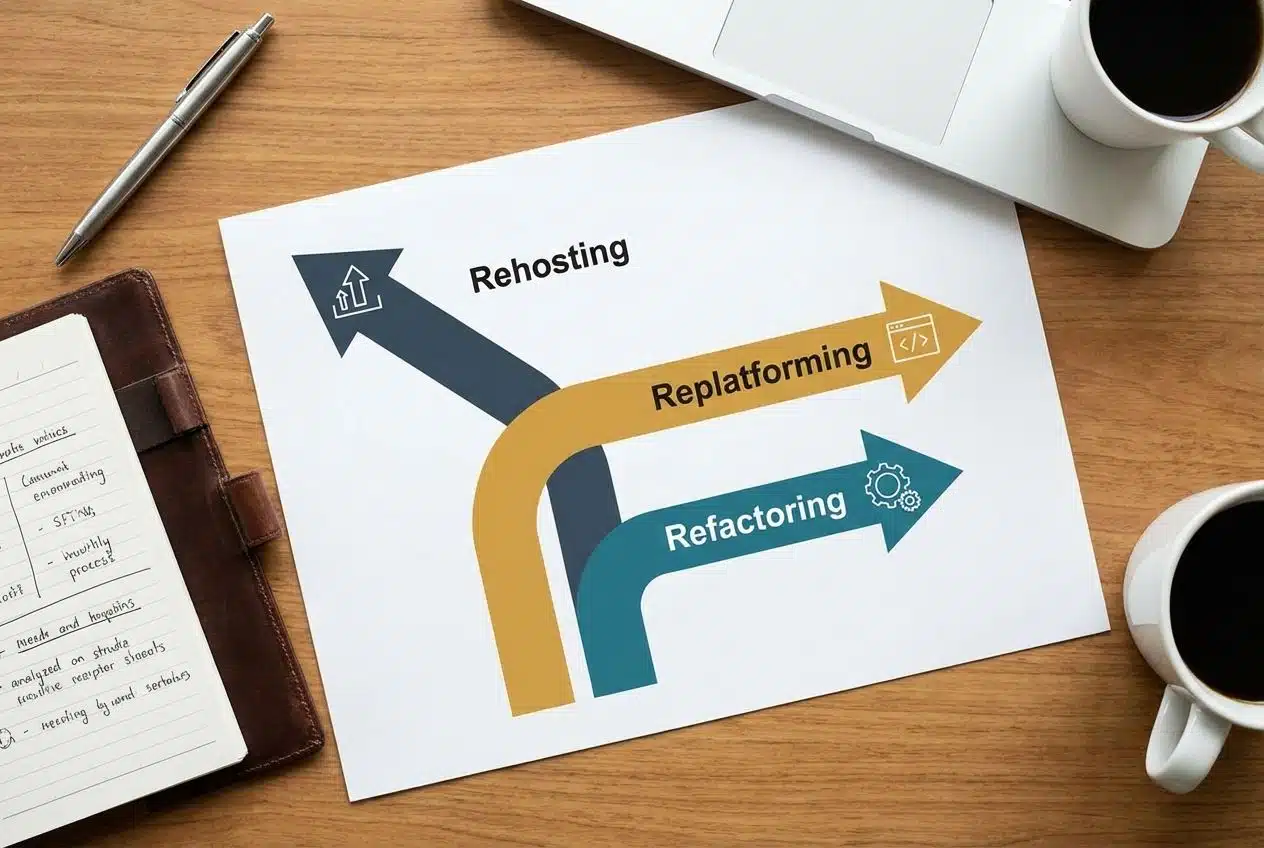
| Strategy | Best For | Key Benefit |
|---|---|---|
| Rehosting (Lift and Shift) | Speed and strict deadlines. | Moves your existing servers to the cloud without code changes. |
| Replatforming (Lift and Optimize) | Improving performance without a rewrite. | Moves apps to managed services like Amazon RDS for less maintenance. |
| Refactoring (Move and Improve) | Long-term flexibility and scale. | Rewrites code to use cloud-native features like autoscaling. |
Rehosting [Lift and Shift]
Rehosting moves your digital assets to the cloud without changing them. You take your existing servers and place them on new virtual machines.
This method saves time because you skip re-coding. It is popular with IT teams facing tight deadlines.
Many companies pick this strategy for quick wins in cost optimization. With rehosting, businesses can scale up faster while keeping core systems stable.
Replatforming [Lift and Optimize]
Replatforming moves your applications to the cloud with a few tweaks. You do not change the core design but you upgrade key parts. For example, you might switch databases to Amazon RDS or Azure SQL Database. This makes management easier and cheaper.
This strategy works well if you want cost optimization without a total rebuild. Teams use tools to automate these small changes. Preparing your infrastructure this way sets you up for future digital transformation steps.
Refactoring [Move and Improve]
Refactoring means updating your applications so they work even better in the cloud. This involves rewriting old code to use features like serverless computing.
You might swap out parts of your software for something faster. Large companies often see lower operating costs by embracing these automation tools. You get the chance to break apps into smaller services or “microservices.” This makes disaster recovery easier.
Refactoring takes time but pays off with a flexible IT infrastructure. It helps you meet high standards for performance and safety.
Repurchasing
Repurchasing moves you to entirely new tools. This approach swaps old software for cloud-based solutions like Software as a Service (SaaS). Think of trading your custom accounting system for QuickBooks Online or Salesforce. You pay a subscription fee and skip big IT upgrades.
Repurchasing helps with cost optimization because the provider handles security. Many companies pick this route for HR or CRM systems. It slashes maintenance tasks. Your team can focus on important goals instead of patching servers.
Retiring
Some applications simply outlive their value. Old tools slow down your migration and waste money. Shut down software that no longer serves a clear business need. Stop paying for licenses and remove them from your infrastructure.
This step cuts clutter. It ensures only useful apps move onto modern cloud services. Think of it like cleaning out closets before moving to a new home. Keep only what matters most.
Retaining
Some systems work better on your current IT infrastructure. You do not have to move every single thing. Older apps may struggle with virtualization. Also, legal rules might require you to keep certain databases local.
Think about which assets bring value if kept where they are. Retention can cut costs and lower risks. You get better results by moving only what makes sense. Do not force everything onto the cloud at once.
Steps in the Cloud Migration Process
Moving to the cloud feels like piecing together a big puzzle. Start small and follow these steps to keep your operations smooth.
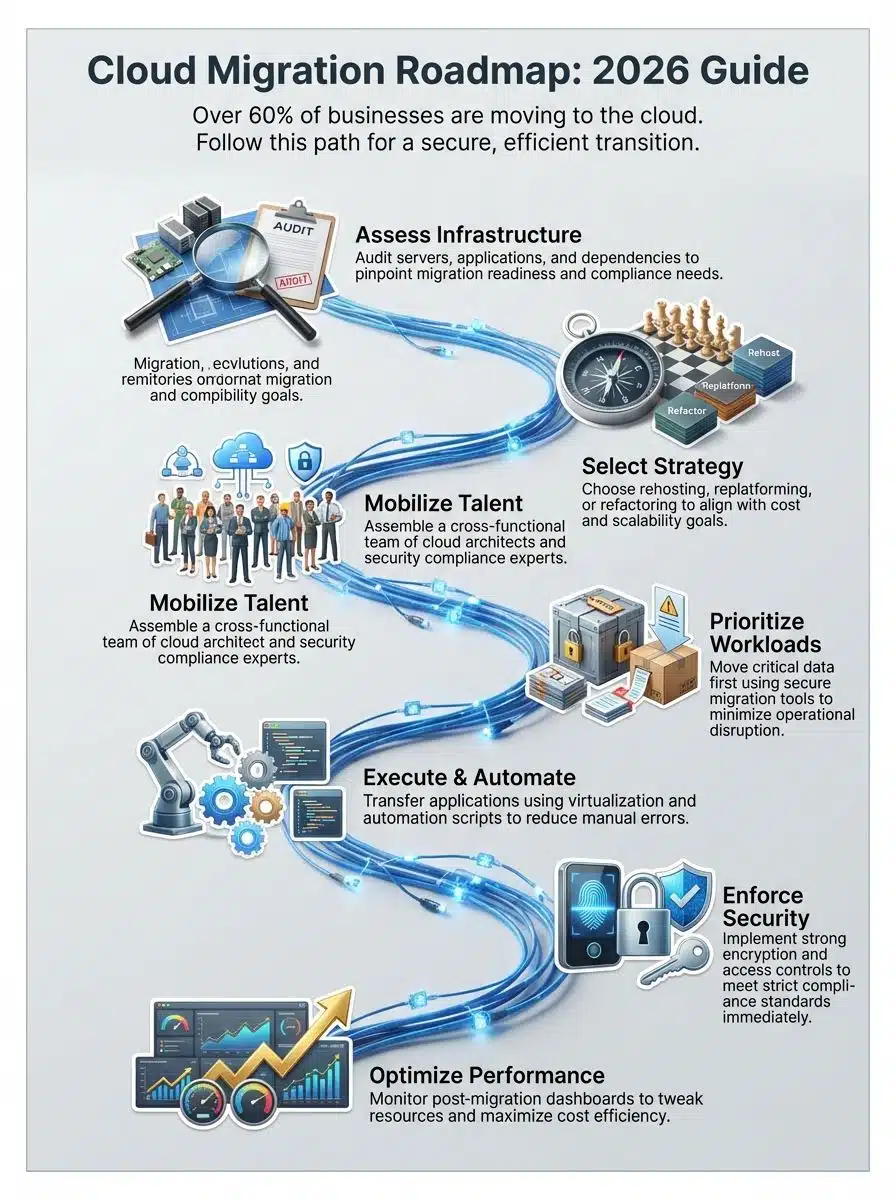
- Assess current infrastructure: Use tools like the AWS Application Discovery Service to list every server and app. Check which systems support daily tasks and which ones are outdated.
- Define goals: Decide if you want to save money or boost speed. Many companies focus on “FinOps” to track spending from day one.
- Mobilize resources: Build a Cloud Center of Excellence (CCoE). This is a team of experts who guide the project and fix problems.
- Execute migration: Move your data first using secure tools. Then transfer applications to services like Azure or AWS.
- Modernize and optimize: After moving, tweak your workloads. Use dashboards to spot waste and cut costs.
Assess current infrastructure and requirements
Start with a fresh look at your IT infrastructure. List every server, database, and application you use. Count how many systems run on old hardware. Check which ones store key customer data.
Ask teams what works well now. Find out if you have any compliance needs for privacy laws like GDPR. Spot applications ready for change. This sets clear goals for your digital transformation.
Define goals and select a migration strategy
Set clear goals before moving anything. Think about reasons like saving money or making things run faster. Pick a migration strategy that fits your goals. Rehosting can move your infrastructure fast with little change.
Refactoring takes more work but gives better results. Choosing the right path shapes how you handle workloads. Next up is putting your team together. Get your resources ready to roll out your plan.
Mobilize resources and build a migration team
Gather your key players. You will need experts in IT infrastructure and security compliance. Assign project roles early. A team lead keeps everyone on task while cloud architects draw the blueprints.
Pull resources from different departments. Often, companies use outside vendors to fill skills gaps. Provide training if anyone needs to sharpen their skills. With each person clear about tasks, moving systems becomes much smoother.
Execute migration: data, applications, and processes
Start by moving your data first. Begin with less critical files before shifting large databases. Use secure tools to protect against leaks. Test each batch as you move it so errors get caught early.
Next, transfer applications to cloud computing services. Virtualization plays a big part here. Check app performance during this step. Make sure everything runs smoothly and meets your service targets.
Modernize and optimize post-migration
After moving to the cloud, check how your IT infrastructure performs. Tweak your workloads so they run faster. Update old apps using new features from cloud providers. Scale resources up or down as traffic changes to save money.
Set up strong security controls with better encryption. Automate small tasks to cut out manual work. Keep an eye on costs each month. Regularly test disaster recovery plans, so your team stays ready.
Challenges in Cloud Migration
Moving data and apps can feel like juggling plates in a windstorm. Surprises pop up that make simple tasks tricky.
Technical complexity
Technical complexity can sneak up on any business. Systems must talk to each other, and old software may not like new platforms. One small error could cause data loss. Cloud computing needs an updated IT infrastructure and skilled teams.
Tools change fast. Integrating third-party apps isn’t always smooth sailing. Planning every step makes a difference. It helps ensure your digital transformation succeeds.
Skills gap in cloud technologies

Many workers lack training in cloud computing. New tools and software change constantly.
“IDC indicates that 90% of organizations will face IT skills shortages by 2026, costing them an estimated $5.5 trillion in delays and lost revenue,” reports TechTarget.
Finding people who know database migration can be hard. Even experienced staff need to learn fresh methods. Hands-on classes help close these gaps. Knowledge of cost optimization and service level agreements (SLA) is vital.
Ensuring data security and compliance
Protecting sensitive data is a big job. Cyberattacks keep rising, so you need strong security. Use multi-factor authentication and encrypt files. Check your systems for threats often. Following the rules set by GDPR keeps your company out of legal trouble. Set up clear controls and track user access. Training everyone on these laws helps stop slip-ups. Now let’s explore how to control costs.
Managing costs and avoiding vendor lock-in
Cloud computing can eat up your budget if you do not track spending. Set cost alerts and watch resource use. Pick cloud services that let you pause costs. Review bills often to spot waste before it grows.
Vendor lock-in makes it hard to switch providers. Use open standards like Kubernetes to keep your options open. Avoid building apps too closely tied to one provider. This way, you stay nimble and cut costs smartly.
Application and networking dependencies
Applications often rely on other apps or databases. If one part moves and others do not, things can break. Some older programs need special settings. These details can stop a digital transformation in its tracks.
For example, moving a payment system without its database can freeze orders. Map out every connection before you start. Talk to your IT teams early about firewalls. Careful checking prevents big issues like downtime.
Best Practices for a Successful Cloud Migration
Smart choices make the shift to cloud feel less like rocket science. Think of these tips as your GPS to keep you on track.
- Use Gantt charts: Visualize your timeline to see what happens when.
- Prioritize quick wins: Move simple, low-risk apps first to build confidence.
- Automate everything: Use “Infrastructure as Code” tools like Terraform to reduce human error.
- Train your team: Encourage staff to get certifications like the AWS Certified Solutions Architect.
- Monitor constantly: Use tools like Datadog or Dynatrace to watch performance in real-time.
Develop a clear migration roadmap
Start with simple steps. List your current IT infrastructure and apps. Set goals to match your digital transformation needs. Use a timeline for each part of the process. Assign tasks to team members who know cloud computing. Break big jobs into smaller ones. Track progress on shared documents. This clear map helps you avoid missed steps.
Prioritize workloads based on business value
Shift focus to what matters most. Not every system carries the same weight. Move critical workloads first, like customer data. These drive revenue and keep operations running. Move less vital tools later. By ranking workloads, you avoid wasted effort. This approach supports better scalability. It keeps projects on track without missing deadlines.
Use automation tools to streamline migration
Automation tools save hours of manual work. Instead of moving files one by one, these solutions handle big batches. They cut human mistakes and boost speed. Cloud providers offer scripts for tasks like syncing applications.
Companies see fewer IT headaches with smart tools. Security compliance becomes easier since many tools log each step. Modern automation adapts as needs change. It makes large-scale moves less stressful.
Invest in training and skill-building for teams
Teams need the right skills to keep up. Cloud computing moves fast. Giving IT teams proper training helps them master new tools. Studies show a big gap in cloud skills.
Companies like Microsoft offer free learning paths. Skill-building classes can include setting up disaster recovery plans. Workshops with real projects help people learn faster. Teams with stronger skills save money and avoid errors.
Monitor and optimize post-migration performance
Keep a close eye on cloud resources. Use dashboards to track speed and costs. Alerts let your team fix problems fast. Test workload speeds often. Remove unused virtual machines so money is not wasted. Set up regular health checks. Cloud computing works best with careful tuning. Fast action helps after each change in demand.
Final Thought: Migrating To The Cloud
Moving your business to the cloud brings big benefits like saving money, quicker scaling, and stronger security. We covered the different types of moves, smart ways to plan them, and how to solve common snags. Each step is simple if you break it down. Look at your setup, set clear goals, and pull together your team.
Cloud migration can change everything from costs to safety in your daily work routine. Check out helpful guides online or reach out for expert support if you need more info. Make 2026 the year you lead with smart choices.