

We have all been there. You just finished a series, and you are looking for your next obsession. Your friend recommends One Piece, or perhaps Grey’s Anatomy, or maybe you finally want to see what the hype about The Wire is all about.
You look up the episode count and your heart sinks. 1,100 Episodes?
The immediate questions follow:
- “Do I have time for this?”
- “If I start now, will I catch up before the new season drops?”
- “Is this going to take over my life for the next 3 years?”
Enter BingeTimer. This isn’t just a calculator; it is a reality check for your watchlist. It helps you budget your time as strictly as you budget your finances.
Why You Need “BingeTimer” Now
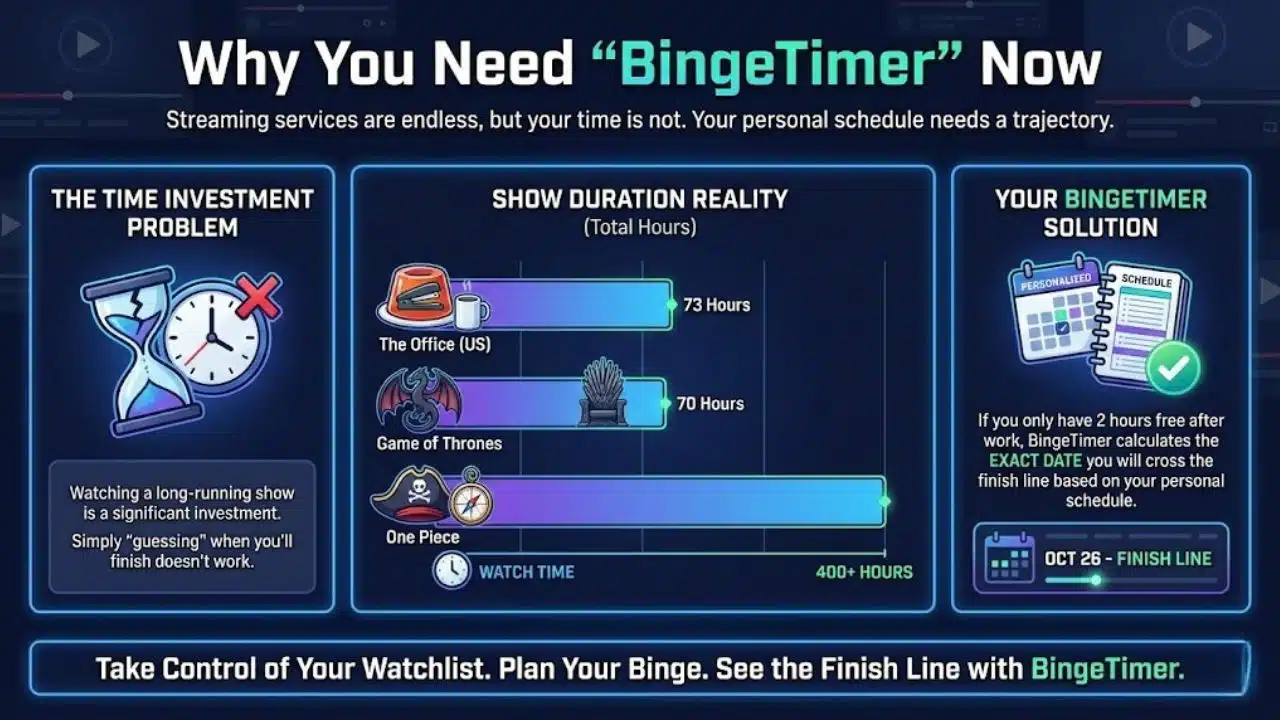
Streaming services are endless, but your time is not. Watching a long-running show is a significant investment.
- The Office (US) takes roughly 73 hours to watch.
- Game of Thrones takes roughly 70 hours.
- One Piece takes a staggering 400+ hours.
If you only have 2 hours free after work, simply “guessing” when you’ll finish doesn’t work. You need a trajectory. BingeTimer calculates the exact date you will cross the finish line based on your personal schedule.
How to Use BingeTimer (Step-by-Step)
Using the BingeTimer calculator is simple. You don’t need to scour Wikipedia for episode counts; we’ve built the heavy hitters right into the tool.
Step 1: Select Your Show
Use the dropdown menu to browse our library of “Select Show”. We have categorized them for you:
- Top Dramas: Breaking Bad, The Sopranos, Succession.
- Sitcoms: The Office, Friends, Brooklyn Nine-Nine.
- Anime: One Piece, Naruto, Dragon Ball Z.
- Long Hauls: Grey’s Anatomy, Supernatural.
Don’t see your show? Select “Choose a Show or Enter Custom” and manually enter the total episodes and average runtime (usually 22 mins for sitcoms, 44 mins for dramas, 60 mins for HBO/Prestige TV).
Step 2: Set Your “Daily Watch Hours”
Be honest with yourself here. How much time can you realistically dedicate to watching TV every single day?
- The Casual: 1 hour (Lunch break or before bed).
- The Fan: 3 hours (A solid evening block).
- The Binger: 6+ hours (Weekends or holidays).
Step 3: The “Speed Mode” (Optional)
This is a controversial but powerful feature. Many modern video players allow you to play content at 1.25x or 1.5x speed.
- Why do this? For slow-paced shows or Anime with lots of “filler” scenes, increasing the speed can shave days off your total watch time without ruining the dialogue.
- Select your speed to see how much time you save.
Step 4: Click Calculate
Hit the big red button.
Understanding Your Results on BingeTimer
The BingeTimer provides three key data points to help you plan your life.
1. The Finish Date
“You will finish on Feb 14, 2026.” This is your target. If you are trying to catch up before a specific event (like a season premiere or a friend’s watch party), this date tells you if you are on track or if you need to watch more episodes per day.
2. The “Full-Time Job” Equivalent
Look at the “Full 8hr Days” stat. This converts your total watch time into standard 8-hour work shifts.
- Example: If the tool says “9.5 Full Days,” that means watching this show requires the same effort as working a full-time job for two weeks straight. It puts the scale of the show into perspective.
3. The Speed Savings
If you selected a speed faster than 1x, the tool will highlight exactly how many hours of your life you reclaimed.
- Example: Watching The Office at 1.25x speed saves you roughly 14 hours. That is an entire waking day saved, just by speeding up the silence between jokes.
Pro-Tips for The Heavy Binger
- The “Skipping Intros” Factor: Our calculator uses the standard runtime. If you skip intros and credits (usually 3 minutes per episode), you will actually finish about 5-10% faster than the date shown.
- Anime Fillers: If you are watching shows like Naruto or Bleach, look up a “Filler Guide” online. Skipping filler episodes can reduce your total episode count by 40%.
- Burnout: The calculator assumes you watch every single day. Life happens. Add a buffer of a few days to the final date to account for days where you are too busy to watch.
Final Words
Time is the one resource you can’t get back. Before you commit to a 9-season saga, use BingeTimer to see the cost. Decide if the show is worth the investment, set your schedule, and enjoy the show guilt-free, knowing you’re right on schedule.