

In the world of cryptocurrency, timing is everything. A coin can pump 20% in an hour and correct just as fast. In that high-speed environment, the last thing you want to do is fumble with a spreadsheet to figure out if you are actually making money.
“Did I make a profit?” is a simple question, but the answer is often complicated by exchange fees, gas fees, and fractional coin amounts.
At Editorialge, we believe every trader—whether a HODLer or a day trader—needs clear numbers. That’s why we built the Crypto Profit & Loss Calculator. It is designed to cut through the noise and show you the only metric that matters: your Net Profit.
Here is why this tool is essential for your portfolio and how to use it to plan your trades effectively.
Why This Micro-SaaS is Essential for Traders
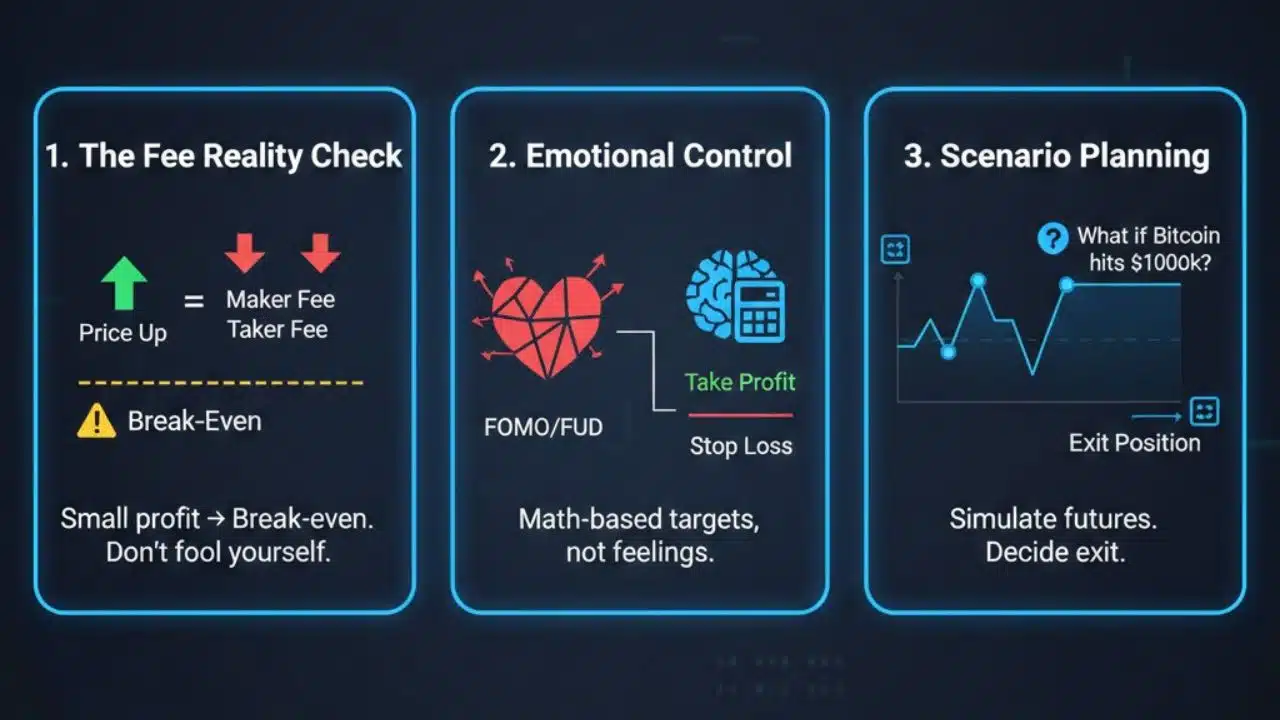
- The “Fee” Reality Check Many traders see the price go up and assume they are in the green. But after you pay the “Maker” fee to buy and the “Taker” fee to sell, a small profit can quickly turn into a break-even trade. Our calculator factors these fees in so you aren’t fooling yourself.
- Emotional Control Crypto trading is emotional. When you see a coin skyrocketing (FOMO) or crashing (FUD), it’s easy to make bad decisions. By using this calculator before you trade, you can set logical “Take Profit” and “Stop Loss” targets based on math, not feelings.
- Scenario Planning “What happens if Bitcoin hits $100k?” “What if Solana drops 10%?” You can use this tool to simulate future scenarios, helping you decide exactly when to exit a position.
Step-by-Step Guide: How to Use the Crypto Calculator
We have kept the interface clean and fast, so you can get your numbers in seconds.
Step 1: Enter Your Investment Details
- Investment Amount: Enter the total amount of fiat currency (USD, EUR, etc.) you are putting into the trade.
- Buy Price (Entry): What is the price of the coin right now (or when you bought it)?
- Example: If you bought 0.5 ETH when Ethereum was at $2,000, enter “2000” here.
Step 2: Set Your Target (The “What If”)
- Sell Price (Exit): Enter the price you plan to sell at, or the current price if you are checking a live trade.
- Pro Tip: Play with this number. Enter a higher price to see your potential profit, or a lower price to see your potential risk.
Step 3: Account for Fees (The Hidden Cost)
- Investment/Exit Fees (%): Most exchanges (like Binance or Coinbase) charge between 0.1% and 0.6% per trade.
- Instruction: Enter the percentage fee your exchange charges. If you don’t know, 0.25% is a safe average to use. Do not skip this!
Step 4: Analyze the Results
Click Calculate. The tool will instantly break down the trade:
- Profit/Loss ($): The actual cash value you will gain or lose.
- Profit/Loss (%): The percentage growth of your capital.
- Total Exit Amount: The total money that will land back in your account after selling.
Strategic Use Case: The “Stop-Loss” Plan
Before you enter a trade, use the calculator to find your “pain point.”
- Enter your investment and buy price.
- Lower the Sell Price until the “Loss” amount is the maximum you are willing to lose (e.g., -$50).
- Whatever that Sell Price is—that is your Stop Loss. If the coin hits that number, you sell. This protects you from losing your entire account.


