
Have you ever opened a website and felt completely lost? It feels like searching for your keys in a messy room. Many readers face this exact problem every day. Finding the right page or knowing your exact location on a site can feel confusing. Here is a helpful tip. Google shows special paths under some search results to help people understand website structure at a glance.
I am going to walk you through how Breadcrumbs in SEO: UX and Crawlability can clear up this confusion. These simple links make sites easier to use and help Google read your content better. Grab a cup of coffee, and let’s go through it together. I will show you everything you need to know.
What Are Breadcrumbs in SEO?
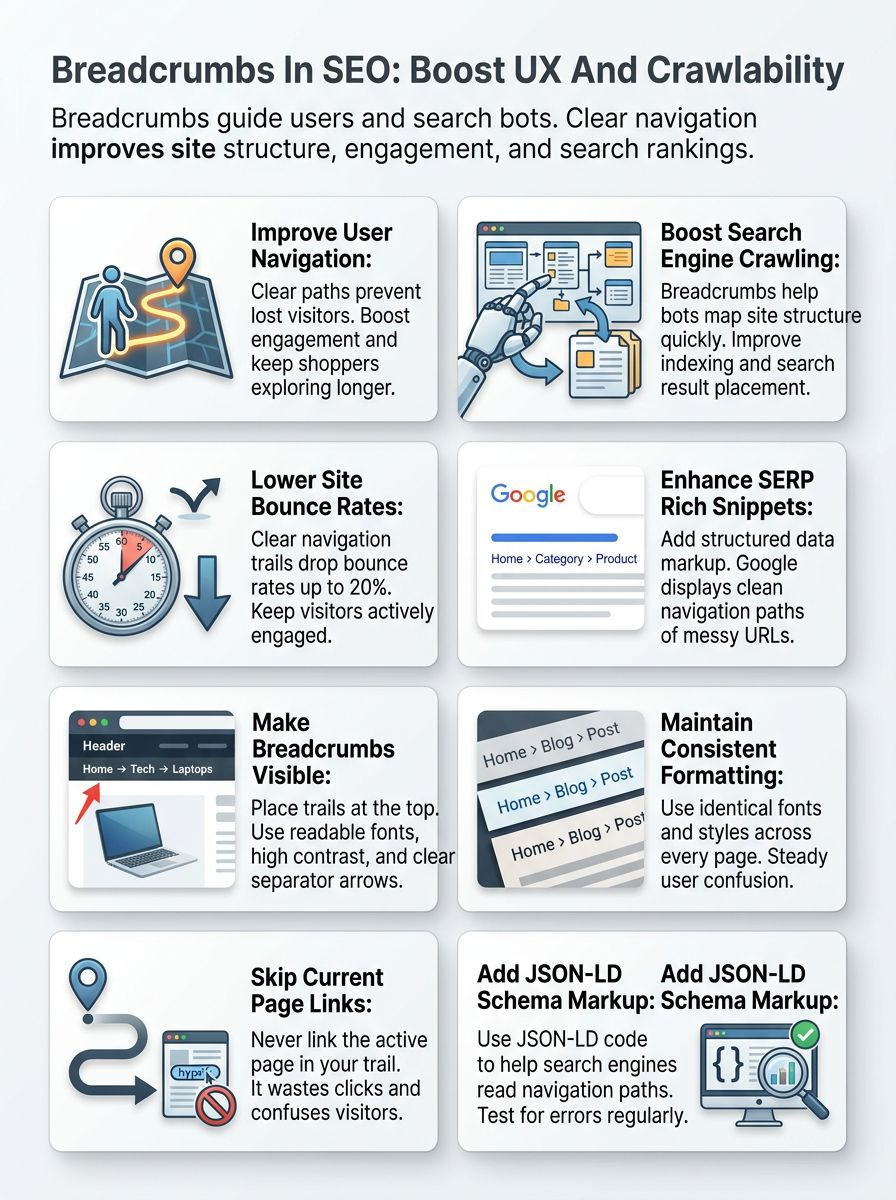
A good site structure helps visitors find their way easily. This is exactly where breadcrumbs come in handy. Breadcrumbs act like small road signs on a page. They show the specific path from the homepage to the page you are currently viewing.
Search engine optimization (SEO) uses these links to show both users and search engines how a website connects its pages. For example, a path like “Home > Shoes > Kids’ Sneakers” tells users exactly where they are.
- Location-Based Architecture: A 2026 report from Yotpo notes that modern breadcrumbs act as the structural blueprint for your site.
- AI Overview Context: They teach Large Language Models and crawlers exactly how your US business organizes its inventory.
- User Orientation: They give human shoppers a clear “You Are Here” map.
Why Breadcrumbs Matter for User Experience, UX, and Crawlability
These simple trails make sites much easier for people and search engines to explore. Clean text links lead visitors step by step, helping everyone find their way with less hassle.
Site visitors use these links to move quickly across different sections. They show clear paths from the homepage directly to the current spot.
Say a shopper moves from “Home” to “Shoes” and then clicks on “Kids’ Sneakers.” Each word is clickable, so going back takes exactly one tap.
This structure stops people from feeling lost in deep site layers. A 2025 usability benchmark from the Baymard Institute found that poor navigation experiences drive 88% of US visitors away.
Customers who know exactly where they are will stay on your site and shop more.
Simple trails also help those using screen readers know their page location fast. This improves web accessibility for everyone.
Improving Internal Linking Structure
These links create simple paths from one page to another. They link child pages back to parent categories seamlessly. Each link helps search engines like Google understand which pages belong together. This makes your Site Architecture much clearer for both users and bots.
Better internal linking spreads page authority throughout the site. It serves as a defense against “orphan pages,” which are deep pages that lack incoming links.
Supporting Search Engine Crawling
Search engines use these text links to map how a website is set up. These trails help search bots move through your site much faster. Pages connected by clear paths often get crawled more frequently. They also tend to earn better placement in search results.
- Mobile SERP Update: Google Search Central removed visual paths from mobile results in January 2025 to save screen space.
- Structural Reliance: Even without visual snippets, bots rely heavily on this structured data.
Providing accurate, structured data ensures bots understand your context quickly.
Types of Breadcrumbs
These navigation tools come in a few different styles. Stick around to see which specific one fits your US business site best.
Hierarchy-Based Breadcrumbs
Hierarchy-based links show a clear path from the main page down to your current spot. Each part of the trail matches a specific level in your site’s structure.
For example, “Home > Electronics > Laptops” shows how users moved deeper into categories. Major US retailers like Target use this exact method.
This makes it easy for people to backtrack without getting lost. Sites with a good hierarchy improve SEO because they make crawling faster for bots.
Attribute-Based Breadcrumbs
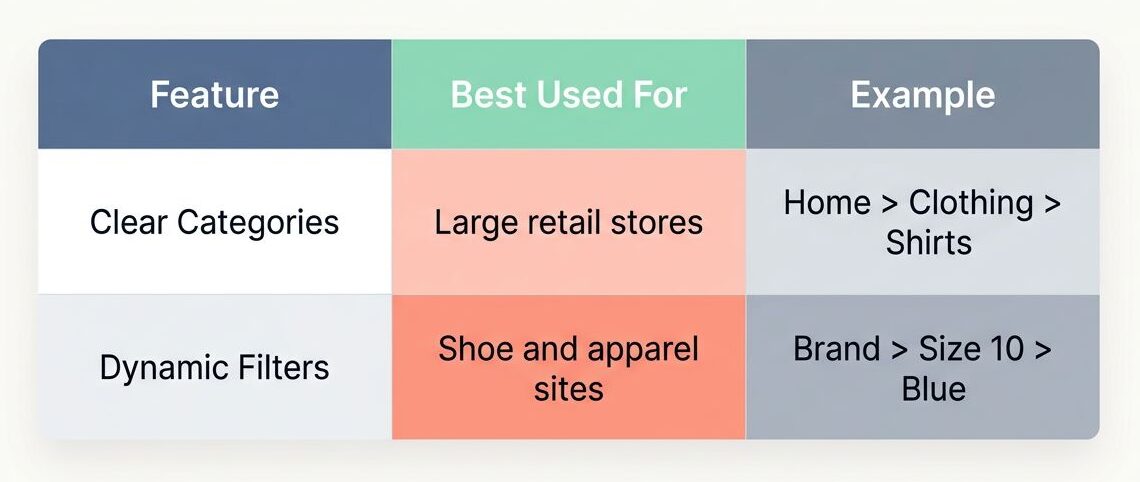
Attribute-based links show specific details like color, size, or style. This is very popular on US e-commerce sites like Zappos.
You might see a path like “Home > Shoes > Sneakers > Red.” These links help users filter products quickly to find what fits their needs.
| Feature | Best Used For | Example |
|---|---|---|
| Clear Categories | Large retail stores | Home > Clothing > Shirts |
| Dynamic Filters | Shoe and apparel sites | Brand > Size 10 > Blue |
Path-Based Breadcrumbs
Path-based links show the exact route you took through a website. You might see “Home > Shoes > Men’s Shoes > Running Shoes” if you clicked each step in order.
This type helps users retrace their steps if they want to check out a previous page. These mirror your click path rather than the site structure.
Search engines use this information to understand user behavior better. It tracks movement across your Site Architecture.
History-Based Breadcrumbs
History-based links track each individual page a user visits on your site. These links show a personal route, guiding folks back through their own clicks. This style does not always reflect your site structure. It simply helps users quickly retrace steps if they wander off course.
According to the Baymard Institute, 68% of e-commerce sites get this wrong. Many sites fail to offer users a proper way to trace their history while shopping.
Benefits of Breadcrumbs for Search Engine Optimization SEO
These links make your site easier to explore from start to finish. They shine a light on where users land. They show both people and bots exactly where they stand at all times.
Improved User Experience (UX)
People love websites that are incredibly easy to use. These links help users know their exact location on your site.
This makes it simple to move from one page to another. Less confusion means happier visitors who stay longer.
- Reduced Friction: Shoppers can jump back a step with only one click instead of hunting through menus.
- Clear Orientation: Visitors never have to guess what section they are viewing.
- Mobile Convenience: They save users from hitting the back button repeatedly on small screens.
Lower Bounce Rates
These text links act like street signs for your visitors. Shoppers on e-commerce stores often land deep on a product page directly from Google.
These paths help them click back to main categories or the homepage with ease. This keeps users moving around instead of hitting the back button right away. Sites with clear trails usually see bounce rates drop significantly. Good Web Design helps keep visitors curious and engaged.
Better Search Engine Understanding of Site Structure
Search engines use these paths to map your site’s architecture completely. Each link creates a clear path. This guides Google and Bing through your categories and subcategories with ease. This helps search bots know exactly how pages connect.
For example, “Home > Shoes > Kids’ Sneakers” tells crawlers where that page sits. Sites with strong internal linking see better SEO results and improved visibility.
Enhanced Rich Snippets in SERPs
These paths can help your site look much better in Google search results. They add a clear navigation path under your page title.
- Better Appearance: Users see words like Home or Shoes instead of messy URLs.
- Higher Clicks: Eye-catching results often lead to better click-through rates.
Sites that use the correct schema markup get a stronger presence on the results page. You can verify this eligibility using Google’s Rich Results Test tool.
Best Practices for Implementing Breadcrumbs
A good navigation path should feel friendly and helpful. Clear design choices make movement smoother for everyone. They give both people and search engines an easier path to follow.
Make Breadcrumbs Visible and Intuitive
Place these links at the top of each page, right where people look first. Use simple words like “Home,” “Shop,” or “Contact.”
You need to pick colors with strong contrast against your background. Following US ADA compliance guidelines requires a strong contrast ratio to help visually impaired users.
- Avoid Gray on Gray: Low contrast text makes reading difficult for everyone.
- Use Clear Separators: Add little arrows or chevrons between links so people easily spot each level.
- Ensure Large Touch Targets: Make sure links are at least 44×44 pixels for easy tapping on mobile phones.
Use Consistent Formats Across the Site
After making them easy to spot, use the same exact format everywhere. Mix-and-match styles will only lead to puzzled faces.
Keep fonts, colors, and sizes steady across every single page. Using a single pattern helps both people and search engines read your site fast. If you use arrows like Home > Category > Product, stick with that specific look throughout your website.
Full path navigation guides users step by step. It makes it easy to see exactly where they are in your URL Structure. Suppose a visitor lands on a running shoe page. The trail might show: Home, Shoes, Running Shoes, Men’s Running Shoes.
Google and Bing use these full paths to understand the flow of a website. Clear paths keep users oriented so they stay engaged.
Avoid Linking to the Current Page
Including the full path helps users see their spot in your site’s hierarchy. Clicking each level guides them backward. There is no logical sense in linking to the page they are already viewing.
A 2026 UX audit guide by Eleken confirms that linking the current page just confuses folks and wastes a valuable click.
Most good WordPress plugins handle this smartly by not making the last item clickable. This keeps your internal linking perfectly clean.
Add and Verify Breadcrumb Schema Markup
Use schema markup to help search engines read your site’s structure. This special code acts like a direct shortcut for Google. Pick JSON-LD, RDFa, or Microdata formats. In 2026, JSON-LD is the standard recommendation for most US e-commerce sites.
After adding the markup, check it with Google’s Rich Results Test tool. Paste in your page link, hit “Test,” and spot any errors fast.
How to Add Breadcrumbs to Your Website
Setting up these paths on your site is incredibly easy. With the right tools, you can guide visitors perfectly. You can do this without ever breaking a sweat.
Using WordPress Plugins for Breadcrumbs
WordPress plugins make adding these paths very simple. Tools like Yoast SEO, Rank Math, and Breadcrumb NavXT do the heavy lifting for you.
With just a few clicks, site owners can boost UX and help search engines. These plugins come with options to customize the style and location.
Yoast SEO lets you turn on this feature directly in its settings menu. Rank Math offers flexible settings and full schema markup support, too.
Implementing Breadcrumb Schema Markup
After using plugins, you can help search engines understand your site even better. Schema tells Google about your paths in a machine-friendly way.
- Clearer Displays: Sites using structured data see better SERP snippets in search results.
- Simple Implementation: You only need a small snippet of code.
Wrap each link with special tags that match Schema.org standards. Place this snippet inside your site’s HTML, usually before the closing body tag.
JSON-LD, RDFa, and Microdata Approaches
JSON-LD, RDFa, and Microdata all help search engines read your site better. JSON-LD puts data in a simple script tag. Google likes JSON-LD because it keeps your HTML much cleaner. RDFa adds extra tags to existing elements right in the page content.
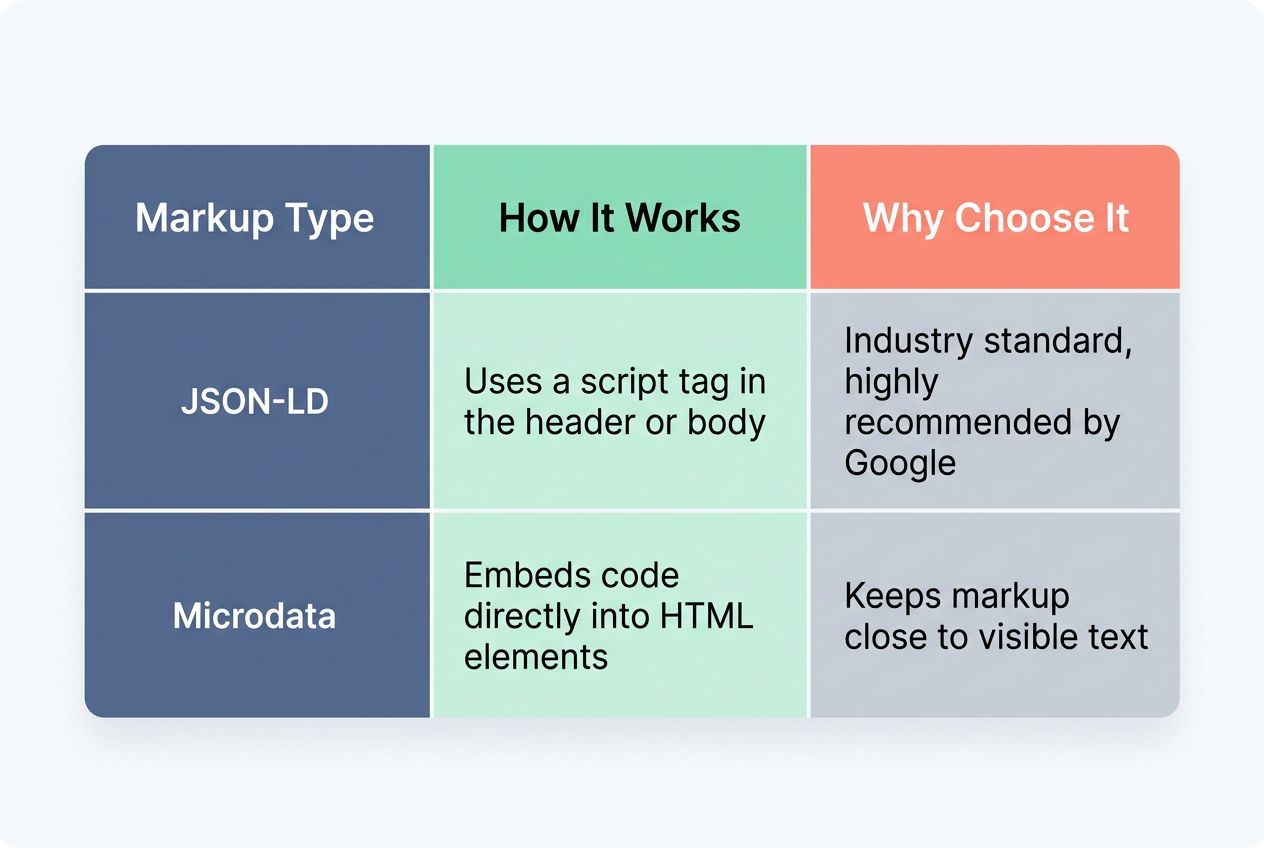
| Markup Type | How It Works | Why Choose It |
|---|---|---|
| JSON-LD | Uses a script tag in the header or body | Industry standard, highly recommended by Google |
| Microdata | Embeds code directly into HTML elements | Keeps markup close to visible text |
Common Mistakes to Avoid with Breadcrumbs
Mistakes with these paths can trip up even seasoned site owners. Get these details right, and your visitors will thank you later.
Making Breadcrumbs Too Long or Too Short
Paths that stretch across the whole page confuse people fast. Users may feel lost, like trying to follow a maze with too many turns.
Long trails often break mobile layouts entirely. A better UX solution involves using horizontal scrolling containers rather than removing the navigation completely. On the flip side, trails with only one step do not give enough context. Aim for simple paths that are three to five levels deep.
Copying the main navigation bar directly can confuse users and search engines. Your trails should show a clear path through the site structure.
Do not just mirror all top-level links from your main menu. Create trails that track where someone is inside your specific hierarchy. For example, put “Home > Products > Shoes” if they are viewing tennis shoes. This builds better crawlability for SEO.
Removing the main navigation bars completely leaves users feeling lost. These trails show a path, but they do not give quick access to key sections.
- Weakened Experience: New visitors struggle to explore different parts of the site.
- Lost SEO Value: Search engine optimization relies on strong internal linking from main menus.
Without visible navigation bars, search engines might miss important links. Use both tools together for better usability and structure.
Using the Wrong Type of Breadcrumbs
Using the wrong type of trail leaves users scratching their heads. Hierarchy-based links show a clear path in your site structure. Using history-based links on e-commerce sites often backfires badly. People get lost fast, bouncing around without reaching helpful pages.
Search engines use structured data to understand internal linking. A user shopping for red sneakers prefers seeing Home > Shoes > Sneakers > Red Sneakers as their specific guide.
Monitoring and Improving Breadcrumb Performance
Check how your links show up in Google, and spot what grabs attention. Watch your site’s numbers over time to see what works. You can tweak your setup as needed to get the best results.

Using Google Search Console for Rich Results
Google Search Console helps you see if your links show up as rich results. Use the “Enhancements” tab to spot errors fast. In 2026, a critical error to watch for is “Missing field ‘item'”. This issue prevents your data from being eligible for rich results.
- Run the Report: Check the Breadcrumbs report every few weeks.
- Fix Missing Fields: Ensure every step includes a valid, absolute URL.
- Look for Syntax Errors: An “Unparsable Structured Data” warning usually means a simple typo in your JSON-LD code.
Periodically Analyzing Traffic and Engagement
Check your website’s traffic and user engagement often. Tools like Google Analytics 4 (GA4) show if visitors actually use your navigation.
You can use the Path Exploration report in GA4 to map out the exact sequence of actions users take. Just navigate to the “Explore” section and select “Path Exploration”.
Track which paths get clicked most, and notice where people drop off the site. Try new labels to keep things fresh and easy for everyone.
Wrapping Up
Breadcrumbs help users and search engines understand exactly where they are on a site. They boost user experience by showing the path clearly. They act much like street signs in a busy city. Internal linking with these paths strengthens the site structure.
This makes it far easier for both people and Google to explore your pages. Websites with clear trails often see lower bounce rates. Adding structured data helps rich snippets show up in SERPs. Small improvements in your Navigation make big waves in usability.
Each step brings your visitors closer to what they want. They find answers without confusion or wasted time using Breadcrumbs in SEO: UX and Crawlability.